Showing posts with label palette. Show all posts

Tuesday, April 15, 2025

gravity.flow ?

Je voulais faire tout autre chose, mais au moment de prendre le code en main, je me rends compte que j'ai une série de modifications qui n'ont pas encore eu droit à leur commit ... et que je ne sais plus trop à quoi elles correspondent.

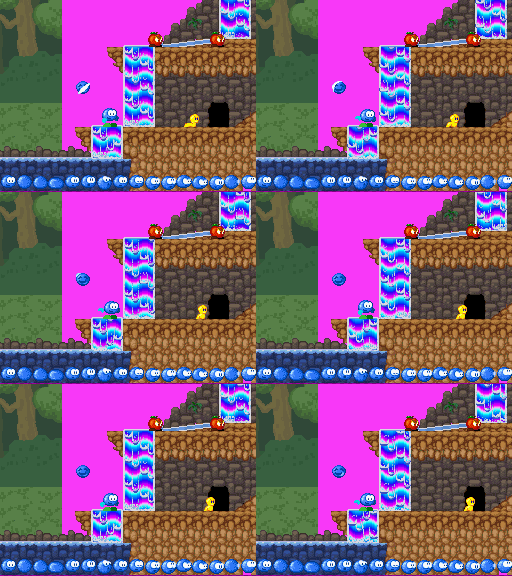
Il s'agissait en réalité de deux modifications liées à l'eau: animer la surface (nager si bien avec un miroir en guise de surface, c'est un peu dommage ...) et faire en sorte qu'on puisse placer un jet d'eau dans une grotte. Parce que vous ne ça n'aura pas manqué de vous faire tiquer: il y a une sorte de rectangle moche au pied du geyser sur l'image ci-contre/dessus. C'est lié au fait que le geyser (tout comme la cascade) est obtenu en par une combinaison des deux couches de décor: l'une avec une animation de type "palette cycling" et l'autre avec une animation conventionnelle. Et donc pour mettre le geyser dans une grotte, il me faut deux nouveaux blocs "décor de geyser fusionné avec le décor de grotte".

After a fairly busy week and significantly busy Saturday, I wanted to try updating the Appleman behaviour, but I found my homebrew directory with different files uncommitted and changes involving binary files like maps. So I started by running the current code first on the emulator, and visit those maps to see whether there were any changes. And oh, of course. First change was animating the water line (see the mastodon video below). Second was an extra water jet in the second green map.

Quand je dis "je ne sais plus à quoi elles correspondent" (y compris une modification du code qui assure le palette cycling), comprenez "il a fallu que je fasse tourner le .nds pour m'en souvenir". Ce qui m'a donné envie d'en faire des petites captures (un jour après le ScreenshotSaturday ... pas de chance ^^"), et sur une de ces captures, on remarquait quand-même fort que le haut du geyser reste en permanence au même emplacement. Moi, j'aimerais qu'il monte et qu'il descende, pour ajouter un peu de dynamisme à la scène, et appeler à l'interaction.

See on that level editor, waterfalls and geysers are made of two layers of tiles combined. But that means you can't put a geyser over a dirt wall unless you've got tiles showing that in first place. Plus I'm using another palette slot for the dirt wall than the default one, meaning the cycling code had to be updated. That was ready for some screen-shotting. 

J'aurais peut-être pu utiliser le contrôleur "grid" de furblock, mais tôt ou tard, il faudra aussi que Bilou soit propulsé vers le haut par le geyser. Plan B: utiliser le même mécanisme de "flow" dans le contrôleur gravity que celui codé pour swim. Je profite donc que tout le setup wifi est là pour modifier le niveau et je définis un nouveau type de tile (les ^ mauves). ça donne des résultats rigolos avec Bilou, mais en réalité, ça ne marche pas: Bilou est bien ralenti quand il arrive dans le haut du geyser, il peut même remonter légèrement, mais au final, la gravité lui donne une vitesse suffisamment élevée (on peut aller jusqu'à 6px/frame) pour qu'il redescende, puisque le geyser le fait monter à une vitesse constante de 2px/frame. Bref, c'est bien pour des tapis roulants mais pas pour des geysers.

But then, the top of the geyser was very static ... I want it to wave up and down a bit. There are different ways I could do that in my engine, but only a few where not only the geyser top but also Bilou is lifted up when in contact with the stream. That implies a mechanism similar to the water flow designed last year, except this new special physics tile will define a property for the gravity controller instead. It will still be an "AIR" tile, though: we can fall through geyser, not swim them. (I hope to avoid nasty corner cases that way).

Unfortunately it didn't work the way I wanted. Lifting Bilou by 2 pixels (cyan lines on the diff) is fine as long as the vertical speed is lower than 2 pixels/frame downwards. It gives a nice boost when jumping and catches you when you're "stomping" the geyser, but while you're being stopped, your intended velocity keeps increasing, and at some point, you'll be fast enough to reach the ground again. Exactly as you start sprinting backwards on a conveyor belt.

So I ended up using the yellow code instead: directly change the polarity of the gravity based on the sign of the terminal velocity stored as a per-tile-type property. Not perfect, but close enough for now.

Mais en fait, il n'y a pas tant à changer que ça: plutôt que de déplacer Bilou, on va utiliser l'information stockée pour contraindre la vitesse maximale ... et tant qu'à faire, inverser la poussée si la vitesse maximale est négative. J'ai pris des vitesse identiques pour la gravité et le jet d'eau pour le "petit nuage" en haut du geyser, ce qui lui donne un mouvement symétrique alors que pour Bilou, la gravité lui permet d'acquérir une vitesse jusqu'à 3 fois plus grande, et il a donc tendance à s'enfoncer plus dans le jet d'eau. ça suffira pour le premier jet ;-)

edit: valeur maximale -2px/frame validée: il suffit de garder le bouton de saut enfoncé pour décoller bien au-dessus du geyser. Et si on tombe du sommet, on ne redescend pas trop bas.
 

Post by @PypeBros@mastodon.social
View on Mastodon

Wednesday, February 07, 2024

Appleman 2.0

Bon, je me suis enfin refait les animations de l'Appleman dans l'éditeur d'animation modulaire. C'est que déjà avant que je ne m'attaque à Apple Assault, j'avais dans l'idée que Bilou puisse ramasser le corps de l'Appleman pour s'en servir ensuite de projectile. Puis c'est plus cohérent avec le comportement de dumblador qui joue le même rôle dans la School Zone.

Sauf que, vous vous en doutez, ça ne s'est pas passé sans mal. D'abord quelques plantages de MEDS (oui, encore) qui m'ont obligé à tout refaire, puis le niveau qui ne voulait plus rien charger le temps que je lui réexplique où se trouvent les animations demandées et que je corrige celles qui étaient lues en boucle alors que la machine d'état prévoit une transition "à la fin de l'animation".

You could easily claim that this was a cursed sprite and I would almost believe you. See, I've had applemen pixels from over 15 years now, and yet I wanted to upgrade its motion into a compound sprite. The idea would be to make it more like the dumblador, losing its feet when stomped, staying stunned until feet are recovered etc. I expect that it would feel fun...

Then the curse started, with blue screens in the editor as I tried to "clean up" some animations, despite I fixed something similar in September. Then the level would no longer load because some of the newly defined animations were looping and AppleAssault assumed it could wait for them to be done for some transition. And when all that was fixed, with WiFi transfers over RunMe through the NUC, the appleman did not have feet but huge, purple fists instead.

Ensuite, voilà que les pieds de l'appleman sont remplacés par des gros poings mauve alors qu'il devrait réutiliser les pieds de Bilou relookés en brun. La faute à un code encore un peu trop jeune dans le chargement d'un 2eme fichier de graphismes. Les couleurs erronées, ça, ça m'aura pris plus de temps. Je me replonge dans le code d'il y a 2 ans, je vérifie qu'on a bien assez de mémoire vidéo pour charger tout ce petit monde (scoop: oui. On a 16KiB, assez pour 8192 couleurs alors que les 16 palettes accessibles par les sprites n'en consommeraient que 4096)

To get proper images, the first thing is to ensure SpritePages are properly remapped when loading the additional set. For the school zone, that was done with spr.more "school.spr" page8,82 meds+4. Yeah, I know. That's not the most self-documenting line of script in the world ^^". What's important here is page8,82. That is controlling the remapping.

  • The first number (8) indicates that we expect Bilou.spr to feature 8 sprite pages, and that pages for "school.spr" are to be numbered 8, 9, 10, ...
  • The second is not a number: it is a series of digits each identifying a page, and each telling where each page is starting with the 8th slot. Page 8 remains unchanged (since the series starts with an 8), but page 9 will use page 2 instead (where Bilou hands and feet are)

That was for the school zone, but the green zone spriteset did not have hand and feet. Instead, they had to be added as the 11th page within the set ... almost page 20 for the level. Code parsing that was a bit crude too and was never meant for things identifying page number higher than 10. Oh, you could do it, but you might have to identify page 11 in the whole set with ;. I tried to simplify that a bit so that we can actually use spr.more "green.spr" page8,-..---.----2 meds+4 instead. Here,

  • every - in the sequence means "that page holds no sprites. It shouldn't be used by animations".
  • . means "don't touch: that page is perfect as it is". Any sprite page in green.spr has such a dot.
  • And you know about the final 2 already: it identifies one page within bilou.spr that must appear instead of a "draft" page of green.spr and be used by Appleman animations

Definitely, some colors from green.spr were loaded here. We wouldn't have the sprite-branch with colours that close to those of the trunk otherwise. But the yellow worm now has weird blueish outlines and the appleman feet are both light-Bilou-green rather than having one dark brown and the other darker brown. 

Et là, la raison était plus ... exotique, on va dire. Le code C++, rien à redire. C'est presque limpide: ça *doit* ajuster les commandes qui définissent les images et palettes utilisées par les personnages, à condition que le décalage soit correct. Et le décalage, je fournis à la main dans le script du niveau. Mais manque de bol: le compilateur (gcc 8.1.0 ajouté à devkitARM 49 en 2018) produit du code machine qui ne correspond pas à ce qu'il me faut (une fois encore). Vérification faite, le gcc 10.1.0 du devkitARM 54 ne fait pas mieux. Pour avoir enfin mes bonnes couleurs, il faudra que je réexprime mon code différemment pour contourner ce qui semble être un bug dans le générateur de code ou dans l'optimiseur ...

There's a line in the remapPages() function that should deal with that: find "change sprite" instructions in the animation code, isolate the current palette value and add the "adjust palette" computed by the caller. It should work, really, but single stepping through the code with all the optimized-away locals left me puzzled. So I dug deeper, taking notes of the machine code, tracking what register meant what and ... 0_0

and there was no add instruction to be found. Nowhere in the loop. The machine code generated by gcc 8.1.0 would just assign the same green_palette[0] to every sprite no matter what palette they were using. That seemed to happen with gcc 10.1.0 as well... it wasn't too hard to work around, but yet. Troublesome.

Tuesday, May 02, 2023

A bit of shadow

Once upon a tweet, was a blog post about making dsgametools widget more readable and nice to use by adding a shadow to the default font. It was the youngest of the Todo family and its sibling would often make fun of it because it had the lowest possible priority for the project.

But then, on an idle day were the coder so tired he couldn't read a screen, though he had the Todo category open on his boox. "Well, why not" he thought, and he let our little Thumby Todo post jump over a blank page of his notebook.

It started sketching one letter, with its right and bottom empty lines of pixels, and split it in 3: Darkness, where light normally never comes; Highlights, where light might strike harder. And it turns out that if Highlights were to fall and the darkness picked up its power, then the letter would look all flat. And then the color that never changes, regardless of whether Highlights or Darkness is winning.

Bon, quelque part entre 2 scorpions, j'ai eu envie de creuser un peu cette histoire d'ombre pour les caractères dans les outils DS. Le mockup donne tellement mieux que mes captures d'écran ... en plus, ça se prête à merveille à un peu de programmation sur papier. Un petit schéma d'abord... puis quelques routines comme à l'époque du cours d'algo. Et puis j'ai fini par me rendre compte que chaque fois que je passais devant cette page-là dans mon livre-ordinateur cahier-agenda, ça réchauffait un peu mon coeur de codeur de penser qu'un jour, peut-être, j'aurais le temps d'essayer ça.

Very well, thought the coder, but I do not feel like hand-painting every 128 characters of the default font. Can we find a simple set of rules that, given a regular 1-bit-per-pixel font would deduce the 2-bit-per pixel font with highlights ? Yes, of course. And that's a perfect fit for bringing back paper coding.

Well, as usual, it then took a good deal of checks and debugging to find where that code should actually be invoked, what prevents it from working and so on. 

Et puis zut. On est dans un projet perso pour le plaisir, pas dans un projet-pro pour le client, donc au diables le Canban, les priorités, les milestones et tout ça. hg branch et voyons ce que ça donne... eh bien, ça donne bien. J'adore. Juste un hic: ça verrouille presque 40 couleurs de la palette utilisée par SEDS. Ou plutôt, dès qu'on charge un .spr qui utilise plus de 216 couleurs, l'effet est ruiné par un texte qui devient illisible. Parce que oui, j'utilise les palettes étendues de la NDS pour le moteur de jeu et pour presque toute l'interface graphique sauf pour le texte et ... pour le widget "palette" :-P

But there it is. Working. And even on emulator, the feel of it is just wonderful. And all it takes is some NES-glory palette swapping, where the text is moved from the 'interactive' palette with black shadow to the 'active' palette where 'shadow' is actually white and highlight has background color, as if the text had been pushed down by one pixel. Unfortunately, there's a price to pay: instead of 4 system colors, I need 40 of them (2 x 16-color palette + 4 on the 3rd palette). And so far, in SEDS, that means we can only use 216 colors instead of 250.

edit: but there is hope: SEDS is currently *not* using the multi-palettes mode (unlike LEDS) It likely wouldn't suffer from some extra system colors if it did. Converting AnimEDS sounds less appealing, because that has all its interactive windows on the 'main' screen rather than on sub-screen like older tools ^^"

Monday, January 24, 2022

ça boume, vieille branche ?

Bonne nouvelle: j'ai enfin ma branche rebondissante. Je suis plutôt satisfait du résultat. A un détail près: les couleurs. Je pensais au début que j'avais pêché la mauvaise palette parmi celles de green.spr, mais j'ai du me rendre à l'évidence: ma petite animation utilise les couleurs de l'autre fichier. Je n'ai encore utilisé que des sprites "tout simples" en dehors de l'école, et j'ai forcé leurs palettes directement dans le script qui définit leur comportement. Pas moyen de faire ça avec les animations binaires de MEDS. Et si je désactive cette astuce, j'ai aussi des couleurs bizarres pour tous les monstres précédents.

Yeah. I've got one first objective met: I have branch-that-bump bumping. Just one last thing to be fixed: it doesn't use the proper palette. I thought I was merely missing some adjustment number in my script, but I had to admit the bare truth: the only reason why school zone had proper palettes for monsters is that Bilou's palettes were split from the School Rush file. It took a few tries to get palette patching working right, but it ended up easier to do than I had foreseen.

ça paraissait improbable, cela dit: après tout les animations du niveau 'school zone' s'affiche correctement. Il doit forcément y avoir une ruse de chargement que je n'ai pas encore prise en compte. Bin non. bilou.spr et school.spr partagent la même palette, c'est tout. C'est aussi bête et sot que ça.

Modifier les palettes au chargement dans l'animation n'est pas trop difficile, heureusement.

Thursday, December 30, 2021

Color Cycling.

Being able to animate things just by changing entries in the color palette is one of the reasons why I'm loving old school programming that much. The amount of pixels you can affect with this technique with just a few memory writes has so much hex appeal! Yet, you wouldn't find anything animated that way in Apple Assault or in School Rush. Flowing ink could have used some, though.

Technically speaking, one key thing to fix to get it working with my setup is to ensure that the palette writes happen in a Vertical blank handler, and the other is that we bring the video memory holding the colors as freely-accessible video memory ( aka LCD for the Nintendo DS) while updating it, and then return it as extended palette bank.

So with all that coded, I could replace the lengthy 16-frames animation of the waterfall with just one static frame. And I have a comfortable homework to create as many tiles of flowing-wafer-slopes as I could need. I used a sort of "rainbow raster" to be able to draw those animations properly, which makes them look a bit strange in the level editor and in runMe, but I should be able to fix that by having the raster be on a secondary palette shot and a "static preview" on the main (and animated) slot.

Yeah, that's the major drawback: I don't see how to get it customizable from the level scripts by now, so I prefer keep it as some custom code running in Dreams.nds and leave runMe alone for now.

Là, je m'attaque à un morceau iconique du développement 16-bit: l'animation des palettes. Un truc que je connais depuis le BASIC mais que je n'ai encore jamais eu l'occasion de pratiquer sur DS (c'est dire si les petites animations sont à la traîne dans mes jeux DS :-P. Le principe ? les graphismes en mémoire vidéo ne contiennent pas directement des couleurs, mais des références à ces couleurs. Les pieds de Bilou seront faits avec la couleur n° 24 alors que sa main aura la couleur n° 79 et le blanc de ses yeux la couleur n°3, etc. Une partie de la mémoire vidéo est dédiée à retenir la correspondance entre ces numéros et les couleurs RGB à utiliser: c'est ce qu'on appelle la palette. Du coup, si vous changez une de ces valeurs, vous avez la possibilité de modifier simultanément une grande quantité de pixels à l'écran.

Une sous-catégorie de ces animations concernent les boucles de palettes. Vous n'ajoutez aucune nouvelle couleur, vous n'en retirez aucune non plus, vous vous contentez de les changer de place. du coup, un dégradé bien construit peut devenir un tapis roulant, une chandelle vacillante, une mare de lave ou une jolie cascade. (Mark Ferarri étant le champion de la discipline, cf. ci-contre).
 
If you look closely at the blue ramp between the two rightmost waterfalls on the gif above, you'll note that palette cycling is working there (backwards, but working). The waterfalls are still 'frozen' because I haven't applied my palette effect on the background layer yet. Oh, and if you wonder why half of the background is pink on those green zone captures, greenbg.spr is 32x32 and CommonMap expects a 64x32 map instead ... so half of it is 'blank'.

Mais pour que le chip graphique puisse pomper les valeurs de la palette assez vite pour tenir le rythme de l'écran, on doit régulièrement caser la palette dans une mémoire dédiée, avec un protocole d'accès un peu plus compliqué que BG_PALETTE[index] = rgbValue; C'était le cas avec le VGA, c'était le cas avec la SNES, c'est toujours le cas avec la Nintendo DS (plus simple à coder, mais pas forcément à expliquer).

Bref, ça marche, mais vu que ça ne peut se produire que pendant le 'temps mort' entre deux rafraîchissements d'écran, et vu qu'il y a cette histoire de va-et-vient entre la configuration où on sait écrire dans la palette (mode LCD) et celle où on sait l'utiliser pour afficher les couleurs (mode EXTENDED_PALETTE), je vais juste garder ça comme un 'petit extra' de Dreams.nds et vous aurez le fond des cascades statiques quand je ferai une démo IRL avec runMe. Vendu ?

edit: pour que ça tourne rond, j'avais eu besoin de me faire une petite map de où-est-quelle-couleur dans le code de la démo. Je vais reprendre ça ici aussi, parce que je me repose la même question deux ans plus tard et que twitter, hein ... on verra bien où il en est dans 2 ans.


Monday, August 17, 2020

En couleurs

 Un dernier p'tit bout d'code pour finir les vacances ... J'ajoute à LEDS la possibilité de peindre aussi bien le décor d'avant plan que le décor d'arrière plan.

En dehors des détails d'organisation (on passe tout par le "Meta Tile" qui indique les informations à remplir quand on touche le niveau quelque-part), je me suis retrouvé à plusieurs reprise "coincé" de par le fait que seul un plan de tiles était prévu pour fonctionner en mode 16 palettes jusqu'ici.

There has been more wall-painting than tile-painting these holidays, but walls are now white enough and I can pick up my notebook and start applying those changes.

On a 'software architecture' point of view, selecting the colors will be the responsibility of upper-screen's "TilesetWindow" (that's where I have room for it). Which color is selected isn't explicitly delivered to MapWidget (that paints tiles on the bottom screen). Instead, it is directly encoded into the palette bits of the recently refactored MetaTile structure that captures what blocks we want to write while drawing.

Then I realised how much the code base was unprepared for my plan. Only one layer on the bottom screen effectively had 16 palettes to use: the 'front' layer of tiles replicated the palette #0 on all slots (so that it could pretend to ignore physics info in palette bits). Things were hardly better on the upper screen, where the GUI engine itself had no idea of how to enable multi-palettes.

Il aura fallu faire sauter certaines limites (style une copie de 16 fois la première palette dans la mémoire de l'avant-plan) et ajouter le support multi-palettes sur l'écran secondaire, chose que GuiEngine ne supportait pas encore jusqu'ici. Et comme vous pouvez voir, j'ai du chipoter pour ne pas perdre le "fond à carreaux" qui permet de savoir dans quel mode d'édition (dessin, copie ou recolorisation) on se trouve.

Il y aura aussi un peu de refactoring à faire du côté du widget "cursor": je ne suis pas convaincu par la manière dont on doit re-manipuler ses coordonnées et forcer des setxy() pour implémenter des actions spéciales en cas de débordement d'une zone donnée. 

 Y'a des trucs pas encore très nets avec le mode "édition de monstres", par contre...

Well, there we are now. I still have to give it a spin on real hardware, and fix the switch to grey checker when editing monsters, (done) but we should be close to a usable editor for the newmap branch.

Look at them colored replicas of the selected tile, on the right of your tileset. Ain't them sweet ?

Sunday, January 13, 2019

Tile Engine Revision

Bon, j'ai une grosse révision de mon moteur de jeu en cours. Jusqu'ici, les propriétés du niveau étaient conservées dans les bits "palette" du niveau, soit 4 bits par mini-bloc de 8x8 pixels (les tiles, pour les intimes. Prononcez avec de l'aï comme dans light). Pour "School Rush" et ses niveaux de 16 écrans de large pour 1 écran de haut, on parle de 8KiB de données. Un niveau de Commander Keen (mettons la machine infernale des Shikadis) avec ses 1200x1200 pixels nécessite 22500 de ces tiles.

Much of my hobby time has been spent in tileset engine investigation since SchoolRush release. The current one has a few shortcomings which proved annoying during the " finish him " phase. Among other things, I want to stop using the palette bits for metadata, but it is still unclear how many bits per tile I can afford.
Most levels in schoolRush need a mere 16 screens, and consume only 8KiB with the current 4-bit-per-tile implementation. A Commander Keen level in comparison is 1200x1200 pixels, which would require about 22K tiles.


Pourquoi tous ces chiffres ? parce qu'au coeur de la révision, il y a le besoin de faire sortir ça des bits de palette pour pouvoir utiliser librement les changements de couleurs si utiles dans School Rush tout en permettant de nouvelles mécaniques de jeu. Jusqu'ici, j'ai pu m'en sortir avec des blocs spéciaux (bonus, pics) qui utilisaient les "codes couleurs" des 4 tiles qu'ils couvraient pour encoder un numéro suffisamment large. Mais quand on commence à réfléchir à faire de l'eau, des ventilateurs ou des tapis roulant, ce système devient bancal.

Of course, one of the goals for the revised engine is to enable multi-palette edition on both tile layers, but I would also like to increase the number of unique materials in the game. My attempts at having ice blocks, conveyor belts and flowing water highlighted that special blocks are not enough for all purposes.
One reason that makes it misfit is that special blocks only work for 16x16 blocks, not for arbitrary layout of 8x8 tiles or for transparent areas.


En particulier, il était basé sur le fait qu'un groupe de 4 tiles sont liées par les numéros de tile (en mémoire vidéo) utilisé parce que l'éditeur de sprites fonctionne comme ça. Impossible donc de définir un bloc-bumper sur un graphisme qui serait fait d'une moitié de gomme et d'une moitié de lettre. ça, c'est plutôt un avantage. Impossible aussi de rendre une pointe de crayon blessante si elle est sur 'l'arrière-plan'.

So from those figures, and given that the NDS has 4MiB of RAM, upgrading to 8-bit per tile should be possible. Granted, it could be nice to include some decompression techniques or some 16-bit era fancy techniques, but none of this seems to be mandatory right now. That's one of the strengths of the DS, imbo, that you can already make interesting games while keeping the engine simple.
And yet I know that at some point I'll wonder how such function could be achieved on a much simpler system - let's say a GBA, a SNES or a Mega-Drive... And should I have need for e.g. virtual tilesets, splitting away physics (meta) information from remappable graphics information would help.


Faut-il donc que je continue avec ce système (données 4-bit) sachant que je travaillerai maintenant sur un tableau séparé ? Puis-je me permettre une extension à 8-bit par tile ? et si oui, comment organiser au mieux les données ? Est-ce que ça m'impose d'intégrer de la compression ?

A mon avis, avec 22Ko pour une map type "Commander Keen" et sur une bécane qui dispose de 4Mo de mémoire principale, ça reste parfaitement jouable. Oui, c'est loin des techniques de trapéziste de l'époque des consoles 16-bit, mais c'est justement une des raison de choisir la DS à mes yeux: elle permet de se concentrer sur le jeu lui-même, avec des contraintes, certes, mais des contraintes simples à apprivoiser.

Saturday, October 17, 2015

Palettes fix

With this fix to GameScript's graphic chip initialization, SchoolZone's colours are back to normal despite the new ink pipes tiles that use the same colour numbers as the browns used for "owl background". I thought at first that I was using a too small memory bank for extended palettes, but no. VRAM_E_LCD is 64K and only 32K are used when mapping as VRAM_E_EXT_PALETTES. But I wrongly set "BG_WRAP" while tile planes are always wrapping (unlike bitmap planes), and for the plane used for the owl background, it forces sharing of the palettes of the playground plane.

Voilà. Une vieille erreur dans l'initialisation des plans de décor de corrigée, et mes couleurs sont enfin comme elles le doivent sans "couleur interdite" pour l'avant plan. Je vais pouvoir passer à la programmation des bouchons et des vaguelettes.

Et au passage, je retombe sur un outil en ligne de planification pour la mémoire vidéo de la NintendoDS assez pratique. Voir dans les commentaires pour ce qui me semble le plus intéressant pour la suite du programme.

Saturday, March 23, 2013

Release Checklist Time

Tomorrow is the yearly release day. I had hopes to come with a fully functional revamp of the "school zone, level 1" as initially drawn by Pierrick and Piet (aka Cyborg Jeff), but that's not yet possible. You still have the latest gameplay demo to try (3rd evolution since Christmas), I you really want to. That's still significant progress achieved since last year's first appearance of a compound Gob in the game engine.

I toyed with the idea of doing a quick-shot of SeaFox on DS, using the sprites I drew 4 years ago (whoaw. that old 0_0), which would now be somehow a piece of cake with the directional tiles I used for Inkjet and the objects generators that I used for berrybats. But I lacked time for that as well.

On the other hand, all the tools have been upgraded since the Neocompo, with the addition of multiple palettes, and so was the game engine. That's not as impressive as introducing the animation editor, but that's still a significant step.
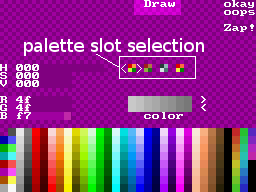
In SEDS, you have a set of radio buttons telling "cmap slot" just above the raster tool. touching one letter picks that palette for edition, and L-touching it will copy the current data onto another slot. Clicking "okay/sure" activate one slot for the sprite editor. That's pretty much all you can say.
  • [todo] enable some sort of "sheet preview" for all the sheets on top screen, and identify the currently selected sheet(s)
  • [done] L+touch on the '>>' and '<<' buttons navigate to the "next page in the same set as the right (edit) page".
  • [wish] 16x32 and 32x16 edition (even with 32x32 grid)
  • [done] provide a button on screen for launching "cursor" mode, just in case R trigger is not as reliable as it should.
  • [done] provide a "Load" and "Save" button on the file screen that do not depend on L/R triggers.
  • [done] auto-compaction of the tileset as you move pages across types of ram
  • [done] two-way navigation in ram types with L+touch. 

In the animation editor, there's two places where you can use alternate palette. When you describe a "limb" for an animation, you can use the "cmap slot" radio buttons on the "FILE" screen to define its default colour (before L-touching the limb table on the left).


Alternatively, you may need to change the palette slot of a "limb" during the animation, for instance to introduce some progressive shading effect. This is achieved by touching one of the "cmapslot" in the bottom-right corner of the EDIT screen.

See this post for identified bugs and things that needs improvement.
  • [done] provide a "Load" and "Save" button on the file screen that do not depend on L/R triggers. 
  • [done] allow more than 48 animations.
  • [todo] dim the sprite when enabling "box" mode (as suggested here), report the current size
  • [todo] allow the box to be moved without getting resized.
  • [wish] more convenient way to encode limbs default priorities (i.e. grid vs. list)
  • [todo] show both *load slot* and *save slot*.
  • [done] export animations into .gif files 

Changing the color of tiles in LEDS is likely the most hack-ish of the three. You will need to ensure that your tiles are on the background layer, then press L+SELECT to switch to properties edition. From there, press the dpad to the LEFT direction once to hide the tile properties, and then press it again so that it says "colors on" on the top screen. you may then use (A) and (B) button to change the current cmap slot and paint objects with the stylus in the currently selected slot.

[done] make sure monsters are properly rendered on screen
[done] allow cloning of .cmd files and update of which map they use.
[done] feedback on file selection.
[todo] feedback on color selection; e.g. change palette for the upper screen and fade foreground objects.
[todo] make tile flipping simpler in draw mode (e.g. reaffect X or Y button).
[think] enable 'book' of sketched objects to be read/written to (may require A/Y for DRAW/COPY mode to be re-thought too).
[done] display non-functional (missing state) GOBs and allow selection.
[todo] report GOBs' cast
[todo] clear/set GOB init expression, set cast.
[need] in 8x8 mode, move the cursor by 8 pixels, not 16.
[done] allow monsters linking.

Hope you'll enjoy it.

Thursday, November 01, 2012

tint'm'up!

Avec les nouvelles version de SEDS et AnimEDS, je n'aurai plus à rougir de la variété des Koopa Troopa. Me voilà également capable de créer des personnages animés en changeant la teinte des différents sprites utilisés. Voilà qui complète agréablement les modifications apportées à mon éditeur de niveau début septembre. Je vais peut-être bien pouvoir en profiter pour faire un premier essai de "pendat" en 2D, même si au départ, j'avais prévu d'utiliser des polygones pour ce perso (et pour BangBash, d'ailleurs).

Ain't 'fraid o' Kolorful Koopas. No more. With my latest updates on SEDS and AnimEDS, I can use up to 8 distinct palettes for the sprites I use to build character and monsters animation. The same "hands&feet" spritesheet can be used for Bilou, Dumblador and even Pendats, with two separate shades for foreground and background. That should be quite enough.

Now I've got to focus on the thing I've left behind for a while: make the game engine support all this as well. Right now, the 'schoolzone test' has a 'donkey kong return' look: only the owl-styled background has colours, and everything else is plain black ^^". But not right now. Right now is Ravioli time.

Sunday, October 21, 2012

pick a slot


I'd say "good. things are progressing" if that progress hadn't been done while I can't get due sleep, coughing and sneezing. Anyway, I'm done with some basic steps to confirm that a multi-slot palette can be loaded in AnimEDS. Much remains, that will need more lunch-thinking.

  • [done] ensure multi-slot palettes are read correctly.
  • [done] buttons to pick slot on skeletton-setup page.
  • [done] selected slots reflect in anim edition window.
  • [done] move swap bits of AnimCommands to their hardware place, to make room for palette bits.
  • [done] limbs table can reflect palette slots
  • [done] palette slot preference stored in animations
  • [todo] frame editor that obey colour preferences
  • [done] preview using real colours
  • [wish] timeline using real colours
  • [done] size up to 8 palette slots for pendats to come in.
  • [done] dumblador using multicols and bilou's feet.
  • [done] Bilou using multicols for darker foot & hand. 
  • [bugfix] saving something multipal with AnimEDS kills all the palettes
  • [bug] sticky palettes selection when changing sprites?
  • [SEDS, done] ensure palette reorganization works in multipalette .spr files.

Tuesday, October 16, 2012

Multipalette de-briefing

I do want to have multi-palette in AnimEDS as well, so that you can tint your monsters and reuse e.g. the same sprite for Bilou's front and rear foot, or for Bilou and Pendats feet and hands. Right now, each foot sprite is cloned 4 times and I only have 1 monster so far ... seriously.

Allons-y: multi-palettes aussi dans l'éditeur d'animation. C'est vrai, quoi: pouvoir repeindre les bouquins dans l'éditeur de niveau, c'est bien beau, mais ça ne change en rien le fait que je suis obligé de maintenir chaque sprite de pied en 3 coloris séparés et 4 coloris pour les pieds. Vous comprenez bien que dans un contexte pareil, tenter de faire un "pendat" avec les pieds et les mains blanches (couleur règlementaire dans l'armée de Sqrt) est totalement hors de question >_<.

So it's time I track the core changes made to Level Editor so that it can benefit from multi-palettes:

Now, AnimEDS will mostly require extended palettes for sprites, not for simply for tiles. So ...
  • [done] make AnimEDS compile in the noswap branch
  • [done] get rid of logo display.
  • [done] only MAIN screen is given multi-pal capabilities. Tell GuiEngine on which screen console should be ; Window provide palette[] and layers abstract registers ?
  • [done] move AnimWindow on MAIN screen; fix sprite-based widgets.
  • [done] make sure a palette is initialised

    Tuesday, September 25, 2012

    So many palettes!

    This time, I do it the correct way: I start mapping which (hardware) palette is used where so that I can later properly track copies that goes on all over the place and figure out why I can't properly load/store palettes in that "multipal" update.

    Many of the operations you can do on the PaletteWindow actually involve copies from one of the palette into the others. Ideally, they are all synchronised...
    •  as soon as you start editing your palette, it differs from those of the "upper screen" which are kept static
    • "okay" button copy the edited palette into SPRITE_PALETTE_SUB, allowing a preview on the current sprite page
    • if you're fine, "sure" button copies the edited palette on BG_PALETTE_SUB as well. It's now officially your working palette for the grid.
    • At anytime, you can undo something by clicking "oops", which copies BG_PALETTE_SUB back as the edited palette. 
    There's something the multipal approach changes, however: what is now stored in the .spr file is the offscreen set of (up to) 4 palettes, which is updated every time you flip to another slot. So "okay/sure" only affects how you will draw pixels in the close future, not what is actually stored when saving. The bare minimum I can do is to ensure that onscreen->offscreen update is performed when clicking "okay" as well. 

    I *could* also enforce this synchronisation when going out of the PaletteWindow, but that would break the former user interface convention (where going out without having pressed "okay" at all means you won't save your palette edits). To overcome this, and avoid data loss, I introduce an additional offscreen undopal[] where I can automatically store data, and a "lost" button that can recall what was on screen the last time you left the palette edition "window".

    Monday, September 17, 2012

    Let's get cracking

    Okay, hardware is restored, it's now time to merge summer experiments and converge towards a platform for more pixels, more animations, more levels and more monster design experiments ...

    • [done] merge the 'z-order' branch back: it has proved it's a GoodThing
    • [done] 4-palettes LEDS must be backward-compatible with one-palette spritesets
    • [done] make sure we still see the background and monsters in 4-palettes LEDS
    • [done] restore disappeared iprintf (known bug)
    • [done] barebones to update colours on BG layer in LEDS
    • [done] ensure that LEDS runs on real hardware (fix blue screens when loading a .cmd file and when switching to colors mode)
    • [badbuild?] ensure it's still possible to L-pick tiles in draw mode
    • [bug?] need to press select twice in SEDS to enable PaletteWindow ? 
    • [done] something odd happens on SEDS when loading a spriteset while a non-zero palette is currently selected in PaletteWindow (palette #0 overwrites current slot)
    • [workaround] entering sleep mode breaks iPlayer's access to the media card.
    • [done] palette selection in AnimEDS as well
    • [fork] find something better than Window::swap() to structure widgets.
    • [bugfix] ensure that SEDS works in the noswap branch too (currently, it's all black!?)
    • [badbuild?] some widget only display randomly on real hardware
    • decide what to do with left-handed mode
    • [done] ensure I've got all the material to edit/test levels on the DSi (currently, something displays "T.M.A.P" and random tiles on the console, and the level doesn't load). LEDS apparently saved a map file as autoexec.cmd. Needs investigation.
    • [done] allow map2png.pl to work again
    • [wish] make map2png.pl work with swapped (and coloured) tiles too.
    • [done] complete the books tileset so that I can change books size (cf. CyanGmou's mockup).
    • [postponed] fix the landing bug for Bilou
    • [postponed] fix blador.cmd so that bladors can be stunned
    • [now] revamp the School's owl
    • [postponed] draw/animate some pendats
    En clair, ça en fait du travail pour se remettre à avancer sur la School zone ... l'objectif, c'est bien sûr plus de souplesse pour construire les niveaux, plus de variétés dans les décors et de nouveaux monstres à développer.

      Monday, September 10, 2012

      First multi-palette LEDS screenshot

      Si le post précédent vous a laissé avec des yeux grands comme des soucoupes, voici une petite image qui résume ce que donne le "multi-palette" hardware une fois ajouté à mon éditeur de niveau. Eh oui: les livres peuvent enfin avoir des couleurs différentes. Bon, on est encore loin du compte, parce que pour l'instant, ce sont les propriétés des objets (solide, pentu, ...) qui modifient les couleurs, alors qu'au final, il me faudra un outil de sélection de couleur à part. En plus, seul l'arrière plan (juste derrière Bilou) pourra voir ses couleurs modifiées, l'avant plan utilisant obligatoirement les couleurs de la palette "de référence".

      the multi-palette .spr file I crafted on my DS phat has been beamed and (thanks to Sverx's precious hints), I've got LEDS now working in extended palette mode, so that it can natively use the same tiles data for at least two different tints of books. I still have much to fix, but it's a nice first step.

      Saturday, September 08, 2012

      VRAM_E_LCD

      I previously messed up with the sources of "Tetris Attack" to gain experience with DS development. Among the things Sten used, there was multi-palette display, using an extra bank of VRAM instead of the "regular" PALETTE_BG and PALETTE_SPRITE.

       videoSetMode(MODE_0_2D |
      DISPLAY_BG0_ACTIVE | /* the background */
      // ... more settings
      DISPLAY_BG_EXT_PALETTE);
      // 128K
      vramSetBankA(VRAM_A_MAIN_BG);
      // 128K
      vramSetBankD(VRAM_D_MAIN_BG_0x6020000);
      vramSetBankB(VRAM_B_MAIN_SPRITE);

      The video mode initialisation we have here is fairly standard (note the old-time code with VRAM addresses still exposed to the homebrew coder :P), except for DISPLAY_BG_EXT_PALETTE flag. You can turn extended palettes on/off separately for sprites/backgrounds, or for top/bottom screens, but if you enable it for background, it's used for *all 256 colors backgrounds*. Period.

        // 64K, can hold palettes for all four BG layers
      // allocate for cpu access
      vramSetBankE(VRAM_E_LCD);

      // background
      Decompress((void*)(0x6880000), background_pal_bin);

      // blocks
      Decompress((void*)(0x6880000 + 256*16*2), sprites_pal_bin);
      // an alternate palette with colors dimmed so that we can
      // easily dim the whole playfield when the game is over...
      CreateShadedPalette((u16*)(0x6880000 + 256*17*2),
      (u16*)(0x6880000 + 256*16*2));

      This magic 0x6880000 memory address sits within the 'LCD-mapped' region and is where VRAM bank 'E' appears. Right then, it's "offscreen", somehow, just ready for setup by the CPU. Each palette is 256x2 bytes long, and each background will have access to its 16 palettes at fixed offset. In this game, we had the backdrop on BG0 (thus palette at 0x6880000 to 0x6881E00 = 0x6880000 + 512*15), "blocks" (or apples) on BG1 that has its first palette at offset 512*16 (0x6882000) and its second palette at offset 512*17 (0x6882200). That makes lot of room unused (15 unused palettes for BG0 and 14 unused palettes for BG1), but if you want them to use different palettes (e.g. being converted independently from each other), you don't really have a choice.

        // text
      Decompress((void*)(0x6880000 + 256*16*2*2), font_pal_bin);
      // more background...
      Decompress((void*)(0x6880000 + 256*16*3*2), singlebackground_pal_bin);

      Score and status are displayed with a tiled layer too, implying yet another palette is needed. He could have used a macro XPALETTE(bg,slot) defined as ((void*)(0x6880000 + 256*(16*bg+slot)*2), or (possibly), use bank F/G forcing BG 0 and 2 to share the same 16 slots, but ensuring that those slots in use by BG2 are never needed by BG0 and vice-versa.


      // then allocate it for extended palette use
      vramSetBankE(VRAM_E_BG_EXT_PALETTE);

      Enough setup: we let the video hardware access those fancy colours ^_^

      supercard and multi-palette

      There is one last thing I can do with my failed homebrew equipment: dig out my old SuperCard (slot 2), update the makefile so that it automatically apply DLDI patch if $DLDI environment variable is set, and work on that multi-palette support that will ultimately allow me to tint books in up to 16 colors in the school zone (only 4 slots atm.)

      Premiers tests concluants pour le système "mutli-palettes":voici un bouquin vert, mais qui peut redevenir rouge à n'importe quel moment. Et il ne s'agit plus d'un simple test grandeur nature dans SEDS: les palettes alternatives peuvent maintenant vraiment être sauvées dans des fichiers .spr et re-chargées plus tard.

      Friday, August 24, 2012

      Roses are Red, Violets are Blue ...

      And my books should be allowed to have whatever color I think fit. Or at least let me put it in a different way: that would be a waste of tiles if I could only have *red* books in the school zone, right ? (and only green binders). It's much more interesting if I can select an alternate palette when I want a blue-tinted book or a darker wood block.

      The DS hardware allows all this (I mean, even the NES had it :P), extending the '256 colors' mode of the GBA to some fancy '16x256' colors. Granted, I *could* very likely work in 16x16 colors mode for the school zone, but I'm not yet a sufficiently good pixel artist to handle that.

      I've took a first step yesterday by allowing some 4 palette slot selection in SEDS' palette editor. Before I give you a rainbow bookself, I still have to:

      • [done] store all this in the SPR file (SpriteSet classes)
      • [done] make sure SEDS has a palette large enough advertised to SpriteSet.
      • [done] adjust the game engine so that it works in extended palette mode
      • [done] provide palette set toggling in LEDS (only for the BG layer: the FG uses it to encode tile properties). That would be better to have it on the bottom screen, and not part of the "tileset" screen as depicted on the mock-up
      • [done] provide palette setting in AnimEDS as well (so that dumblador and Bilou (and pendats) can share feet tiles. Being able to define it when the sprite' skeletton is created should be a good first step
      Oh, and don't worry: there will be an polish on the transanims and a schooldemo.nds by the end of august. I just need to recover a DS lite for that, so I'm messing up with other parts of the summer-todo-list.

      Friday, June 15, 2012

      Devoir de Vacances...

      Bon, on est encore loin d'avoir une "school zone demo" convaincante, mais au moins, la première vague d'upgrade des outils touche à sa fin. J'aimerais avoir pour la fin de l'été une démo avec Bilou converti en animation composite (plus ou moins indispensable, vu que j'ai déjà effacé son corps pour les étapes de marche, ce qui explique le "clignotement" dans la dernière démo) et de l'encre animée qui tue (lentement si on veut).

      Let me pick a chalkboard and try to map all the improvements I still have to bring to the Bilou-in-school-zone demo, so that I can identify priorities and schedule coding sessions for this summer (if we ever happen to have a summer here this year :P)

      And the winner is ...

      ink animation and repair Bilou walk animation


      Rien que ça, ça nécessite déjà deux interventions immédiates sur SEDS et AnimEDS. Ensuite, j'aimerais pouvoir me rapprocher du look "pile de livres" proposé par Facet, mais ça, c'est plus ambitieux, et donc à garder pour une 2eme passe.

      • GridWindow::save_back_tiles(), which is involved in the cursor-driven edition, already does some 32x32<->16x16 conversion. All I need to do is to move it where it really belongs -- EditorSpriteSheet : public SpriteSheet -- so that I can reuse it in FileWindow::event().
      • 32x32->16x16 is now available and the ink tiles are converted.
      • modifying one line in GameScript.cpp should allow to animate the ink, but there's more code cleanup waiting there, for more efficient memory management, for instance.

      Monday, May 28, 2012

      Palette animations and 4096 colours

      I've seen the use of multiple palettes on DS first in the Tetris Attack source code.
      The game used to use multiple palette to handle "shading" of the game when you're K.O. It involves using one of the VRAM slot (usually VRAM_E) as a extra-palette place, but you need to map it back as LCD to enable modifications ... so it's not convenient if you're planning to do palette animations.

      it's completely OK to switch the VRAM bank you're using for ext palette to LCD mode -when in vblanking- to access it, the DS doesn't care when it's not drawing the screen. Just remember to set it back to ext palette mode as soon as you updated its contents. Using multiple palettes, for instance for sprites, could be useful if you want to have enemies with different colors but just store their frames in memory once (/Sverx :)


      That's good to know. I won't have to drop palette animation altogether if I start using multiple palettes for "painting" books in the school. If I'd be checking gbadev more often, I'd know for quite a while.