Showing posts with label runme. Show all posts

Saturday, April 04, 2026

NDS for DSi

I had announced on some discord channels that I had a new NDS demo of my ongoing work. One of these channels is the one where I'm in touch with Fei, who already tried a copy of the 3-rooms demo back in 2021 and 2023.

Back then, we finally managed to have something running at his place, but it doesn't seem it has been preserved. After locating a register that could tell me whether we're running on DSi (and then skipping the InitGBA function that would blue screen the demo -- as there are no GBA memory around), the best I could get is a "EFS search failed" message, but also a mention that 1) DLDI is around but 2) the demo is installed on Fei's SD card rather than in the filesystem.

Bad news is that I don't see anything in libfat or in libnds that would enable DSi' SD card access, which goes through completely separate hardware and isn't covered by DLDI at all (to my best knowledge). I'm not the only one to have such problems, but there was no answers to be found.

So I guess my best move to make progress there is finally to get homebrew software running on my own DSi thanks to StyleHax...  for that, the next step was to enable a DNS server on the cube. That sounded like a task the rubber duck could take care of and it suggested the following: 

Use a small local DNS resolver (dnsmasq or unbound) bound to the interface and configure only the few hosts to use it via per-interface/etc resolver settings or systemd-resolved split DNS. Since you want minimal config/deps on Ubuntu 18.04, dnsmasq is simplest.

  • Edit /etc/dnsmasq.conf (or add /etc/dnsmasq.d/custom.conf) and add: 
  • interface=eth1 # replace with your interface name 
  • bind-interfaces # ensure dnsmasq binds only to listed interface 
  • listen-address=192.0.2.10 # IP of that interface (optional, stronger) 
  • no-resolv # avoid reading /etc/resolv.conf 
  • add local hostnames: address=/host1.example/192.0.2.101 address=/host2.example/192.0.2.102 

ok, fine. That allowed me to fake some website with some other DNS name, and eventually get stylehax page shown on the DSi, even once making a green screen (exploit worked, but boot.nds was missing) and once loaded the dumptool.nds, but it complained the SD card was too small (it's a 128MiB one) and refused to do anything. Each attempt takes 1-2 minutes, and I'd say the success rate is at best 1:10.

One of my ideas was to use e.g. runME as boot.nds and work directly from there, but from this experience, it doesn't seem to be a viable plan ...  

Maybe I should pay a closer look to the updated nds_loader ? 

Maybe I should check the way GetDeviceOpTab is implemented and try to write something that reports all available devices ? (alt. repo from Patater)

Or maybe I should simply use another hack ? like the Memory Pit for the camera application ? 

edit (25/5): Got lucky with stylehax this morning: every boot.nds made it through in 1 or 2 attempts. So I managed to get DLDI scanning of Dreams-inspector.twl.nds and figured out I had to fix my Makefile to apply efstool processing over that new .twl.nds as well ^^. And eventually, I got Dreamlands 3-room demo running on my own DSi !_!  

Friday, October 04, 2024

furblock de montée

La dernière tentative d'améliorer la branche s'est plus ou moins soldée par un échec constructif. Puisque le week-end de montée m'offre un peu de répit, je vais partir sur une idée qui m'est venue en passant en revue les autres jeux avec des éléments de gameplay similaire: commencer par me faire un "bloc-note" à la SMB3, qui se concentre sur le mécanisme, pas sur l'animation. Et une fois que le mécanisme sera validé, je fait la même chose avec un objet invisible.

So trying to combine physical motion and animation for the bouncy branch proved to be a bad idea. Rolling back. I'll keep my satisfying animation and combine it with an invisible block behaving like the "note block" of Super Mario Bros 3 instead. And I'll prepare that with non-invisible block in an easier-to-test environment, that is the pyramid room.

  • premier fix: je dois retirer les zik.import de mon script pyrat.cmd: ces commandes sont propres à la "trhee rooms demo" qui pré-charge un module de base (bilou.xm) et runMe ne connaît pas (encore) l'équivalent, même après recompilation du dernier modèle
  • deuxième fix: runMe a besoin d'un "../spriteB.spr" explicite pour aller chercher le nouveau fichier (et pas un vieux fichier de SchoolRush dans efs:/moving/spriteB.spr ^^")
  • 3eme fix: ma petite anim' faite à la main doit utiliser la SpritePage 8+2 (parce que le fichier bilou.spr préchargé contient 8 pages)

Bon on y est. J'ai un "furblock" dans le niveau-test de la pyramide. Je saute dessus et il s'enfonce bien puis ... il décole vers l'infini et au-delà (ç.à.d  -2147483648). Ah oui, et il n'a encore un tête de fury que sur DS, pas sur l'émulateur. 

J'ai utilisé pour le réaliser un nouveau contrôleur "grille" qui indique si on est repassé au "bloc" suivant, histoire de passer d'un état "repoussé vers le haut" à un état "repoussé vers le bas", et que le bloc finisse par se stabiliser à sa position d'origine. Mais manifestement, ça ne marche pas encore.

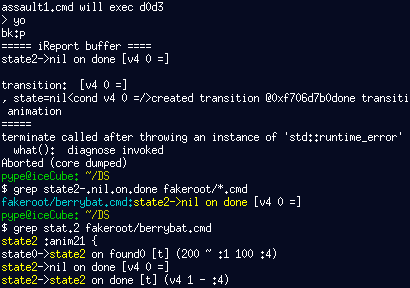
There have been a few "setup" issues, leading to a few TODO items to be processed later (this season?) in my notebook, like runMe not supporting the multi-music commands and the lack of "translate to that sprite page" macro for multi-spriteset that leads to annoying magic numbers. But I have to admit that even with that done, the behaviour was fairly surprising. Well, on the DS, the "furblock" did a downwards bump and then skyrocketed to negative numbers: I needed something to fire an event when the original position has been reached. And that thing could be the "grid" controller that was part of my "how to code bosses" arsenal.

But even with that, the resulting behaviour is emerging and perplexing. I guess I haven't found the proper set of rules yet.

Et nous voilà le week-end d'après encore plus au calme, ce qui m'a permis de décortiquer avec InspectorWidget le comportement émergeant (mauve) et de trouver les corrections (bleues) nécessaires pour que ça marche pour de vrai ;)

Special thanks fly to Wye for his SMW-remake-howto video and how it reminded me that the Springy note block exists in first place, and how they were perfect match for the feature I was looking after. ^_^

Tuesday, February 20, 2024

Tools update


It'd be fun to try your editors! I'd probably do any serious development on a computer, but it's still cool to have an opportunity to try something I would've loved to have as a kid.

(Nova Storm, 7 February 2024)

I told you about Nova's work on NES and SNES already. Earlier this year, she shown interest into NDS homebrew and linkers, so I proposed her to try the dsgametools, and she replied with the heartwarming sentence above. My last tools release dates back from 2021, and while there are not that many things that have changed since, some annoying bugs were fixed nonetheless. So I went for a new package with some README, example files and PERL tools in addition to the .nds files proper. 

Salut les neveux. Si vous voulez tenter de faire des jeux sur Nintendo DS avec mes outils, vous êtes arrivés sur la bonne page. Téléchargez le .zip en utilisant l'image-lien ci-dessus et copiez les fichiers *dlta.nds à la racine de la carte-mémoire de votre DS. Tant que vous y êtes, vous pouvez aussi créer un répertoire nommé "moving" à la racine de la carte mémoire et déposer les fichiers présents dans Demo/efsroot/ du zip. On fait bien attention à ne rien effacer, on éjecte en toute sécurité, on remet tout en place dans la DS et voilà.

Level Editor: 

  • fixing bugs with meta buttons;
  • add support for special tiles used in conveyer belts and flowing water
  • cosmetics: buttons with shadow and show when they are pushed

AnimEditor: 

  • fixing 'apply to all previous frames' and 'apply to all future frames' buttons.
  • only store thumbnails when the animation is used. 

runME:

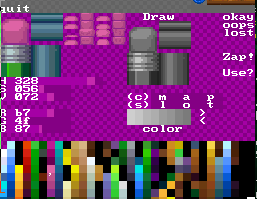
SEDSdlta est votre éditeur de graphismes. Il permet de définir des palettes de couleurs et des pages de blocs 16x16 ou 32x32 qui seront sauvées dans des fichiers .spr. Ces fichiers peuvent ensuite être ouverts dans l'éditeur d'animations MEDSdlta ou dans l'éditeur de niveau LEDSdlta. Les niveaux créés par LEDSdlta seront sauvés dans des fichiers .map

Deux points communs dans tous ces éditeurs: maintenir L enfoncé pendant qu'on touche un bouton/une grille/une image à l'écran permet de faire une opération différente. Et appuyer sur L+R donne un peu d'aide.

These tools seem like they're very compact and full of features, maybe to the point of feeling a little bit cramped or unintuitive, though it's tricky to do something about that with this sort of screen resolution. I do appreciate the manual that you can access whenever to find out how to do stuff, and I'd rather have all the features than have a simplified tool. I liked the "scan" button in the sprite editor; that's not something I've really seen in pixel art programs.

I can certainly agree with that. It isn't rare that I have to dig my own blog -- or worse, the source code -- of AnimEDS when I want to do something a bit less frequent like copy a frame to a given position, create a new skeletton or adjust hit boxes. I'll have to complete the "L+R to get hint on how to use things" but it's good news that someone noticed it and appreciated it. Maybe it could be completed by a "please explain that control" mode where you can touch something on screen and learn about it rather than use it ...

I feel like it would help a lot to have buttons that bring up menus (especially on the animation editor, which needs more explanation than sprite editors do), where you'd have more room to make it clear what each option does or avoid needing button combos so you can fit more options on-screen, but that has to be weighed against how much it would slow down a user who knows what they're doing. You *could* have quick shortcuts with small icons alongside a button that brings up a menu that's less compact, though.

I have started something along these lines for 'monsters edition' in LEDS... That will be motivating to push it further

As you may have guessed, that lovely avatar for Nova comes straight from her website ;)

Saturday, December 25, 2021

xmas21.zip

I finally posted something more on my sourceforge project: the set of editors (plus runme) as I've got them by this Christmas, invoking oven-hot slopes support.

I wish I could provide you with a meaningful 'change log' for this 'release' of my tools, but let's be

honest: there are over 20000 lines changed between then and now (assuming that you're only interested in what changed since last AnimEDS release in 2020). It won't be exhaustive, but I'll try to give you an idea of what's in anyway.

Sprite Editor

  • allows you to work on any file you've got on your memory card (including automatic backups put in /DATA/SEDS/*)
  • better 'colors zapping' implementation.
  • 'where is that color used?' now cleanly implemented in the PaletteWindow
  • (improved host tools sprdo and sprck are missing from this pack)

Animation Editor

  • allows you to work on any file you've got on your memory card. 

Level Editor

  • uses new map layout with dedicated PHYS layer (accidentally named 'SYHP' in the file >_>)
  • show the 8 color palettes when selecting a block in DRAW mode (A). Color paint mode now available on both foreground and background layers (trigger with L+A on the desired layer)
  • supports new any-sized special blocks with 'lookup arrows', features revised 'meta buttons' widget to select tile properties.
  • reads new 'slopes %d = "%x"' hint in .cmd or .gam files and populates the slope tiles graphics accordingly. Different maps can use different slopes or share them by importing the same .gam file.
  • supports spritesets and tilesets overlay commands

runMe (gameplay preview & WiFi transport)

  • Allows live-skipping of buggy script lines
  • allows auto-repair of the /moving/ directory
  • features new level map engine
  • supports script-driven song swapping with zik.file = "%s"
  • Improved modplayer playback speed stability
  • supports spriteset overlays (spr.more "%s" ...) and tileset overlays (bg0.more "%s" ...)

All these .nds files will work from anywhere in your flash card, but if you install them with their original *dlta.nds filenames at the root, you'll be allowed to hope from one tool to another with the embedded buttons (quit, LEDS, SEDS, MEDS) in the application welcome windows.

Thursday, March 25, 2021

c:\sink.pl

 Bon, vu qu'on est re-confinés j'ai toujours une machine Windows à la maison. Elle a reçu un mingw (non sans une grosse dose de Rongtudjus). Et si en plus elle avait PERL, (pacman -Sy, mon ami), serait-elle capable de faire des échanges de fichiers avec une DS ?

Bin ça n'a pas l'air d'être le cas. Même après avoir autorisé PERL sur tous les réseaux dans le firewall ... tout au plus, le Windows parvient-il à envoyer les invitations à transmettre (en UDP sortant). Mais j'ai systématiquement une erreur 0xcafe au moment d'essayer d'établir la connexion.

Eh ? ... pas si vite. C'est quoi cette cochette à gauche du nom 'perl' ? et pourquoi est-elle restée décochée ?


Ah bin oui. Là, tout de suite, ça va beaucoup mieux!

Comme ça je peux récupérer le 'xmasdad' découpé pour faire de l'animation modulaire. C'est la branche tuto qui va être contente...

edit: et pour scripter ça, ce serait avec netsh (dont la partie utile de la doc est ici.

Sunday, June 18, 2017

runme + assault = todo

I'd love to have the time to provide a real tutorial for people to start working with libgeds. So far, the best I have is a package with 8-bitifed graphics for AppleAssault and the corresponding game/character scripts... which -- thanks to some work I did a few weeks ago -- now also comes with a copy of RunMe that can run all of that. Maybe that will at some point make it more interesting to start working with the Game Engine for DS.

Of course, because runME is a tool primarily designed to transfer files, it will not exactly be easy to start a game there.


Bon, j'avoue, j'adorerais avoir le temps de travailler sur un vrai tutoriel pour le système lib geds, mais jusqu'ici, la seule chose qui s'en rapproche un petit peu, c'est une sorte de kit avec les graphismes de Apple Assault en version 8-bit et les script correspondant pour les personnages et pour le jeu. Et grâce au travail de ces dernières semaines,  tout ça i tourne maintenant avec une version récente de runme. youpi. Peut-être que ça rendra les choses plus faciles pour ceux qui veulent commencer à travailler avec le game engine for ds on peut toujours rêver...


click 'offline', then 'cmd'click 'A' to pick one of ASSAULT*.CMD, and then click the name you want to runpress now L+A to load the script into the memoryand now press L+Y to process that script to the end.

Évidemment, le programme 'runMe' est avant tout un outil de téléchargement. Donc il faut un peu chipoter pour pouvoir démarrer son programme:  passer la détection réseau , par exemple, puis choisir le fichier qu'on veut démarrer, et des commandes un peu barbare du genre La+À ou L+y pour démarrer la lecture du script ou pour l'interpréter sur la DS.

When I want to run this, I do it with desmume-cli, using --cflash-path=AA-efsroot (which is in the 'runMe.zip' archive) and --load-type=1. But that only works in Linux. For windows user, you'll have to go into config->slot2 and setup the directory manually (I just hope for Windows users that they can somehow save that configuration)
Il faudra aussi s'assurer que l'émulateur a accès au fichier du jeu qu'on veut essayer. Moi, je fais ça à la ligne de commande dans Linux, mais évidemment, les gens qui travaillent sous Windows devront passer par les menus de configuration de desmume pour avoir la même fonctionnalité ( voir l'image).

Voilà, avec tout ça vous avez la possibilité de tester le jeu que vous avez vous êtes en train de développer, mais malheureusement, s'il y a des erreurs dans le script, c'est encore très laborieux de les trouver et de les corriger. On peut faire mieux avec l'outil de test automatique que j'ai développé pour mettre School rush au point, mais c'est un truc qui doit être compilé à part. Et pour l'instant, il faut même le compiler à chaque fois qu'on veut essayer de traiter de nouveaux script pour un nouveau jeu, donc il faudrait que je fasse appel à l'équipe pour avoir une variante qui tourne sous Windows histoire que les jeunes puissent essayer de faire le même. Mais voilà, l'équipe, pour l'instant c'est juste bibi. alors soit vous vous enrolez, soit de vous patientez. Ciao.

All this makes you able to try the game you're developing, but when there are errors in the script, you just have a stop with the content of the offending line dumped.
Hopefully, It can now also be checked with 'testme', the unit-testing tool for current School Rush game. (which unfortunately still requires a rebuild for Windows everytime you change the scripts you want to check).

I could really use a helping hand to get that going somewhere. Someone who's used to do builds of Linux native projects in a Windows environment. Even then, it's unclear whether I can compete with a tool such as DSGameMaker, but I still think people should have the choice ^_^


Oh, et si vous allez jusque là, la présence du "log" deviendra vite gênante dès le niveau chargé avec succès. Rassurez-vous: il est tout à fait possible de le faire disparaître: il suffit pour ça de toucher le bouton 'log' sur l'écran du bas. Et si vous voulez retourner charger un autre niveau, le bouton "beam out" vous ramènera sur l'écran avec la liste de fichier et le "clavier virtuel" (qui fait les "lettres paires" quand on garde L enfoncé, soit dit en passant).

Et pendant que vous lisiez tout ça, j'ai ajusté la position des vagues d'encre pour le "niveau retour" de School Rush...

Sunday, March 12, 2017

runMe truly resumed (hopefully)

All of sudden, runMe works as expected again. I have sound playback (missing since 1st of January) and I can use the GUI on the bottom screen while playing on the top screen. I'm relieved, but I can't really feel proud. This is the most silly fix I've done in years. For all that time, I've been linking runMe with the default ARM7 binary instead of using my own "ppp7.arm7" that integrates my modified version of libntxm. Some commands thus had no effect, and others had undefined effect (including likely crashing the ARM7, meaning that reading touchscreen no longer worked).

Tout à coup, runMe re-marche.Et je ne m'en sens même pas fier après cette descente dans les arcanes du système de la libnds. Voyez-vous, j'avais fini par suspecter un crash du processeur ARM7, celui qui se charge de lire la position du stylet dans les puces-esclaves de la DS pour en informer l'ARM9, le processeur principal. Mais aucune de mes théories ne semblait fonctionner. J'ajoute un p'tit embryon de widget succeptible de me dire en temps réel où on en est dans le fichier XM (la musique, pour ceux qui reviendrait de looongues vacances ou d'une rédaction de thèse), et il ne me donne aucune information pertinente ... je branche ddd sur le processeur 7, et il déclenche les break-points n'importe comment, comme si les fonctions s'enchaînaient les unes derrière les autres et ce avant même que main() ne soit appelé.

Jusqu'à ce que je me rende compte que la connexion ddd-arm7 marche sans problème avec SchoolTest et que je sois pris d'un très gros doute: est-ce que je compile bien ce que je crois ? est-ce que j'ai bien dit à l'outil qui rassemble le binaire pour ARM7 et le binaire pour ARM9 en un seul et même fichier (.nds) que je voulais utiliser mon binaire pour ARM7 et non celui par défaut de devkitpro ...
Eh bien non.

Donc si vous me le permettez, je sors chercher un miroir pour me lancer des noms d'oiseaux.

Monday, March 06, 2017

Au coeur de runMe

Okay, basics of getting runMe to run game scripts on emulator is restored. Now let's repeatedly launch script and hit the 'back' button to figure out what's working and what isn't in the mechanisms of the switching.

Bin, puisque j'ai récupéré un émulateur capable de faire tourner runMe, essayons de réparer ce mécanisme de gestion de la config de l'écran, alors. Histoire de pouvoir enfin comprendre pourquoi les boutons se bloquent pendant qu'on joue au jeu ... et de pouvoir à nouveau travailler sur les maps (oui, il y a eu tellement d'interruptions imbriquées que c'est un miracle qu'on ait pas tous été téléportés sur StackOverflow ;)

  • have a color for top screen's backdrop in 'pickWindow' and 'storWindow'
  • [wish] have an 'open' button on storWindow (not only the obscure L+A)
  • [done] reset the scrolling position when returning to GUI windows. -- implies disabling the onvbl handler of InfiniMap.
  • [done] invoke GameLayers::apply() when entering game parsing mode
  • [done] have translucent log in game mode.
  • [done] don't forget to turn off 3D when you're leaving the game mode.
  • [done] restore system colors in extended palettes.
  • [done] replace the digscreen() system of runMe's MetaWindow.
  • [done] make sure I still see logs through the digged screen.
  • make sure InspectorWidget don't try to apply default LayersConfig ^^"
And then, it would be nice if I could force exit ... wait ... isn't "SELECT" bound to that ?

    Saturday, January 07, 2017

    runMe is coming back

    I got the most annoying bugs fixed, and in the "restructuring" branch, I'll also be able to use the same controllers/shooters state machine plug-ins for both runMe (the interactive playtest tool) and the final SchoolTest ROM.

    I can choose between regular background and debug console output too. InspectorWidget, on the other hand, is messed up with some text. I'll be able to resume level design...


    Avoir mon programme de chargement à nouveau opérationnel, c'est plutôt une bonne chose. Il est peu utile de faire progresser l'éditeur de niveaux -- ou de dessiner un nouveau niveau à la verticale -- si je dois à chaque fois transférer le niveau hors de la DS, recompiler tout et récupérer à nouveau le .nds sur la console pour faire le test... et c'est bien à ça que runMe me sert le plus: tenter un morceau de niveau avant de retourner dans l'éditeur, faute d'un mode "modification de la map en cours de jeu" qui serait indispensable pour un projet plus sérieux.

    well as soon as I figure out why the level editor is stripping out all the dynamic objects. (not that it's so surprising, as the last thing I tried was to remove dynamic objects that were out of the level's boundaries).

    There are other oddities linked to incomplete port to the latest devkitpro/devkitarm/libnds, imho, such as

    • [fixed] no sound playing in new builds of runMe
    • [fixed] no EFS found for SchoolTest
    • [workaround] everytime a level is loaded, 3D effect is zoomed out a bit more
    • [fixed] dying on the title screen leads to the game to stall on a blue screen.
    • [fixed] none of the runME control widget seems to be working once the game is running...

    Monday, August 22, 2016

    revising build system

    Once upon a commit, was runME, a tool to assist game development on NintendoDS by embedding a game engine, WiFi transfer functions and launch buttons to sprite, level and animation editors. Revising a level should have been as simple as click "LEDS", update the area that wasn't suited to the gameplay, "save and play" to return to runME that would allow you to run the game with its new layout. Editing monster's behaviour should have involved at most a similar trip to SEDS and uploading some revised scripts from a laptop PC.

    Nothing like that still occur with SchoolRush. The code layout and the build system makes it extremely tedious to maintain identical feature set for the game's own binary and runME. Slight differences between the two means the game will not play as expected and even will even fail to run on runME because some 'plugin' controllers (the C++ toolkit to build game state machines) expect different arguments. RunME is almost exclusively used to beam .spr and .map files out of the DS to be tested in emulator on the integrated game binary and them beam back the .nds into the DS after some preliminary tests were made on emulator. That's likely the slowest development cycle you could think of :(


    Un jeu est sorti. Je m'autorise donc à prendre un peu de temps pour faire de la maintenance dans du code qui en a bien besoin. En particulier le système de gestion des compilations. Ce ne sera pas aussi élégant que ce qu'on a construit au boulot avec mes collègues, mais je reprends quand-même quelques idées... J'élimine les VPATH, notamment. Je regroupe ce qui peut l'être dans un 'common.mk' inclus depuis le makefile de chaque projet, etc.

    J'espère que ça me permettra de recommencer à faire de l'exécution dans runME quelque-chose de plus fiable, de façon à pouvoir tester un niveau gribouillé sur DS sans devoir le re-passer par le PC.

    I'm on a quest to make it better, drawing experience from the buildroot-derivative project we're dealing with at work. I have hope it will also ease the task of writing unit-tests for LEDS and SEDS that will make them more reliable tools: I've got way too many instances of "data recovery" in the last edits of School Rush.

    Maybe I'll have to push myself to avoid re-inventing a "dlod" systems for the plugins and accept that a static library and proper re-compiling statements is all I need: a first intermediate build of "plugins.a" allows me to look at all the things that the bunch of controllers need from the environment to do their job. If I was able to offer that via in-runME patching, I could just upload a new "ppplatformer.bin" to the NDS and have runme work with the update functions. Admittedly, beaming a new runme is simpler and does the job.


    [edit] J'aurais pu suivre une alternative intéressante: celle des modules Linux. Dans ce cas-là, c'est l'équivalent de mon "common.mk" qui est fourni à make, et l'emplacement du module à compiler est passé en ligne de commande avec un M=. Du coup, les "raccourcis usuels" qui donnent presque l'impression qu'on a affaire à un dialecte de makefile sont encore plus transparents. Un inconvénient pour un projet dont la base d'utilisateur est plus réduite, peut-être ?

    Wednesday, March 18, 2015

    selective WiFi transfers.

    My .spr files are becoming large. That's especially annoying when you remember that issue with DS-to-PC bandwidth issue, which I still haven't investigated more. Look at all that grey and all that purple: these are not used by the game engine. I started an evolution of RunMe where you could selectively transfer "tiles" or "sprites" or "animations" of one .spr file, and then reconstruct the whole file on the PC side, but it's dormant, waiting (yep, that one too) for the game to be properly polished.

    Thursday, January 29, 2015

    Time to fix things.

    After graphically resolving dependencies between my huge list of todo items, I attacked with usability issues in RunMe. I trashed a couple of evening on long-lasting bugs (although pathetically trivial >_<) in InspectorWidget and adjusted further the areas reporting so that I can follow which one is active when. That way -- and with another fix on AnimEDS -- I can check that flashing hitboxes needed to improve GRAB animations work fine.

    There is also a curious asymmetry in the "GRAB" states. Just having left-facing GRAB react "on dpad" prevents the animation to run to completion. Indeed, the button will appear to be released (triggering a "dpad" event) a few frames after it was pressed (as a result of the mechanic allowing for precise jumps). Better seems to be Good's archenemy.

    I've got an on-going experiment that allow beaming only "tiles" or "animations" or "sprites" (...) of a .spr file, in an attempt to work around limited reliability of WiFi transfers for increasingly large files from the DS... It's not very convincing so far.

    Oh, and compared to June, Inspector widget has improved. I can expand/shrink behaviour controllers, set breakpoints on their events, and touching left/right "monster area" change the "suspect" in the GOBs list (only selecting those that are active, iirc).

    Sunday, July 20, 2014

    DLODs for runme.

    Scribbled notes on how to extend runme tool with a way to import plug-ins (or Dynamically-Loadable Object Directories -- DLODs) that would contain a set of controller, guns and effects required for a given game. So far, changing some of Bilou's behaviour require that you recompile controllers.cxx, which in turns mean that you also need to re-compile runme if you want it to work with your new code. I'd like instead that the map file indicating where the support code entry points are so that we can have DLODs that are statically-linked to work with one instance of runme, and loaded at a specific location in the DS's 4MB of RAM.

    That's on my secret todo-list for about 7 years, but that won't be for this summer.

    In a similar approach, I'd like a gobscript-to-c++ compiler that would replace run-time parsing of the script with build-time generation of a series of constructor/setters or static data.

    Dinner Time. See ya.

    Thursday, February 13, 2014

    runme3D

    Toujours aussi tendu dans --IRL, au point que j'ai fait les modifications il y a bien une semaine mais que je n'ai toujours pas eu le temps d'en parler. Assez curieusement, j'ai des triangles flashy blancs qui apparaissent dans tous les sens quand je m'approche de l'emplacement d'une éponge sur DS, chose que je ne parviens pas à reproduire dans l'émulateur... et qui ne se produisait pas avec la version intégrée "SchoolTest.nds" ToT

    So runme theoretically now support 3D layer when running a game. Theoretically as in "it works in the emulator, it crashes the real hardware, and I have to find more time to figure out why". It has been initialized somehow, since it starts displaying random triangles when one approaches a spongebop, but either I'm dumping incorrect coordinates to those triangles or something was mis-initialised.

    Wait a minute. If I download back the copy that's ready-for-self-update, it doesn't display anything 3D in the emulator, while the version I have rebuilt this lunchtime do display it fine. Looks like I'll have to double-check I'm indeed testing my latest build on the RealThing... It sounds like I should have set a stronger separation between "introduce 3D" and "change the web host for self-update" phases ...


    Another interesting update on the "broken bonus" issue. I had already noted that only the screen content was bogus. If you move far enough and come back, the bonus are completely removed. I noted this lunch time that we could see some *other* location being cleared. In other words, clearblock() function might not properly handle odd-tiled blocks that sits on the seam of the onscreen texture. Restoring the original screen location to the left of the level makes the bug disappear.

    Je pense bien avoir mis le doigt sur ce qui provoque ce curieux bug de bonus-à-moitié-disparus, par contre... et à reprendre le fichier construit proprement, la 3D passe aussi dans runme. Cafouillages de téléchargements, j'imagine. Il faut dire que le "nouvel hébergeur" (le site web de sourceforge) est d'une lenteur affligeante à l'heure des CDNs. Il va falloir que je trouve un autre plan B ou que je parvienne à prolonger mon occupation du serveur qui marchait si bien jusque là.

    Wednesday, February 05, 2014

    Le point sur Bilou


    Je pense que j'ai plus ou moins fait le tour des mises à jours et autres améliorations à apporter à ma démo de la School Zone. Les bases de "Bilou: rush to completion" sont plus ou moins jetées, et ça pourrait être sympa de commencer quelques graphismes pour les niveaux complémentaires.

    J'ai tenté à deux ou trois reprises d'ajouter le support "marcher sur les taille-crayons", mais les paramètres --IRL ne m'ont pas permis d'aller bien loin. Je devrais sans-doute refaire un .doxygen pour mon cybook avec la dernière version de mes sources.

    J'ai numérisé quelques notes sur l'encre qui monte et qui descend, élément essentiel de Deep Ink Pit, Rush To Completion et du "niveau-de-rémi". Celà dit, d'un niveau à l'autre, l'approche souhaitée n'est pas la même >_<. Donc, je vais juste retaper mes notes et on verra en fonction du jeu qui sort le premier quelle approche j'implémente.

    Sur la version "beetle" avec la map la plus récente, j'ai de curieux effets sur les bonus qui ne disparaissent plus qu'à moitié.

    L'éponge arrive aussi plus près du "tableau", mais un p'tit pallier supplémentaire pour attraper l'éponge serait le bienvenu.

    J'ai quelques correctifs pour les programmes de développement,
    • [done] intégrer le rendu 3D à runME,
    • [todo] éliminer les monstres hors-niveau lors d'un changement de map dans LEDS,
    • [done] permettre de passer à la "page d'animation suivante" lorsqu'on essaie de sortir des 6x8 cases visibles dans AnimEDS.
    • [done] ajuster la mise à jour autonome vers le nouvel hébergement.
     Oh, et pendant ce temps-là, Piek nous finit le premier boss de Bilou: origins :) Alors moi, je reprends mon script d'analyse de spriteset pour qu'il génère automatiquement les "data" compatible avec son moteur de jeu (enfin, j'espère), histoire qu'il puisse passer à la zone suivante ^_^

    Sunday, September 29, 2013

    1 day left

    I have quirks in moving inkjets and the pendat doesn't feel like progressing forward right now (nor left now, afaik). There's a more concerning issue, however: I will have to cut the number of monsters present in the level. With pendat reaching up to 6 or 7 "limbs", and each limb being an individual OAM, and all those OAM (i.e. hardware sprite) being statically assigned to objects, I regularily (e.g. when inkjet throws droplets) hit the "128 OAMs" barrier of the hardware that makes some sprite becoming invisible. Another engine update will be requiredwelcome to fix that. That shall be the road ahead.

    J-1, bonjour les pépins. En plus des effets curieux lors des déplacements d'encriers et du pendat qui fait la grève, je me retrouve régulièrement avec le moteur de jeu qui se plaint qu'on dépasse la limite des 128 sprites hardware. Il faut dire qu'à lui seul, un pendat en consomme déjà bien 6 ou 7, et que le moteur les pré-alloue pour l'ensemble du niveau. Du coup, quand les encriers décident de lancer de l'encre je suis trop court.

    (edit: heureusement, ce n'était qu'une fausse alerte liée au fait qu'un des morceaux de runME s'auto-alloue la moitié des sprites hardware et n'en laisse que 64 pour les niveaux du jeu ^^" voir les détails dans les commentaires)

    edit: fixed with automated OAMs management. It took over 1 year, but hopefully, meanwhile I had realised that I was far from the hardware limit and just experiencing issues in runME because it pre-allocated half the OAMs "for internal purpose"

    Sunday, September 15, 2013

    Ready? School!

    one whole line of airborn (trans)anims!
    Aah ! Ça fait du bien! J'ai réussi à mener à bien les modifications synchronisées de l'éditeur de niveau et d'animations pour permettre jusqu'à 6 fois plus d'animations. Du coup, ma DS "green lime" est prête à reprendre le flambeau et me permet d'enfin bricoler ce "niveau anniversaire", qui a d'ailleurs bien avancé ^_^ Le fait que toute la famille ait été à moitié K.O.-microbes pendant le week-end n'y est pas tout à fait étranger ^^"


    I'm kinda proud of this week-end's progress. LEDS, AnimEDS and runME have been syncrhonously updated to allow more animations (up to 6 sheets) and thus more flexibility in behaviours. That will give me plenty of headroom for "thrown by an inkjet", stunned by a blador and all other interactions that should make the School Zone interesting to play. As a result, I have doubled the content of the "anniversary school zone" level which I hope to be ready by the end of the month.

    Btw, be ready to hate the bopping eraser. It will not exactly "chase" Bilou, but it's gonna turn back or adjust the height of its jumps depending on your position 0:-°

    Thursday, August 22, 2013

    runbox 0.8 then LEDS ...

    That's the result of summer re-factory: runme can now be used to navigate the content offline, launching levels and tools, and pre-viewing pictures and musics (although some more regression testing on those last features would be welcome). The top-screen show me where I am, what the current filter pattern is (e.g. SC*.MAP) or the selected file once a file has been selected.

    Now, I'd like to make Level Editor to benefit from these improvement as well. The "map filename" mechanism has been fairly disturbing lately. It lacks contextual re-naming/cloning of one map as already wished back in March.

    So yeah, LEDS time again, but on the front end rather than on the back end.
    • [reverted] Having 'dirname' and 'typed text' on the top-screen MetaWindow is not such a good idea in LEDS: it makes noise on the level editor and could potentially corrupt the level.
    • [done] I'd need a "mapname" widget (not merely a button) that embeds file name, size (current or suggested) crop, drop and re-name sub-buttons.
    • [done] update cmd filename too, and make sure that new mapname is reflected in the saved cmd file.
    • [won't] Maybe GuiEvent should be completed with a BLUR event, when someone clicks another widget. RELEASE is "stroke started inside an object and ends outside", and complements CLICK ("stroke started inside and ending inside") but we have no complement to TOUCH ("new stroke starting inside.") -- but that might interfere with W_DIRECTORY events generated in the "PICKMAP" context >_<


    Wednesday, August 14, 2013

    Widgets come and go.

    Hmm ... allow me to use one post as a documentation-to-self for a feature of the GuiEngine that I haven't used a lot, yet: the ability to dynamically control widgets showing up on screen.

    • one static widgets list per window
    • nbWidgets may tune how far you can go in that list
    • wstart indicates where you start reading from.
    • add(x,y,Widget) populate the list, normally in the Window's CTOR.
    • setmark() inserts a terminator in the list.
    • setmark(HOP_TO_ZERO) inserts a "goto" item that forces the list to be read from the start. This is allowed only when wstart>nbWidgets, which implies that you must reset nbWidget to the position returned by the earlier setmark(). I'm not happy with this constraint.
    When one wants a (set of) widget(s) to be optional, the prefered approach is to place it after a terminator and followed by a HOP_TO_ZERO to further process the "permanent" widgets. That also gives those "tabbed/pop-up" widget precedence over permanent widgets.

    
    if (wstart==nbox) {
        wstart=0; box->hide();
        ge.release();
    } else {
        wstart=nbox; box->render();
        ge.focus(box);
    }
    Note that visibility of the 'pop-up' widget needs to be manually adjusted with render()/hide() and that we need to force the Gui Engine to lose widget focus to make it work. In setup, the current location of the optional widget (here box) needs to be captured (in nbox):
    
    add(64,0,(box=new BoxWidget(...))->attach(...));
    setmark(HOP_TO_ZERO);
    nbox=nbWidgets--;
    If you want the 'pop-up widget' to be hidden when you'll enter that window again, you'll have to complete your Window::release() method with a conditional test:

    
    if (wstart==nbox) {
          box->hide();
          wstart=0; 
    }

    Thursday, August 08, 2013

    RunME needs a fix.

    Mid-summer has been fairily hostile to game/tool development, unfortunately... I'm stuck on level editor progress because I can't easily ensure levels I edit are working properly, as RunME struggle to launch them. The best I could do while *deline was exploring the joy of the sea-side was some documentation of RunME so that the following fixes could be performed:
    • [done] file/directory selection information should get its own space on top-screen
    • [done] not only the FILE*, but also the extension name (file type) should be accesible from the L+A launcher button.
    • [done] beam-in files in the last directory used for beam-out.  [todo] currently, only typing a new mask on the "alphanum keypad" will activate that directory.
    • [todo] buttons (SEDS/edit) shouldn't overlap.
    • [todo] ensure we can move back to SEDS/LEDS/download mode at all time.
    • [done] don't try connecting when there's no sink on a given slot
    • allow beam-out to be cancelled.
    • [wish] global_connectAP and wfcWindow::autoconnect should belong to WiFi widget. 
    • [done] IP address and [wish] SSID shown on the top screen once the connection is established.
    • [wish] allow .spr files to become autoexec.spr even though they're too large to fit our 256K buffer.  
    • [todo] spritesheet loaded with L+A in RAM should be able to display their colours, despite the "extra palettes" setup.
    • [done] a way to try again the WFC connection settings from the "access point selection" list, as they may contain WEP keys, too.
    • [wish] enter WEP key in AP selection list.  
    • [wish] use Window.active flag if "clicking on other screen's button" is a bug rather than a feature.
    ^ UI/transfers -- level running v
    • [done] fix the 'unregister XFER' loop bug.
    • [done] proper cleanup when 'returning' to beaming activities from a test.
    • [todo] avoid InspectorWidget/LoadingWindow interference (active areas not reacting anymore, beam-in offers cluttering the display)
    • [done] report hero/ennemy/none class in InspectorWidget.
    • [todo] control log display, clear and end-of-test from Inpector widget. 
    • [think] special InspectorWidget display mode on (breakpoint collision), showing both colliding GOBs' state *before evaluation occurs*, with the ability to step to the next frame (after collision occurs)
    • [done] double-check .spr and .xm loading support: no jamming allowed.
    • [fix?] how could die() end up showing blank screens (when leaving the running game)?
    That makes a NeoCompo entry very unlikely this year, unfortunately.
    But at least, it gave me time to sit down and think about what mechanics could nicely complement JUMP in the full-blown adventure game.

    post-trauma-edit: I just picked Surt's tileset I used for LEDS release 0.1 with the hope that I could use it to prepare a "tutorial map" and ship LEDS for NeoCompo ... result? I quite certainly screwed'up my school0.map (and will have to recover it from some git) with parts of the tuto map because I hadn't changed *that* filename in "tuto.cmd" ...
    When I tried to save back the map under "tuto1.map", the map got all cleared ... Unfortunately, LEDS is not ready for shipping to the world and an extended 4-days week-end won't help even though I'd decide to invest all those free hours in a compo rush, I'm afraid.