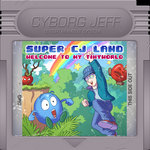
Bon, oui, le GB studio, c'est rigolo comme concept. Et ça fait pas mal de titres tout à fait sympa comme ce dinosaure de luxe. Mais y convertir du Bilou, je vois mal le truc ... même Badman aurait du mal. .. mais, petit délire de Mars ... j'ai déjà un jeu qui avait été pensé pour le monochrome dès le début: Caliméro!
On ne va pas se mentir, par contre, ça n'avait pas vraiment été pensé pour les 160 pixels de large du DMG. Le personnage ne ferait pas loin de la moitié de l'écran!
I've spent a good amount of hours on GameBoy, back in the 90's, playing Super Mario Lands, Kirby and of course, Link's Awakening. So when I hear fellow developers enjoying to work with environment like GameBoy Studio and reaching a significant audience, I can't help thinking "shouldn't I try gameboy dev as well ?"
But what game would I make there that wouldn't be over-ambitious for the platform ? That can't be Bilou and while there has been a pseudo-gameboy level in Badman III, it's unclear it would be working with the rest of the game. But ... how about "my" monochrome hero in his monochrome adventures because it was originally designed on a monochrome 8086 back in 1990 ?
Une fois remis à une une échelle un peu plus raisonnable, avec un perso en 24x24, ou quelque-chose comme ça, on commencerait à pouvoir jouer. Pas que le jeu deviendrait automatiquement un hit, hein, mais voilà.
So I looked up for a GB screen template, dug my old Calimero screenshots and started to tweak colors to see how it would look like... and spoiler alert: it looked huge. Calimero was designed for 720x348 screen resolution and then ported to VGA 640x480 keeping its original sprite data, of 54x50 pixels or so. that's nearly 1/3rd of the GB screen in each direction. I know Calimero "gameplay" has always been about die-and-retry and you-should-have-known, but it would be pushing the thing too far. Scaling the sprite to some 24x24 would allow something much more playable.
Oh, bin puisqu'on en parle, je pourrais aussi vous mettre le lien vers une série de scans de l'été dernier. La Pipe Zone, bien sûr, inspirée de SMB3 et qui sera un thème récurrent dans les niveaux de mon frère, la pyramide dont le design ne m'a jamais convaincu et la "water zone" qui a un petit côté Alex Kidd.
Même quelques boss ;)
And what better post could I find to put a link towards the set of scanned level designs I did last summer ? Scans, I mean. Level designs are from 1989-1991 and from my brother. Let me tease you with this "pipe world" (obviously influence by the pipe world of SMB3). I'll let you explore the link and find the pyramid levels as well as Alex-Kidd-inspired bosses.
Been reading this far ? well, that deserves a link to that other mastodon thread where I tried to convert some of Bilou screenshots into 4-shades-of-grey mockups, after somebody posted a music disk of Mickey Magical Quest for Game Boy in January '25...
Et on pourrait essayer de finir en beauté avec une petite image de Bilou en 4 niveaux de gris, avant et après retouche par votre serviteur de janvier 2025... qui ne tient absolument pas compte des contraintes du genre "3 couleurs + transparence par pavé de 8x8", ni du nombre max de sprites par lignes, ni du nombre max de tiles de la GB ni rien. Un pur délire de Gimp, quoi.
Toujours en mode "post-desktop". Toujours avec mes carnets qui me servent entre-autres à suivre la progression (lente mais présente) du projet "dreamland". Tout le jeu, avec ce genre de carnet, c'est d'arriver à conserver facilement accessible les choses qui sont encore pertinentes. Souvent, ça passe par un coin de feuille sur lequel je vais me faire une espèce de petit index illustré des pages sur lesquelles j'ai encore des cases de "todo" à cocher ... régulièrement quand la dernière page de ce genre a perdu son statut de "priorité absolue".
Working without a desktop ... without a central unit where your project has its home and grows ... it has slowed me down for years until I opted for making the new home for my project to be made of paper instead. But that means I need to dig older contents into newer pages on a regular basis. And part of the solution for me was that this notebook hosts everything I need to keep track of.
A trick I've started using lately was to make visual/graphical table-of-contents towards past pages, in this case, all the pages where I have "TODO" items still pending, like a small mushroom getting hit by an apple to remind of the todo-state-machine that guided me throughlatest screenshot saturdays
C'est évidemment la page 61 qui a ramassé le plus de cochettes ces temps-ci, avec les interactions autour de Funghi et les Applemen, au point qu'il a même eu droit à sa petite barre de progression.
D'autres points avaient été relevés lors du feuilletage et vont se retrouver grisés: ils ne sont pas utiles pour proposer une "première démo" de Dreamland. C'est le cas pour les ajouts juteux autour du poing-écrabouilleur de la pyramide. Oui, ce serait plus sympa qu'il fasse de la poussière, qu'il fasse trembler l'écran etc. mais on peut très bien tester le jeu sans rien de tout ça.
There are a good number of the other todo items that are linked to water interactions and swimming but that's no big surprise: water and swimming have been added over the previous year to an engine that was unable to handle that before, so there are plenty of little things left to tune or fix.
Once I was done with that first sweep, I tried to rationalize: I'd like to be able to let people play the game as early as I manage, and many of the todo items, while valid, aren't needed before people play. Sure, big smashing punch looks better if it triggers clouds of dust and shakes the screen as it smashes into the ground, but none of this is a blocking point if it's missing ... that's why the punch "icon" is greyed out.
Si la page d'index visuel correspond à un moment-détente, comme certain(e)s feraient des mandalas, il y a aussi des petites notes beaucoup plus gribouillée sur des choses à corriger saisies au vol pendant que l'un ou l'autre essaye le jeu. Mon frère est particulièrement redoutable à ce numéro-là. Mettez lui un de mes programmes entre les mains et il va vous le soft-locker ou pire en moins de 2. Il aura fallu pas loin de 3 reboots pour qu'il puisse lancer une pomme sur Funghi le week-end dernier ^^".
Et comme vous pouvez le voir, c'est beaucoup autour de l'eau que j'ai pris du retard.
And yeah, many of the items in those sub-page are less eye-candy than the index. Many of them are on-the-fly sketches of something my brother or my son or someone encountered while testing the latest version on my NintendoDS. Sometimes they are summaries of other TODO items grouped according to the tools/energy I'll need to tackle them. I can't really setup WiFi transfers through my NUC-cube while the dinner is cooking. I won't have my blog at hand to remember me what I wanted to draw on the NDS once I'll be in a no-WiFi zone with my DS around. I'd better focus on editing code once I'll be in the good setup to edit some code, etc.
Il m'arrive aussi de temps en temps de faire une version structurée différemment de ces todo-index, où je re-trie les check-box en fonction de ce qu'il va me falloir comme matériel pour avancer: la DS elle-même, le laptop, le "cube", un moment WiFi ...
L'idée est d'essayer de mieux grappiller les moments disponibles et ne pas retomber sur "ah oui, il faudrait faire ça ... ah mais non, il faudrait d'abord que je mette à jour Bilou.cmd et je n'ai que la DS" quand j'ai une petite demie-heure qui se dégage.
Et forcément, c'est dans ces moments-là qu'arrive une idée du genre "mais oui! faire des ricochets sur l'eau avec les pommes!" ou "les chauve-souris cessent de vous pourchasser si elles rencontrent de l'eau (façon essaim d'abeilles Disney ;-)
And of course, I have to accommodate for the fact that ideas pop up when they feel it, not when I'm in front of a nice blank page on which a big title has just been polished :P
edit: for the next week-end, analysis and preparation happened thanks to the cube serving the repository over WiFi to the boox sketchpad and then coding happened early in the morning, outdoor in the Virtual Machine of That Other Laptop (better battery, awful keyboard) through sshfs as the files and compiler were hosted on the cube too but the emulator ran within the laptop. At least, the 1st half-hour session was outdoor then the rest was coded on the "dining" table next to the coolness dispenser. That allowed me to have 3 items done (that's completing the page 61) and 2 screenshot saturday released :P
Funky Funghi, un des plus anciens personnages de la Green Zone sur DS, vient de se ramasser une pomme. Jusqu'il y a peu, la pomme serait juste passée à travers, mais alors que ce blog va sur ses 20 ans d'existence, j'ai rajouté les quelques lignes de code script qui manquaient pour que l'interaction proposée début 2022 devienne une réalité: on va pouvoir dégager les champignons du chemin à coup de jets de pommes.
Throwing apples around is a bit more fun since they've started rolling when hitting the ground, but one thing has felt odd so far: seeing the appleman crossing the path of a bouncing Funghi without triggering any effect. Since early 2022, I had the idea that we could have Bilou *bouncing* when hitting the hat of Funghi rather than being hurt, and that implied of course that a thrown apple should bounce as well. It was now time to implement that.
Ah, and yeah, I've played a good deal of the original Rayman, including throwing fist at bouncy plums and yin-yan balls to make them reach the place I wanted them to be. With all this new bounciness, Funghi is no longer just a hazard and you might actually want him to be *somewhere* rather than just wanting him away. Some of the initial ideas -- such as having the hat deflecting apples and only the foot being the target to hit if you want him moving -- quickly proved unpractical, and uselessly tricky to do, especially for a World-1 interaction.
Bon, j'avoue que comparé aux "prunes rebondissantes" de Rayman, on est sur quelque-chose de nettement plus détendu: Funghi ne risque pas d'aller rebondir contre un mur et de revenir vous écrabouiller. Il ne reçoit que la moitié de la vitesse de la pomme et ralentit de moitié à chaque rebond. Juste ce qu'il faut pour passer d'une souche à "entre les deux souches" en une pomme. Mais ça devrait être marrant quand-même vu qu'il y a moyen de ramasser à nouveau la pomme et de la lancer une fois de plus. D'autant plus que maintenant, il va aussi être possible de rebondir sur le chapeau de Funky Funghi! (c'est peut-être encore un peu fort, d'ailleurs).
La solution à laquelle je suis arrivé à coup de débuggeur d'expression est un rien intimidante ... entre autres parce qu'elle dérive de la collision destinée à faire rebondir Bilou, et que pour Bilou, je voulais que l'angle change selon qu'on arrivait plutôt sur le bord ou sur le centre de Funghi, comme s'il était vraiment un bumper de flipper. Pour ça, on va préparer deux valeurs et les combiner avec | dans le byte haut et le byte bas d'un entier 16-bit avant d'écrire le tout dans la 10e variable de Funghi avec :a. C'était rigolo avec l'appleman, mais ça devenait compliqué d'y ajouter le transfer d'énergie ... donc au final, pour l'appleman, Funghi agira toujours comme un mur qui absorbe 50% de sa vitesse horizontale et n'a aucun n'effet à la verticale. Et sur l'énergie absorbée, la vitesse acquise par Funghi est moitié moins importante que celle qu'avait l'appleman ce qui nous permet de calculer qu'un Funghi pèse à peu près 2 Applemen ;P
I ended up with something simple for Funghi/Apple interaction: half of the speed of the appleman (w0) is transferred to Funghi, and the other half is bounced back. But since Funghi is bigger, the half it takes only result in 1/4th of the speed. Not pushing him very far, I'm afraid. And well, that's only the part w0 4 / v0 + :0. All the things that happen before are reusing the "protocol" defined for throwing things where the thrower decides of the direction of the thrown object I already used for dumblador. The X speed and the Y speed will be set in the 10th register of funghi with :a and later used by the appleman with
$RTHROWN->$LTHROWN on hit0 [C_THROW wa 0 < &] (wa $ff00 & :0 wa 256 * :1)
Mais dans le code de l'appleman, j'ai quand-même gardé un code générique qui se contente d'appliquer le vecteur-vitesse qu'il trouve dans la 10eme variable de ce qu'il a heurté. ça pourra me permettre par la suite de faire en sorte que les branches rebondissantes puissent elles aussi renvoyer les applemen ^_^. Petite subtilité: la transition hit de l'appleman est testée avant la transition found de Funghi mais c'est found qui fournit le vecteur vitesse que hit va utiliser. c'est pour ça qu'il y a un test qui s'assure que wa < 0, pour que lors de la première frame de collision, l'appleman conserve sa trajectoire pendant que Funghi calcule l'impact. A la 2eme frame, wa est défini et la trajectoire de l'appleman pourra changer.
Et pour la collision Bilou/Funghi, c'est la distance entre le centre des hitbox (we) qui va déterminer l'angle de l'impulsion que Funghi va nous imposer, entre (-3,0), (-2,-1), (-1, -2), (0, -3)
The idea inintially was to use the same behaviour as the one I coded for Bilou, where the angle you're bounced depends on the position you hit Funghi on. That's decided in Funghi's script with
state0->state0 on found$bilou [C_THROW we 0 >= &] (we 4/ 256* we 4/ 3 - $ff & | :a)
where we is one of the collision-specific parameter (rather than an internal variable of the collided object) containing the center-to-center distance between Bilou and Funghi, ranging from -24 to +24. At the very edge of Funghi, you'll get bounce horizontally by (+-3, 0), and at the center of his hat, you'll be bounced by (0, -3). In between, you could get (+-2, -1) near the edge and (+-1, -2) near the hat. And yup, it's got the overall expr_1 256* expr_2 $ff & | shape again to put both together in a single variable.
I still had to do something for how static Funghi looks when hit by something. My first attempt failed because transanims with characters that are made of a single sprite, and so far, Funghi was still like that. But behold, Funky Funghi 2.0, remade in AnimEDS after I separated hats and feet, so that I can animate it more freely, at in-between frames of some sort, etc.
It doubles the amount of memory it takes, but I think it's worth it.
Il me restait un truc à régler: Funghi donne l'impression d'être en béton et que rien ne peut lui arriver même quand on rebondit dessus ou qu'on lui lance une pomme. J'aurais bien essayé de réutiliser l'animation "rebondit au sol" dans un sens ou dans l'autre, mais Funghi est toujours un "SimpleGob" premère génération, et je ne leur ai manifestement jamais ajouté le support des transanims.
Je profite donc de la p'tite canicule du week-end pour redécouper un peu Funghi dans le Sprite Editor, refaire ses animations dans AnimEDS et rajouter un "fait rebondir un truc qui arrive du haut" ainsi qu'un "fait rebondir un truc qui arrive sur le côté". Ce n'est pas spectaculaire, mais ça donne plutôt bien quand-même.
C'est Régis Monterrin qui avait attiré mon attention dessus avant que je ne note des bizarreries dans les tiles, un peu comme si l'artiste avait fait un chouette truc puis que l'outil pour exporter son travail avait buggé et que personne ne s'en était rendu compte.
Parce que bon, on a tellement de carrés répétés indépendamment de la texture, de transition brutale entre palettes de couleurs aux frontière de la grille-de-tiles que ça en devient presqu'un contre-exemple de pixel-art, où les spécialiste vous donneraient des astuces pour éviter qu'on ne remarque que tout n'est que carrelage aligné sur une grille.
En fait, au fil de l'évolution de ma "green zone", je suis passé par un état un peu de ce genre et j'ai noté que ça me faisait inévitablement penser à ce jeu C64: Forbidden Forest. (et sa suite, sur le screenshot)
Forbidden Forest, c'est le jeu qu'il vaut mieux ne pas regarder de trop près. Alors ok, pour un jeu de l'époque 8 bits, avec un maximum de 256 caractères à l'écran alors qu'il y a place pour plus de 1000 d'entre eux, c'est le truc le plus organique et le plus varié que vous puissiez faire. Là où l'état de l'art, ce sont les écrans interchangeables de "Pitfall" ou la répétitivité de Wonder Boy, ici, on est sur un scrolling continu d'arbres tous différents les uns des autres ... mais aussi sur une omni-présence de l'angle droit.
Tout ça disparaissait sur un bon vieil écran CRT évidemment. Juger du
graphisme de cette époque sur un LCD n'a pas de sens, puisqu'ils étaient
créés sur et pour le CRT
J'avoue que j'avais un peu de mal à y croire. Que le côté "patterns bizarre" du tramage ne pose pas de soucis, oui. Mais ces gros pavés ? ces lignes horizontales et verticales quasi-continues se feraient adoucir rien que par le balayage ?
J'ai cherché un peu sur youtube, des fois que quelqu'un aurait effectivement joué à ce jeu sur tube cathodique ... c'est un des niveaux qu'on avait fait avec J.L.N lors d'un "ludifestival", mais à l'époque, manette en main, on faisait bien sûr beaucoup plus attention aux feuilles-plateformes-géantes qu'au décor. Pas de chance, la seule vidéo que j'aie trouvé, c'est celle ou le joueur a coupé cette séquence au montage.
Mais pendant ce temps-là, Aurélien, lui, avait ressorti son bon vieux Phillips et sa méga-drive et re-joué à Castle of Illusion jusqu'à ce niveau-là pour refaire un screenshot (non?) réaffiché l'image de Régis pour la prendre en photo.
Et là, il faut bien reconnaître qu'à part la ligne horrizontale à hauteur du pied de Mickey, sur la gauche, ça donne plutôt propre. Ni les joueurs ni les testeurs de l'époque n'ont dû y trouver à redire.
Bon, fondamentalement, ça ne change pas grand-chose en ce qui me concerne: puisque mes pixels à moi vont être sur la NintendoDS, je n'aurai pas de flou gaussien pour venir à ma rescousse :P
I have a git folder that is accessed both by a windows host and a linux guest from a VM (as a shared folder). Everything was fine until some git package upgrade started warning about "in the working copy of 'project.txt', LF will be replaced by CRLF the next time Git touches it" (or the equivalent from the Linux guest).
I'd like to avoid cloning the repository twice and I already have something that makes these file LF-only on the master repository. I set autocrlf = false in .git/config, but that does not seem to help.
The manpages of git are heavy, freaky and intimidating to say the least. But I guess if I had rtfm'd them, I'd have eventually encountered the git config --show-origin --get-all core.autocrlf command, which conveniently reports all the files where the given configuration item. I'd have figured out that while I had my local configuration file requiring "do not do auto-CRLF conversions", the system-global configuration actually had the precedence. ... ridiculus, but that's the way it is now.
git check-attr -a project.txt and git ls-file --eol project.txt could be useful to check the current state as well.
With autocrlf=false in Git/etc/gitconfig, I don't have the warnings anymore, but I still have the file that is switching between CRLF and LF depending on whether Windows host or Linux guest is checking it out. It looks like the only way to get the desired behaviour is to edit * text=auto eof=lf in .gitattributes, at the root of the repository. I want that to remain a local decision, and hopefully, my colleagues haven't committed that file yet, so that'll work.
somewhere, on planet Earth, there's a weird guy named Sylvain (aka. PypeBros) who loves to write programs and draw comics with a blue ball named "bilou". That's me.
If you have a blog that talks about similar stuff, just leave me a comment.
 Bon, oui, le GB studio, c'est rigolo comme concept. Et ça fait pas mal de titres tout à fait sympa comme ce dinosaure de luxe. Mais y convertir du Bilou, je vois mal le truc ... même Badman aurait du mal. .. mais, petit délire de Mars ... j'ai déjà un jeu qui avait été pensé pour le monochrome dès le début: Caliméro!


 - +
- + 


 Vote for your favourite post