
I also managed to put it on sourceforge download before my own laptop's battery told me to stop and go to bed...

I also managed to put it on sourceforge download before my own laptop's battery told me to stop and go to bed...

But I wouldn't be studying Turing processors this week-end, nor how the 1st Pokemon game stored its maps. Instead I was trying to tackle two old bugs in my editors that affect loading new files in AnimEditorDS and leaving "monsters edition mode" in LEDS. It's not very impressive, but it's releaseversary day, so here it is anyway.

I'm sure there are plenty of bugs and glitches here and there. This is not a polished demo, more a presumably playable snapshot of the ongoing work.


Oyez oyez! voici un nouveau fichier téléchargeable pour explorer vous même toutes les petites mécaniques de jeu qui ont fait le buzz lors des "Screenshot Saturday" de ces derniers mois! Ramassez et lancez des Applemen ! Défiez Bangbash ! Bondissez grâce aux branches, aux jets d'eau ! Accrochez vous aux racines !
La dernière fois que vous aurez eu autant de fun, c'est quand vous étiez dans une plaine de jeu !
Parce que, bin, on ne va pas se mentir, ça reste une démo-plaine-de-jeu pour vérifier que les mécaniques principales du futur "Bilou Dreamland" fonctionnent bien sans devoir traverser un niveau de 2048x1024 pixels pour s'en convaincre. Mais ... mais ça pourrait bien changer prochainement.
Vous allez voir qu'il y a encore plein de petits détails pas au point, surtout s'il vous vient l'idée de lancer des pommes dans l'eau. C'est assumé. C'est parce que pour la prochaine démo, je vais me faire une version "brouillon" des niveaux qui sont déjà dessinés histoire qu'on puisse voir ce qu'ils donnent avec la physique actuelle de Bilou.

.more loading, and the like... 
bbox x y w h command to align the visuals with the slope ... but it really was almost blind guesses.For some reason, the "box size" bits were ignored, and the "offset" bits were ... well, it will work better with offsets that says "pictures starts 4 pixels on the right in the 16x16 frame. Of course, fixing the size first made most of the offset wrongs until I've got new offsets computed.
Even after one more afternoon of map fixing, there are weird things happening in that school zone level, like
Alors, voilà: un joli bouton vert vers une nouvelle démo à essayer chez vous. Bien sûr, ça reste très en chantier et vous trouverez pleins de trucs pas au point, mais au moins, les horreurs ont été éliminées. Rendez-vous en Décembre avec une démo incorporant BangBash ?
Ah, and it's not in the school zone, but [done] that ugly pink background showing up in the green2 level, too... I'd rather have that fixed before uploading a new demo...
edit: There we are: 2 work-in-progress levels can be found if you explore the three rooms properly. There is still much to do, but also much to explore if you've never launched anything earlier than School Rush.

ah. Voilà qui est mieux... Le saut est amorti, puis le bloc re-propulse Bilou en l'air une fois dans la phase à gravité positive. J'ai encore un glitch temporaire à régler, mais au moins Bilou ne se met plus à rebondir dans le vide une fois sur deux. Alors je suis sûr que vous avez d'essayer ça, donc.

Et si on appuie sur le bouton de saut au bon moment (c'est à dire n'importe quand pendant qu'on est sur le bloc), on part en super-saut. Hahaa... On est prêt pour ramener ça sur la branche aussi...
$BACK->$IDLE on event2 [v1 256 <] ($VTHROWN(0) 0 :1 0:6); // 1
$BACK->$IDLE on event2 [v6 0 <=] ($VTHROWN(0) 0 :1);      // 2
$BUMP->$BACKLAST on event2 [v6 1 =] (v1 2 / :1 v6 1 - :6 $DIR(D_DOWN));
$BUMP->$BACK_ on event2 (v1 2 / :1 v6 1 - :6 $DIR(D_DOWN));  // 4

$BACK->$BUMP on event2 (v1 2 / :1 $DIR(D_UP) $VTHROWN(VTHROWN 3 * 2 /);

$IDLE->$BUMP on hit0 [w1 0 >] ($VTHROWN(200) w1 512 m :1 $DIR(D_UP) 3:6);
$BACKLAST->$BACK_ on hit0 [w1 0 >] ($VTHROWN(200) w1 512 m 2 * :1 3:6);

BACKLAST state. Normal cycle alternates between BUMP where Bilou can stay landing on the block (think as "compressed" state) and BACK where Bilou would be ejected ("expanded" state). There may be up to 4 such oscillations before the block comes to a halt. A former glitch happened when Bilou would fall back while we're in BACK state and react as if it hit an eraser although it isn't close enough.
BACKLAST was intended to fix this: it let the block oscillate one last time, but it doesn't feature the hitbox that would propel Bilou up. Of course, that does not work alone, so I also added a transition that restart a cycle if Bilou still shows up, exactly as if we were idle. But we cannot simply do BACKLAST->BUMP, else we will screw up how the "on grid" controller decide where we should transition.
My last glitch came from the speed division on line #3, that makes each oscillation smaller than the previous one: if we keep the last line's expression identical to that of $IDLE->BUMP, the speed will almost immediately be very low, and we might not hit and propel as intended, hence the additional 2 * to compensate the division that is about to occur as soon as we've reached the "default" position of the block. (still, I'll have to cross-check the collision coordinates: it doesn't feel right that it need that much fine-tuning...)
update: okay, works for the branch as well. Just took 1 or 2 hour of tuning...

And then a new batch of colleague joined, including one who's been doing a Flappy Bird clone on FPGA for a school assignment. They are the same generation as my S-team beta-testers, so I decided to pick my DS along at one social event, showed it to the young team... not much more than AnimEditor, but they were quite smiley about it. I did not have any ready-to-run playable demo on the device, though, and the cheese pot came in ...
That was a few months ago. Two weeks ago, I was visiting Ged's place. I clearly couldn't get there without my latest demo in my pocket. Well, not quite that version. The 'ongoing work' one, with a different tune for every world, but still needing fixes every here and there. He did enjoy it, though, and his 8-year-old son did enjoy some not-too-old version of SchoolRush. I've been told that it is a shame we can no longer catch the highest apples on the green zone, though.
Then there was my birthday, alone until 13:00 where Cyril came and play some Donkey Kong Tropical Freeze ... and check the latest progress on Bilou. And I knew I'd bring some "cookies" at the office the day after. I typically prefer to make it so people can come and meet me at the coffee machine rather than just drop the stuff and disappear... So I decided it was about time to show them Bilou as well.
Most of my team were pleased to give a look at the game, a few of them played either 3-Rooms (.nds) or School Rush, and among those who did, none found it obvious that GRAB is GRAB instead of PUNCH. I might want to do something about that before I make a release of DreamLand... A few colleague actually tried to beat level 1 of School Rush and one even managed to reach level 2.
In other teams, there were of course some colleagues to find it odd that I do that with a Nintendo DS rather than going for Androïd or Nintendo Switch. The recent court face-off between Big N and the team behind 3DS and Switch emulators doesn't really speak in favour of retro-homebrew approach ...
Final round was yesterday with my even-younger-nephews who wanted to try 3-Rooms after I shown it to my brother for music selection approval. Last but not least, that triggered a question from the 15-y-o Tango nephew who was curious to know where he could download the tools I used to build the demo and asked whether programming was required to create new characters.
A new demo appeared. At last, my checklist is complete (and sure, there are still many more things to write for a next list). The demo is still based on the "three rooms" -- mini-maps barely larger than the screen, each presenting one of the zones the full game should provide. Don't expect much more land to explore. I still have a few concepts to prove before I can do that.
 |  |  |
Compared to the previous demo, you can try

Feel like playing a real game ? Try my previous titles ;)

It'd be fun to try your editors! I'd probably do any serious development on a computer, but it's still cool to have an opportunity to try something I would've loved to have as a kid.
I told you about Nova's work on NES and SNES already. Earlier this year, she shown interest into NDS homebrew and linkers, so I proposed her to try the dsgametools, and she replied with the heartwarming sentence above. My last tools release dates back from 2021, and while there are not that many things that have changed since, some annoying bugs were fixed nonetheless. So I went for a new package with some README, example files and PERL tools in addition to the .nds files proper.

AnimEditor:
runME:
These tools seem like they're very compact and full of features, maybe to the point of feeling a little bit cramped or unintuitive, though it's tricky to do something about that with this sort of screen resolution. I do appreciate the manual that you can access whenever to find out how to do stuff, and I'd rather have all the features than have a simplified tool. I liked the "scan" button in the sprite editor; that's not something I've really seen in pixel art programs.
I can certainly agree with that. It isn't rare that I have to dig my own blog -- or worse, the source code -- of AnimEDS when I want to do something a bit less frequent like copy a frame to a given position, create a new skeletton or adjust hit boxes. I'll have to complete the "L+R to get hint on how to use things" but it's good news that someone noticed it and appreciated it. Maybe it could be completed by a "please explain that control" mode where you can touch something on screen and learn about it rather than use it ...
I feel like it would help a lot to have buttons that bring up menus (especially on the animation editor, which needs more explanation than sprite editors do), where you'd have more room to make it clear what each option does or avoid needing button combos so you can fit more options on-screen, but that has to be weighed against how much it would slow down a user who knows what they're doing. You *could* have quick shortcuts with small icons alongside a button that brings up a menu that's less compact, though.
I have started something along these lines for 'monsters edition' in LEDS... That will be motivating to push it further
As you may have guessed, that lovely avatar for Nova comes straight from her website ;)

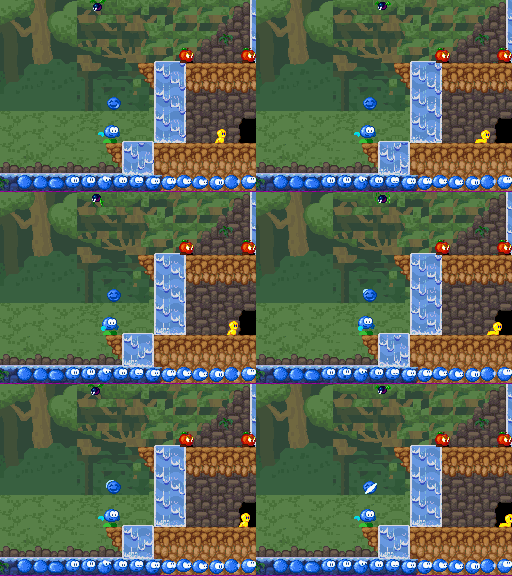
En fait, maintenant que j'y pense, pour ceux qui arrivent à atteindre la plate-forme là-haut, on peut même essayer de voir ce que ça donne de sauter par-dessus. Allez, ça mérite une démo téléchargeable, ça.

La deuxième année de développement de "Bilou Dream Land" tire à sa fin. Il n'y a pas encore de nouvelle maps, mais je pense que les outils sont maintenant prêts à l'emploi.
 |  |
Ce qui n'était qu'un brouillon avec quelques notes est maintenant une démo exécutable sur DS. Bugguée, certes. Incomplète, tout à fait, mais une démo tout de même. Je me donne l'année 2022 pour continuer d'ajouter des mécaniques de jeu dans ces trois pièces (branches rebondissantes, de l'eau où on nage, des plate-formes mobiles et des écrabouilleurs pour la pyramide, etc). Après 2022, il commencera à être temps de construire les niveaux eux-même avec tout ça, et de réfléchir à la technique pour faire les boss.
Au niveau du contenu du jeu, j'ai un premier projet de niveau dans la pyramide (depuis Aout) -- gardé au secret, évidemment -- et la zone-montagne commence à se dessiner peu à peu. Le "goomba-like" et les "bricks-like" sont venus compléter le bestiaire de la pyramide: je ne devrais plus avoir besoin de rien de ce côté-là. Ce qu'il me faut maintenant, c'est convertir tout ce petit monde en pixels.
Il y aura encore eu quelques gros bug-de-murs pendant l'année, mais tout semble indiquer que Bilou supporte convenablement son nouvel environnement, maintenant. En tout cas, on peut essayer les maps de J.L.N sans devoir redémarrer à tout les coins de couloirs.
Euh ... donc en fait ... mise à jour de la Démo.
Edit: J.L.N me rappelle qu'il y aura des boss en plus des 4 mondes. J'imagine que mon prochain milestone (en plus de remplir ces salles de tests), ce sera de faire un proof-of-concept avec au moins un boss. N'importe lequel.
I finally posted something more on my sourceforge project: the set of editors (plus runme) as I've got them by this Christmas, invoking oven-hot slopes support.
I wish I could provide you with a meaningful 'change log' for this 'release' of my tools, but let's be
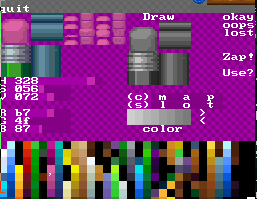
Sprite Editor
Animation Editor

runMe (gameplay preview & WiFi transport)


Download: Dreams.nds updated Dreams.nds for new year
Voici donc (enfin ?) quelque-chose de téléchargeable avec les environnements que j'ai l'intention de faire évoluer pour y amener toutes les nouveautés de gameplay de Bilou's Dreamland. Alors, soyez avertis quand-même: c'est vraiment une version 0.0.0.1 là. Pas même une ébauche, tout juste un canevas. Y'a des retouches à faire par-tout. Y'en a tellement que je n'aurais même pas le temps d'en dresser la liste avant d'aller me coucher. Mais qui sait, ça vous amusera peut-être.
 Okay, these will be the first tools release with my new devkit setup. They seem to work fine on my iPlayer + lime DS setup.
I won't try to go with a 'how to use XXX' here, as this will be the mission of the AnimEDS manual page I'm editing this week. but you may want to know what to do after you
right ?
Fine. Look at all the files in the archive, find back your micro-SD adapter and copy the files at the root of your SD card. The files themselves need to go there, not the AnimEDS-2020 folder. Don't change any file name.
Then put back everything in place, ensure your DS linker supports DLDI and launch medsdlta.nds. You can load the demo spritesheet by pressing START then L then A.
 I want to use them in an emulator
Fine as well. I suggest you download the latest desmume (or at least 0.9.11).
Then, again, press START, then L then A to get the santa-demo file loaded.
This is where the Sprite Editor and the Animation Editor will look for your projects. That allows reliable load/save commands even when you're commuting, rather than having to cross finger while you tap the screen with the stylus.
They have path to each other hard-coded, so that you can switch from one to another easily (real hardware only, so far). This is also why you should drop them at the root of your media card.
Hope that will help ManafilledMangoes try out the soft.
"Papa, je peux jouer à Bilou?" .. Celle-là, je l'ai attendue ! Et voici donc J.l.n qui, du haut de ses presque-6-ans s'attaque au niveau qui avait été dessiné sous la direction de sa grande soeur. Mais pour une raison que je n'ai pas encore identifiée, mon p'tit bonhomme est plus ou moins fasciné par la puissance. Et dans school rush, la puissance, c'est le power-up du "gros poing". Il veut l'avoir et donc il veut éliminer les crayons qui le détiennent ...
 |
| remember your first pendat ? |
Voici 5 ans, je vous faisais un jeu-anniversaire avec Bilou dans la zone de l'école. Quelques semaines plus tard, en septembre, mes p'tits n'veux me faisaient me rendre compte qu'il me fallait quelque-chose d'autre comme niveau pour introduire les mécaniques du jeu. Ce niveau non-tutoriel est depuis devenu le premier niveau de School Rush.
Download SchoolRush - JLN build.

I'm proud I could get feedback from several professionals with the 2016 release. I hope the game is better now. May there be many of you finding it, may you have a fun time playing it. This is my gift to whoever makes free software, free music, or free videos. Thank you all for making coding possible/enjoyable.
Aujourd'hui, le développement de School Rush prend fin. Ce fut long, parfois fastidieux, mais je voulais l'amener jusqu'au bout. Comme dans tout jeu, il y a des choses qui ont été abandonnées en cours de route. Soit qu'elles ne convenaient pas, soit qu'elles m'écartaient du but premier du jeu... soit qu'elles promettaient de devenir un gouffre de développement rendant irréaliste toute sortie tant que je serais en solo sur le développement. Que ce jeu soit mon cadeau à tous ceux qui ont écrit du code free software que j'utilise tous les jours, les musiques que j'écoute en codant, les vidéos sympa qui m'ont donné envie de continuer. Merci à tous pour votre travail.
Featured on PDRoms.de
 it has been almost one year since the last release of Bilou : School Rush. Through unpractical ideas, oversophistication and deep engine refactories, I finally get something to share with you. Here is maybe the penultimate release bringing 1-UPs and hi-score tables to School Rush.
| Download |

Prêts pour la nouvelle année ? Voici une version de Bilou: School Rush avec un niveau secret terminé, des images de chargement qui racontent l'histoire du jeu, la séquence de crédits ... Et pour ceux qui n'arriveraient pas encore jusque là, deux modifications qui rendent le jeu moins impitoyables: on peut "nager" hors de l'encre (encore faut-il pouvoir trouver une plate-forme où atterrir) et on grimpe automatiquement dans les encriers quand on tombe dessus, même si on tenait un taille-crayon entre les mains.

 |
 |


 - +

 somewhere, on planet Earth, there's a weird guy named Sylvain (aka. PypeBros) who loves to write programs and draw comics with a blue ball named "bilou". That's me.
If you have a blog that talks about similar stuff, just leave me a comment.





 Vote for your favourite post
