
Je ne peux pas dire "rien", mais ce sont des photos tellement vieilles ou ne montrant que partiellement l'interface. Il était temps que j'y remédie, même si je n'ai pas de développement en cours sur SEDS pour l'instant.

Je ne peux pas dire "rien", mais ce sont des photos tellement vieilles ou ne montrant que partiellement l'interface. Il était temps que j'y remédie, même si je n'ai pas de développement en cours sur SEDS pour l'instant.

It'd be fun to try your editors! I'd probably do any serious development on a computer, but it's still cool to have an opportunity to try something I would've loved to have as a kid.
I told you about Nova's work on NES and SNES already. Earlier this year, she shown interest into NDS homebrew and linkers, so I proposed her to try the dsgametools, and she replied with the heartwarming sentence above. My last tools release dates back from 2021, and while there are not that many things that have changed since, some annoying bugs were fixed nonetheless. So I went for a new package with some README, example files and PERL tools in addition to the .nds files proper.

AnimEditor:
runME:
These tools seem like they're very compact and full of features, maybe to the point of feeling a little bit cramped or unintuitive, though it's tricky to do something about that with this sort of screen resolution. I do appreciate the manual that you can access whenever to find out how to do stuff, and I'd rather have all the features than have a simplified tool. I liked the "scan" button in the sprite editor; that's not something I've really seen in pixel art programs.
I can certainly agree with that. It isn't rare that I have to dig my own blog -- or worse, the source code -- of AnimEDS when I want to do something a bit less frequent like copy a frame to a given position, create a new skeletton or adjust hit boxes. I'll have to complete the "L+R to get hint on how to use things" but it's good news that someone noticed it and appreciated it. Maybe it could be completed by a "please explain that control" mode where you can touch something on screen and learn about it rather than use it ...
I feel like it would help a lot to have buttons that bring up menus (especially on the animation editor, which needs more explanation than sprite editors do), where you'd have more room to make it clear what each option does or avoid needing button combos so you can fit more options on-screen, but that has to be weighed against how much it would slow down a user who knows what they're doing. You *could* have quick shortcuts with small icons alongside a button that brings up a menu that's less compact, though.
I have started something along these lines for 'monsters edition' in LEDS... That will be motivating to push it further
As you may have guessed, that lovely avatar for Nova comes straight from her website ;)

Pour faire ses propres personnages sur la Nintendo DS avec mes outils, il va falloir commencer par les images. Voilà l'écran d'accueil de l'éditeur d'image de dsgametools: SEDS. Dès ce moment, il est prêt à dessiner sur la grille de 32x32 pixels présentée au milieu de l'écran. Il y a pas mal de choses qui peuvent se gérer avec l'écran tactile, et pas mal d'autres qui marchent mieux avec les boutons de la DS. On en rediscute tout à l'heure.
C'est parfois plus facile de se faire la main en modifiant une image existante qu'en démarrant de rien, donc suivons ce qui est recommandé sur l'écran du haut: appuyons sur START pour passer sur l'écran de chargement et regardons un peu ce qu'il y a dans les fichiers du répertoire Démo du .zip
 |  |
| Nous voilà dans l'écran de chargement touche le mot "browse" au stylet pour explorer le contenu de la carte mémoire plus librement. | L'exploreur montre \moving\*.spr par défaut. pas de défilement ici, mais si nécessaire, on peut filtrer les fichiers et répertoires affichés avec l'alphabet dans le coin. Appuyer sur "I" par exemple montrera tous les fichiers commençant par I. Pour les lettres paires, il faut maintenir le bouton L enfoncé pendant qu'on touche la case. |
 |  |
| bg.spr contient quelques blocs libres de droit pour faire des petits décors de niveau de jeu de plate-forme | hero.spr contient un petit père Noël, également libre de droit. Notez qu'en le chargeant après bg.spr, on a encore en mémoire un "fantôme" du fichier précédent. Pas terrible ici parce que les deux fichiers utilisent des palettes différentes, mais ça peut s'avérer utile dans certains cas. |

Les blocs dans ces fichiers sont en 16x16, la grille est un peu différente qu'à l'écran d'accueil, mais le principe reste le même:
Une fois les modifications terminées et ramenées sur la table, on peut appuyer sur START pour retourner à l'écran de chargement. Là, presser sur les boutons R puis A va enregistrer les modifications dans le fichier de travail "spriteA.spr", R puis B dans "spriteB.spr", idem avec X et Y. Appuyer deux fois sur R réécrase le fichier qui avait été sélectionné au départ.
Oh, en passant, j'avais fait un petit sondage à l'époque ... Editer des jeux sur la NDS, vous trouvez ça
I finally posted something more on my sourceforge project: the set of editors (plus runme) as I've got them by this Christmas, invoking oven-hot slopes support.
I wish I could provide you with a meaningful 'change log' for this 'release' of my tools, but let's be
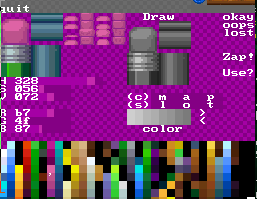
Sprite Editor
Animation Editor

runMe (gameplay preview & WiFi transport)

Novembre 2020. J'ai voulu pouvoir ouvrir n'importe quel .spr dans mon Sprite Editor et j'ai rajouté un discret petit "dir" qui ouvre OtherFileWindow. Oui, parce que jusque là, c'était toujours A pour spriteA.spr, B pour spriteB.spr et ainsi de suite jusqu'Y.

Sauf que quand j'ai voulu essayer de re-sauver ça n'avait pas marché. Pas de quoi fouetter un chat, mais j'ai moins ri quand je me suis rendu compte l'éditeur de niveau ne marchait plus. J'ai tenté un patch, j'ai voulu l'uploader dans runMe, mais runMe ne savait plus rien uploader non plus...
For over 15 years (!), Sprite Editor for DS has been satisfying to use with only 4 files directly accessible. It no longer is, with Furries experiments, demo projects and dreamland target that will use 4 different environment plus bilou.spr.
Hopefully, back in November, I added a new window in SEDS that let you pick a .spr when tapping the (poorly named) "dir." button.
There's unfortunately an unforeseen interference between SpriteSet::SaveBack() and OtherFileWindow::event(). One expects that the string you passed to SpriteSet::Load() megacycles ago is constant and hasn't changed. The other needs to drop the 'file' part of the path so that you can pick another file later on and not end up with fat:/moving/bilou.spr/desert.spr/green.spr ...

Heureusement, je n'avais pas bousillé toute ma carte mémoire, mais par contre, au moment de faire la sauvegarde, mon "fat:/moving/oldies.spr" était redevenu "fat:/moving/", prêt à traiter un nouveau fichier et en faire un chemin d'accès. Et le code qui crée le fichier .bak à partir du .spr est ... disons ... vieux et innocent. Il à renommé fat:/moving/ en fat:/movibak qu'aucun de mes outils ne reconnait.
Et bien sûr, ça m'est re-arrivé hier en voulant changer quelque-chose dans mon bilouchk.spr ... Donc cette fois j'ai sorti mon callepin et le code-sur-boox
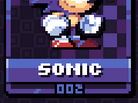

Petit mockup de ce que ça donnerait... On peut même raffiner en utilisant ce truc que pour les caractères "interactifs" des widgets. On peut même utiliser une couleur supplémentaire "highlight" qui disparaîtrait quand on active le widget alors que l'ombre passerait à la couleur de texte pour donner ce petit effet interactif "le bouton s'enfonce quand je pousse dessus" qui fait toujours du bien.
Maintenant que je suis passé à du multi-palettes dans tous mes outils, pourquoi s'en priver ?
edit: oh bin justement, quelqu'un a mis en ligne une belle collection de polices bitmap issues de la demoscene...

Oui, parce que par la suite, je n'en ai pas vraiment fait grand-chose: ça ne permettait d'atteindre aucun objectif. ça ne contribuait pas à cocher des cases dans la todo list. Mais si 2020 m'a appris quelque chose au niveau des bilouteries c'est que je dois arrêter de faire comme si elles étaient un entrainement à la gestion de projet.
Ne pas travailler sur certains aspects d'un projet parce que le management trouve que ce sont d'autres aspects qui doivent recevoir la priorité, c'est plus ou moins mon lot quotidien au bureau. J'ai besoin de casser avec ça et de faire (faire faire) c'qui me plaire (plaire plaire). Pas de prétendre que je suis dans le management en plus d'être un bon exécutant. Alors, la semaine dernière, j'ai remis ça en route.

Bon, il est vrai que j'ai aussi essayé une fois de plus d'utiliser la fonction 'tiens, qui utilise cette couleur' pendant que je gribouillais des essais de décor inspiré du graphisme de Nerkin, et qu'une fois encore, j'ai perdu tout le travail en cours parce que le programme s'est gelé.
Au final, j'ai maintenant des boutons plus clairs, mieux séparés les uns des autres pour éviter les maladresses, et un tout nouvel algorithme basé sur une sorte d'énumération générique du tileset. Il faudra d'ailleurs que je réécrive aussi la fonction "Zap!" pour en bénéficier.
Et tant qu'on y est, je pense qu'avec une petite modification supplémentaire, je pourrais aussi m'en servir pour préparer (enfin) une prévisualisation des pages de graphisme quand on choisit quel doit être la prochaine page à éditer. Une idée vieille comme l'éditeur de niveau, mais qui ne s'était jamais retrouvé "en tête" de la liste des priorités...
Mais là, c'est les vacances qui s'annoncent, alors au diable les priorités. Faisons du hobby-coding. C'est pas Monsieur-je-suis-un-dev qui va me contredire.
 Good news: I managed to reproduce in a controlled environment the corruption of a spriteset. Bad news: because I had no idea what was the possible cause of such corruption, I just went through a random set of deletions and then a random set of recycling of the released blocks. And repeating the process from a sane initial spriteset until the "checker" tool reports something abnormal
One interesting thing, though: what's abnormal is abnormal twice: not only I shouldn't have "cross clusters" in my sprite pages (two slots on two pages actually referring to the same tiles), but I possibly shouldn't have "0" at all (it is reserved on most spriterams) and I definitely shouldn't have some odd tile number since the smallest allocation unit so far is 4 tiles.

 A few days after releasing the playable version of Bilou : School Rush, I started encountering ideas for one ultimate level, one where you climb up to the top, rather than running horizontally. Something much more along the lines of the "original" deep-ink-pit although not expecting any specific game physics.
What was nice with that was that it turned the otherwise purpose-less "school rush" into something backed by a story (simple, I admit, but a story nonetheless). It opened nice opportunities to have hand-drawn pictures as support for a "game ending / credit" moment, too... and last but not least I found a nice way to ensure that this last level is available only in "amiga" or "arcade" mode, but not in "casual" (which is meant for training and teasing, as you remember).
 A sketching pause was more than welcome, and now I have some concept art and some tiki-books for the background to change the atmosphere of the ultimate level. I'm under the process of converting that to pixel art. With a size of over 800 individual tiles, it is clearly the biggest piece i've addressed with my sprite editor. I had to chunk it into 64-pixels slices, resisting the temptation to redesign the UI of the editor, but I'll allow myself to add a "live mockup construction mode" before I'm done.
I first opted for 32-indexed colours in Gimp, thinking that I'd paint over the lines, but the shapes are too far from pixel-friendly angles, and "cleaning up", adding highlihgts could turn out to be my best approach. Yet, I'm already raging against my own self:

Eh bien, il y en a, des choses marquées "à faire" depuis les années. Plus de 20 pages si je veux les imprimer sur papier. Ce sont principalement des améliorations pour les éditeurs, comme la possibilité de définir les zones de collision et les points-tests dans un éditeur graphique, aujourd'hui (enfin) très actuel.
La plus ancienne des fonctions manquantes du Level Editor -- les propriétés des blocs -- serait plutôt revu en "appliquer la combinaison graphisme/propriété à l'ensemble du niveau", et il faudrait aussi que je permette aux descriptions de blocs d'être partagées entre plusieurs scripts de niveaux.
Enfin, il y aura la liste des projets devenus hors-propos ou qui ne sont plus à l'ordre du jour pour mon projet actuel, rebaptisés "wish", comme l'éditeur 3D de bangbash ou l'intégration de RunME dans la PAlib :P
Mais la palme du PlusVieuxToutDouxDuMonde, c'est sans doute la possibilité de partager des tiles d'un bloc à l'autre (les blocs faisant 2x2 tiles), qui apparaît dès les premières réflexions sur l'animation des blocs en 2005 et marqué "need" en 2008 (traduisez: fonctionnalité jugée indispensable pour l'avancement du projet, qui permettrait de redescendre à 66% du nombre de tiles actuels). La possibilité de poser des quarts de blocs dans LEDS aidant, évidemment... Dans l'immédiat, j'aimerais plutôt pouvoir enregistrer des morceaux de niveau pour capturer des objets complets (qui apparaissait 6 mois plus tard, puis revient à la charge).
Voilà. J'ai fait un peu le ménage dans ce qui datait d'avant 2013 ... je ne suis pas sûr que ça m'ait vraiment fait progresser pour améliorer le niveau des expériences en cours, par contre. A suivre. Comme toujours :P
codes couleur: [done], [todo nécessaire pour school rush], [todo dans l'absolu], [wish]

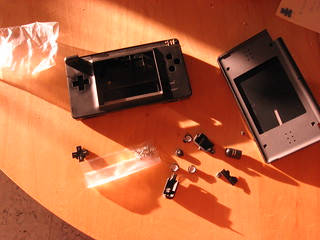
 Dans la mesure où ce bouton contrôle la "sauvegarde" dans SEDS et AnimEDS, c'est plutôt génant. A plusieurs reprises, j'ai du re-transférer d'anciennes versions de mes livres pendant que j'en faisais la mise à jour pour corriger une réécriture intempestive alors que je cherchais juste à activer le mode curseur (lui aussi déclenché par R). Mais voici donc une mise à jour de mes outils qui offrent des boutons cliquables (au stylet, donc) pour compenser ce genre de problème. A noter que le bon fonctionnement du bouton L, lui, reste incorrigiblement critique.
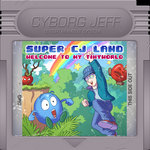
Tomorrow is the yearly release day. I had hopes to come with a fully functional revamp of the "school zone, level 1" as initially drawn by Pierrick and Piet (aka Cyborg Jeff), but that's not yet possible. You still have the latest gameplay demo to try (3rd evolution since Christmas), I you really want to. That's still significant progress achieved since last year's first appearance of a compound Gob in the game engine.
I toyed with the idea of doing a quick-shot of SeaFox on DS, using the sprites I drew 4 years ago (whoaw. that old 0_0), which would now be somehow a piece of cake with the directional tiles I used for Inkjet and the objects generators that I used for berrybats. But I lacked time for that as well.


 There is one last thing I can do with my failed homebrew equipment: dig out my old SuperCard (slot 2), update the makefile so that it automatically apply DLDI patch if
 $DLDI environment variable is set, and work on that multi-palette support that will ultimately allow me to tint books in up to 16 colors in the school zone (only 4 slots atm.)
Premiers tests concluants pour le système "mutli-palettes":voici un bouquin vert, mais qui peut redevenir rouge à n'importe quel moment. Et il ne s'agit plus d'un simple test grandeur nature dans SEDS: les palettes alternatives peuvent maintenant vraiment être sauvées dans des fichiers .spr et re-chargées plus tard.
 And my books should be allowed to have whatever color I think fit. Or at least let me put it in a different way: that would be a waste of tiles if I could only have *red* books in the school zone, right ? (and only green binders). It's much more interesting if I can select an alternate palette when I want a blue-tinted book or a darker wood block.
The DS hardware allows all this (I mean, even the NES had it :P), extending the '256 colors' mode of the GBA to some fancy '16x256' colors. Granted, I *could* very likely work in 16x16 colors mode for the school zone, but I'm not yet a sufficiently good pixel artist to handle that.
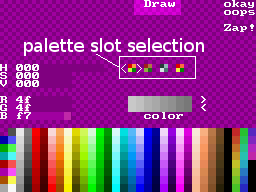
 I've took a first step yesterday by allowing some 4 palette slot selection in SEDS' palette editor. Before I give you a rainbow bookself, I still have to:
 For the second time, I'm entering the "Neo Coding compo", with latest versions of AnimEDS and SEDS, with in-app help for almost all the operations. I had first some hope, as there weren't that much "good" (imho) applications submitted until Smealum (arsenal) nuked me with his FPSMaker ...
Un badge, des messages d'aide, un personnage moustachu en salopette dans un .spr (à la place de Badman), et voilà AnimEDS (et SEDS) prêts pour la compétition de "rétro-coding" de Neoflash. Cette année, c'est "toutes machines confondues", avec un sérieux regain d'intérêt pour les participants, même si je n'ai pas vu côté DS de production à la hauteur des jeux qui avaient brisé les espoirs de Apple Assault en 2010. Si je devais donner un pronostic, je parierais sur la victoire du FPSMaker dans la catégorie "Applications" (également sur DS).
Anyway, although I made the effort of having the compo badge shown in my entry this year, winning some prize is not my main motivation: I want to take the opportunity of many people blowing dust away from their handheld console and downloading homebrews to get more feedback about the user interface and how to make things more "user friendly". 10/15 blog readers have voted for that in the app/game poll that ends by friday ... but for that I'll need to know what people think and expect from my apps.
Utiliser SEDS n'était déjà pas très facile pour un gaucher ... LEDS et AnimEDS, c'est encore pire. Or, mon frangin et mon filieul sont gauchers et clairement intéressés à faire leur propres petites maps...
si ça, c'est pas un tout-doux-il-t'aime, alors il n'y en a aucun sur ce blog :P
How sort of a godfather would I have been if I couldn't hear the crying voice of a little left-handed boy who's willing to draw maps with LEDS but struggle to use the current controls ...
So let's do a first try and allow swapping of L and R trigger buttons that should already help a lot. I'll need to meet a left-handed again to check whether keeping map navigation with R+DPAD sounds like a good idea or whether I should also swap DPAD and ABXY...
 - +
- +

 somewhere, on planet Earth, there's a weird guy named Sylvain (aka. PypeBros) who loves to write programs and draw comics with a blue ball named "bilou". That's me.
If you have a blog that talks about similar stuff, just leave me a comment.
somewhere, on planet Earth, there's a weird guy named Sylvain (aka. PypeBros) who loves to write programs and draw comics with a blue ball named "bilou". That's me.
If you have a blog that talks about similar stuff, just leave me a comment.




 Vote for your favourite post