Showing posts with label vram. Show all posts

Saturday, April 25, 2026

Foreground for the underground ?

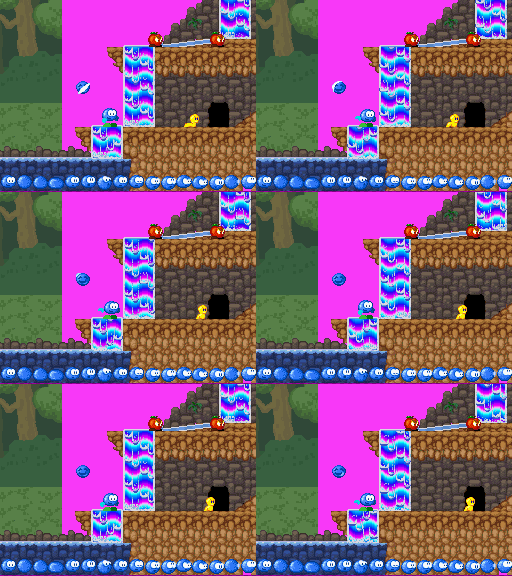
Something is annoying me with the underground section of the green zone levels: it's too repetitive. It shows in every screenshot I try to make. I have variation tiles that could make it less uniform, but they don't really work if we repeat them. I have plans for a background, parallax layer underground, but it only really works in open environments, not in tunnels, and underground areas are mostly made of tunnels. in the Green Zone.

But those funny pillars might work as foreground  layer as well! Maybe even better because they're bigger than the pebbles repeating tile of ground I have. They would focus the gameplay in a smaller part of the level just like a circle-of-light would, but with something pleasant to look at. The question is, how can I make it indeed focusrather than obscure. I don't want to make Infogramish game where you don't see where you're heading to because of the foreground.

Let's ask Bouli to make a bit of math, here: if my foreground layer advances by e.g 3 pixels everytime my regular layer advances by e.g. 2 pixels, then I just have to make a map that is 3:2 bigger than the playfield if I want to follow things properly.  

I mean, my "foreground" map would be drawn over a 150% zoom up of the main map, and that should be it. At least, that's the intuition. How to confirm it quickly ? Well, how about cutting some paper to make a live overlay and make it move around. Of course, you have to consider that only a part of the result will be shown to the player, too.

Does that mean I need a special mode or a variant of the Level Editor ? ... maybe not. At least, not more than "use the "physical" layer of gac.map (move by 2:3) and let me edit gacfg.map on top of that.

The fun trivia here, is that the initial motivation was to find a way to have VRAM for textures now that I know it does not require palette slots. But while comparing the options, I came to the conclusion that I had no real use of 3D in the green zone anyway, except maybe to render more trees in the background... but checking Case Portman's Lost in Fuzz video, I realised that proper amiga-style parallax would work better than any 3D and would be easier to make here. And yes, I'm only using 2 tilesets out of the 256K allocated to the background tiles in Dreamland, so I could fit a 3rd one and another "infinimap" in the unused space ...

Does it means textured 3D becomes out of reach ? No, but that Bilou's Dreamland will sometimes use 3D, sometimes not (plain 3D does not require more VRAM, but it consumes one layer).

Does it means Yoshi-Island-Style dual screen action should be forgotten ? No, but it would only work in levels where we have no 3D objects and no fancy lush background/foreground maps.

Does it mean having Bouli or another character "telling the story" on one screen while Bilou is "living the action" on the other impossible ? No, but Bouli may have to survive within 16K of sprite VRAM, using DKC-like live-update techniques for his animations.

edit: sidequest finding: shifting extended palettes from 64K to 16K VRAM isn't that trivial to do. (but not required unless we want to texture 3D stuff)
 

Thursday, June 01, 2023

Déveloper pour DS

Figurez-vous que le youtubeur Nathan Fallet vient de se lancer dans une série de vidéo "live coding" pour faire un petit jeu DS. Son idée est de prendre juste libnds et les outils de devkitpro et de faire une adaptation d'un petit jeu pour smartphone qu'il avait fait il y a quelques années. L'idée est assez proche de ce qu'aurait fait un nouveau venu sur un forum à l'époque, donc j'ai envie de suivre ça.

Son point de départ, c'est l'exemple 'animate simple.nds', où on peut promener un sprite sur chaque écran avec le DPAD en modifiant l'image utilisée par le sprite en fonction de la direction prise.

Pour ce programme, les développeurs ont choisi d'embarquer les images directement dans la section "données en lecture seules" du programme. Là où se trouveraient aussi les chaînes de texte si on avait un texte. Pas d'ouverture de fichier avec ce système-là, mais pas non plus la possibilité de prévoir de charger/décharger des images de la mémoire principale pour y mettre autre-chose. En même temps, comme la DS a 4 beaux gros Méga, on devrait être tranquilles pour un projet modeste.

Il y a un programme (que je n'ai pour ainsi dire jamais utilisé) qui prendra en charge la lecture du fichier .png pour le convertir en données brutes (des tiles et des palettes) exploitables directement par le hardware de la console. Par contre, ce programme ne voit qu'une seule image à la fois. Il peut ranger les couleurs dans la palette, éviter les doublons, etc. mais si vous lui donnez deux .png différents, chaque .png produira son lot de sprites supposant que sa première couleur est en position 1 dans la palette. Essayer d'afficher les deux à la fois donnera de mauvais résultats. Le programme d'exemple masque un peu ça avec son man.png et sa woman.png, parce que dans ce cas précis, chaque personnage est chargé dans la mémoire de son écran. L'un sur le chip "main", l'autre sur le chip "sub". Il ne sauront jamais se rencontrer.

Le programme d'exemple n'utilise que la fonction "sprites" du hardware 2D. Aucun des 4 plans de décor possible n'a été configuré. Mais ça ne veut pas dire qu'on soit condamné à errer dans le noir pour autant.

Comme dans le cas de la Super NES, chacun de ces plans serait scrollable indépendamment des autres et possèderait une "couleur transparente": l'entrée 0 dans la palette de couleur. Mais si aucun plan n'a donné de pixel à afficher, le hardware nous mettra un plan avec la couleur 0. Et cette couleur, elle est trouvée tout simplement dans la mémoire vidéo. Les fichiers d'en-tête fournis avec libnds nous donnent un symbole BG_PALETTE qui permet de lire et d'écrire dans la palette "décor" de l'écran principal.

Ce n'est pas la seule manière de faire, bien sûr. On aurait pu activer un plan de tiles, remplir un tile avec une autre couleur puis remplir la map avec ce tile. On aurait pu activer un plan bitmap et remplir 98K de mémoire vidéo avec la même valeur. On aurait pu activer le moteur 3D et mettre un gros polygone monochrome...

Déplacez le BG_PALETTE[0] dans la boucle principale, modifiez sa valeur d'une itération à l'autre, et vous aurez un fond "stroboscopique". Pour faire un dégradé, par contre, je pense qu'il faudra passer par le HDMA. Mais ça, je n'ai pas encore tenté.

Bon voyage, M. Nathan ;-)

Je note au passage que depuis le temps, libnds s'est dotée d'un mécanisme de gestion des ressources (allocation dynamique de mémoire vidéo pour les sprites) et d'une cache pour la mémoire vidéo contrôlant les sprites (permettant potentiellement de les mettre tous à jour pendant le vblank)

Tuesday, April 19, 2022

des sprites 32x16 ?

Le support des sprites rectangulaires, c'est pas encore une grande réussite dans GEDS. En chipotant un peu, on parvient à avoir une planche de sprites verticaux ou horizontaux dans SEDS. Ils sont quand-même édités sur une grille carrée, mais soit.

Les choses sont déjà un peu plus louches dans AnimEDS, où de curieux résidus viennent se placer par-dessous un sprite 32x16. ça gâche un peu l'effet, mais disons qu'on s'en serait accommodé le temps de d'un ennemi ou deux.

There is somehow way to introduce non-square sprites in my SpriteEditor (with those 'new W(ide)' and 'new H(igh)' buttons), and the NDS hardware definitely has support for them, but let's face it: none of the game engine or Animation Editor was half ready for a 32x16 scorpeye 'shell'

Mais le moteur de jeu a l'air de perdre complètement les pédales, lui.


Une petite réactivation de l'afficheur-de-sprites finit par me pointer le problème: je suis déjà au bout des 1024 sprites possibles dans ce nouvel environnement... enfin, pas exactement. Je n'ai pas encore saturé les 128K de mémoire disponibles pour les sprites, mais seulement les identifiants disponibles.

J'ai déjà joué avec ça pour l'éditeur de sprites, mais le moteur de jeu, visiblement, n'était pas prêt non-plus pour ça ... ça va faire un gros commit ...

You see: it really doesn't make sense. We get parts of Bilou heads instead of getting our expected shell, and the shape isn't even rectangular. Part of it is because the engine cannot change the shape of a 'limb' for a compound character while playing (changing states doesn't let you break that rule). If you're rectangular on your frame one, you're rectangular all your life long. Another part of it is because I'm hitting the tile number limit. I thought SchoolRush was already using 128K of VRAM for sprites, but it seems I was wrong and everything used to fit the default 64K. Only the background tiles had been increased. Anyway, the Makefiles didn't like it, but it is now expanded to 128K. Anything else ? Yep. size = 16 + mode = wide gives you 32x8 sprites. Not 32x16. That explains the lone stripe I had in the final attempts.

Un autre soucis visible sur l'animation: les tailles de gobs pour une page donnée ne peuvent pas être changées en passant d'une animation à l'autre. Et j'avais gardé la première version 32x32 pour l'animation "immobile". Du coup, les autres animations tentaient aussi d'utiliser du 32x32 même quand les images à charger étaient en 32x16.

Ah, et j'ai probablement sous-estimé l'existence des sprites 32x8, ce qui fait qu'encore après tous ces patches, il me manque la moitié de ma carapace ...

Thursday, December 30, 2021

Color Cycling.

Being able to animate things just by changing entries in the color palette is one of the reasons why I'm loving old school programming that much. The amount of pixels you can affect with this technique with just a few memory writes has so much hex appeal! Yet, you wouldn't find anything animated that way in Apple Assault or in School Rush. Flowing ink could have used some, though.

Technically speaking, one key thing to fix to get it working with my setup is to ensure that the palette writes happen in a Vertical blank handler, and the other is that we bring the video memory holding the colors as freely-accessible video memory ( aka LCD for the Nintendo DS) while updating it, and then return it as extended palette bank.

So with all that coded, I could replace the lengthy 16-frames animation of the waterfall with just one static frame. And I have a comfortable homework to create as many tiles of flowing-wafer-slopes as I could need. I used a sort of "rainbow raster" to be able to draw those animations properly, which makes them look a bit strange in the level editor and in runMe, but I should be able to fix that by having the raster be on a secondary palette shot and a "static preview" on the main (and animated) slot.

Yeah, that's the major drawback: I don't see how to get it customizable from the level scripts by now, so I prefer keep it as some custom code running in Dreams.nds and leave runMe alone for now.

Là, je m'attaque à un morceau iconique du développement 16-bit: l'animation des palettes. Un truc que je connais depuis le BASIC mais que je n'ai encore jamais eu l'occasion de pratiquer sur DS (c'est dire si les petites animations sont à la traîne dans mes jeux DS :-P. Le principe ? les graphismes en mémoire vidéo ne contiennent pas directement des couleurs, mais des références à ces couleurs. Les pieds de Bilou seront faits avec la couleur n° 24 alors que sa main aura la couleur n° 79 et le blanc de ses yeux la couleur n°3, etc. Une partie de la mémoire vidéo est dédiée à retenir la correspondance entre ces numéros et les couleurs RGB à utiliser: c'est ce qu'on appelle la palette. Du coup, si vous changez une de ces valeurs, vous avez la possibilité de modifier simultanément une grande quantité de pixels à l'écran.

Une sous-catégorie de ces animations concernent les boucles de palettes. Vous n'ajoutez aucune nouvelle couleur, vous n'en retirez aucune non plus, vous vous contentez de les changer de place. du coup, un dégradé bien construit peut devenir un tapis roulant, une chandelle vacillante, une mare de lave ou une jolie cascade. (Mark Ferarri étant le champion de la discipline, cf. ci-contre).
 
If you look closely at the blue ramp between the two rightmost waterfalls on the gif above, you'll note that palette cycling is working there (backwards, but working). The waterfalls are still 'frozen' because I haven't applied my palette effect on the background layer yet. Oh, and if you wonder why half of the background is pink on those green zone captures, greenbg.spr is 32x32 and CommonMap expects a 64x32 map instead ... so half of it is 'blank'.

Mais pour que le chip graphique puisse pomper les valeurs de la palette assez vite pour tenir le rythme de l'écran, on doit régulièrement caser la palette dans une mémoire dédiée, avec un protocole d'accès un peu plus compliqué que BG_PALETTE[index] = rgbValue; C'était le cas avec le VGA, c'était le cas avec la SNES, c'est toujours le cas avec la Nintendo DS (plus simple à coder, mais pas forcément à expliquer).

Bref, ça marche, mais vu que ça ne peut se produire que pendant le 'temps mort' entre deux rafraîchissements d'écran, et vu qu'il y a cette histoire de va-et-vient entre la configuration où on sait écrire dans la palette (mode LCD) et celle où on sait l'utiliser pour afficher les couleurs (mode EXTENDED_PALETTE), je vais juste garder ça comme un 'petit extra' de Dreams.nds et vous aurez le fond des cascades statiques quand je ferai une démo IRL avec runMe. Vendu ?

edit: pour que ça tourne rond, j'avais eu besoin de me faire une petite map de où-est-quelle-couleur dans le code de la démo. Je vais reprendre ça ici aussi, parce que je me repose la même question deux ans plus tard et que twitter, hein ... on verra bien où il en est dans 2 ans.


Wednesday, December 26, 2018

virtual tilesets

How should I handle tilesets larger than the 1024 tiles the NDS hardware is designed to use? Quick maths show that with 16K unique tiles, I'm already consuming 1MB of RAM. Full 16-bit tile identifiers would address the whole 4 MB of RAM the NDS has.

Unlike in Eric's games, I cannot assume here that the RAM is just a cache for the whole game data (ROM) because the game data may only be accessed through the SD card interface, abstracted through DLDI which -- afaik - - does not support asynchronous reads. And the score-table l implemented lately suffered noticeable lag while accessing the filesystem.


So there will be only main memory and video memory. Echoing what happens on x86 CPUs Virtual memory management, I'll use "logical" for the identifiers related to the full tileset and "physical" for the identifiers related to (temporary) video memory locations.The two functions that deal with translation between the two  sets of tiles are linked to the scrolling updates: since the level map is made of logical identifiers, we need logical-to-physical conversion there. The other(new) function kicks out trees that no longer need to be in VRAM.

I haven't really found a use for a physical-to- logical map. And all my plans for a smart combine-bitmaps system to decide which tile to evict fell flat when I realised it would be smaller to just keep an integer counter for every physical tile. So I will avoid over-complicating things and just go for the array of counters.

I know the logical-to-physical map could use a hash table implementation. It would have at most 1k items present, i'd say that means the main table should be at least 2k entries large. One important thing to consider is that we will have to remove items quite often, which means resolving collisions with chained list would work better than by using the next available entry in the table. Especially given that we will likely find consecutive tiles present, for instance when we have a large structure on screen. Good thing is that since there is an upper limit to the amount of items present, we know an extra 1 k entries for the chained list with always be enough.

Now, one entry in such a table is at least 16-bit logical id + 16-bit physical id + 16-bit next pointer. that takes us close to 18kB for the table, while a plain array of physical identifiers indexed by logical id would take at most 32 kB. Granted, the diffeence is critical for SNEs deving, and likely significant for GBA deving. But here? is it really worth the extra memory lookups ? Is it worth doing divisions to get a good hash function? We'll look into that if I ever need more than 8192 unique tiles in a level.

Friday, March 30, 2018

Aladdin Sources Analysis

They made a wonderful job at gamehistory.org, based on an in-depth analysis of the sources of the Mega-drive game "Aladdin". The game was made by David Perry's team who also brought us Cool Spot. At the core of their work is a technique and a toolset to allow more flexibility in animating graphics on 16-bits system that had read/write video memory on-board (as opposed to NES with read-only video memory alone, on the cartridge) and fixed-size sprites (e.g. 16x16, 16x32, 32x32).

https://gamehistory.org/aladdin-source-code/#sect_36Everything else will seem silly to you if you do not accept that, by then, getting more KB of memory for your game was very - very - hard. The size of your game was decided by non-technical people based on how much the console vendor would charge for a 2Mbit chip, when the game should came out and how much kids would be allowed to spend given which license you'd be using. So they have early planning deciding how much to dedicate to sprites, levels, code, maps, etc. Based on that, they'll decide how much levels there will be in the game, etc.

Of course, game characters animation all started by having characters whose size fit the hardware requirements (mario nicely stands within a 16x16 box and a 16x16 mushroom makes him 16x32), flipping from one sprite to another within an all-in-VRAM bank. Then some special characters (the hero) would get a special status and only get one or two VRAM slots dynamically updated. To crunch more animation frames, one could use run-length-encoding compression that does wonders on row of pixels of identical color. Others have used 2/3-bit-to-4-bit decompression once realizing that Link sprite (and all others) only need 8 colors per palette, not 16. But all this requires CPU, and the CPU resources too, were limited (Not even 8MHz. Less than my good old 80386).


If we could instead keep the same binary format between the ROM and the RAM, having the right picture in video memory at the right time is all a matter of "blasting" them through the Direct Memory Access chip. See that big line on my notes ? that's the DMA doing its job, while the CPU can focus on crunching numbers to make the game physics stunning and fun...

To make that possible with fun stretch-and-squash, cartoon-like animation, they ultimately relied on their chopper tool that cuts pictures into hardware-sized sprites. Just like the one I imagined for Titus's Prehistorik II sprites.

Ok, granted, it doesn't look completely automated. But the idea is clearly there. And ultimately, it would run on a system that has 1/4 of the power of my Nintendo DS.

So, am I allowed to dream of porting some libgeds game on 16-bit engines ? Well, with the engine refactoring that splits script parsing, it is pretty tempting to see what we could do about it.


Let's start with the animations, thus. What is weird with the animations is that their code has to interrupt every here and there when there is some delay. In high-level language, we'd likely use a switch construct branching you to frame T or frame T+1 code depending on some argument we'd pass to the function. But if we're generating machine code instead, we can do much better. We can then have the actual next animation instruction remembered, rather than an index into an array of virtual instructions. No more conditionals and branch delays on that non-speculating old CPU. Just one jump.

Implementing "keep that state for N screen refreshes" is then looking a lot like software multi-threading: you have a call to some yield_animation micro-routine (and saving your current position into the generated animation code on the stack), which will pop that resume position into some CPU register (an internal scratch variable, in case you didn't know yet), and then return to the code that called animate_aladdin, letting it save the next animation position where it sees fit. Looping animation ? super-easy ! Have you seen how much boilerplate the current virtual-RISC-processor-for-animations of libgeds and AnimEDS must deal with instead ?


What else ? State machine of course. State machines are built with simple expressions used either to guard transition (only let them used when some condition is met) or to define what to do when the transition occur (besides changing states, that is, like playing a sound, changing speed, etc).

The collision system currently will follow a list of GobExpressions calling eval(guard_predicate) until one returns true, then proceeding with eval(action) and changing state. Instead, with generated machine code, that would all be packed into a sequence of predicate code that branch to the appropriate action code or keep testing until we hit the "okay, then nothing happens" terminator that returns to the collision system itself.

One day ... maybe. That would be much more interesting on 16-bit than it would be on DS or native x86_64 code, anyway.

edit: for more background information about how things actually came into existence, seeing tools and teams in action, don't miss the excellent "Splash Wave" episode on the game.
 

Thursday, January 11, 2018

Engine Refactory

The Big Refactory has started (I could pretend it is a new-year resolution). And it even went pretty far, like abstracting away the animated objects list so that only the code for animated objects need to know details of the animation scheduler.

I was about to try changing the VRAM allocation system so that only classes deriving from using Resources could request items, and I got stuck in the animation editor.

Unlike SEDs and -to some extent- LEDs, AniMEDs still use a lot of global variables. Things like the sprite set or the animation being editted are used almost directly in many places, instead of being captured as "structural singletons". And at some places, it also means that we were calling Ressource Manager directly at top-level code, and that contradicts what a common base class can do.

There is one other peculiar thing about the animation editor: the set of pixels used in the game isn't uploaded to the video memory. Instead, we keep it in main memory, and only some bits of it go tothe VRAM through a Sprite sheet that map some sprite memory.  These sprite sheets are linked to a specific widget, such as the timeline or the frame preview. I must not try to make them part of a "model": they truly belong to the implementation of the widgets.

And yeah, although I have a digital sketchpad and an e-boox, I still enjoy some good paper and fine (erasable) pens for such things.

Saturday, December 02, 2017

spriteram vs . Resource

Using InspectorWidget to understand buggy situations has become abnormally hard. Just look at the picture we got earlier this season. Compare that to what it used to look like. I've got the "boxes" area all messed up. Of course: in School Rush I now have two things trying to use the sprites of the bottom screen: Inspector Widget and the HUD.

I needed to change a bit the code for the HUD (which uses a SpriteRam to load hud.spr) so that it tells the GUI engine that it used some resources, which are thus no longer available to the InspectorWidget... and let the Engine give some other tiles to Inspector Widget.

One thing I had overlooked is that I devoted up to 256KB of VRAM to background tiles on the main screen, leaving only 16KB for HUD sprites. At 256 bytes per 16x16 block, that means I can have at most 64 different blocks at all. I have 20 different sprites used, 44 left.

Inspector Widget uses 1 such block for "box-borders" (with 4 different flips), and then it has 4 areas-reporting sprites (made of 64x64, 16-color sprites that get scaled up and down to match the effective area shape). That's 32 "tiles" count each for the engine, or 8 of the "blocks" I've used above. So with proper values, I can get it right.


Saturday, August 06, 2016

Tout vient d'la cache

Quand Eric parlait de faire des mises à jour à la volée de la mémoire au fil de l'animation des sprites, je pensais spontanément à un système semblable à celui de Donkey Kong Country: chaque personnage se voit attribué un emplacement en VRAM et les mises à jours pour ce personnage-là viennent systématiquement à l'emplacement alloué à l'apparition du personnage. Du coup, s'il y a deux "kritters" en même temps à l'écran, il n'y aura aucun partage entre eux: le nombre d'objets à l'écran devient fortement contraint, même s'il y a peu d'images indépendantes, comme dans le cas d'Apple Assault.

In my first attempt to understand Eric Zmiro's animation engine I thought the video memory would be managed somehow similarly to what happens in DKC on SNES: every new object on screen would receive a chunk of video memory large enough for the most complex frame it has to render and it would update its content during the vertical synchronization timeslice (or at some other time slice when the GPU isn't busy looking up those pixels). To some extent, the DKC engine would be an auwfully bad choice to implement a game such as Apple Assault, where there are a large number of similar ennemies on screen and high probability that a single block of VRAM is in use by multiple ennemies at the same time. That was failing to include the key ingredient in Zmiro's engine.

J'avais oublié un élément essentiel des moteurs de jeu à la sauce Zmiro:

Chez moi, tout est en cache : Fichier, sprites, palettes, bloc... tu n'allais tout de même pas dupliquer les blocs autant de fois qu'il y a d'instance ? si ? [...] avec ce systeme (développé sur GBA en 2000), on fait actuellement l'affichage de fonte (du texte!) avec caractères proportionnel sur XBOX one et PS4, codé en utf-8 et disposant de toutes les langues y compris chinoix, japonais et coréen ! Tu vois, c'est souple.
Like for tileset used by a gigantic and varied map, Eric introduced cache management algorithm deep into the animation rendering. Animation data refer to logical blocks and the mapping to VRAM location happens dynamically, reusing blocks when possible, importing new ones only when they are not yet in VRAM somewhere else and dropping unused one only when room is needed, keeping them available for the next animation cycle when you have few sprites on screen.

With this approach, no need for pre-defined locations, no need to do spritesheet optimizations such as "let's keep only one VRAM slot for the stunned dumblador and update it from main RAM to get the desired animation on screen". For every block in the SpriteSet, all we need is an additional short integer indicating whether the block is currently missing in VRAM or stored at some location between 0 and 1023. Everytime an OAM need to be patched to reference one logical sprite block (like "page 4, block 21), you can check the corresponding VRAM slot in the spriteset and copy to a free VRAM slot if none is currently assigned.


Fini donc les emplacements pré-établis. Finies les acrobaties du genre "je vais garder une seule image pour 'dumblador assomé' sur la spritesheet et j'aurai un SprAnim qui change son contenu depuis la banque d'image restée en RAM (je fais pareil avec les vagues d'encre actuellement): pour chaque bloc de données contenues dans le spriteset, il nous faut un nombre supplémentaire, entre -1 (absent) et 1023 qui indique l'endroit en VRAM où on peut trouver cette image-là.

A chaque fois que l'on veut reprogrammer un OAM pour qu'il fasse référence au bloc "page 4, image 21", on regarde l'emplacement VRAM associé, et on en alloue un en réutilisant un emplacement libre si le bloc correspondant n'est pas encore en VRAM. Avec 1024 blocs de 16x16, on peut avoir assez de pixels différents dans les sprites pour couvrir 5 fois l'écran de la DS. Le risque d'un objet invisible par faute de mémoire vidéo est virtuellement nul. Dans mon organisation actuelle, j'ai 128Ko pour les sprites, soit moitié moins, mais ça reste tout à fait viable.

Le côté génial du truc, c'est que tant qu'on alloue sur des blocs qui ne sont pas actuellement présents à l'écran (marqués comme libres), on peut faire la mise à jour de la mémoire vidéo pendant la phase longue où le GPU retrace les pixels à l'écran. Seules les substitutions où on est obligé d'éjecter un bloc utilisé lors de l'image actuellement dessinée devront se faire pendant la phase courte émulant un "retour de balayage".

Now, how would that work with Bilou's spritesheet ? I'm currently using about 1/4th of the video memory for Bilou's heads while only one is shown at every single frame. Streaming Bilou's head into a double-buffer as the animation needs it was one of my top improvements for AnimEDS. With a Zmiro-cache, I no longer need to allocate VRAM slots to GOBs. I no longer need AnimEDS updates. And potentially, I could have the whole set of heads used by the current animation in video memory, having only gradual updates of the VRAM as I switch between actions.

Alors, est-ce que ça marcherait avec Bilou ? Un bon quart de la VRAM est utilisé actuellement pour toutes ses "têtes" et une seule est affichée à la fois. J'avais bien l'intention de faire une sorte de "streaming par double-buffer de la RAM vers la VRAM" dans une révision de AnimEDS. Le Zmiro-cache permet de passer souplement d'un double-buffer à "seules les têtes utilisées dans l'action en cours restent en mémoire vidéo". Je gagne de la place et je peux (enfin) me permettre d'autres petites animations avec des grimaces, etc.

Les mains et pieds partagés par les crayons, les taille-crayons et Bilou ? Ils n'occupent pas beaucoup de place et ont de bonnes chances de rester présents en permanence.

Shared hands and feet (used by Bilou, pendats and dumbladors) only use a small area of the whole spritesheet. It's likely a 'least-recently-used' policy would keep them permanently in video memory. Bonuses, ink drops, dust clouds would likely come and go as needed, giving more room for ennemies frames.

How many ennemies could we host ? Well the critical point is more "how much VRAM slots will be off-screen at every frame?". If you have a free (off-screen) slot for every block you need to bring in for the next frame, then you don't need time-critical copies during the blanking interval. You have 128KB of sprites memory, which means 512 different 16x16 blocks. enough to cover 2.5 times the 256x192 screen of the NDS. The gameplay will become cluttered well before you hit the cache limits. 


Les bonus, gouttes d'encre et autres nuages-de-poussière-encore-à-dessiner ferait probablement des apparitions éphémères, forçant des objets dont l'animation tient plus déjà du "streaming" (p.ex. inkjet) à faire revenir une image de la mémoire centrale vers la VRAM.

Bref, vu le nombre de fois où je me suis "cogné la tête au plafond" de la quantité de VRAM disponible juste sur le projet "School Rush", introduire cette technique de cache pour gérer la mémoire vidéo serait sans doute la bienvenue avant d'envisager un jeu plus ambitieux ... disons de la taille d'un Commander Keen ?

Thursday, August 04, 2016

Si j'étais graphiste ...

Si j'étais graphiste, mes sprites auraient plutôt cette trogne-là. Je saurais qu'une bonne animation, c'est une animation où on a pas peur de casser les cadres et j'arriverais à l'appliquer. Du coup, le meilleur environnement pour faire du bon travail, ce serait quelque-chose qui soit le plus souple possible. avoir suffisamment d'images disponibles simultanément pour les copier-coller et les comparaison. Bref, un outil comme SEDS ne me semblerait probablement jamais franchement pratique.

Let's be honest: I'm far from getting any close to what a real pixel artist produces. If I was, my spritesheets would look like those featured in Titus's Prehistorik II: I would not let canvas restrict myself and I would apply squash/stretch so that animations work fine. There would be significant pixels variation between frames, too. In a word, the SEDS+AnimEDS would be very unlikely to suit me. I'd need something more flexible, and in return, my game engine would need something to easily convert such flat sheets into usable assets.

Mais pour mettre des graphismes dans un jeu, faire des graphismes ne suffit pas: il faut aussi qu'ils puissent être intégré au jeu. Il faut que l'artiste puisse le plus librement possible retoucher son animation, y compris faire grandir ou rétrécir certaines images.

L'idéal pour ça, comme l'expliquait hier Eric Zmiro -- concepteur avec plus de 20 ans de métier -- c'est d'avoir le système le plus automatisé possible. Voici donc ce que j'ai compris du système qu'il décrit.

 I had the opportunity to compare the tools used in my own "School Rush" with the kind of tools and techniques that Eric Zmiro (now at Magic Pocket, and formerly developer of Prehistorik II at Titus). The core idea is to make the spritesheet-to-game data conversion as automated as possible. There cannot be any "great hotspot positioning tool" because there shouldn't be any human doing such task in first place.

From his explanations, I started to think about such automated framing tool, which is mostly a matter of separating lines that contain pixels from lines that contain none -- and having some conventions such as "an animation is bottom-aligned horizontally". Of course, there is still need to identify a reference position for each frame, so that e.g. the character's nose stays at the same position on screen while scrolling at constant speed, but a mere line of lone pixels could do the trick.


Sur base de la première planche de sprites, le premier algorithme à faire tourner est un système qui identifie les zones dans lesquelles il y a des images des zones vides. Une ou plusieurs lignes horizontale ne contenant aucun pixel (gris foncé): c'est une nouvelle animation. Une ou plusieurs lignes verticales ne contenant aucun pixels (gris clair) à l'intérieur d'une tranche d'animation: c'est une séparation entre deux étapes d'animation. On peut ensuite raffiner pour rétrécir verticalement la zone active d'un sprite.

1) on découpe les animations par planche (1 planche = 1 animation)
2) on a un outil qui capture les sprites, les convertie en bloc

3) quand un bloc existe déjà dans la banque des bloc, il ne le rajoute pas.
4) pour chaque sprite indique : [x, y, flipXY, color_index, bloc_number, size] (j'espère n'avoir rien oublié)


Si deux sprites sont identiques, ils seront partagés. Mieux, certains blocs peuvent être partagé même si ils appartiennent a des sprites différents
Encore mieux, des blocs peuvent être identique apres flip, ou être identique a une transposition de palette prêt..
Si elle me semble contre-productive, la décision "une animation par fichier" trouve tout son sens dans une équipe soumise à une date de sortie: sur une planche "prehistorik-man.png", on peut effectivement laisser le logiciel découper les bandes d'animations et faire référence à prun = pman[0][*]; pcrawl = pman[1][*]; pswim = pman[2][*]; pjump=pman[3][*]; etc. Mais imaginons qu'au terme de la production on décide finalement de laisser tomber le niveau aquatique. L'animation de nage tombe aussi et pjump devient maintenant pman[2][*]. Tous les autres animations doivent également être re-numérotée. On s'en passerait bien vu qu'il faut livrer la ROM fin de semaine pour que le jeu soit prêt début décembre...

But my understanding was yet one productivity-step below the Zmiro approach: by enforcing only one animation per sprites file, we now have a strong filename-to-game asset relationship. If the file is named pcrawl.png, then we can gather all the corresponding sprites as pcrawl[*]. When instead the 'crawl' animation is simply refered as the 5th one on pman.png, then we become vulnerable to the removal of e.g. 4th or 3rd animation, for instance because "well, the water level doesn't work, we drop the swim animation".

Yet, having the art split into multiple bitmaps doesn't mean that the tool importing them all cannot identify shared frames (or blocks) across the whole dataset. The final touch, for every frame the auto-cropper found, will be to isolate solid pixels into a minimum set of hardware-compatible blocks and pack the pixels of those blocks into tiles. The DS video chip, for instance, will only work with 8*W x 8*H blocks with W/H ratios of 0.5, 1 or 2 and a maximum size of 64*64 pixels. Even with a simple greedy algorithm, we can easily shrunk the amount of video memory required for a sprite to 1/3rd of the brute-force 64x64 sprite approach. Each batch of tiles has a companion set of OAM data that can configure hardware sprites' size, ratio position and indexes so that your 7 sprites actually look like a single, seamless cro-magnon protagonist to the player.


Reste à faire manger ça par le hardware d'une console comme la DS, qui ne fonctionne qu'avec des sprites hardware de 8x8, 16x8, 8x16, 16x16, 16x32, 32x16, 32x32, etc. jusqu'à 64x64. Sa mémoire est limitée, aussi donc avec un seul bloc de 64x64, le nombre de sprites affichables simultanément est sérieusement réduit. Ici, p.ex., on a un cro-magnon de 37x49 pixels qui prendrait 64x64. Avec un simpe algorithme de découpe "glouton", on peut le couvrir avec 4 blocs de 16x16 et 3 blocs de 8x16. Soit 6/16 de la mémoire nécessaire pour l'afficher d'un seul bloc.

AnimEDS travaille par petites éditions successives. Mais AnimEDS suppose que le contenu de la mémoire vidéo est constant. Ici, il n'y a aucun intérêt à garder un morceau de cro-magnon en mémoire si cette image-là n'est pas à l'écran. Du coup, tout ce qu'il faut c'est allouer un bloc de N tiles de sprites -- avec N assez grand pour la plus grosse étape d'animation -- et assez de blocs 'OAM' pour les contrôler. Pendant la synchronisation vidéo, c'est un nouvel ensemble "VRAM+OAM" qui est transféré simultanément pour changer les pixels que la console peut afficher et l'information sur quoi afficher où (les OAMs).

Then you need to have a game engine that can make the best use of these list of OAM datas. A real animator like those who work with Eric will easily saturate the 128K of sprite memory the DS has, so every new frame is likely to see new sprites tiles updated in VRAM together with the OAM updates. More on that in a future post.

Mais je ne suis pas graphiste. Il y aura encore pas mal d'eau coulant sous des ponts avant que je n'accouche d'un personnage pareil ... donc je vais garder SEDS et AnimEDS encore un petit moment. Par contre, si mon moteur de jeu évolue dans le bon sens, on pourrait envisager un outil d'importation des .png en .spr qui ferait ce genre de travail pour faciliter l'importation de graphismes non-SEDS dans un jeu tournant grâce à libgeds.

Tuesday, May 03, 2016

HUD layers

Cette fois-ci, il faut que j'attaque le gros morceau du livre-interface: les images qui changent au fur et à mesure du ramassage de bonus. Les voilà prêts à être utilisés sur des calques hardware séparés pour qu'on change indépendemment l'illustration de gauche et celle de droite.

N for new tiles in hud-bg-none.spr
I had built complex plans and sketched VRAM usage layout to enable dynamic illustration updates as Bilou gets power-ups. And it all turns needless because they actually fit altogether on the 1024 tiles allowed on a tileset. That's better, because otherwise, enforcing a single palette in all the individual .spr could have proven complex. The only thing that could need a tileset update would be to replace "hud-bg-none" with another background book image, for instance as you collect puzzle pieces that give you gameplay hint (in easy mode only, ideally).

Sauf qu'en fait ce découpage se révèle totalement inutile: l'ensemble des 6 images totalise moins des 1024 tiles autorisés (de justesse) donc elles peuvent être encodées en une seule fois. En fait, elles doivent être encodées simultanément sinon, il va y avoir un problème de palette... Par contre, si je veux remplacer le "livre vide" (hud-bg-none), je devrai veiller à faire plus simple que le texte.

Le changement d'illustration pourra donc se faire simplement en reprogrammant (voire en scrollant vers) le bon morceau de la "map HUD", mais le tileset, lui, pourra rester constant.

Tuesday, November 18, 2014

Economiser des pixels

Imaginons un instant que je tente de faire l'animation du crayon-soldat qui court derrière Bilou juste en pixel art ... Il me faudrait avant tout gagner assez de place sur mes planches de sprites. Heureusement, les "1002/1024 tiles used" sont un peu surfaits. Si je visualise le contenu de la VRAM, les sprites colorés en rouge sont ceux dont je n'ai en fait aucun besoin. Ceux en vert sont ceux qui pourraient bénéficier du système d'animation par copie qui est à la base de l'encre-qui-monte.

This is the current content of the 64K of sprite sheet in the School Rush game. Sprites in red are unused and could be dismissed. Sprites in green are those who could benefit from the streaming technique (updating VRAM content as the frames advance. Given that I used only 6 16x16 blocks for the pendat so far, I could have the room for a pixel art running pendat, after all ...

Wednesday, April 30, 2014

Streaming to SPRITE_GFX

It's a tiny and modest commit to my source code, but with last Sunday's revision, I open up a new animation approach in my game engine: RAM-to-VRAM streaming.
For instance, I can have Bilou's head (when idle) replaced by some animated ink wavelet without requiring additional room in video memory: at every animation step, the proper data block is blitted to VRAM during the blanking period.

Un modeste pas de plus vers l'encre-qui-monte: je peux réutiliser le même système d'animation à base de copie RAM-vers-VRAM sur les sprites composant les personnages. Je pourrais aussi m'en servir pour synchroniser toutes les animations "à l'arrêt" de Inkjet pour récupérer un peu de place dans la mémoire des sprites. En poussant un peu plus l'intégration, je pourrais faire en sorte qu'AnimEDS puisse utiliser le contenu des pages marquées "anim" et ordonne des copies là où il y avait précédemment un simple déplacement d'une "tête de lecture" dans la mémoire vidéo.

Granted, that's totally useless in that way, but applied to inkjet, it could turn a 12K footprint into 4K, at the cost of having all the inkjets waving synchronously. If integrated to AnimEDS (e.g. automatically opting for a I_STREAM instruction instead of I_SPRNO), it could also significantly extend the range of animations for Bilou and make him use less than 1K for his head ... just like Donkey Kong only used a few slots in VRAM in DKC.

Friday, April 05, 2013

LEDS update

    Mon filieul (12 ans) -- de passage chez moi -- s'est assez rapidement désintéressé de ses projets de monorail LEGO et m'a laissé entendre qu'il avait son AceKard 2 en poche pour que je lui fasse une mise à jour d'Apple Assault. Après des semaines passées sur Minecraft DS, il était mûr pour se lancer dans du dessin de niveaux et j'en ai donc profité pour lui transmettre l'intégralité de mes outils de développement, avec les spritesheet dernier cri... pour me rendre compte qu'il y avait un très désagréable "guru meditation" au moment de charger les derniers niveaux (variable non-initialisée dans TileTable).

    Je contourne le problème en lui installant plutôt la dernière version "stable", et après avoir essayé les techniques de contre-attaque d'Apple Assault, le voilà lancé dans la réalisation de "Thom.map". Il maîtrise plutôt bien les techniques de base pour placer des blocs sur la map, et a rapidement pigé le fonctionnement du "plan de collision". Le voilà donc qui place quelques blocs-code pour que ses crayons blessent et s'émerveille devant son premier niveau qui prend vie.
      Mon seul regret aura été de ne pas avoir pu lui permettre de placer des monstres sur sa map. J'ai un couac avec l'édition des monstres dans LEDS. Ils apparaissent complètement tordus malgré mes meilleures tentatives pour importer les "miniatures" d'AnimEDS. Après une série de tests en émulateur ce matin, j'arrive à la conclusion désagréable que le SpriteSet est trop grand pour pouvoir accueillir les 48 miniatures d'animation (1Ko chacune) ajoutées au sprites de base.
      One of my lil' nephews asked me to install my map-design tools on his DS earlier this week. And this led to some more flaws to be identified in the version of LEDS I shipped on my birthday. After I fixed a guru meditation error on level loading, I still had to figure out why monsters thumbnails couldn't work right. It's a bit tricky to tell a 12-year-old "don't trust those pictures you see in the level: this is a blador, and that's a sponge bop although they both look like shrunk-down version of Bilou".

      C'est un peu ridicule, parce qu'il n'y a pour l'instant qu'une dizaine d'états initiaux pour Bilou et les 3 monstres de la school zone (spons, blador et inkjet). Mais l'éditeur de niveaux ignore tout ça et tente de faire tenir toutes les miniatures d'animation plus toutes les images individuelles (des fois qu'une animation à l'ancienne les utiliserait). Je pourrais bien sûr rationaliser tout ça et faire en sorte que chaque byte en VRAM soit utile dans l'éditeur ... Mais si la DS n'est pas capable de traiter plus de 1024 images différentes pour les sprites, elle est en revanche parfaitement capable de traiter des sprites plus gros. Jusqu'ici, j'utilisais DISPLAY_SPR_1D_SIZE_64, soit 64 bytes par sprite (8x8 pixels ?). En passant à DISPLAY_SPR_1D_SIZE_128, je perds la possibilité d'utiliser des micro-sprites, mais je peux faire tenir mes 64K d'images dessinées dans SEDS plus jusqu'à 64K de miniatures rajoutées par AnimEDS sans compromis notable puisque SEDS travaille au minimum avec des sprites de 16x16 (donc DISPLAY_SPR_1D_SIZE_256 pourrait même s'envisager).

      After sufficient time was invested into documenting the multi-pass parsing of the command files in the editor, a lunch-testing-session revealed the naked truth: the amount of sprites supported by the video hardware was once again the root cause of the issue. More precisely, it wasn't an issue with the amount of VRAM (the game engine accepts up to 64K of sprites and all the thumbnails won't take more than 48x1KB) nor with the number of objects the hardware can handle, but merely with the number of individual graphics that can be addressed by the OAMs.

      Hopefully enough, it was a mere matter of re-configuring the GPU so that it uses coarser indexing. So far I could precisely point at a single tile (8x8 pixels) in sprite memory, which only used the first 64KB. Yet, it's possible to use up to 16x16 pixels per index (the size of the smallest sprite generated by SEDS. Even with an intermediate and conservative setting of DISPLAY_SPR_1D_SIZE_128, I immedately recover the ability to preview the monsters on the level. Too bad: my nephew is gone :P

      But that's not too much of an issue: as soon as his DS gets in range of a friendly WiFi, all he's got to do is launch his current version of LEDS, and press SELECT while holding L+R on the welcome screen (instead of clicking <go>. That should grab ledsgama.nds, the latest build.


      Seuls les pieds et les mains de Bilou tiennent dans une taille de 8x8 à l'heure actuelle, et ils ne représentent que 12 sprites sur les 1024 autorisés. Une perte d'espace probablement acceptable. Si nécessaire, je pourrais envisager de les transférer en 8x16 plutôt qu'en 16x16 ... on verra ça une fois que je saurai quelle quantité de mémoire vidéo la 3D me demandera ...
      • [done] fix guru meditation when entering edit mode
      • [done] keep VRAM for thumbnails
      • [done] properly render monsters
      • [todo] ignore duplicate GOB entries when reading a level
      • [done] ensure we don't generate duplicate entries.
      • [done, runme] ensure we can read the log as soon as there's an error.
      • [todo, runme] ensure we can move back to SEDS/LEDS/download mode at all time.
      • [wish] "generate .cmd" wizard window.
      • [done] clearer view of which file is loaded/saved/renamed

      Saturday, July 28, 2012

      OAM priority issues

      I'm about to introduce significant complexity in the game engine for the purpose of displaying some compound animations properly. I've took the time to think about it (while drilling staircase for a kid-safety-barrier, if you ask :P) and figured out how to sort all the needed details. I just missed one point: this is absolutely not the only place where I need OAM depth-sorting.

      Remember of Apple Assault's frenzy, and how you could end up not seeing that appleman that runs towards you because it's actually sneaking behind a row of stunned applemen ? That's never been fixed to date because I had no way to instruct the game engine that "those stunned applemen should be moved to the background".

      Then I remembered of that "talk" by Rafael Baptista about resource management on the GBA. Before he entered the core meat of his talk, he suggested that copying OAM entries (you can think of them as sprite descriptors) could be the right time to follow a Z-order linked list and keep the "hardware" OAM entries and their "shadow" counterpart. Nice move, although I still wonder how he manages the scaling/rotation matrices along the way...

      I used to have a large, one-chunk DMA transfer of all the sprites & rotation information. I would have to split that in 3-u16 slices. That sounds like I'll have to pay sverx's report on memory copies performance benchmark a second - and more careful - read... and possibly opt for an intermediate - sorted, but in-cache - version out of the vblank period and then DMA that into VRAM when the vblank is hit.

      A final consideration: there is little chance that I need a fine-grained Z-sorting. low/normal/high priority should be enough in 99% of the cases, and the remaining case could likely be "sorted" out at GOB instanciation by internally sorting the OAMs the GOB received.

      edit: I asked myself the right question: 'is that move out of DMA sync'ing gonna cost me framerate or not ?'. From that point on, I hacked a modified version of my game engine, that uses CPU-driven copy with merging of OAM and rotations into one single table (as the DS hardware expects) and started Apple Assault with aggressivity setting turned at max (so many apples that you'll experience "ghost" berry bats and shots). Good news: it still works flawlessly (that is, I can't observe any slowdown). Next: the depth-re-ordering...


      edit++: just applied silly reverse-priority and order-enforcement-at-sync() in an AppleAssault check: it proves the concept: now Bilou can sneak behind stunned applemen. Useless, but you can't deny it's no longer the default z-order that is applied.

      edit+++: checked that a (Simple)Gob set on zlist[0] appears in front of (Compound)Gobs set on zlist[1]... now I've got to figure out how to use that best to implement the pullmask for my "roll jump" animation ...

      Monday, May 28, 2012

      Palette animations and 4096 colours

      I've seen the use of multiple palettes on DS first in the Tetris Attack source code.
      The game used to use multiple palette to handle "shading" of the game when you're K.O. It involves using one of the VRAM slot (usually VRAM_E) as a extra-palette place, but you need to map it back as LCD to enable modifications ... so it's not convenient if you're planning to do palette animations.

      it's completely OK to switch the VRAM bank you're using for ext palette to LCD mode -when in vblanking- to access it, the DS doesn't care when it's not drawing the screen. Just remember to set it back to ext palette mode as soon as you updated its contents. Using multiple palettes, for instance for sprites, could be useful if you want to have enemies with different colors but just store their frames in memory once (/Sverx :)


      That's good to know. I won't have to drop palette animation altogether if I start using multiple palettes for "painting" books in the school. If I'd be checking gbadev more often, I'd know for quite a while.

      Sunday, March 18, 2012

      Dumblador coming slowly

      Jusqu'à 81% d'interruption de service chez voo ce week-end, en ce qui me concerne ... on ne peut pas dire que ça aide le télétravail, ni le développement sur Bilou, mais j'ai quand-même pu progresser un rien sur dumblador, premier personnage à utiliser l'animation composite dans le jeu.
      On est encore loin du compte, celà dit: il est invisible, pour l'instant.

      Oh well, dumblador is now present on the level. Immobile and Invisible, but present. TODO:

      • [done]make sure console output goes on the bottom screen when playing
      • [done] restore InspectorWidget's output (it's done in AppleAssault, afaik).
      • focus on the dumblador gob rather than on Bilou to figure out what's going on
      • [done] Make dumblador interactive
      • [done] make dumblador appear!


      It looks like no oam has been set up (or even allocated) by the system on CompoundGob initialization. Needs further investigation ...

      Monday, December 13, 2010

      Debugging sessions darker than night

      Beyond Infinity, a fellow OS hobby developer back in 2002 used to twist Gandalf's quote into "I see debugging sessions coming, darker than night itself" ... I guess that could apply to the last week. After identifying the reason why DDD wasn't operating properly (not showing machine code) anymore and quickly applying a patch, I started investigating the internals of desmume's gdb stub ... the part of the emulator that allows one to perform source-level debugging as if it was a locally running program. With zeromus, we identified a couple of curious things in the emulator-debugger communication, and although we don't agree yet on how it should best be fixed, I managed to patch the emulator as well so that it behave the way I need.

      J'aimais bien être développeur d'OS sur mega-tokyo. Une chose sympa avec les développeurs d'OS, c'est que comme on en prend tous pour 20 ans, on apprend à se connaître, à construire ensemble, etc. "Beyond Infinity" était l'un de ceux-là, geek de première dans sa manière de détourner les 'quotes' des grands films et livres. C'est à lui que je dois le parallèle entre les "jours plus sombres que la nuit elle-même" du Seigneur des Anneaux et ces scéances obscures de debugging ou plus rien ne semble marcher comme il se doit au point qu'on finit par débugguer la machine virtuelle et/ou le débuggueur lui-même.

      D'une certaine manière, voilà qui colle parfaitement à mes activités homebrew de la semaine dernière ... Et après avoir surmonté des lignes de code sans nombre, triomphant de bugs inouïs, de haute lutte j'ai frayé mon chemin jusqu'au stub par-delà localhost:9999 pour reprendre la condition de course qui s'était infiltrée. Vouaip. Et du coup, je suis enfin en mesure de chercher pourquoi certains décors ne s'affichent pas dans Apple Assault sous "dkp-r32". Vous vous tenez bien les côtes ?

      Bon, bin voilà: le comportement de fread() a changé. Il n'est désormais plus possible de transférer des données directement entre un fichier et la VRAM si la position dans le fichier n'est pas un multiple de 4. Quand on sait que la VRAM ne peut pas être adressée par bytes (mais uniquement par mot de 16 ou 32 bits) et qu'on a désassemblé quelques memcpy dans sa vie, on se dit "bon sang, mais c'est bien sûr" ... mais on a quand-même passé des heures dessus >_<

      I am thus (at last) in position to think about why some of the background in AppleAssault don't show up anymore. It looks like something has changed either in newlib or in libfat that altered the way non-aligned memory transfers are handled by fread(). The problem is I regularly transfer tiles data straight from the file into the VRAM, but that the VRAM only support 16-bit or 32-bit wide writes. It is typical for a memcpy implementation to fall back to byte-per-byte copies as soon as a mis-alignment condition is detected, but in this case, it kills the whole transfer. I need to patch some pictures so that they have an even number of colours.


      Là-dessus, maintenant que mon code est revenu à un état plus rassurant, il va falloir que je réattaque vaisselle et ménage ... Ma fée a beau avoir une patience d'ange, 'y'a des choses qui ne se font pas toutes seules.

      cd /home/kitchen
      make mrproper
      /etc/init.d/dishwasher reload
      cat /tmp/laundry > /dev/drier

      Tuesday, November 16, 2010

      vsnes à la rescousse...


      Bion, nous y voilà: à gauche la version SNES, à droite la version GBA. Même lieu (le boss du chaudron), Dixie sélectionnée et Diddy en mode "suiveur" dans les deux cas. Ambiance sombre et dantesque sur SNES, grosse bouillie rougeâtre à droite. Qu'il s'agisse du sol, du décor de fond ou de la lave, on a l'impression que la version GBA n'a eu droit qu'à un seul dégradé ... Je pourrais refaire la même analyse avec plein d'autres screenshots, je pense.

      Face to face, the SNES and the GBA version of Diddy Kong's Quest (DKC2). I'd like to find out whether there was a technical subtle difference between the video hardware of the two that would explain why the GBA version is so ugly to my eyes... something like "DKC2 used an infamous 256-colour mode thanks to an on-cartridge bank switching device" or whatever... I used vSNES to analyse the use of video resources by DKC, but I couldn't find an evidence of such a techical explanation. So my only guess so far is that the colours have been changed *on purpose* to meet the rendition capabilities of the backlight-less screen of the GBA. Hover the screenshots below for english comments.

      Avant de commencer à dire ce qui aurait été faisable ou non sur GBA, voyons un peu de quoi étaient faits les jeux de RARE sur la SNES.

      J'ai trouvé un outil assez ultime pour ça: vSNES, un analyseur de cartouche et de savestate ... Comprenez : je démarre la ROM dans l'émulateur zSNES, je presse F2 pour sauver l'état, je quitte, et vSNES va interpréter l'état sauvé (contenu de la VRAM, notamment) et me permettre de visualiser les couleurs utilisées, le tileset (avec les différentes palettes disponibles), le rendu de l'écran dans les différents modes (DKC en mode 7 donne un résultat assez ... inattendu)

      Première observation: 64K de mémoire vidéo pour la SNES, tileset et sprites partagés, les deux travaillant avec 16 couleurs par pavé de 8x8 pixels (les "tiles", vous vous souvenez). Chaque sprite et chaque pavé sur la map peut choisir la palette de 16 couleurs qu'il utilise, ce qui explique que j'ai des bananes oranges et un donkey correct à gauche, et des bananes correct avec un donkey psychédélique à droite.

      Deuxième observation, les couleurs sont bien en R5G5B5 sur SNES, tout comme sur GBA. On aurait donc en principe pu reprendre les images de DKC (et de DKC2, vu que je n'ai pas de raison de penser que cette partie-là du moteur de jeu a été modifiée entre les deux épisodes) et les afficher telles quelles sur GBA. On a 3 plans dans le jeu SNES, la seule subtilité est que la priorité des tiles (devant ou derrière les sprites) peut être manipulé tile-par-tile sur SNES (comme sur la SEGA Genesis, donc) alors qu'il faudra obligatoirement passer par un layer supplémentaire sur DS ou GBA.

      J'espère trouver un outil similaire pour GBA (no$gba sous Wine, peut-être) pour faire la même analyse sur la version portable du jeu. Ma seule hypothèse jusqu'ici est que l'écran de la petite portable (sans rétro-éclairage) aurait conduit à un jeu inutilisable si les graphismes avaient été conservés tels quels. Si je remets la main sur la DS Phat de ma fée, je pourrai peut-être me faire une meilleure idée...

      Monday, October 18, 2010

      BG_MAP_RAM_SUB

      Oh, well ... there are impressive updates and no-pressive updates. This one is of the latter kind, I guess. For "historical" reasons, the game (including apple assault) was running on the "sub" screen of the DS -- that is, the one with less VRAM available and no 3D possibilities. It had visible effect in Apple Assault, where I was short on VRAM to display the "howto" informations properly. It's not exactly exciting to pass over my code, replacing BG_MAP_RAM_SUB by BG_MAP_RAM and vice-versa (idem for most other graphic memory areas), but at least it is done and open up a new page for progressing on GEDS tools ...

      Ouais, bon, on ne peut pas révolutionner le monde à chaque post, hein ? Donc, voilà: j'ai basculé la logique de jeu vers l'écran "principal" (ou plutôt devrais-je dire le 2D Engine principal), celui qui est capable d'avoir plus de 128K de graphismes et de faire de la 3D. Ca résout quelques bugs mineurs dans Apple Assault, et ça fout très certainement la zone dans runme, mais bon, on corrigera ça plus tard. C'est pas vraiment excitant comme news, mais au moins c'est fait.

      For my own archive, the following changes had to take place :

      • GameScript::GameScript() hard-code initialisation of tilesram with (u16*)BG_MAP_RAM_SUB(8*tile_index)
      • GameScript::BgCommand() hardcodes videoSetModeSub, SUB_BG0_CR, usage of BG_PALETTE_SUB for the new SpriteSet and BG_MAP_RAM_SUB for new InfiniMap objects.
      • color %% RRGGBB gobscript command hardcodes BG_PALETTE_SUB
      • spr.load ### :%% gobscript command hardcodes SPRITE_GFX_SUB and SPRITE_PALETTE_SUB
      • FadeSequence (guns.cxx) uses SUB_WIDGETS_OVERLAY, SUB_BG1_CR and videoSetModeSub
      • CmdWindow::restore/release() uses SUBxxx all over the place.
      • GobAnim::prepare explicitly allocates Engine::RES_OAM_SUB
      • page import in BlockAnim explicitly uses BG_PALETTE_SUB
      • ANIM_SET_SPR in BlockAnim explicitly memcpy towards BG_MAP_RAM_SUB(...)
      • Engine::clearscreen() was tweaked so that it doesn't clear the map we've loaded as sub-bg.
      • the console needs to be remapped on the sub-screen.
      • GE_MORE_MEMORY only partly address the purple side-effects. I wonder whether the loaded background is large enough.