Showing posts with label InspectorWidget. Show all posts

Thursday, September 03, 2026

Inspector Widget Improved

Inspector Widget ... le mode pause du moteur de jeu de GEDS qui permet de voir à travers la Matrice. Repérer les zones de collision, mais aussi visualiser le terrain autour des personnages tel que les contrôleur le perçoivent. Sauf que le code qui faisait l'affichage du terrain date de l'époque Apple Assault  et qu'il est plus ou moins inutile avec le nouveau système de map physique.

During AppleAssault and SchoolRush development, the "playfield" feature of InspectorWidget has proven an extremely valuable feature of the GEDS engine. I could get an overview of what the engine sees of the level without having to manually decode contents of the physics map. But with the evolution towards a new, richer encoding, the information it was showing became mostly useless. But hopefully, during the "Blador-vs-Spike" episode, I located where the responsible code was and could start fixing it. Initially, it was looking like the listing below.

Le code qu'il aurait fallu que je retrouve il y a un moment était caché dans InspectorWidget::clearmain(). 

for (int ty=sy; ty<=ey; ty++)
  for (int tx=sx; tx<=ex; tx++) {
    unsigned f=gob[0]->world->getflags(tx,ty);
    unsigned c=BCHECK; // pattern for the "outer ring" of the zoomed tile
    if (f&F_BLOCKING) c=BON; // plain light ring = solid block
    if (f&F_PLAYERTHRU) c=BOFF; // dark ring = air / water / etc.
    if (f&0x10000) c=BCHECK; // checkered ring = special block
    if (f&F_SLOPE) c=97; // striked through = slopes
    char sq[16];
    memset(sq,c,16);
    if ((f&(F_FLOOR|F_SLOPE))==F_FLOOR) memset(sq,BON,4);

    sq[5]=80+((f>>12)&0xf); // 4-digits code in the inner area
    sq[6]=80+((f>>8)&0xf); // encodes the F_* flags for cando() calls.
    sq[9]=80+((f>>4)&0xf);
    sq[10]=80+(f&0xf);
    u16* v = vram+MAP+(ty-sy)*128+(tx-sx)*4;
    for (int i=0;i<16;i++) {
      *v++=sq[i];
      if ((i&3)==3) v+=28;
    }
  }

Pour ceux qui ne parlent pas le C couramment, le listing ci-dessus raconte que chaque pavé de la map va être représenté par un code à 4 caractères entouré d'une bordure dont le pattern est variable. 

  • bordure solide pour ce qui ne laisse pas passer le personnage
  • bordure en damier pour les blocs spéciaux
  • bordure en hachure pour les pentes.

Le code au centre du carré, ce sont les propriétés utilisée par la fameuse fonction cando(). Et il faut bien admettre que maintenant qu'il y a plusieurs types de pentes différents, plus de blocs spéciaux et des blocs aux propriétés particulières, juste les flags pour cando(), c'est devenu à la limite de l'inutile. Parce que la plupart des blocs spéciaux ont les mêmes propriétés et que celles des pentes sont prédéfinies.

Mais heureusemement, j'ai trouvé l'occasion d'améliorer ça.

  • un code à 2 chiffres, c'est un tile à encodage direct. on voit littéralement le byte de la map physique et chacun de ses bits nous renseigne pour une propriété. 44, c'est de l'air.
  • un code à 2 chiffres sous une petite ligne à damier, c'est un bloc spécial. Ici aussi, la valeur et celles du byte de la map. Les valeurs ff, fe et fd servent pour les fameuses "flèches jaunes" de l'éditeur.
  • les pentes sont toujours identifiées par leur contour hachuré. Le code à 4 chiffres donne les hauteurs des pixels au centre du tile. 3456 ou 6543 pour des pentes à 45°. 2233 et 6677 pour des pentes plus faibles en "montée" de droite à gauche, etc.
  • Enfin, pour les autres blocs, on reste sur un code à 4 chiffres qui contient les flags. à l'ancienne. 

The new code varies the shapes a bit more. Some tiles will only have a 2-digit code (the byte straight out of the map), sometimes with a checkered line on top of them for special blocks. Slope tiles still have a 4-digit code, but it now shows how heights ramp up or down along the tile. And the so-called "indirect" tiles, those which can be assigned physical properties such as friction and flow, keep showing the 16-bit cando() flags as before ... at least so far.   


Tuesday, May 20, 2025

GobExpression debugger

Throwing apples does not work the way they should. There are likely bugs in the state machines transitions, and -- once again -- they are tedious to isolate. So here a screenshot of a first step towards a tool that would let me step through guards and actions at bytecode level.

The colored line just below shows those opcodes, one character at a time.

I've got such bugs to fix in the past, of course, but that's always been a pain. InspectorWidget can only break when a specific transition is taken, but not before its guard expression is evaluated. And something in my C++ code prevents gdb from stepping through the expressions evaluation function.

Juste avant de partir en vacances, j'ai fait des petits tests avec des lancers de pommes, mais il faut reconnaître que ça ne marchait pas comme prévu. Et faire du debugging de transitions, avec les outils actuels, c'est le truc le plus pénible (en dehors des 'guru meditation', peut-être). Il était temps que je m'attaque à un "side-project" esquissé pendant les valises: un véritable bytecode debugger dans lequel on sélectionnerait son expression comme si on explorait des adresses mémoire: n° de gob, n° d'état, type de transition puis choix de la transition.

On aurait ensuite la possibilité de mettre des breakpoints au niveau "instrution", mais aussi de faire du step-by-step dans les expressions pour voir si l'évaluation se produit comme prévu ou non.

La capture d'écran ci-dessus vous montre bien qu'on en est qu'au tout début: faire en sorte de pouvoir utiliser les caractères programmables de la DS pour pouvoir renseigner 'constante n° 2' ou 'décaler de 3 bits vers la gauche' sur le même espace qu'un des caractères ASCII.

So far, it's really the first baby steps: video mode switching and character reprogramming so that opcodes can each be shown on a single 8x8 character. Part of them could fit within the extended ASCII range, but there's some room consumed right after that for the 'screen maps' themselves, that cannot be assigned to any character.

But the idea is to half a screen of these expression, see a cursor step as you press the 'forward' DPAD direction, see the stack fill, the reads and writes from object variables, etc. Long is the road ;)

I don't want the expression evaluator to be slowed down by extra tests, so I'll do the kind of tricks 8086 debuggers were doing: inject breakpoint opcode at the next instruction and remember what was there instead. Next time the debugger is invoked, it will restore the saved opcode, show us the new state and tell the expression to retry current instruction when we give a green light.

Friday, August 09, 2024

Fixing the Inspector

I've been through another guru-meditation session last night. It's a bit weird to claim "I like it" while it implies checking hex codes between disassembled C++ and numbers shown on the Nintendo DS screen, looking up for virtual table addresses in gdb to confirm some arbitrary location found in the DS registers actually leads to a GobArea rather than a GobState and so. But I actually do like it :P

Eh oui: c'est encore un post avec des captures de débuggeur, du code assembleur, des chiffres sur la DS et des tas de gribouilles sur un bloc de feuilles: c'est la saison des guru meditations. Le fautif cette fois, c'est Inspector Widget, qui se met à regarder dans des zones mémoires invalides dans certaines situations. Dont la situation que je voudrais bien essayer pour vérifier une stratégie pour améliorer la branche-qui-rebondit. Parce que le tuning ne convainc définitivement pas.

Hopefully my "blue screen of death" isn't that dead and I can navigate almost freely in the DS's core memory to follow pointers and such. Hopefully, too, the bug I encountered last week-end wasn't too hard to reproduce. Well, you have to pick a specific sprite (the bouncing tree branch), give it the debugging focus, activate its passive collision box, then activate Bilou's collision boxes as well and frame-step the game until they collide again ... but at least I was doing that intently last time the bug happened.

Mais cette fois, j'ai été attentif à profiter du plantage sur la DS pour partir explorer la mémoire et prendre des petites notes sur un bloc-notes. Repérer les addresses du code sur la pile, prendre le début des différentes structures pointées par les registres, etc. 

ça n'a pas suffit, malheureusement, et je n'ai pas pu reproduire le bug dans l'émulateur, mais au moins cette fois-ci, je savais comment il était apparu et je pouvais le reproduire sur DS. Donc, recompilation, synchronisation des montres exécutables, petit passage par le stick WiFi et je me retrouve avec un setup de méditation digne de ce nom: la RAM sur l'écran bleu de la DS, le code désassemblé dans mon terminal, et un émulateur qui tente de reproduire le problème grâce auquel je peux vérifier des hypothèses comme "le 116eme byte à partir du début du GameObject, c'est le pointeur vers le GobState. Si c'est bon, le devrais y voir 0x0206c16c qui est l'adresse de la table virtuelle de la classe GobState".

But at least, I could upload a recompiled runme.nds to my DS over my wifi stick and have hex numbers that can be directly used rather than playing match-three between .elf debugging in ddd and hex numbers on the NDS. And yeah, that implied graph paper, writing down values, annotating assembly code with registers values and the like.

All of this to figure that I was missing a test against NULL somewhere in the Inspector Widget logic. and then I feel like a hunter coming back with some evaded cows, proud to bring them back only to be welcomed by his relatives frowning, with their arms crossed and a look saying, "Well, maybe if you were paying a bit more attention when crafting fences, we wouldn't have to hunt after our own cows every 3 weeks ! ..."

Anyway ... that was part of an attempt to see whether I could make Bilou better follow the branch position in a new "soft-land" state and it turns out that it will take more effort before it starts working.

Saturday, June 24, 2023

area %d = anim %x

Bon, franchement, je me demande depuis quand ce problème attend que je m'y attelle... que ce soit mon blog, twitter ou mon calepin, impossible de trouver une date correspondant à "oui, la plate-forme se reclappe, mais quand je me mets plus sur sa gauche, je passe à travers.

J'imagine que ça fait partie des choses qui m'ont motivé, fin du mois dernier, à faire en sorte qu'Inspector Widget marche à nouveau dans la démo "3 rooms". Et la visualisation des zones de collision m'avait porté à croire que j'avais mal défini les zones de collision dans l'éditeur, sur NDS.

At some point, I noticed that InspectorWidget wasn't working anymore in Dreams.nds ... not quit ideal when you're trying to add bits of gameplay to your years-long-under-development demo. Especially not when you barely manage to get more than 1 hour of gamedev at once. And after I managed to get it back, I suddenly remembered that seeing Bilou falling through the flipping platform was nothing new and that it was linked to the platform having bad hitbox.

Parce que oui, ayant la flemme de définir les zones à la main, cette 'crocforme' est (avec la branche-qui-rebondit), un des premiers objets du jeu à importer une zone de collision passive directement avec area 0 = anim ${FLAGS}, plutôt que d'en fixer explicitement les coordonnées comme j'ai fait avec Apple Assault et School Rush.

Sauf que sur DS, les hitbox sont parfaites. Rien à redire. Je re-transfère le fichier (le lendemain), des fois que j'aurais oublié que j'avais déjà corrigé le soucis. Je recompile (le surlendemain), je teste. Pas d'amélioration. On est samedi, je sors l'artillerie lourde: une nouvelle instruction `break` pour le langage de script histoire de pouvoir mettre un breakpoint dans ddd et commencer à inspecter le comportement du parseur de script pile là où ça coince: dans la boucle qui lit les commandes 'Define' de l'animation où on fixe les coordonnées de la zone solide et des hitboxes pour l'animation.

At first, I thought I had just messed the hitbox within AnimEditor for DS. But a few checks and WiFi transfers later, it turned out that no: the data (as far as the editor was concerned) was ok, but the game still would use the bad hitbox. Checking that on the parser would be darker than night -- or so I thought. This is how the parser now supports an additional "break" instruction that is a noop where you can set a gdb breakpoint while parsing things. These are not meant to be committed, of course, but it definitely helped.

A few 'next instruction' later, it turns out that my engine is using tool-absolute coordinates for the hitbox instead of object-relative coordinates. That is, when you edit an animation in AnimEDS, you don't only store how to use it in-game, but also what you need to edit it again in the editor, and that includes where to put each component on-screen in the editor. The character's center and the edition widget center may match, but they don't have to.

Le code qui gère ça n'est pas tout neuf: il a permis d'améliorer les hitboxes pour attraper les objets dans SchoolRush il y a près de 10 ans. Mais j'ai commis l'erreur de copier-coller le code plutôt que de faire une fonction "importArea" qui serait utilisée des deux côtés: pour les zones actives et les zones passives.
ça n'aura donc pas été trop compliqué de faire en sorte que les deux utilisent le même bloc de code (le bon) et d'avoir une plate-forme qui fait *enfin* ce qu'on attend d'elle :-P

J'espère que je passerai un peu plus vite de la découverte du problème à la recherche de sa solution, la fois prochaine ^^"

If I want to fix that, I need to track not only hitbox#n ORIGIN coordinates, but also those of the 'solid' box -- the one used to decide whether the object cando() something. then when one 'ORIGIN' instruction shows up for the area we're interested in, we create relative coordinates. Hopefunny enough, it turns out I already have code that does precisely that, because I have both active and passive hitboxes and I failed to avoid repeating myself when writing the original parsing code ... and later failed to fix both copies when I realised things were not going as they should have.

Sunday, June 10, 2018

simplifying events engine

I want to get rid of some static pointers in the management of events. The idea turned cleaner as I was flying over Denmark. But the result isn't convincing yet.
- you can't jump out of inkjets anymore (event from dpad controller is ignored - apparently because TrackAttached produced an event too -- although it has no corresponding transitions)
- you might get pushed away from spongebops when you try to grab them -- weird things still occur here with my best solution for inkjets.
- if Bilou starts swimming up, he'll keep swimming up forever -- that's fixed with swapped-priorities
- the little stars shining around you when you pick a health bonus keep shining forever. -- seems fixed with swapped-priorities too.

The thing is, when I want to combine the "thoughts" of two controllers, only one events list can survive. And of course, things don't get fixed if I swap the order in which they are produced (unless I swap them properly, that is). Weird things remains with that swapped-priorities, though. Like why don't we play the 'roll-in-the-air' animation anymore when Bilou's direction is changed while jumping ? I'll have to re-activate InspectorWidget and use the combined powers of InspectorWidgets and DDD to find out.

By the way, did you know that we could have methods, operators overloading and constructors for unions ?

Saturday, December 02, 2017

spriteram vs . Resource

Using InspectorWidget to understand buggy situations has become abnormally hard. Just look at the picture we got earlier this season. Compare that to what it used to look like. I've got the "boxes" area all messed up. Of course: in School Rush I now have two things trying to use the sprites of the bottom screen: Inspector Widget and the HUD.

I needed to change a bit the code for the HUD (which uses a SpriteRam to load hud.spr) so that it tells the GUI engine that it used some resources, which are thus no longer available to the InspectorWidget... and let the Engine give some other tiles to Inspector Widget.

One thing I had overlooked is that I devoted up to 256KB of VRAM to background tiles on the main screen, leaving only 16KB for HUD sprites. At 256 bytes per 16x16 block, that means I can have at most 64 different blocks at all. I have 20 different sprites used, 44 left.

Inspector Widget uses 1 such block for "box-borders" (with 4 different flips), and then it has 4 areas-reporting sprites (made of 64x64, 16-color sprites that get scaled up and down to match the effective area shape). That's 32 "tiles" count each for the engine, or 8 of the "blocks" I've used above. So with proper values, I can get it right.


Monday, May 08, 2017

Another Inspector Widget ?

I have another instance of sprites disappearing and re-appearing in School Rush. It is likely something with the "pull part on top of every other sprite (aka. zlist[0]). I believe the issue happens when a modular sprite gets frozen while it had one of its component pulled to zlist[0], and then comes back to activity.

It would be great to investigate those situations to have an alternate widget for the Inspector Window Something that would show the on-screen area, the "GPU-active area" around it (where hardware sprites are are still programmed to be shown), and the area where the objects are still active although their OAMs are all disabled to avoid display glitches.


Bon, je tape un peu en vrac mes cogitations du week-end. Si je n'ai pas encore refait une release avec les améliorations de School Rush du mois dernier, c'est que je suis confronté à un retour des sprites-fantômes. Au départ, c'était juste dans la tour encrièrnale, mais ça se généralise à tout le jeu School Rush... J'ai ma petite idée sur la cause, mais j'aurais bien aimé en avoir la preuve avant de tenter une correction du code. Histoire d'être en mesure de montrer que c'est bien corrigé.

L'ennui c'est que j'estime le rapport entre corriger et démontrer que c'est corrigé de 1 à 10 au minimum. Voire de 1 à 100. L'autre ennui, c'est que ni l'amélioration d'Inspector Widget (qui aurait de la gueule) ni l'écriture de cas de tests (qui serait en aveugle) ne me paraît préférable

Ideally, it should be able to show "regular" and "pulled" sprites differently so that we can spot what state they are in and when. It should of course allow pausing and step-by-step processing to maximize our chances to reproduce the believed cause of the crash. Would that be enough ? should I rather try to have that investigated through "unit" testing ? I don't know yet.


Thursday, January 29, 2015

Time to fix things.

After graphically resolving dependencies between my huge list of todo items, I attacked with usability issues in RunMe. I trashed a couple of evening on long-lasting bugs (although pathetically trivial >_<) in InspectorWidget and adjusted further the areas reporting so that I can follow which one is active when. That way -- and with another fix on AnimEDS -- I can check that flashing hitboxes needed to improve GRAB animations work fine.

There is also a curious asymmetry in the "GRAB" states. Just having left-facing GRAB react "on dpad" prevents the animation to run to completion. Indeed, the button will appear to be released (triggering a "dpad" event) a few frames after it was pressed (as a result of the mechanic allowing for precise jumps). Better seems to be Good's archenemy.

I've got an on-going experiment that allow beaming only "tiles" or "animations" or "sprites" (...) of a .spr file, in an attempt to work around limited reliability of WiFi transfers for increasingly large files from the DS... It's not very convincing so far.

Oh, and compared to June, Inspector widget has improved. I can expand/shrink behaviour controllers, set breakpoints on their events, and touching left/right "monster area" change the "suspect" in the GOBs list (only selecting those that are active, iirc).

Saturday, August 02, 2014

reposé.

Des corrections tous azimuts et nous y voilà: l'encre monte. C'est encore assez imparfait comme vous pouvez le voir: les vagues créées à la volées ne sont pas ajustées les unes contre les autres. J'ai aussi un retard dans l'évaluation de la position de la caméra qui provoque un traît vide quand on fait monter l'écran, mais ça, ça devrait être trivial à corriger. Bref "rush to completion" commence à prendre forme. Dommage qu'il n'y ait apparemment pas de NéoCompo cette année >_<

Fixes here, and there, and here we go: the ink moves up, stops at a desired height in the level, and looks "solid". It's not quite perfect as you can see: there are "seams" between wave sprites. There's also a glitch when tracking vertical movement, but at least "Rush to Completion" is taking shape. Too bad there won't be a Neoflash competition this year ToT

edit: au final, j'ai remplacé le "chenillard de vagues" par un système où les même vagues sont utilisées d'un bout à l'autre du niveau, mais partent s'afficher à l'autre bout une fois qu'elles atteignent la fin de l'écran d'un côté. Plus simple, plus fiable (les vagues restent toujours à une position multiple de leur taille), plus facile à mettre au point (grâce à une extension d'Inspector Widget pour passer en revue la liste des GOBs) ... cette fois, ça marche. Je me serais quand même épargné un beau mal de crâne si mon moteur de jeu avait pu m'indiquer à l'avance les zones de collisions inopérantes parce que trop larges ou les vitesses excessives lorsque les deux objets impliqués dans un "CopyCoordsController" sont trop loins l'un de l'autre.

Fun Fact: given the level structure, this specific level only need to be "rushed" for 1/4th of its length if you mastered SpongeBop moves :P

Thursday, June 12, 2014

InspectorWidget could be more helpful ...

Ok, je suis toujours dans les ajustements supposés permettre à Bilou de soulever un taille-crayon dans un empilement. DDD, cybook, tout le monde y passe ... j'aurais bien aimé avoir un peu plus progressé sur l'Inspector Widget pour me simplifier la tâche, mais il faut faire avec ...

Après avoir envisagé la possibilité d'envoyer un message "à tous les objets qui me sont attachés", j'opte pour une approche plus pragmatique: une variable de la plate-forme que les objets transportés peuvent tester via leur contrôleur (on écrira donc onpath(when w7.1)) pour demander un avertissement si la 7eme variable de la plate-forme voit son bit 0 retomber à 0.

At last, Bilou can pick up any blador even when they're stacked up. One glitch fixed. I hope the same technique will allow me to have Bilou's carrying/non-carrying state more coherent. What technique ? Well, at first I thought collisions would be suitable to notify that one can no longer stand on a platform. E.g. when the platform fades into the background, I'd have a state with a collision area triggering a $STAND->$FALL (Detach) transition. But that's not working properly, because gobs might get collisions from another object that the one they're attached to. Tweaking areas so that the collision is properly received by all the gobs in all their states also turns into a sort of nightmare. 
Instead, I updated 'onpath' controller so that it optionally polls one of the target's variable and raise an event when this variable states "I'm no longer a solid platform, go away." That was the least resistance path. Plus, the polling is virtually free since we had to check that target for presence, position and speed anyway.

What about inspector widget and the picture ? well, it's an additional todo list to remember everything InspectorWidget should have been able to do to ease the (completed) debugging session.

On dirait bien que le problème est maintenant résolu. Glitch suivant: les mains de Bilou qui disparaissent dans certaines conditions (lancer un taille-crayon près d'un taille-crayon isolé, p.ex).

Thursday, August 08, 2013

RunME needs a fix.

Mid-summer has been fairily hostile to game/tool development, unfortunately... I'm stuck on level editor progress because I can't easily ensure levels I edit are working properly, as RunME struggle to launch them. The best I could do while *deline was exploring the joy of the sea-side was some documentation of RunME so that the following fixes could be performed:
  • [done] file/directory selection information should get its own space on top-screen
  • [done] not only the FILE*, but also the extension name (file type) should be accesible from the L+A launcher button.
  • [done] beam-in files in the last directory used for beam-out.  [todo] currently, only typing a new mask on the "alphanum keypad" will activate that directory.
  • [todo] buttons (SEDS/edit) shouldn't overlap.
  • [todo] ensure we can move back to SEDS/LEDS/download mode at all time.
  • [done] don't try connecting when there's no sink on a given slot
  • allow beam-out to be cancelled.
  • [wish] global_connectAP and wfcWindow::autoconnect should belong to WiFi widget. 
  • [done] IP address and [wish] SSID shown on the top screen once the connection is established.
  • [wish] allow .spr files to become autoexec.spr even though they're too large to fit our 256K buffer.  
  • [todo] spritesheet loaded with L+A in RAM should be able to display their colours, despite the "extra palettes" setup.
  • [done] a way to try again the WFC connection settings from the "access point selection" list, as they may contain WEP keys, too.
  • [wish] enter WEP key in AP selection list.  
  • [wish] use Window.active flag if "clicking on other screen's button" is a bug rather than a feature.
^ UI/transfers -- level running v
  • [done] fix the 'unregister XFER' loop bug.
  • [done] proper cleanup when 'returning' to beaming activities from a test.
  • [todo] avoid InspectorWidget/LoadingWindow interference (active areas not reacting anymore, beam-in offers cluttering the display)
  • [done] report hero/ennemy/none class in InspectorWidget.
  • [todo] control log display, clear and end-of-test from Inpector widget. 
  • [think] special InspectorWidget display mode on (breakpoint collision), showing both colliding GOBs' state *before evaluation occurs*, with the ability to step to the next frame (after collision occurs)
  • [done] double-check .spr and .xm loading support: no jamming allowed.
  • [fix?] how could die() end up showing blank screens (when leaving the running game)?
That makes a NeoCompo entry very unlikely this year, unfortunately.
But at least, it gave me time to sit down and think about what mechanics could nicely complement JUMP in the full-blown adventure game.

post-trauma-edit: I just picked Surt's tileset I used for LEDS release 0.1 with the hope that I could use it to prepare a "tutorial map" and ship LEDS for NeoCompo ... result? I quite certainly screwed'up my school0.map (and will have to recover it from some git) with parts of the tuto map because I hadn't changed *that* filename in "tuto.cmd" ...
When I tried to save back the map under "tuto1.map", the map got all cleared ... Unfortunately, LEDS is not ready for shipping to the world and an extended 4-days week-end won't help even though I'd decide to invest all those free hours in a compo rush, I'm afraid.

Friday, May 24, 2013

Un grand pas en avant ...

Pas évident d'avoir des pentes correctement intégrées dans le déroulement du jeu.

Souvenez-vous: dans Apple Assault, si les pentes fonctionnaient presque correctement, il me restait une certaine probabilité que Bilou se "bloque" arrivé au sol, et ce n'est qu'avec la révision du moteur de jeu en Septembre dernier que le bug fut corrigé. Mais on était pas tiré d'affaire pour autant...

A force de refaire des tests pour m'assurer que Bilou ne puisse plus se bloquer dans les murs suite à un atterissage en catastrophe (en mode "pas à pas"), je finis par me rendre compte il y a quelques semaines que lorsque Bilou arrive au bord d'un livre (terminé par un tile pentu en bordure), il oscille quelques fois entre "marcher" et "attendre" avant de finalement se décider par sauter. C'est la plupart du temps presqu'imperceptible pour le joueur qui ne notera peut-être qu'un temps de retard, mais je me suis mis avec ce projet d'avoir un moteur de jeu irréprochable. Exit l'à-peu-près et les excuses bidon: si je ne peux pas être le moteur candidat pour Super Mario World 3 sur SNES, alors le côté "documentation de comment on aurait sans doute pu faire les choses avant de passer à la 3D" perd sa raison d'être.

My nephew had pointed out that Bilou could get stuck in the "School Zone" quite a while ago, and while I was checking that I fixed that properly, using step-by-step mode in Inspector Widget, I realised that Bilou would also temporarily "stick" to book corners before falling down. In stop motion, one could have noted that it flickers between walk and idle 2 or 3 times before actually jumping off the cliff. I want a rules-perfect engine, not a "we can play it out", so I invested several evenings figuring out what was actually wrong.

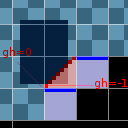
As in many engines, I handle slopes using a 'hotspot' pixel that must stay on the 'curve' defined by the slope. The rest of the character (the dark box) may enter slope tiles or be in the void, what it doesn't cando() is entering those black, solid tiles (which is checked separatedly). Making sure this looks nice is the level designer's problem, not the engine's. Within a tile, when the horizontal coordinate is changed by the 'walking' behaviour, we retrieve the ground height for the corresponding target pixel and align the hotspot there. With that approach, we may end up in a tile that has no ground at all (gh=0) when switching to the next (horizontal) tile. In that case, the alignment is performed on the tile just below.

Commençons par un rappel du fonctionnement des pentes dans mon environnement découpé en pavés (les "taïlze/tiles"). Bilou n'y est qu'un rectangle qui doit pouvoir naviguer sans rentrer dans les tiles solides (noirs). Il possède en plus un point de référence (hot spot, en rouge vif sur l'image) qui doit rester en contact avec le sol lorsqu'on suit une pente. Pour avancer d'un pixel vers la gauche, le hot'spot passe d'abord dans un tiles complètement vide (gh=0) où il n'y a pas de sol à suivre. La fonction do_slopes détecte ça et teste du coup le tile situé juste en dessous. Son pixel le plus à droite correspond à une hauteur gh=-8. On se retrouve ré-aligné sur le prochain pixel ... tout va bien.

Le problème apparaît seulement lors d'une transition pente/trou, comme j'en ai ajouté sur le bord des livres. Ici, lorsque'on regarde sous le tile vide, il y a ... un tile vide. Pour do_slopes, celà signifie qu'il n'y a plus de pente à suivre.  Idéalement, on devrait donc juste se retrouver "le long de la ligne bleue" inférieure, qui empèche Bilou de tomber jusqu'à ce qu'il l'ait complètement quitté. Mais voilà, à ce moment-là, on est pas encore sur le sol! Du coup, lorsqu'on teste s'il est possible de tomber d'un pixel, la réponse est "oui" et le contrôleur envoie un FAIL.

Now, when we instead have a sloped edge, as with books, both tiles are AIR and have no "ground" to align on. The do_slopes function then consider there is no slope to follow and let the walker::think behaviour function to adapt accordingly. Walker's behaviour is then to walk as long as possible, testing whether Bilou cando a move downwards (meaning he can fall). That would be all fine if Bilou was aligned on the blue line by then, but he isn't. he's still one pixel above, because that's where the slope ended.

Would have it implied that Bilou started falling earlier, I wouldn't have minded. But that's not what the state machine decides. from its perspective, the backward testpoint is still on the ground and thus the FAIL even is translated into a transition to idle state rather than towards fall.

Seulement, voilà, l'échec du contrôleur n'implique pas forcément une chute. C'est à travers les transitions du comportement de Bilou que les choses vont maintenant se jouer. Tomber d'un pixel ne serait pas impeccable, mais celà nous conviendrait. Seulement, pour celà, il faudrait que le point-test placé au sol indique du vide ... et étant décalé sur la droite, il est toujours dans la pente! Du coup, c'est vers l'état "do_slopes. C'est ainsi qu'on parvient finalement à quitter le livre après ce qui semble être un instant d'hésitation.
à l'arrêt" (idle) que Bilou passe. Mais puisqu'on a toujours le DPAD incliné vers la gauche, on quitte dès l'image suivante cet état pour tenter à nouveau une marche... qui échoue encore. Heureusement, à chaque échec, on avance d'un quart/demi de pixel qui correspond au "mouvement entammé".

Une fois que l'Inspector Widget est devenu assez précis pour faire ce genre d'analyse, il devient assez évident que la solution est de forcer le personnage à s'aligner sur le sol quand on quitte une pente, et de ne considérer qu'on chute que s'il est possible de descendre alors que le personnage est déjà aligné sur ce qui devrait être du sol.

The actual solution is of course to ensure that we're aligned on ground when there's no slope. Only if we cando the move downwards *while being on a tile boundary*, we will claim it a FAIL move that should switch to some other state. But to realise that, significant upgrade on InspectorWidget's precision was required. I even was tempted to turn this post into another "Inspector Widget's novel" post, but the implication on the game engine and behaviour coding was too high, and I'd rather went for a tutorial shape.

Pour faire bonne mesure (et pour éviter que Bilou ne se retrouve en suspens sur un bord de livre parce qu'il n'a pas sauté assez haut), j'ajuste enfin le saut à travers une plate-forme à sens unique (les branches de Apple Assault): on ne peut plus atterir sur ce type de plate-forme que lorsqu'on vient d'au-dessus de la plate-forme.

Sunday, May 20, 2012

FLITS again

Okay, let's keep tools-fusion for later on and focus on the impending walk of Dumbladors. I had them stepping blindly yesterday, and now, I'm trying to use the "walker" controllers (the one that can follow slopes and so on) to control them, so that they can be placed like Applemen rather than suffering woodworm-like bugs.

I had some more "FLITS" bugs, with dumbladors disappearing into the void of the toroïdal space (?) as soon as they hit a wall 0_o

The good news is that InspectorWidget was already much more capable than I thought, despite its cryptic user interface:

  1. (1) touch here to set a "breakpoint on bounding-box intersection
  2. (2) once a monster appears, click its "name" (2 first letters of BLador.cmd plus current state number) to give it the inspector focus.
  3. (3) click the coordinates of one monster to "disable" it from execution (or resume its execution).
  4. (4) click the focused gob's "name" bar to switch between iGobControllers display or cdata (GOB's private variable used in GobScript) display.
  5. (5) touch "p*" or "a*" to enable the rendering of collision areas.
  6. press L to step to the next frame (slow-motion) or L+START to resume normal play (with breakpoints active).

After fixing the "silly sunday bug" (giving a positive v0 speed for a state that moves to the left :P), I think I identified the reason why blador disappears: the "deficit" for step-based walk increases by v0 at every frame, but I also have "delay xxx" instructions in my animation, which makes the GOB to accumulate deficit move over time. When it comes to turn around, it is first "wrapped" to the place it's supposed to be (not very ideal)... and that happened to be off-screen this time ^^"

Sunday, March 18, 2012

Dumblador coming slowly

Jusqu'à 81% d'interruption de service chez voo ce week-end, en ce qui me concerne ... on ne peut pas dire que ça aide le télétravail, ni le développement sur Bilou, mais j'ai quand-même pu progresser un rien sur dumblador, premier personnage à utiliser l'animation composite dans le jeu.
On est encore loin du compte, celà dit: il est invisible, pour l'instant.

Oh well, dumblador is now present on the level. Immobile and Invisible, but present. TODO:

  • [done]make sure console output goes on the bottom screen when playing
  • [done] restore InspectorWidget's output (it's done in AppleAssault, afaik).
  • focus on the dumblador gob rather than on Bilou to figure out what's going on
  • [done] Make dumblador interactive
  • [done] make dumblador appear!


It looks like no oam has been set up (or even allocated) by the system on CompoundGob initialization. Needs further investigation ...

Thursday, November 11, 2010

Stuck again >_<

A peine avais-je corrigé cette histoire de "blocage en tombant au sol" que je me rends compte que Bilou peut à nouveau se retrouver coincé dans un mur >_<.
J'ai un peu pataugé pour trouver le soucis (de nouveau lié au changement que j'ai introduis il y a une ou deux semaines), entre autres parce que je cherchais au mauvais endroit. La dernière fois qu'une telle chose s'était produite, c'est le "StopController" qui ne vérifiait pas que Bilou ne rentrait pas dans les murs. Mais cette fois-ci, rien.

Himmel! Just after I fixed the land-and-got-stuck case I mentioned last week, I got a phone call from GuiEngine, asking me to find out who smashed Bilou into a wall up to the point that he became definitely stuck! Once again, I suspected a side-effect of the new way events are managed, and investigated collision checks in StopperController who were involved in similar cases a while ago.

J'ai finalement repris les choses à la base, avec la fonction "pas à pas" de l'InspectorWidget -- maintenant totalement rétabli, pour me rendre compte tout d'abord que c'était bien pendant que Bilou marche qu'il heurtait les murs, mais aussi que le problème ne venait pas d'un signal FAIL mal traité, mais du fait que les contrôleurs (en l'occurence la gestion de l'inertie) générait des EVENT à tort et à travers, court-circuitant certains tests.

But the stopper was innocent this time. I was sneaking on the wrong guy. I was walking down dark, cobble streets, under pouring rain with hope that one of my contacts would sing me a clue... in vain.
I sat down and opted for another strategy, reviewed the facts and the pictures shot by Inspector Widget one after the other, and the truth at last appeared to me in a flash: Bilou was walking when he got embossed into the wall. It turned clear that DDD had lied to me and that he should be paid another visit. "You asked me about FAILures!", he said crawling on the ground, "I told you all I knew about them !..." - "You did", I replied, "and still you knew there was more to tell. Where can I find DPAD and Momentum ? They're hinding since the start of this case!". Panting and flickering, it didn't take long for DDD to sing after I pointed my breakpoint at him. Before the end of the hour, I had Momentum tied on the back seats of a car: he'd never forge fake speed limit reports again.

Thursday, November 04, 2010

Got Stuck ?


Hover me
Dans un vrai développement, introduire quelque-chose comme les transitions en cas d'évènement liés aux contrôleurs alors qu'on est en phase pre-alpha n'est pas souhaitable. J'aurais été au boulot, j'aurais au moins fait un "svn copy trunk/ branch/..." avant de m'y attaquer. Mais voilà: c'est un projet-hobby et la liste des choses à faire entre une version et la suivante n'a plus grand-chose d'excitant...

This is something you'd never see occuring in a "real" project, but this one is a hobby project. I may know very well how to use SVN to create branches and avoid that an experimental feature triggers a bug in a pre-release, and I do it on regular basis for work. I just don't care too much about it when it comes to hobby project: I do what I wish yo do when I feel so. And so I may end up with Bilou curiously getting randomly "stuck" again when he hits the ground, not responding to DPAD anymore, etc. It doesn't even get hurt by Applemen, as you can see...


InspectorWidget, functional, but not fully restored yet
Bref, je me suis retrouvé à avoir Bilou bloqué de temps en temps au moment où il touchait le sol. Fort heureusement, InspectorWidget n'était pas bien loin, sans aller jusqu'à dire qu'il soit complètement opérationnel avec ce changement d'écrans ... Mais je ne suis pas mécontent d'avoir passé du temps sur ce petit débuggeur intégré l'été dernier: alors que j'avais sèché sur le script "bilou.cmd", il m'aura suffit de reproduire le problème et d'appuyer sur [START] pour découvrir que ce n'étaient pas la chute, mais bien les manoeuvres d'évasion qui étaient en cause.

This is where InspectorWidget turned handy again. I was cautious enough when I disabled it for AppleAssault, and it wasn't very far away. It's tempting to claim "all I had to do was to change bool InspectorWidget::FullyQuiet = truefalse; in main.cpp, but the recent swap of screens required a bit more tweaks and cleanup. And as shown below, it's not yet fully recovered :P
Yet it was sufficient to point me at those evasive moves for further investigation -- I was searching for bugs in the regular "falling" states until then -- and the fix should now be trivial.

/* fixed: la plupart de ces bugs d'affichagent étaient dûs à la redirection de la console (consoleInitDefault() vers l'écran du bas qui détruisait les caractères personnalisés par Engine::createChar() :P */

Saturday, August 14, 2010

You've said "BSOD" ?

Hola !? Che passa ?
Inspector widget
Mekwa ? Kesseksa ?
hou houuu~

Yauntruk kivapa !
Inspector widget
Et ça s'arrête làaaa
hou! hou!

Despite my attempts to get InspectorWidget (the internal debugger of my game engine) out of the way for the Apple Assault release, you may encounter a screen like this if you really hunt for easter eggs. The game hasn't crashed: it is just waiting for you to press the (Y) button so that it can proceed with execution of the game script. press it repeatedly so that you go through all the initialisation steps, and you should be able to keep playing. Thanks fly to Alekmaul for pointing that out.

Même si ça en a fort l'air, Apple Assault n'est pas planté même si vous voyez ce genre de choses à l'écran. Rappelez-vous: au départ, l'interpréteur de gobscript traitait les commandes une par une, attendant une pression sur (Y) chaque fois qu'un "print" apparaissait dans le script. Cette fonctionnalité existe toujours, désactivée, et en pressant sur START, on active le mode "débug" dans lequel cette "initialisation pas à pas" est à nouveau présente.

Mais c'est clairement quelque-chose que je devrai éliminer pour la prochaine release.

Thursday, May 06, 2010

Do I smell release ?

On s'approche d'une nouvelle démo. La quasi-totalité des petits soucis ont été corrigés ... Depuis ce soir, InspectorWidget est capable de me montrer quel monstre (sur l'écran de jeu) correspond à quel objet (sur l'écran de debug) et en cliquant sur ses coordonnées on peut le "mettre en veille" jusqu'à nouvel ordre. Avec ça, je devrais être paré pour comprendre comment mes applemen se retrouvent suspendus en l'air ... hopefully.

We're getting closer to a new demo. The only todo item that I have to take care of is the appleman's behaviour. And with tonight' updates on InspectorWidget, I can more precisely identify GOBs (a touch on their debugging area make them flip) and I can disable those who disturb debugging (such as the berrybat, atm).

-- edit: doh' Problems with applemen obviously arise when they leave the "stunned" state for more hunting. I haven't any button to set breakpoint on such transitions ... not yet.

Sunday, April 25, 2010

InspectorWidget : playfield.

Quelques nouvelles de Bilou, comme promis. Mon débuggeur intégré au moteur de jeu reçoit sa touche finale, puisque je peux à présent visualiser le contenu de la map dans la "zone centrale" (celle où les personnages sont représentés par des carrés et des barres colorés). Je peux observer les propriétés de chaque "tile" du jeu (via 4 chiffres hexa disposés en carrés) et je me suis même offert quelques aides visuelles pour les cas les plus courants (blocs, sol, pentes ...)

At last some news of Bilou dev'ing. The little blue ball hasn't been forgotten, as you can see now. It's just that some of the tweakings I had to do on Inspector Widget were hardly worth of note. But now, embedded debugging facility is virtually complete, including the last-but-not-least ability to render the playfield. I can have near-real-time peek at every tile to know its precise type (through hex values), plus easy-to-read hints for major classes (blocks, floor, and slopes). I can also "hop" from bilou to baddies when inspecting, proceed step by step, trade "controllers report" against GOB internal variables (such as speed, bounce counts, etc.). Now, i'm off to test that on the Real Thing...

L'inspecteur, puisque tel est son nom, peut aussi passer de Bilou à un autre personnage, basculer de l'affichage "contrôleur par contrôleur" à la liste des variables internes du personnage (vitesse, compteur de rebond pour funky funghi, etc.). Reste à tester tout ça en "live" sur DS.

Sunday, April 11, 2010

Une bière fraiche ! Dans un verre propre, nom de ... !

Avec le départ du professeur Ribbens, c'est sans doute une page de l'histoire de Montef' qui s'est tournée, quelques années (mois ?) seulement après le début de ma carrière. Comme pour beaucoup des cours que j'ai suivi, j'ai peut-être bien eu la chance à avoir reçu du maître du Scheme en personne une initiation aux techniques des continuations et du "data-driven programming". Et sa rétrospective sur les LISP machines et techniques de garbage collection était tout simplement magistrale.

In my 3rd year at University, I've finally been taught a programming language that forced me to re-think everything I thought I knew : LISP (and I practiced mostly its Scheme dialect). Beyond the charismatic character of Pr. Ribbens whose motto could more or less be translated in "brew sana in f**ing bottlore sano", it introduced me to "data-driven programming" and design of language-specific processors. To make a long story short, "data-driven" is what you feel you should be using when you start going beyond 10 rooms in a Lone-Wolf game : keep the code short, simple and generic, and have it proceed through structured data in order to obtain the desired result.

C'est de "Data-driven" justement, qu'il est question ici, puisque j'ai décidé de ne pas directement *coder* la logique de mon jeu, mais de la décrire par des structures de données traitées par un moteur qui reste plus simple et plus générique. Une approche qui me ralentit peut-être par moment mais qui me titille : je veux en avoir le coeur net et vérifier par moi-même si oui ou non il sera possible de construire un jeu de plate-formes sophistiqué de cette manière.

Les "livres dont vous êtes le héros" sont sans doute le meilleur exemple possible de "data-driven programming": tout programmeur qui a un peu roulé sa bosse "sent" bien qu'il y a moyen de faire mieux que

sub Salle42
print "au détour d'un couloir obscur vous entendez un bruit sourd ..."
print "1. vous dégainez Voleuse de Vies"
print "2. vous vous avancez dans les escaliers"
input "votre choix"; choix
if choix = 1 then Salle44()
if choix=2 then VousEtesMort()
. Programmer une fonction par salle / évènement (en fait, par numéro de "chapitre" dans le livre) serait extrèmement pénible, la logique du jeu se retrouverait noyée par des éléments de second ordre comme "est-ce que le clic se trouve dans la zone s'avancer dans l'escalier ou dans dégainer la Voleuse de Vies?" Sans parler de la difficulté à gérer les modifications du scénario. On préfèrerait de loin pouvoir stocker toutes les "données" du jeu dans un format à part ... un fichier texte avec des "macro-commandes" pour les vieux patchs de mon genre (et leurs mentors) ... un document XML pour les afficiandos de l'UTF-8 et autres codeurs post-moderne. Une S-expression pour les fans de "recueil de petits problèmes en Scheme", je présume. Peu importe, finalement, la forme: ce qui comptera, c'est le fond, la sémantique, le modèle sous-jacent.

My "game script" and the state-machine-based-monsters is deeply influenced by this technique. Unlike your regular scripting language (Lua ?), building a data-driven game engine means that you're building with line of code a software microsystem that will process data in a specific context and for a specific purpose. You are free to define the line between code-bound function and data-driven function, and placing that line at the right place will be the key to efficient processing.

Bref. Pour mon jeu de plate-forme, le "modèle" de données est un peu plus complexe, fait en partie de pixels et de commandes qui décrivent les machines d'état des différents intervenants. Une réminiscence du cours "Ingénierie du Logiciel Orienté-Objet" et de ma confrontation avec l'UML, et dans une moindre mesure, avec le formalisme des automates à états fini. La frontière entre data-driven programming et langage de script complet (cf. microLua pour DS) est sans doute ténue ... Elle explique sans doute la décision parfois curieuse de garder certaines choses "en-dehors du script". La détection des collisions, notamment, ou la prise en charge des animations. J'ose espérer que cette volonté de "rester juste un cran en-dessous d'un DS-Basic" me permettra de garder un moteur de jeu suffisamment efficace.

Avec mon "InspectorWidget" désormais opérationnel, on se rapproche aussi d'un éditeur graphique pour ces machines d'état ... Et certains "défauts" du modèle actuel deviennent flagrant. Par exemple, Bilou saute, cours, nage, attend ... autant d'états que je dois déclarer et que je relierai ensuite les uns aux autres par des transitions, p.ex. "lorsque les boutons changent, si le bouton 'saut' est enfoncé, alors modifier la vitesse verticale et passer dans l'état 'saute'". Par contre, pour que l'appleman puisse être assomé quand Bilou tombe dessus, il faut que tous les états de l'appleman mêne vers l'état "appleman assommé" si la 'bonne' collision se produit. Il est facile d'en oublier l'un ou l'autre en cas de modification, et c'était d'ailleurs en partie la raison pour laquelle il était si difficile de s'en défaire dans les démos précédentes du jeu.

UML state machine formalism was one of other things I learnt that very same year, and it looked like a powerful way to express behaviours while avoiding repetitive boilerplate code to be described ... So my current data model for GOB behaviours is mostly implementing that. So far, it has the limitation that a transition is always flowing from exactly one state (to exactly one other state). It's expressive enough (that is, there isn't a behaviour you cannot implement with that), but it's not code-friendly in that when you actually want to implement a transition that should apply from (almost) all other states to a specific state, you can quickly forget something. It actually occured with the Appleman that couldn't be stomped when walking to the right simply becaused I missed some state20->state33 on hit0 [t] statement.

Je cherche donc depuis quelques semaines à ajuster le modèle de manière à pouvoir justement exprimer "depuis tous les états, ..." ou "pour tous les états où X est au sol, ..." et donner une transition unique qui s'applique à un groupe d'état d'entrée. Comme prévu de longue date, d'ailleurs (cf. ce schéma du comportement de l'Appleman). Outre l'économie de temps de parsing au démarrage du niveau et de quantité de mémoire (à mon avis négligeable), celà permettrait de pouvoir d'un seul clic dans le débuggeur forcer un point d'arrêt sur "je vais me faire blesser", quelque soit l'état actuel de Bilou. Pour l'instant, avant le debugging, il était nécessaire de passer tous les mouvements de Bilou en revue pour cliquer sur "transition vers l'état n° 15" depuis chaque état. Pas franchement folichon.

I haven't added such "group transitions" yet, but at least I made a nice step towards it by letting states and animation be defined in the context of .cmd files, so that each monsters' state machine can be written without having any knowledge of what other monster do and how many animations they use. Then, only a small amount of the states are "imported" by the master (level) script.

I'll have to adapt the level editor accordingly, but it should make InspectorWidget more friendly to use as the 'kind' of monster is now part of the state's name. Moreover, once the group transitions are in, activating a breakpoint on "jumping->hit" should equally activate "standing->hit", "walking->hit" etc. as long as you used a group transition for "{jumping, walking, standing, ...} -> hit"


Un premier pas dans cette direction, ç'a été de donner à chaque fichier ".cmd" (généralement un par personnage ou ennemi) son propre "répertoire" d'états et d'animations, désormais indépendants de ce que font les autres. Seuls certains de ces états seront "importés" par le script qui définit le niveau en cours pour placer les intervenants sur la map. L'éditeur de niveau devra être adapté, bien sûr (eeh oui. Faire et défaire ... that's the question), mais ce sera pour un mieux: plus besoin de passer en revue toutes les positions de Bilou, ni de savoir lequel des états de l'appleman convient comme état initial. Les groupes de transitions devraient s'y greffer plus agréablement.

Et InspectorWidget lui aussi en bénéficie, puisque les monstres sont maintenant nommés "fu01", "ap07" ou "wo00" plutôt que d'être représentés avec un simple nombre.