Wednesday, January 10, 2024

Nager mieux

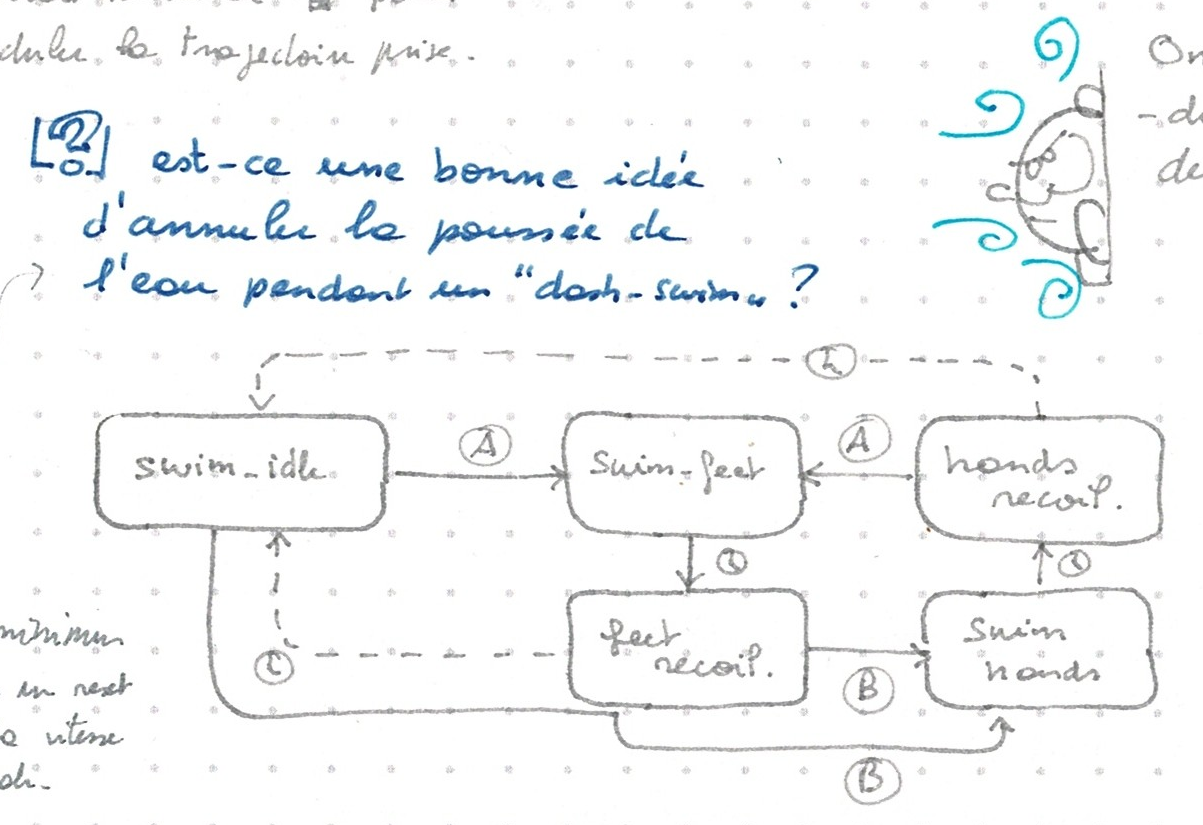
I like to release a demo on special occasions like new year or my birthday. It is twice unfortunate that I had none to show by the end of 2023 since it was the 30th anniversary of Bilou's original design. But there was something still lagging behind: for an untrained player, it takes countless trials to get out of the water in the green room. When the season holidays started, I thought I could just change the state machine a little bit so that Bilou would jump out of water if we hold the FOOT button.

Il y a un élément qui m'empêche encore de faire une nouvelle démo avec les améliorations de l'an dernier: c'est difficile de sortir de l'eau. Je m'en suis rendu véritablement compte en laissant un peu la démo actuelle entre les doigts de J.L.N ... Je m'étais donc donné la mission d'essayer de faire fonctionner ça pendant le congé, mais avant même le premier essai, j'ai compris que ça n'irais pas comme je voudrais. Parce que pour qu'on puisse "jaillir de l'eau si on a appuyé sur le bouton de saut près de la surface", j'ai besoin de pouvoir mémoriser que ce bouton a été enfoncé. 

It didn't work as I expected though. Maybe it could be adjusted with some cleaner input buffering, but since I intend to use some different SWIM mechanics to help the game being fun, it seems silly to hack something else first. So I went on, picked my animation editor and started crafting swim left, right and up animations, each split so that they player would have to chain button pressing to reach full speed and Bilou could come back to some "rest position" otherwise.

ça pourrait être réglé avec une peu de tuning sur l'input buffering, j'imagine. Mais comme j'ai aussi prévu de passer à un autre système de nage dans lequel Bilou reste dans l'équivalent d'un dash sous-marin pendant quelques frames quand on a appuyé sur "pieds", ce serait naturel que l'on jaillisse automatiquement si on est dans cette phase de dash. J'ai donc passé deux petites soirées à faire des animations dans MEDS pour que notre brave Bilou brasse mieux.

Manque de pot, une animation supplémentaire s'est invitée dans le fichier. J'ai prévu 4 "pages" d'animations pour bilou.spr, mais cette nouvelle animation est sur la page 7, décalant toutes les nouvelles animations

- code avant la nage avec les sprites avant la nage:
  - démarrer la pyramide: ok
  - passer de la pyramide à l'école: ok
  - sortie de l'école: gros crash.

Une petite modif' plus tard (là, ce soir) pour éviter que l'animation excédentaire soit à la fois sous le contrôle du jeu et sous le contrôle du reste (sinon, ça fout un chaos digne de Jurassic Park dans le gestionnaire de mémoire) et j'ai de quoi commencer à utiliser toutes ces jolies nouvelles animations. Sauf que ça fait bizarre de voir Bilou essayer de rejoindre la surface la bouche grande ouverte (animation "super jump" recyclée) puis fermer la bouche une fois qu'il arrive à l'air libre :-P Edit et il va falloir que j'en fasse une ou deux de plus pour permettre au joueur de quand-même avancer. Sur base des animations de Fury ? Pourquoi pas ...

But unfortunately, some bits got twisted, and I ended up with an undesired 'temporary' animation stuck in the bilou.spr file. Then I picked the wrong decision of ignoring it while loading rather than fixing the editor and saving the file again. It worked when I tried the animations in the green room, but when I tried to 'move' between rooms later on, everything blew up. I had HDMA experiments catching my attention, so I was all out of holidays when I finally understood why it broke and how to fix it. Sounds like you'll see the swimming another time ^^"
Edit: one more thing ... Dash-swimming might be fun, but I also need something to use when player just navigates with the DPAD. Maybe Fury's swim sheet will be the template I need for that ... 

Edit²: give it a try in the latest demo

Saturday, January 06, 2024

Raycasting ?

There's an awesome effect one can achieve once you have HDMA in a platformer: add depth to your background with "floors" like in DKC2 Lava lagoon. There will be complete occlusion of the 'far' background plane (wall) by the 'near' background plane (floor side), so having them scroll at different speed is 'just' a matter of updating X scrolling register at the right time. Having the floor positioned above or below the "seam line" between two walls is 'just' a matter of adjusting Y scrolling register earlier or later so that they 'skip' part of the far background art to show front background art.

The awesome part is that depth effect added with the horizontal planes, of course. That is about adjusting both X and Y scrolling registers and that will need maths to explain properly, using some pre-slanted texture as shown in the ripped contents of DKC2.

First immediate thought after I realised that it could be more than welcome in the pyramid level of Bilou's Dreamland was that it is actually an instance of the raycasting algorithm. Yeah, that infamous thing that turned ID software away from my beloved Commander Keen and sent them trashing the whole era of 2D platformers with first-person shooters. No wonder why, despite my affinty for maths and software optimization, I never ever felt tempted to code one myself. But hey, do it vertically instead of horizontally, and this is precisely what we need to decide whether to show floor, ceiling, wall or cut-through floor-to-ceiling structure.

So before trying to reconstruct the algorihtm that might have been used on SNES, let's see what it would cost us.
  • the background scene must be structured along a 2D grid. I'd say 64x64 pixels would be fine by me
  • For every scanline , we will have to step through the grid, one tile at a time, essentially checking whether one more "depth" step takes us farther than one "height" step in our case.
  • We need a direction vector associated with every scanline. That implies 192 square roots per frame, but hopefully, those computations are the same for every frame: they depend on the camera-to-screen distance and define angle used to trace through each pixel. They could be pre-computed even at compile time and stored in a look-up table.

So for every scanline Ys of the screen, (DDA) raycasting will give us a pair of (Zw, Yw) coordinates in the world that is shown on that scanline. Most likely, we don't want to compute the distance to Zw, Yw nor use that distance to adjust scrolling speed. Instead, Zw should directly be used to decide the scrolling speed. Well, unless we're on a horizontal surface, that is. Well, I can't help thinking this is overgeneral and overkill, despite übercool.

The trick in the SNES DKC2 implementation is that we have pre-rendered floors and ceilings. They already feature some depth-of-field effect. if you use them as-is. And being 440px wide, they're significantly larger than the screen (256 pixels iirc). Where does that 440 value come from ? Well, I guess this is screen_width + pattern_width, as the flat stripe shows a repeating pattern of 184 pixels. So whereever you are in the pattern, you can always have at least one full scanline ahead. The most distant line of the ceiling has only 96 pixels between two patterns, matching exactly the size of the tiled background wall. That means if the 'front' part is moving exactly at 1 pixel / frame, the tiled part should be moving at 0.52 pixel/frame so that Thales theorem is satisfied.

That size difference also tell us how far away the tiled parallax layer should be from the 184x32 parallax layer (and thus how deep the floor/ceiling objects are): they're as far from each other as the 184x32 layer is from the "camera"

  s16 xref = REG_BG1HOFS;
  s16 yref = (offset >> 2) % 192;
  s16 xamp = xref + xref / 2;
  s16 yamp = yref + yref / 2;
  int ytrigger = 224 - yamp;
  int btrigger = 192 - yref;
  int i, j;
  for (i = 0, j = 0; j < N; j++, i += 2) {
    if (j > ytrigger && j < ytrigger + 64 
|| j > ytrigger + 256) { data[i] = xamp; data[i+1] = yamp + 30; } else { data[i] = xref; data[i+1] = yref + (j >= btrigger ? 128 : 64); } }

That doesn't make the 3D-effect of DKC yet, but at least it gets me synchronous parallax with a single hardware layer.

Next step: find the zones where ceiling and floor should be shown. And there, trials and errors became too complicated to figure out. Hopefully, I found a way to analyze the problem with maths. Most of what's computed is derived from that "yref" value, which is normally the input from camera position. What I need to do is use that yref as horizontal axis and study how "triggers" that define top or bottom of areas evolve, cross and areas overlap appear or disappear. And once the (simple) maths were written, it took only half an hour to write the code to do it right.

With this graphics, that's the best I can do... let's see how it follows up once I have dedicated background.

Oh, and while I'm at it, there's a stunning online tool out there, to visit every map of every DKC SNES game: the DKC-atlas.


Monday, December 25, 2023

Petite pause HDMA

Yes! I managed to get some HDMA effect applied on my 3-rooms demo. It has absolutely no use in that particular scenery, but it did work. Yet, at first, I couldn't get anything, up to the point where I suspected that my emulator simply had no support for HDMA at all. But then I remembered seeing something very HDMA-esque in WarhawkDS (recently open-sourced). And then before I could even try whether the .nds would work in my emulator, Asie confirmed that she knew another open-source homebrew using HDMA: MegaZeux.

Hahaa! Nous y voilà! J'ai réussi à appliquer un effet "HDMA" dans ma démo de Bilou Dreamland! ça ne sert à rien, c'est d'une esthétique discutable, mais voilà: il y a presque 2 ans que j'ai des notes sur comment faire ce genre de chose dans mon carnet-agenda et que je passe par-dessus en me disant que "ouais, je tenterai ça un de ces 4. C'est complètement le genre de technique qui fait que je suis sur NDS et pas sur playdate ou androïd. Mais c'est McMartin avec son post sur le HDMA de la SNES qui m'a donné envie de bousculer un peu mon absence-de-planning de hobby-coding pour le mettre en oeuvre. Sauf que vous vous en doutez, au premier essai, rien ne marchait. J'avais pourtant quelque chose de quasi-identique à ce setup dans MegaZeux DS ou même warhawk DS.

  DMA1_CR         = 0;
  REG_BG0VOFS_SUB = scroll_table[0];
  DMA1_SRC        = (u32)(scroll_table + 1);
  DMA1_DEST       = (u32)&REG_BG0VOFS_SUB;
  DMA1_CR         = DMA_DST_FIX | DMA_SRC_INC | DMA_REPEAT | DMA_16_BIT |
                    DMA_START_HBL | DMA_ENABLE | 1;

The registers configuration is almost identical to the one I tried in my demo: 16-bit transfer with proper start and repeat setup, and a transfer size of 1 word per line. At that point I started suspecting that something else in my code would break the setup of the DMA transfer. After all we already have channel 0 used for 3D pipeline and channel 3 used by dmaCopy macros. So I picked up devkitpro simplest graphics demo and tried to bring it there instead.

Un petit passage dans les programmes d'exemple de devkitpro. Aucune ne fait du HDMA alors j'essaie d'injecter mon code dedans. Sauf que la première victime n'a aucun plan de décor (donc rien à faire onduler) et est écrit en C (contre du C++ pour mon code). Je m'adapte et je fais la bonne vieille rasterbar (impossible dans le code de Bilou parce que je travaille en mode 4096 couleurs par plan, ce qui veut dire que la palette est hors de la mémoire adressable). Et là, ça marche presque nickel. Il faut juste veiller à programmer la couleur pour la ligne 0 "à la main" avant de commencer la configuration du HDMA qui fera toute les autres lignes parce qu'il se déclenche *à la fin* de chaque ligne, mais pas pendant les lignes virtuelles du délai entre 2 images.

The first one (simple sprite) had no background to wave but it had single palette, so there (unlike with my demo), I could beam values into palette slot 0 and see it draw raster bars on screen. A bit of translation was needed because it was a C example rather than a C++ one, but there it is. changing the background colour like I was driving an Atari 2600 except the DMA does the waits and syncs, and not the CPU.

class HdmaEffect {
  static const size_t N=256;
  static const unsigned CHN = 1;
  s16 data[N];
  size_t offset;
public:
  HdmaEffect(); // intialize data[]
  ~HdmaEffect() {
    DMA_CR(CHN) = 0;
  }

  void Frame() {
    DMA_CR(CHN) = 0; // disable channel
    DMA_SRC(CHN) = (uint32)(data + offset);
    DMA_DEST(CHN) = (uint32) &REG_BG0HOFS_SUB; // mind the & to get register *address*
    DMA_DEST(CHN) = (uint32) BG_PALETTE_SUB;
    DMA_CR(CHN) = DMA_REPEAT | DMA_START_HBL | DMA_SRC_INC | DMA_ENABLE | DMA_DST_FIX | 1;
    offset = (offset + 1) & ((N / 4) - 1);
  }
};

void mainLoop() {
	HdmaEffect hdma;
	
	while(1) {
		swiWaitForVBlank();
		hdma.Frame();
		scanKeys();
		if (keysDown()&KEY_START) break;
	}
}

Mais mon code C++, lui, toujours rien. Il n'est pourtant pas si différent. Je continue à passer d'un exemple à l'autre et je tombe sur un avec un décor (qui refusera mordicus de bouger) et en C++. Toujours rien. Par contre, en reprenant et adaptant le code C, là, je parviendrai à faire onduler le texte de l'écran du bas. Moins sexy, mais c'est un début. Il m'aura fallu un bon réveillon familial et une petite nuit de sommeil pour comprendre la différence fondamentale entre les deux implémentations.

I picked another example featuring a background, this time in C++. I couldn't get any color changed with my C++ code, and I couldn't get the picture waving. But with the adapted C code, it could change colors and I could make the text on the bottom screen waving (although somehow weirdly). We were 24th of December, I had errands to run and a party to attend, so I accidentally shut down the computer and went doing something completely different. It's only when I woke up this morning that I got struck by the difference between the C++ class and the C code. The C++ class will have the source array in a member and it allocates the HdmaEffect object on the stack. But the stack is invisible to DMA operations. I've been tricked by that a good number of times in the past already. One more alloc/free pair was all I needed to get the working screen-waving effect you've seen above. Huzzah! Merry Christmas! May the source be with you all ;-)

La conversion rapide en C utilisait une grosse variable globale pour le tableau contenant les différentes valeurs à streamer dans le registre de scrolling. La version C++, plus propre sur elle, encapsulait ce tableau au sein de l'objet HdmaEffect, lequel pouvait être construit dans une variable locale pour gérer ses ressources (le canal DMA) Rabi-style. Sauf que "local", ça veut dire "sur la pile" et que la pile de la DS est 1) petite et 2) mappée sur de la mémoire plus rapide (type cache L1) logée au coeur du chip ARM ... et donc inaccessible depuis le bus système avec lequel travaille le contrôleur DMA. Eh oui. Un malloc plus tard, j'étais prêt à faire une démo qui marche ^^"

Sunday, December 17, 2023

tapis roulant!

Nous y voilà enfin! Après l'eau-qui-pousse, je peux vous présenter le sol-qui-pousse. Le point délicat, vous vous en doutez, ça aura été de mélanger ça avec des sols pentus. Ce à quoi je ne m'attendais pas franchement, par contre, c'est que être poussé pendant qu'on est immobile sur le sol se révèle plus compliqué à gérer qu'être poussé pendant qu'on avance.

The natural step after water-that-push-Bilou was ground-that-push-Bilou. It started quite nicely and it is finally working, but to reach that nice behaviour, there has been significant ups and downs, and especially to get it working on sloped ground. But hey, sloped conveyor ground was my trick to have one-way halls without getting too mechanical.

C'est que pendant qu'on avance, on appelle régulièrement la fonction do_slopes, voyez-vous. Et même si le sol annonce "je te pousse de deux pixels sur la gauche" alors qu'on est sur une pente, on finira bien 2 pixel à gauche et 1 pixel plus bas si nécessaire. Mais rien de ce genre dans l'état "immobile sur le sol". Et notre fonction do_slopes est prévue pour aller directement corriger la vitesse et les déplacement retardés du personnage, or l'idée du "sol qui pousse", c'est justement de manipuler la position dans un premier temps et de laisser le code qui traite la vitesse tranquille. Sans ça, sur un tapis roulant trop rapide, vous verrez Bilou se retourner pour marcher tout seul vers la gauche plutôt que de le voir s'échiner à avancer vers la droite tout en reculant malgré tout vers la gauche. Pas terrible.

Dans Rayman, j'avais pu voir qu'on avait deux types de pentes: des normales et des glissantes. Chaque angle et chaque offset est dédoublé avec un second type pour gérer les deux types de physiques. J'avoue que je souhaite plus de souplesse pour Bilou. Pas tant que j'ambitionne de faire un jeu plus complexe que Michel Ancel, mais surtout parce que je n'ai pas l'occasion de planifier l'ensemble du jeu. Je suis incapable actuellement de garantir qu'il n'y aura jamais plus de 2 types de sol dans un niveau ni 2 types de pentes. Le projet était donc d'utiliser des emplacements séparés pour encoder la pente et les propriétés du sol. Et quand je me suis mis à coder, c'était encore plus simple que prévu: quelque soit la position de Bilou sur une pente, il est toujours à l'intérieur du tile "pentu". Et donc pour trouver le tile avec le type du sol, il suffit toujours de regarder 8 pixels plus bas. Enfin ... presque toujours.

And that was the final test for my "neat idea" to "simplify" the level editor: use separate tiles to indicate the slope (if any) and the ground properties. Ground properties are always on the 'plain' part of the ground and the slope types sit on top of it. A new getGroundType function can probe through that slope layer to find the actual ground and return its numerical type. Then, each controller use that to index to retrieve relevant parameters, such as push vector, friction, or whatever needed. It mostly worked except on one spot: the precise location where Bilou's hotspot has just been shifted out of the lowest 'sloped' tile of a slopes stripe. It is now mid-air, with one 'slope' tile below it and the ground properties one more below. Then Bilou stops because it is no longer pushed but doesn't fall either. And if I try to hack that around, I end up with Bilou moved horizontally instead of following the slope because there's no slope to follow.

Comme toujours avec les pentes, les problèmes commencent quand le sol n'est plus dans le prolongement horizontal de celui utilisé une frame plus tôt. On se retrouve dans ce cas-là soit avec Bilou qui s'arrête au milieu de la pente, soit continuant à se faire pousser, mais à l'horizontale

Yet, when you walked on the sloped ground rather than letting yourself pushed by flowing sands, you wouldn't get any issues. The trick is that walking state already has a call to the do_slope function that keeps Bilou in contact with sloped ground despites of motion. The extra shift happened prior that call, so it would still re-align when Bilou's own velocity is applied. But there was no such call in "idle, standing" state so far. And the do_slopes function wasn't meant to affect anything but character's speed, while it should now sometimes affect temporary variables used to immediately apply a coordinates update.

And just in case that seemed too easy, a typo in the first coding sprint made me change accumulated step instead of actual speed, ruining the whole thing with Bilou digging into the ground. Then a bug introduced in the level editor broke some part of the level without me realizing it and I started suspecting wrong properties for the ground here or there.

But there we are. It's working, even though it cost me hopping back in time with Mercurial and re-doing the sprint one dash at a time, checking, committing, re-importing maps and the like. And about one week later, I finally shot a decent .gif of the behaviour so I could post it and write this stuff. It's been planned for so long. It has been through so many preliminary work and so that I'm gonna call it a milestone.

Bref, inspector widget, ddd, j'ai pu sortir toute la panoplie. Presque (pas les unit-tests, cette fois). Mais l'éditeur de niveau m'aura bien cassé le rythme.

(wow. Le soir est tombé, j'ai encore une machine à faire tourner et je n'aurai pas fait plus de homebrew de cet aprèm' libre que de vous raconter tout ça :-P)


Thursday, November 23, 2023

Making swim fun

Somewhere last year April 2023, I had been reading something a neogaf thread about water levels in platformers and whether it might be possible for them to be actually fun. Because, well, I don't think I'll manage to copy the awe DKC sharks may produce and I can't ask my brother to come up with something like David Wise's Aquatic Ambience for my Nintendo DS title.Yet there will be water.

There have been some platformer titles over the last years that came with fun-to-play water levels. I think about "20000 lums undersea" level in Rayman Legends and some level of DKC: Tropical Freeze. Swimming in Ori and the Will of the Wisps was pretty pleasing as well. All these games share something: they benefit from analog stick and they depart completely from their 8-bit and 16-bit counterparts by letting you target any direction freely. Your character will typically need some time to turn himself towards the direction you want though, which works fairly well.

Les niveaux aquatiques dans les platformers, ça a mauvaise réputation. Vu le nombre d'échecs que Vanilla Lake Forest of Illusion 2 m'a infligé, je ne peux pas franchement leur donner tort. ça a commencé à aller un peu mieux avec Donkey Kong Country, d'abord parce que la musique de David Wise était aussi époustouflante que l'animation des requins, mais surtout grâce à Enguarde qui permet de cesser de se battre continuellement avec la gravité... Et d'avoir une chance contre la poiscaille.

Plus proche de nous, Tropical Freeze et 20000 Lums sous la mer l'Océan des Songes de Rayman Origins nous ont donné un nouveau mode de fonctionnement d'un personnage de jeu de plate-forme qui tombe dans l'eau. Ils sont maintenant capables de se diriger dans n'importe quelle direction (indiquée par le stick analogique), accélèrent dans la direction correspondante si on appuie sur un bouton. C'est souple. On voit son perso se tortiller pour faire un demi-tour ce qui donne l'impression d'être dans l'eau ... On peut chercher une certaine forme d'élégance dans les trajectoires qu'on prend ... d'une certaine façon, ça se contrôle un peu comme un jeu de micromachines avec beaucoup de dérapages. Ou un avion qui fait des loopings.

Dans chacun de ces cas, exit la "blind box fonctionelle"  d'Enguarde: on peut attaquer dans n'importe quelle direction, à n'importe quel moment.

But the part I prefer is how you get a speed boost into the direction of choice with the JUMP button, and especially how you jump out of water in Ori and the Will of the Wisp like you were a true dolphino. I could certainly do something alike in Bilou Dreamlands. (at first, I wanted to make it an unlockable move so that you could discover secrets later on when you've unlocked some ability ... but that's something for Bilou's Adventure instead).

Of course, with the NDS DPAD, I can't truly have free aiming like in the switch/wiiu titles, but maybe I can find something approaching:

  • when you hit FOOT, you get a speed boost in the one-of-eight direction you're aiming with the DPAD.
  • during that move, you can modulate your direction (say, +/-15°) around that main direction with the DPAD
  • the swim animation eventually comes to a slow down step where you can chose a new main direction and hit FOOT again to keep speeding.

Une des choses que j'ai préférées dans ces jeux plus modernes, c'est la manière dont notre personnage peut jaillir hors de l'eau si on fait une "attaque" près de la surface. J'avoue qu'au départ je pensais utiliser quelque-chose inspiré de la physique de nage de Fury of the Furries, où on ne sait sortir de l'eau que s'il y a une berge suffisament "à niveau". Puis offrir le "mode dauphin" avec un level-up, comme le fait Ori and the Will of the Wisps. Mais bon, l'objectif ici, c'est un "dreamland", pas un castlevania. Pouvoir bondir hors de l'eau dès le début du jeu, pour le fun, c'est l'objectif. Première chose à tenter, donc: permettre à Bilou de jaillir de l'eau si on tente de sauter près de la surface.

Deuxio, prévoir un dash-swim qui propulse Bilou dans une direction indiquée par le DPAD si je tente de sauter dans l'eau. ça pourrait être intéressant d'en profiter pour essayer de faire l'équivalent aquatique d'un wall-jump parce que j'ai toujours trouvé plus simple de se propulser en utilisant le bord de la piscine que de nager à proprement parler.

Tertio, le dash sera normalement suivi par une période de "retour au repos" pendant laquelle le bouton saut n'aura aucun effet, mais ça pourrait être intéressant de prévoir d'enchaîner sur un dash si on utilise plutôt le bouton "ramasser". On nagerait alors à la vitesse maximale en enchainant pied - main - pied - main avec le bon tempo... Pas d'attaque aquatique prévue pour l'instant, mais je n'ai pas non plus un bestiaire aquatique débordant ... 

Quarto(?): permettre d'infléchir la trajectoire vers le haut ou le bas avec des petits coups de DPAD pendant un dash horizontal. Et vice versa ... et diagonalement. Ce sera l'équivalent à la croix directionelle des mouvements libres au stick analogique.

One other fun thing that might be worth experimenting is doing the equivalent of wall-bounce underwater. At least, it might be the easiest way to get a first experience with wall jumps in my engine.

And finally, one possibly terrible (or fun) idea would be to keep moving fast underwater with properly timed FOOT / HAND / FOOT / HAND button pressing
 

Saturday, November 18, 2023

tile 4 { swim.flow = (256,0) }


Enfin! Je m'attaque enfin à la dernière face de mon 'newmeta/newmap': les tiles spéciaux. Il y avait déjà les blocs spéciaux, auxquels on peut attacher des zones de collision et des actions. Il y a les pentes qui se passent de commentaires et les tiles aux propriétés "directes" qui permettent de combiner jusqu'à 6 propriété distincte (eau, sol, air, lianes, ...) librement. 

Dans le cas des "nouveaux" tiles, le script définissant le jeu va pouvoir encoder librement les propriétés voulues pour chaque type de tile. J'aime y penser comme à un accès indirect, mais c'est probablement parce que j'ai fait trop d'assembleur :-P. Et ça ne s'arrête pas là: je veux les utiliser pour les tapis roulants, le sol qui glisse, et ce genre de choses. Chaque type permet donc aussi d'aller paramétrer des valeurs le concernant auprès des différents contrôleurs.

En pratique, on va définir dans un fichier script.gam

tile 8 {
    is flowdn "0055220000552200"
    props fc8 # WATER
    swim.flow = (0,512)
}

La première commande dans le block, is est utilisée dans l'éditeur de niveau, pour fixer le graphisme représentant le type de tile. La commande props donne les fameuses propriétés indirectes. Ces deux-là existent aussi pour les blocs interactifs. La dernière sera passée à une nouvelle fonction SwimControllerFactory::setTileVariable() qui s'occupera de tout ce qu'il y a derrière le signe = et enregistrera le "mouvement forcé" à appliquer dans GobSwimController::think() quand on se trouve sur ce genre de tile.

Hello. I've been writing notes about how to have conveyers and flow-in-water since at least 2020 2019. Now is the time to get it done. At last. The syntax of the new "tile" description will look as much as possible to that of the "block" description, used for collectibles and more. Like them, it can describe the value of cando() flags to be used by controllers with a props statement.

What only they can do is set values for 'controllers variable'. Say that we want water to be able to push Bilou in some direction while he's swimming, we need a table of swim::flowx and swim::flowy that indicate how much Bilou should be moved at each frame if he stays on the given tile.

After some refactoring of the iWorld class and some more code in the script parser, this is finally possible. And with some bugfixes on the level editor, I've got a test case coded for the "three rooms" demo where Bilou is moved away from the waterfall because tiles say so.

Quelque jours plus tard, j'ai enfin ajouté le code qu'il faut au contrôleur utilisé pour la nage, téléchargé une nouvelle map avec des tiles "pousseurs" sous la cascade, et voilà: une première mise en application du concept où Bilou, tel un Fury, se fait embarquer vers le fond, puis un poil sur le côté avant d'être recraché vers le haut par les remous...

Friday, November 10, 2023

Neocities

Pendant des années, j'ai eu un site présentant mon projet d'OS et mon activité sur la démoscène... et quelques-uns des jeux qu'on avait réalisés avec des amis. Le point commun entre eux, c'était le nom de l'équipe: "PPP Team (Software)". Il a migré de mon compte étudiant à mon compte de chercheur, puis il a fini par disparaître corps <body> z'et bien quand j'ai quitté l'unif.

Dommage parce qu'il n'y a plus rien pour parler de notre passage sur la Inscene ou des concepts originels du Clicker32 sans lui.

Mais entre deux tweet, j'entends parler d'un nouveau service d'hébergement orienté "bon vieil HTML", sans lourderie en php: neocities. Vu que mon premier hébergeur était geocities, ça fait mouche, bien sûr.

Je transfère donc mes derniers backups sur  https://pppteam.neocities.org/ pour voir ce que ça donne ...

Somebody on twitter mentioned neocities ... Since I have old (pre-php) web contents that has turned unavailable lately, I decided to re-upload it on brand new https://pppteam.neocities.org/ ... So you can visit my old demoscene archives and operating system development manifesto and I don't have to wonder how I could convert that into wordpress

bin ça donne plutôt sympa ^_^