Showing posts with label coding. Show all posts

Friday, September 18, 2026

--dump=D

Okay, I need to remember this once for all. I'm frequently using gcc [OPTIONS] someFile.c -E to understand some of the error messages from the compiler, but too often, I have to ask a crawling duck what preprocessor option would let me see the values of the #define statements, not just the lines of code with all substitutions applied. So it's time I post something to remember me it's -dD

...

Or maybe I could just add some line in my cpp-output-colorizer that would remind me of it ?

Thursday, September 03, 2026

Inspector Widget Improved

Inspector Widget ... le mode pause du moteur de jeu de GEDS qui permet de voir à travers la Matrice. Repérer les zones de collision, mais aussi visualiser le terrain autour des personnages tel que les contrôleur le perçoivent. Sauf que le code qui faisait l'affichage du terrain date de l'époque Apple Assault  et qu'il est plus ou moins inutile avec le nouveau système de map physique.

During AppleAssault and SchoolRush development, the "playfield" feature of InspectorWidget has proven an extremely valuable feature of the GEDS engine. I could get an overview of what the engine sees of the level without having to manually decode contents of the physics map. But with the evolution towards a new, richer encoding, the information it was showing became mostly useless. But hopefully, during the "Blador-vs-Spike" episode, I located where the responsible code was and could start fixing it. Initially, it was looking like the listing below.

Le code qu'il aurait fallu que je retrouve il y a un moment était caché dans InspectorWidget::clearmain(). 

for (int ty=sy; ty<=ey; ty++)
  for (int tx=sx; tx<=ex; tx++) {
    unsigned f=gob[0]->world->getflags(tx,ty);
    unsigned c=BCHECK; // pattern for the "outer ring" of the zoomed tile
    if (f&F_BLOCKING) c=BON; // plain light ring = solid block
    if (f&F_PLAYERTHRU) c=BOFF; // dark ring = air / water / etc.
    if (f&0x10000) c=BCHECK; // checkered ring = special block
    if (f&F_SLOPE) c=97; // striked through = slopes
    char sq[16];
    memset(sq,c,16);
    if ((f&(F_FLOOR|F_SLOPE))==F_FLOOR) memset(sq,BON,4);

    sq[5]=80+((f>>12)&0xf); // 4-digits code in the inner area
    sq[6]=80+((f>>8)&0xf); // encodes the F_* flags for cando() calls.
    sq[9]=80+((f>>4)&0xf);
    sq[10]=80+(f&0xf);
    u16* v = vram+MAP+(ty-sy)*128+(tx-sx)*4;
    for (int i=0;i<16;i++) {
      *v++=sq[i];
      if ((i&3)==3) v+=28;
    }
  }

Pour ceux qui ne parlent pas le C couramment, le listing ci-dessus raconte que chaque pavé de la map va être représenté par un code à 4 caractères entouré d'une bordure dont le pattern est variable. 

  • bordure solide pour ce qui ne laisse pas passer le personnage
  • bordure en damier pour les blocs spéciaux
  • bordure en hachure pour les pentes.

Le code au centre du carré, ce sont les propriétés utilisée par la fameuse fonction cando(). Et il faut bien admettre que maintenant qu'il y a plusieurs types de pentes différents, plus de blocs spéciaux et des blocs aux propriétés particulières, juste les flags pour cando(), c'est devenu à la limite de l'inutile. Parce que la plupart des blocs spéciaux ont les mêmes propriétés et que celles des pentes sont prédéfinies.

Mais heureusemement, j'ai trouvé l'occasion d'améliorer ça.

  • un code à 2 chiffres, c'est un tile à encodage direct. on voit littéralement le byte de la map physique et chacun de ses bits nous renseigne pour une propriété. 44, c'est de l'air.
  • un code à 2 chiffres sous une petite ligne à damier, c'est un bloc spécial. Ici aussi, la valeur et celles du byte de la map. Les valeurs ff, fe et fd servent pour les fameuses "flèches jaunes" de l'éditeur.
  • les pentes sont toujours identifiées par leur contour hachuré. Le code à 4 chiffres donne les hauteurs des pixels au centre du tile. 3456 ou 6543 pour des pentes à 45°. 2233 et 6677 pour des pentes plus faibles en "montée" de droite à gauche, etc.
  • Enfin, pour les autres blocs, on reste sur un code à 4 chiffres qui contient les flags. à l'ancienne. 

The new code varies the shapes a bit more. Some tiles will only have a 2-digit code (the byte straight out of the map), sometimes with a checkered line on top of them for special blocks. Slope tiles still have a 4-digit code, but it now shows how heights ramp up or down along the tile. And the so-called "indirect" tiles, those which can be assigned physical properties such as friction and flow, keep showing the 16-bit cando() flags as before ... at least so far.   


Tuesday, September 01, 2026

CompoundGob::RefreshPage

I guess you can hardly tell what's going on on the picture below, and I can't blame you for that. It's supposed to be a stomped scorpeye shell, but since I've added crawling animation for the scorpeye, we see that glitchy mess of sprite parts instead.


Ah oui, je m'étais fait un joli scorpion qui marche, mais si vous parvenez à l'assommer, tout à coup, il ne ressemble plus qu'à un tas de pixels complètement glitché. Comme j'envisage de passer refaire un coucou au "gaming club" de vendredi, ça ne serait pas mal de corriger un peu ça.

La cause du problème, je la connais: l'animation de la marche est construite avec 5 sprites hardware: un "large" pour la carapace du scorpeye et un carré pour chaque "patte". En revanche, les animations "carapace seule" et "carapace qui tourne parce qu'on l'a lancée" sont toujours inchangées et n'utilisent que 3 sprites hardware. Et le couac, c'est qu'en plus, le sprite large n'est pas sur le même d'une animation à l'autre. Il était donc temps que je me gratte un peu la tête et que je retrouve les fonctions-clé pour gérer ça, en particulier loadAnim() dans CompoundGob et setupOAM() qui peut redéfinir les tailles et aspects des sprites.

What happens is that you have dedicated bits in the hardware sprite entries to indicate whether you want a square, tall or wide sprite and of what size. So far, in my engine, those properties are defined once when you allocate hardware sprites for an object and then preserved as we just update coordinates, VRAM location and optionally palette slot of each sprite as we animate them. But by mixing the new crawl and the old spinning animations, I'm breaking an old habit of sharing the same structure for all animations of a given game object. So I need to extend the game engine with the following function:

  void refreshPages(const GobAnim *ani) {
    unsigned nlimbs = ani->getnlimbs();
    unsigned i;
    pages = ani->getpages();
    for (i = 0; i < nlimbs; i++) {
      if (oam[i]==NO_OAM) continue;
      pages[i]->setupOAM(sprites + oam[i], 0 /*?*/);
    }
    for (; i < nboam; i++) {
      if (oam[i]==NO_OAM) continue;
      sprites[oam[i]].attribute[0] = ATTR0_DISABLED;
    }
    nboam = nlimbs;
  } 

Je dois dire qu'au départ, je m'attendais à plus compliqué, mais la petite fonction ci-dessus et une brave ligne de plus, les animations se sont réparées presque d'elles-même. à utiliser avec prudence tout de même: le système ne se déclenche que si les deux animations ont un nombre différent de sprites.

To be honest, I was expecting it to be harder to code. It was a bit tedious to locate where to act in the code (state transition? animation loading ?) and I spent a significant part of a holiday afternoon in ddd setting conditional breakpoints to figure it out. Then I got puzzled by the update/setup/allocate functions manipulating hardware sprites through the "SpritePage" class: the one that is used at every frame to update what we see on screen keeps aspect ratio and size of the sprite unchanged... but after all, it was just a matter of a small function called when we detect that the current number of OAMs (aka hardware sprites) is different from the number of limbs the animation uses. Pretty and straightforward.

Saturday, August 15, 2026

Le fight club, version cflags

Last summer, I started reworking collisions in my game engine. The idea was to be able to define groups, so that e.g. collision-based communications between a stunned blador and its feet would never interfere with a bouncy branch and things it bounces away. Sure, there was way to do that already, by assigning them separate collision flags, but I've long ran out of these, forcing me to make weird groups and combinations.

Oui, parce que bon, ça fait maintenant un moment que j'ai ouvert la branche "new-cflags" dans laquelle on a la possibilité de définir des groupes de collision, et je m'en suis même servi pour gérer les portes, mais si je veux permettre à un appleman de rebondir contre les autres applemen tout en passant "à travers" les petits vers, je me retrouve devant un imbroglio avec la question épineuse "je le mets où, mon nouveau flag ? et est-ce que ça coince ?"

With recent work on the appleman, I wanted to make a distinction between "weapon-sensitive area, from a light object" and "weapon-sensitive area, from a heavy objects", but I wouldn't know how to encode it anymore. So far, the groups had only been used to implement the doors, but felt like it was time to define a new group, to deal with every collision that deals damage to entities in the game... which I finally decided to call the "fight" group.

Alors c'était l'occasion de se demander "et si en fait on faisait un groupe pour toutes ces actions qui retirent des points de vie à un des objets ?". Petit à petit, hein, en vérifiant qu'on ne casse rien (et donc, forcément avec une vidéo Screenshot Saturday où tout d'un coup, on passe à travers les branches au lieu de rebondir et à travers les pommes sans qu'elles ne se doutent de rien...)

Un nouveau G_FIGHT donc (j'ai un peu chipoté pour trouver le nom du groupe puis le Fight Club s'est rappelé à mon bon souvenir, tel une évidence inévitable). Peu à peu, les différents scripts-personnages sont convertis en nettoyant les vieilleries comme les scripts avec des valeurs numériques plutôt que des combinaisons de symboles. Puis arrive le moment crucial de réactiver la branche-qui-rebondit, et là, je me rends compte que garder dans G_FIGHT l'action principale F_STOMP, celle que Bilou utilise jouer à Super Mario assommant un goomba, ça ne va pas marcher. ça va imposer aux zones de collision destinées à être de simples plate-formes de faire partie du Fight Club alors qu'elles n'ont même pas de "points de vie". D'autant plus problématiques qu'on a aussi des flags du type F_PLATFORM pour, par exemple, empiler des taille-crayons sans qu'ils n'infligent de dommages.

It wasn't that straightforward ... I mostly broke everything first and then repaired things one after another. Last week, for instance, only the woodworm would still interact with Bilou. but now the code is cleaner and I think everything is repaired ... I may to a bit more time travelling to check the blador / tiled pencils interaction ... it looks like it isn't working as good as it did previously.

Then a few things just did not resume working, like jumping higher when you press the JUMP button while bouncing on a branch ... mostly because some hit areas needed to be duplicated and transition depending on them needed to be reassigned to the new area. Current GobScript doesn't make that easy to refactor. 

Ah, and yeah, below is a snippet of what the area collisions look like now.   

Heureusement, j'avais prévu de garder une portion des flags "neutres" (CFLAGS_LONE_FLAGS), valables qu'il y ait accord sur les groupes ou non. On pourra donc mettre la branche dans le groupe G_GROUND (qui n'existe pas encore) dont F_PLATFORM ferait partie et lui ajouter un "ah, oui, on prend F_STOMP aussi, même si ça ne fait pas vraiment partie du groupe". Certaines des zones de collisions ont dû être dédoublée (une avec G_FIGHT, l'autre sans), un petit défaut dans la réécriture quand ça arrive et on se retrouve avec des branches qui ne rebondissent plus aussi bien qu'avant ... un petit schéma, un peu de ddd et ça se remet en place. Le code pour tester deux zones de collisions ressemble donc maintenant à


 cflags GobArea::test(const GobArea *o, GameObject *g, cflags mask, GobCollision* gc) const {
     if (o==this) return 0;
     cflags group = mask & CFLAGS_GROUP_MASK;
-    if (group && (flags & CFLAGS_GROUP_MASK) != group) return 0;
+    if ((flags & CFLAGS_GROUP_MASK) != group) mask &= ~CFLAGS_IN_GROUP_FLAGS;
     if ((mask & flags & CFLAGS_EXPR_MASK)==0) return 0;
 
     // congratulations: you may compare coordinates, now.
     

edit: there was one last thing I had spotted that wouldn't work as expected: sticking dumbladors on pencil spikes. Especially, the dumblador might still wake up. So I dug the good old SchoolRush and checked what happened. Verdict: the dumblador *might* wake up there too, but it looks like it's much more unlikely to happen due to terrain geometry.

Friday, August 08, 2025

ROX'64

This is a piece of history. A screenshot from ROX64, a small lunar lander for C64 (without rotation) where you'd have to shoot at meteors once you've landed before the moon you've landed on starts getting moonquake due to excessive amount of shocks from meteors.

Ce petit screenshot n'a l'air de rien mais il a pour moi la saveur du Chaînon Manquant... cette part d'histoire qu'il faut que je vous raconte: c'est le jeu qui m'a fait passer d'un projet de quizz géographique en texte pur à un projet mêmant PETSCII, sprites et même quelques effets son au SID. Oh, ne vous emballez pas: le jeu que vous voyez là est un titre tout à fait officiel dont je n'ai pas touché un seul byte, mais il était écrit en BASIC, et j'ai donc pu l'imprimer, l'analyser et -- au final -- le bidouiller pour remplacer le module lunaire par un Caliméro.

One interesting aspect of the game was that it was 100% BASIC, meaning you could get and print the listing, study it ... and in my case, modify it so you'd play as Calimero throwing apples to avoid getting squashed. It wasn't much, and I bet nobody would have played it more than I did while proof-testing the thing, but it was the first time I was going beyond a quizz game and actually made something with all chips of the C64. If you think about it, replace the starry sky by some massive mountain, make the asteroid look red and you've got a boss-sort encounter that would have actually fit the theme of the (yet to come Calimero) game's first zone.

Oh and the (original) game was by Jeff Minter, by the way .. the one person who wrote "Revenge of the Mutant Camels"
 

Friday, May 23, 2025

the NIOS quest

I had learnt of Microblaze by my FPGA colleagues, of course. It felt a bit weird at first that you would use fully programmable silicium to remake a CPU because I was working on a design where there was a CPU onboard already. And yes, if I want my gates in the FPGA do what they have to (e.g. convert the proper video signal based on width and height), they need to be filled with proper values, and in many cases, a compact CPU fetching instructions from memory is more practical for the job than turning that into state machines that turn into FIFOs and LUTs. I still had to learn that not all of them are microblaze. There are actually so many soft cores!

In intel/altera technosystem, it seems that NIOS is the reference softcore. And readers, it is sure tricky to install. I finally got nios2eds/bin/gnu/*/bin/nios2-elf-addr2line and friends installed on my linux VM after I manually started QuartusSetup-23.1std.0.991-linux.run and manually checked the md5sum because the Intel Quartus Prime Installer was stuck in the "checking file integrity step" forever. Now that it is done, I should be able to close the installer, but it insists that it has a background task to complete. I don't see anything but the qinst processes ... I guess I'll have to kill them manually as well.

So much about not sending humans do machines' job.


Thu Apr 18 16:10:08 2024 INFO: Do download ...
Thu Apr 18 16:10:08 2024 INFO: Path: /tmp/intelFPGA_standard_23.1std
Thu Apr 18 16:10:08 2024 INFO: Total disk space: 21,83 GB
Thu Apr 18 16:10:08 2024 INFO: Free disk space: 4,44 GB
Thu Apr 18 16:10:08 2024 INFO: File: QuartusSetup-23.1std.0.991-linux.run resume position: 0

Thu Apr 18 16:10:08 2024 INFO: GET QuartusSetup-23.1std.0.991-linux.run
Thu Apr 18 16:11:30 2024 INFO: Downloaded /tmp/intelFPGA_standard_23.1std/QuartusSetup-23.1std.0.991-linux.run, 2671252465 bytes (status: 200)
Thu Apr 18 16:11:31 2024 INFO: File: max10-23.1std.0.991.qdz resume position: 0

Thu Apr 18 16:11:31 2024 INFO: GET max10-23.1std.0.991.qdz
Thu Apr 18 16:11:41 2024 INFO: Downloaded /tmp/intelFPGA_standard_23.1std/max10-23.1std.0.991.qdz, 300376601 bytes (status: 200)
Thu Apr 18 16:11:42 2024 INFO: Checking file integrity ...
Thu Apr 18 16:57:02 2024 INFO: Download stopped
Thu Apr 18 16:57:02 2024 INFO: Total download time: 46 mins 54 secs
A few tips about the machine code
  • uses the RISC-typical approach of OP dst, op1 [,op2] except for store instructions that follow STx data, target(offset)
  • movhi reg, 0xcafe ; addi reg, 0xbabe is the natural way to put 0xcafebabe in some register
  • arguments in function calls are put in r4, r5, r6, r7, ...
  • function calls can fit 1 32-bit word.
  • it is not unusual to see a bunch of ldbu reg, ...; stb reg, ... in place of a memcpy call (for small amount of data)

Thursday, April 24, 2025

"Why am I doing this?"

It's not unusual to ask yourself the question among indiedev. What struck me is that the question was raised this time by someone who's been interviewed by Pix'n'Love and makes games with his son: Dale Coop.

There are moments when I wonder, “Why am I doing all this?” It takes so much time, few people care, and it brings nothing in return. The majority of people don’t even know it exists. Should I just move on to something that makes more sense for my life and family? That’s where I am today 😔 -- Dale Coop

I know that feeling. I relate it to those time where you feel the urge to eat, but nothing you eat seems to quiet it. Because actually, I need to eat something different (sometimes more fruity, sometimes more crunchy, ...) Sometimes gamedev is satisfying, sometimes we need something else.

What tend to make me wonder "why am I ..." is the overall dsgametools approach. 20 years past the introduction of the NintendoDS, and despite my first game on the system is now about 15 years old, none of my relatives have really picked up the tools and start making their own PPP games with them. It is heartwarming to read veteran artist say "your tools are perfect and tailored to your needs", yet

  • basic *EDS tools apparently feel repulsive to friends and nephew and will be lacking to professionals
  • conversion tools are so tricky to use, you'd better consider them inexistant
  • I've got nice IRL chat sessions with my son about the game design overall, but pencil drawing is none of his hobbies so I'm left with all the job anyway
  • mixing script and C++ code in the engine doesn't feel that useful when I'm the only developer anyway. It makes many debugging sessions more complicated that they should because you can't really single-step the GobExpressions

I've got something running, but it is far from perfect and it gives me the feeling that I've made my own life overcomplicated. Nobody would use scripted state machines in a platformer. Or if you really want editable behaviour, you'd go for something like Fury of the Furries. 

Nobody ?

Well, I've encountered some github project to decompile the original Rayman title on PSX. I was looking for the code of that tricky-to-beat bandlands bug, and I got intrigued by some of the GO_SPEED, GO_LEFT, etc. you could find in the "top" function DO_MIT_COMMAND. No reference to that anywhere else in the codebase. I was also puzzled by the "skipToLabel();" calls. Digging through references, I end up with just one big "load" function filling all the commands together with other loads for the level... So they're not just some data part of the game engine.

I couldn't find anything like "Rayman Level Format" as I hoped, but I found Ray1Map ... the website that pretends to be a Rayman 1 level editor, and that's nearly as good as far as I'm concerned.

And there, we can view the commands for each individual enemy in the game. Some of them will be delivered to per-enemy handler (like LEFT % and RIGHT %), many will affect variables that those handlers can check and manipulate (especially enemy state), but there's also a whole set of flow control instructions for loops, branches, and even subroutine calls. And as you can see, the programs are already quite sophisticated. But that was used, and not only by that game (and its numerous ports), not only for other Rayman games (like the designer kit or the Junior series), but for dozens of unrelated platformers until the GBA era... or so does the Readme.md file suggests.

So well ... let's say that for 32-bit consoles, that approach makes sense, and recreating a game engine that deals with such abstract code at runtime isn't a bad idea. I just need to give myself better tools to address the debugging aspects... like presenting the whole thing as the debugger for a virtual machine that does not exists ?

Tuesday, April 15, 2025

gravity.flow ?

Je voulais faire tout autre chose, mais au moment de prendre le code en main, je me rends compte que j'ai une série de modifications qui n'ont pas encore eu droit à leur commit ... et que je ne sais plus trop à quoi elles correspondent.

Il s'agissait en réalité de deux modifications liées à l'eau: animer la surface (nager si bien avec un miroir en guise de surface, c'est un peu dommage ...) et faire en sorte qu'on puisse placer un jet d'eau dans une grotte. Parce que vous ne ça n'aura pas manqué de vous faire tiquer: il y a une sorte de rectangle moche au pied du geyser sur l'image ci-contre/dessus. C'est lié au fait que le geyser (tout comme la cascade) est obtenu en par une combinaison des deux couches de décor: l'une avec une animation de type "palette cycling" et l'autre avec une animation conventionnelle. Et donc pour mettre le geyser dans une grotte, il me faut deux nouveaux blocs "décor de geyser fusionné avec le décor de grotte".

After a fairly busy week and significantly busy Saturday, I wanted to try updating the Appleman behaviour, but I found my homebrew directory with different files uncommitted and changes involving binary files like maps. So I started by running the current code first on the emulator, and visit those maps to see whether there were any changes. And oh, of course. First change was animating the water line (see the mastodon video below). Second was an extra water jet in the second green map.

Quand je dis "je ne sais plus à quoi elles correspondent" (y compris une modification du code qui assure le palette cycling), comprenez "il a fallu que je fasse tourner le .nds pour m'en souvenir". Ce qui m'a donné envie d'en faire des petites captures (un jour après le ScreenshotSaturday ... pas de chance ^^"), et sur une de ces captures, on remarquait quand-même fort que le haut du geyser reste en permanence au même emplacement. Moi, j'aimerais qu'il monte et qu'il descende, pour ajouter un peu de dynamisme à la scène, et appeler à l'interaction.

See on that level editor, waterfalls and geysers are made of two layers of tiles combined. But that means you can't put a geyser over a dirt wall unless you've got tiles showing that in first place. Plus I'm using another palette slot for the dirt wall than the default one, meaning the cycling code had to be updated. That was ready for some screen-shotting. 

J'aurais peut-être pu utiliser le contrôleur "grid" de furblock, mais tôt ou tard, il faudra aussi que Bilou soit propulsé vers le haut par le geyser. Plan B: utiliser le même mécanisme de "flow" dans le contrôleur gravity que celui codé pour swim. Je profite donc que tout le setup wifi est là pour modifier le niveau et je définis un nouveau type de tile (les ^ mauves). ça donne des résultats rigolos avec Bilou, mais en réalité, ça ne marche pas: Bilou est bien ralenti quand il arrive dans le haut du geyser, il peut même remonter légèrement, mais au final, la gravité lui donne une vitesse suffisamment élevée (on peut aller jusqu'à 6px/frame) pour qu'il redescende, puisque le geyser le fait monter à une vitesse constante de 2px/frame. Bref, c'est bien pour des tapis roulants mais pas pour des geysers.

But then, the top of the geyser was very static ... I want it to wave up and down a bit. There are different ways I could do that in my engine, but only a few where not only the geyser top but also Bilou is lifted up when in contact with the stream. That implies a mechanism similar to the water flow designed last year, except this new special physics tile will define a property for the gravity controller instead. It will still be an "AIR" tile, though: we can fall through geyser, not swim them. (I hope to avoid nasty corner cases that way).

Unfortunately it didn't work the way I wanted. Lifting Bilou by 2 pixels (cyan lines on the diff) is fine as long as the vertical speed is lower than 2 pixels/frame downwards. It gives a nice boost when jumping and catches you when you're "stomping" the geyser, but while you're being stopped, your intended velocity keeps increasing, and at some point, you'll be fast enough to reach the ground again. Exactly as you start sprinting backwards on a conveyor belt.

So I ended up using the yellow code instead: directly change the polarity of the gravity based on the sign of the terminal velocity stored as a per-tile-type property. Not perfect, but close enough for now.

Mais en fait, il n'y a pas tant à changer que ça: plutôt que de déplacer Bilou, on va utiliser l'information stockée pour contraindre la vitesse maximale ... et tant qu'à faire, inverser la poussée si la vitesse maximale est négative. J'ai pris des vitesse identiques pour la gravité et le jet d'eau pour le "petit nuage" en haut du geyser, ce qui lui donne un mouvement symétrique alors que pour Bilou, la gravité lui permet d'acquérir une vitesse jusqu'à 3 fois plus grande, et il a donc tendance à s'enfoncer plus dans le jet d'eau. ça suffira pour le premier jet ;-)

edit: valeur maximale -2px/frame validée: il suffit de garder le bouton de saut enfoncé pour décoller bien au-dessus du geyser. Et si on tombe du sommet, on ne redescend pas trop bas.
 

Post by @PypeBros@mastodon.social
View on Mastodon

Sunday, July 21, 2024

map poked!

map.poke is done. Okay, it doesn't read "map.poke" in the level script but rather block (coordinates) = (hex) so that it mimmics the block (hex) { ... } definition. And that makes it specific to special blocks.

But there it is. After some branches untangling and more commits weaving, I could use it to add a secret exit in the trunk of the 'greent' room without having to go through the now-clumsy steps of patching the level on NDS while editing code on the PC.

Bon, je crois qu'il n'y a pas besoin que je vous dise que quelque-chose n'a pas marché, hein ? vous vous en doutez rien qu'en regardant l'image... En mars, j'avais évoqué la possibilité de reprendre les vieilles maps pour étoffer un peu "Dreamlands" (ou à tout le moins, proposer un peu plus de contenu pour la démo "3 rooms"). Et bonne nouvelle, j'avais fini par retrouver les maps en question. Je m'étais donc rajouter un peu de script qui dise "alors, le bloc de type 11, c'est une sortie secrète, et dans le niveau greent (le nouveau), si on la touche, tu charges le niveau greeny (l'ancien)". Sauf que pas moyen de tester, évidemment, parce que sur greent.map, il n'y a aucun bloc de type 11...

C'était donc l'occasion de se bouger un peu et de coder le mécanisme dénommé "map.poke", à savoir permettre au script d'aller modifier les propriétés d'un bloc du niveau sans rien demander à personne (et en particulier pas à l'éditeur de niveaux ;P). Et oui, la vie est telle qu'il m'aura fallu un bon mois pour que ces malheureuses lignes de code finissent compilées sur le PC qui avait aussi le fichier greeny.map ce matin. Tout ça pour se rendre compte qu'avant de pouvoir faire une "release" avec la vieille map n°1, je vais devoir lui faire un sérieux ravalement de façade pour l'adapter au nouveau tileset ^^"

Oh I presume you don't really recognize the big tree of my so old two-levels demo: since I re-structured the tileset, there are quite some editing to happen there before you can actually enjoy anything :P

Tuesday, July 16, 2024

How GEDS scrolling works

The scrolling routines of InfiniMap weren't as well documented as I hoped. Not even when I blogged that "yeah, it finally works". And while trying to document them, I noted some undesired difference between what the code does and what I claimed it does in the comments. So here it goes. First this is the full level map, stored as a 2D array of tiles. Within them, we define an area of world coordinates (xmin,ymin)-(xmax,ymax) that is guaranteed to be present in the video memory as well. That is the "invariant", the condition that was true on the first line of a scroll_*() call and that must be restored before we leave the function.

if (py < ymin + WH / 2)
do { up_scroll(); } while (py < ymin + WH / 2);
else if (py + WH / 2 > ymax)
do { down_scroll(); } while (py + WH / 2 > ymax);
if (px < xmin + WW / 2) left_scroll();
else if (px + WW / 2 > xmax) right_scroll();

WWxWH is the dimension of the validty area. We will never let xmax - xmin < WW happen. To decide whether scrolling routines should update the contents of video memory, the scrolling code compares the position of the camera (i.e. the center of the viewport) with the coordinates of the area. If it gets too close to one edge of the 'validity area', video memory contents will be updated and that edge will be moved, possibly dragging the opposite edge along (since we have fixed-dimension video memory)

void right_scroll() {
unsigned xoff = (xmax - xmin) / TL;
// compute target position in video memory
u16 *src = dataview + xoff;
xmax += SQ; // new validity window will end 64 pixels on the right.
if (xmax - xmin > 512) {
xmin += SQ;
xview = (xview + SQ / TL) & 63;
dataview += SQ/TL;
}
// copy from src to video memory
// so we fill the expanded area with valid tiles. 
} 

Then, this is the video memory. The hardware reads it as a 2-dimensional wrapping array, that is if it cannot read more at the right, it goes back reading on the leftmost column. The (xview,yview) reference point corresponds to "where in the video memory is (xmin,ymin)" (that was the part that needed a patch).

Note that only a part of that valid area will show up on screen (highlighted here).

Note that whatever happens, xmin always shifts by 64 pixels. That's the horizontal copy granularity SQ (because it was meant to be square), and no, I never checked it led to better performance than 32. We must have ScreenWidth + 2*SQ < VramWidth, though.
 

Saturday, March 02, 2024

Let's have more musics!

If you have tried the last demo, you most certainly noted that there are only 2 soundtracks for 3 rooms. And moreover, that there is a different set of sound effects depending on the room you're in. This is a drawback of the current sound engine, where everything is in one data file: main in-game tune, side tunes for menu and such, single-pattern for level clear, mini-patterns for 1-UPs and notable pick-ups, samples to play them all and samples to be used as standalone sound effects.

Bon, un des gros morceaux de programmation qu'il me reste à faire sur le moteur de jeu, c'est de faire en sorte qu'on puisse plus librement passer d'une musique à l'autre. Pas charger une autre musique en changeant de monde, ça c'est déjà fait. Non. Je veux dire décider que "string tracking" n'est pas la musique idéale pour la green zone et que "4U2" donnera mieux. Ou "little flower on the grass". Pour l'instant, ça pose un soucis parce que les fichiers musique contiennent aussi la palette sonore pour les différents personnages. Je voudrais donc pouvoir faire avec les samples et autres patterns ce que j'ai fait avec les images : charger un deuxième jeu de sons par-dessus la musique destinée au monde. ça fait un moment que ça me trotte en tête.

Et cette semaine, j'ai pu passer un premier cap: importer les samples. ça a l'air de marcher, mais ne nous leurrons pas: vu le type de programmation auquel on a affaire, il faudra rajouter quelques tests automatiques sous scruteur de mémoire pour garantir qu'on n'a pas ajouté une bombe à retardement dans le jeu. Et il y aura une repasse pour mettre ça au net avec des classes une fois que j'aurai validé le concept, parce que pour l'instant, ça part dans tous les sens, aucune des classes du moteur de jeu n'ayant été prévues pour ça.

So among the objectives I sketched in my 2024 notebook, there was some ideas to overlay .xm files the way I overlay .spr files... Or rather the other way'round. Here the generic "bilou.xm" containing mostly sound effects would see its samples and patterns imported over the world-specific song.

#ndsdev status last night: I could allow 2 instances of NTXM::Song to exist together.
#ndsdev status tonight: I can import instruments from one NTXM::Song so that different environment can share some sound effects.
little step for #gamedev, giant leap for game #MadeWithMyEngine.

I admit it might sound weird to add the common part over the world-custom part. After all video does the opposite. The reason here is that odds of adding common sounds over the course of the development feels higher than odds of adding new samples to an existing song. It shouldn't be too hard to tell my brother that patterns 50-60 should be kept free for sound effects, same for samples 50+, no matter what song we're using than to remap all samples of the per-world-songs to other slots because we've got one extra ooch-that-is-electric sample added in the shared bilou.xm

But yeah, I still make sure that bilou.xm is only loaded once, when the game initializes, and we don't pay extra wait time for overlaying it from the SD card. Instead, samples and patterns from the shared song got "borrowed" from the shared song and marked as such so that they aren't freed when we swap songs. Did I mention I read a bit about RUST programming language earlier this week ;) ?

edit: now also imports mini-pattern ^_^

edit: tried new songs ... some things worked, but some things look broken

edit: ow. turns out when you encounter pattern break on a mini-pattern, only the channel with the break command is discarded ^^". Seems like it was only a matter of luck that SchoolRush did work fine, and possibly explain why playing / leaving it idle long enough started producing super-fast trash sounds. Now, you'd have hard time dumping the ROM with that ... not as "easy" as with a runaway audio channel on a GBA.

edit: fixed

Saturday, January 06, 2024

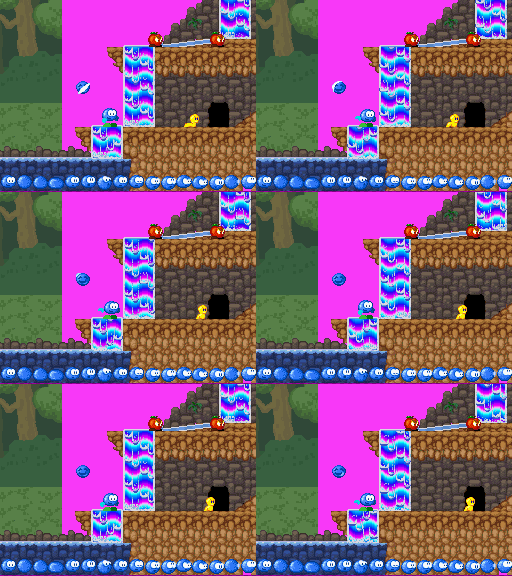
Raycasting ?

There's an awesome effect one can achieve once you have HDMA in a platformer: add depth to your background with "floors" like in DKC2 Lava lagoon. There will be complete occlusion of the 'far' background plane (wall) by the 'near' background plane (floor side), so having them scroll at different speed is 'just' a matter of updating X scrolling register at the right time. Having the floor positioned above or below the "seam line" between two walls is 'just' a matter of adjusting Y scrolling register earlier or later so that they 'skip' part of the far background art to show front background art.

The awesome part is that depth effect added with the horizontal planes, of course. That is about adjusting both X and Y scrolling registers and that will need maths to explain properly, using some pre-slanted texture as shown in the ripped contents of DKC2.

First immediate thought after I realised that it could be more than welcome in the pyramid level of Bilou's Dreamland was that it is actually an instance of the raycasting algorithm. Yeah, that infamous thing that turned ID software away from my beloved Commander Keen and sent them trashing the whole era of 2D platformers with first-person shooters. No wonder why, despite my affinty for maths and software optimization, I never ever felt tempted to code one myself. But hey, do it vertically instead of horizontally, and this is precisely what we need to decide whether to show floor, ceiling, wall or cut-through floor-to-ceiling structure.

So before trying to reconstruct the algorihtm that might have been used on SNES, let's see what it would cost us.
  • the background scene must be structured along a 2D grid. I'd say 64x64 pixels would be fine by me
  • For every scanline , we will have to step through the grid, one tile at a time, essentially checking whether one more "depth" step takes us farther than one "height" step in our case.
  • We need a direction vector associated with every scanline. That implies 192 square roots per frame, but hopefully, those computations are the same for every frame: they depend on the camera-to-screen distance and define angle used to trace through each pixel. They could be pre-computed even at compile time and stored in a look-up table.

So for every scanline Ys of the screen, (DDA) raycasting will give us a pair of (Zw, Yw) coordinates in the world that is shown on that scanline. Most likely, we don't want to compute the distance to Zw, Yw nor use that distance to adjust scrolling speed. Instead, Zw should directly be used to decide the scrolling speed. Well, unless we're on a horizontal surface, that is. Well, I can't help thinking this is overgeneral and overkill, despite übercool.
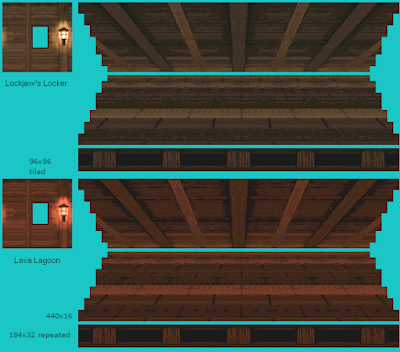
The trick in the SNES DKC2 implementation is that we have pre-rendered floors and ceilings. They already feature some depth-of-field effect. if you use them as-is. And being 440px wide, they're significantly larger than the screen (256 pixels iirc). Where does that 440 value come from ? Well, I guess this is screen_width + pattern_width, as the flat stripe shows a repeating pattern of 184 pixels. So whereever you are in the pattern, you can always have at least one full scanline ahead. The most distant line of the ceiling has only 96 pixels between two patterns, matching exactly the size of the tiled background wall. That means if the 'front' part is moving exactly at 1 pixel / frame, the tiled part should be moving at 0.52 pixel/frame so that Thales theorem is satisfied.

That size difference also tell us how far away the tiled parallax layer should be from the 184x32 parallax layer (and thus how deep the floor/ceiling objects are): they're as far from each other as the 184x32 layer is from the "camera"

  s16 xref = REG_BG1HOFS;
  s16 yref = (offset >> 2) % 192;
  s16 xamp = xref + xref / 2;
  s16 yamp = yref + yref / 2;
  int ytrigger = 224 - yamp;
  int btrigger = 192 - yref;
  int i, j;
  for (i = 0, j = 0; j < N; j++, i += 2) {
    if (j > ytrigger && j < ytrigger + 64 
|| j > ytrigger + 256) { data[i] = xamp; data[i+1] = yamp + 30; } else { data[i] = xref; data[i+1] = yref + (j >= btrigger ? 128 : 64); } }

That doesn't make the 3D-effect of DKC yet, but at least it gets me synchronous parallax with a single hardware layer.

Next step: find the zones where ceiling and floor should be shown. And there, trials and errors became too complicated to figure out. Hopefully, I found a way to analyze the problem with maths. Most of what's computed is derived from that "yref" value, which is normally the input from camera position. What I need to do is use that yref as horizontal axis and study how "triggers" that define top or bottom of areas evolve, cross and areas overlap appear or disappear. And once the (simple) maths were written, it took only half an hour to write the code to do it right.

With this graphics, that's the best I can do... let's see how it follows up once I have dedicated background.

Oh, and while I'm at it, there's a stunning online tool out there, to visit every map of every DKC SNES game: the DKC-atlas.


Sunday, May 28, 2023

special properties

While thinking at 'how to implement conveyer belts', I end up investigating some currently incomplete code in special blocks handling. They have correct implementation of their collision areas, but since the migration to the new tile types engine, they can no longer act as 'doors' because they all have the same cando() properties.

Au départ, je réfléchissais à "comment coder des tapis roulants" et je me retrouve à creuser du côté du traitement des blocs spéciaux: ils ont bien un support des zones de collisions, mais depuis le passage au nouveau format de maps, on ne sait plus les utiliser comme des "portes". Je m'explique.

Au moment de coder la démo 9-9-9, je voulais mettre un système "clé-et-porte": un petit bloc devait rester ... bloquant jusqu'à ce qu'on le touche avec au moins 9 pommes, auquel cas il disparaissait et devenait du "ciel": on pouvait passer. Mais pour faire ça, il faut qu'une pomme (à travers laquelle on peut marcher, tomber, etc) ait des propriétés physiques différentes d'une porte. C'est ce qui manque actuellement. 

Euh ... attendez. Non: on a déjà un scanf qui ferait ce qu'il faut ... reste à le tester. 

There's some code in the parser to change that, and some code in 'FlatWorld' to return BlockInfo::props when we encounter one ...

Wait ... BlockInfo::props is precisely what this last `siscanf()` updates ... so ... that means the code is not incomplete at all ? it just needs to be tested ?

Tuesday, May 02, 2023

A bit of shadow

Once upon a tweet, was a blog post about making dsgametools widget more readable and nice to use by adding a shadow to the default font. It was the youngest of the Todo family and its sibling would often make fun of it because it had the lowest possible priority for the project.

But then, on an idle day were the coder so tired he couldn't read a screen, though he had the Todo category open on his boox. "Well, why not" he thought, and he let our little Thumby Todo post jump over a blank page of his notebook.

It started sketching one letter, with its right and bottom empty lines of pixels, and split it in 3: Darkness, where light normally never comes; Highlights, where light might strike harder. And it turns out that if Highlights were to fall and the darkness picked up its power, then the letter would look all flat. And then the color that never changes, regardless of whether Highlights or Darkness is winning.

Bon, quelque part entre 2 scorpions, j'ai eu envie de creuser un peu cette histoire d'ombre pour les caractères dans les outils DS. Le mockup donne tellement mieux que mes captures d'écran ... en plus, ça se prête à merveille à un peu de programmation sur papier. Un petit schéma d'abord... puis quelques routines comme à l'époque du cours d'algo. Et puis j'ai fini par me rendre compte que chaque fois que je passais devant cette page-là dans mon livre-ordinateur cahier-agenda, ça réchauffait un peu mon coeur de codeur de penser qu'un jour, peut-être, j'aurais le temps d'essayer ça.

Very well, thought the coder, but I do not feel like hand-painting every 128 characters of the default font. Can we find a simple set of rules that, given a regular 1-bit-per-pixel font would deduce the 2-bit-per pixel font with highlights ? Yes, of course. And that's a perfect fit for bringing back paper coding.

Well, as usual, it then took a good deal of checks and debugging to find where that code should actually be invoked, what prevents it from working and so on. 

Et puis zut. On est dans un projet perso pour le plaisir, pas dans un projet-pro pour le client, donc au diables le Canban, les priorités, les milestones et tout ça. hg branch et voyons ce que ça donne... eh bien, ça donne bien. J'adore. Juste un hic: ça verrouille presque 40 couleurs de la palette utilisée par SEDS. Ou plutôt, dès qu'on charge un .spr qui utilise plus de 216 couleurs, l'effet est ruiné par un texte qui devient illisible. Parce que oui, j'utilise les palettes étendues de la NDS pour le moteur de jeu et pour presque toute l'interface graphique sauf pour le texte et ... pour le widget "palette" :-P

But there it is. Working. And even on emulator, the feel of it is just wonderful. And all it takes is some NES-glory palette swapping, where the text is moved from the 'interactive' palette with black shadow to the 'active' palette where 'shadow' is actually white and highlight has background color, as if the text had been pushed down by one pixel. Unfortunately, there's a price to pay: instead of 4 system colors, I need 40 of them (2 x 16-color palette + 4 on the 3rd palette). And so far, in SEDS, that means we can only use 216 colors instead of 250.

edit: but there is hope: SEDS is currently *not* using the multi-palettes mode (unlike LEDS) It likely wouldn't suffer from some extra system colors if it did. Converting AnimEDS sounds less appealing, because that has all its interactive windows on the 'main' screen rather than on sub-screen like older tools ^^"

Tuesday, April 18, 2023

std::unique_ptr<>

Okay, it shouldn't be that hard to have a variable that gives access to an object RAII-style while allowing late initialization: I should use std::unique_ptr

RAII is neat. Despite having an impossible-to-use-and-remember-name (don't be surprised if I use 'Rabi' instead ;), it means that you spend less time catching/rethrowing exceptions, less time checking return codes (because you used exceptions) and can think of your software as something as reliable as a building instead of some Jenga game. Want to have some code dealing with some file, but don't want to forget closing the file handle if anything goes wrong ? Simple.

  • have a RabiFile class that encapsulate your file handler
  • have the ctor of RabiFile do *everything* that's needed to be working on the file
  • have the destructor always going to a clean state.

As soon as you've written something like RabiFile music("forest.xm", RabiFile::RO), you're good to go

  • either your RabiFile exists and all its methods are now valid
  • or you failed to create it and an exception has been thrown, taking you out

So with that approach, you'll never write any music->open("underwater.xm") nor any music->close() anywhere. That makes writing of constructors a *bit* more complicated, I admit, especially those for objects that contains some RabiObjects: they have to catch exceptions and rollback any 'personal' resource acquisition they performed because nothing invokes destructor on objects that haven't been fully constructed. If your constructor fails with an exception, it's up to your constructor to ensure it leaves no mines behind.

But that usually don't happens a lot. It does happen when I stretch the RAII fashion to long-lived objects like GameLevel that has LevelMap and SpriteSet(s), or to GobState that has GobTransitions, though. But Rabi* is mostly for temporary things that need us to hold something while something else.

There's one common drawback to both, though. Because my objects have to be allocated on the stack to benefit automatic cleanup on failure, it is tricky to benefit from polymorphism. Say I should either create an instance that reads the script from a file or an instance that reads it from a buffer received over WiFi by runME ... I can't just replace BufferReader reader(...) at the head of my function by


loaderCode() {
   if (fromFile) {
       FileReader reader(whichFile);
   } else {
       BufferReader reader(whichBuffer);
   }
   DoStuffWith(reader); // no such reader, dude.
}

because there, the condition-dependant objects are no longer valid when I then want to use them. And migrating the DoStuffWith into the condition will soon turn unpleasant as well because it is not DRY. So instead, I can have


loaderCode() {
   std::unique_ptr<InputReader> reader;
   if (fromFile) { 
      reader = std::unique_ptr<FileReader>(new FileReader(...));
   } else {
      reader = std::unique_ptr<BufferReader>(new BufferReader(...));
   }
   DoStuffWith(*reader);
}

Granted, that will not allocate the object on the stack but at least it guarantees that the created object gets deleted whatever happens during DoStuffWit(*reader). Given the size of the NDS stack, it might not be a bad move.
Maybe I could have done it with auto_ptr instead. It seems it was the way to do it before C++11 came, declared auto_ptr obsolete and unique_ptr as being the way to do this instead.

A few things to remember when working with unique_ptr

  • you must use std::move(reader) if you intend to return the unique pointer as function value
  • you must use std::move(aswell) if you want to capture some unique pointer you've received as a member of a new uniquely pointed thing

  •  

Wednesday, January 12, 2022

Slopes Landed.

I think I got it working. There was one major flaw in my earlier design: stating that you can F_FALLTRHU a slope implied that you could no longer walk on it, as the walking controller tests for solid ground by checking whether it would be possible to fall down from the current location. Oh, not much. Just one pixel is enough to claim that you cannot walk anymore.

Là, je pense que je le tiens. Il y avait un défaut majeur dans mes premiers essais: considérer qu'on peut tomber à travers une pente en lui donnant la propriété "F_FALLTHRU" implique automatiquement qu'on ne peut plus marcher dessus: le contrôleur "walker" s'assure que le sol est solide en testant s'il serait possible de tomber à travers ... pas beaucoup: juste quelques pixels, mais si ça marche, ça suffit pour indiquer que marcher n'est plus possible.

Mais la technique utilisée pour les collision avec le sol (le "cando()") part du principe que on ne peut faire un déplacement que si l'entièreté de la zone concernée permet ce type de déplacement. On ne peut nager qu'entièrement dans F_WATER, on ne peut grimper qu'entièrement sur F_LADDER, etc. Mais donc un tile de type "pente" doit à la fois nous permettre de tomber à travers lui (au moins jusqu'à atteindre l'altitude du sol) et nous empêcher de commencer à tomber. Le seul moyen de réconcilier les deux, c'est de dédoubler le flag: avoir un bit indiquant "autorise le début de chute" (F_START_FALLING) et un autre "autorise de continuer à tomber" (F_FALLTHRU). Un pour le contrôleur de marche (walker), l'autre pour le contrôleur de gravité. 

But the technique used for terrain collision detection -- cando() -- assumes that we only do a move if we can do it over all the tiles covered during the move. That means the slope tiles should both allow us to fall through them (until ground height, at least), and not allow to start falling through them. To get that solved, I had to split the flag, having one bit telling whether we can start falling (F_START_FALLING) and one telling whether we can keep falling. Walker controller tests one of these bits, gravity controller tests the other one.

Then I had another issue, not properly computing the ground distance to see whether the move we cando actually remained over the ground. Let Bouli explain that...

We were at old position (ox, oy) and will move our 'hot spot' (the one that is kept in contact with the ground on uneven grounds) to (hx,hy). In order to know whether we're find with slope-landing, we compare hy - oy with the 'ground distance', which is construct with an appropriate sum of tile.groundheight() calls.

But groundheight() gives us a value relative to the bottom of the corresponding tile. -8 means the whole tile is solid. -2 means the first 2 pixels of the tile are solid, the rest is air. 0 means the whole tile is air. That was quite quickly remembered and accounted for. The other part to take into account is that the start of the darkblue 'vertical motion vector' may be anywhere within the first tile. If we're in the 4th pixel of the tile and the last pixel of the tile is solid, then only hy - oy < 3 are uninterrupted moves.

Mais ce n'est pas de ça que Bouli veut vous parler. Une fois le problème des propriétés réglé, il reste à calculer correctement la distance jusqu'au sol. Supposons qu'on parte d'une position (ox, oy) et qu'on veut déplacer le "hotspot" (le point qui doit rester en contact avec le sol dans une pente) en (hx, hy). Déterminer si on a atterri sur une pente, c'est comparer la distance hy - oy avec la distance jusqu'au sol, à partir des résultats de tile.groundheight().

Seulement, ce nous donne une altitude par rapport au bas du tile. -8 pour un tile entièrement solide, -2 pour indiquer que les 2 pixels du bas sont solides et qu'il y a ensuite de l'air, 0 pour un tile constitué uniquement d'air. Une fois qu'on a relu un peu sa doc, c'est vite traité. Par contre, le début du vecteur-mouvement (en bleu foncé sur le schéma) peut se trouver n'importe où dans le tile de départ. Si on est au 4eme pixel d'un tile dont seul le dernier pixel est solide alors seuls les mouvements tels que hy - oy < 3 pourront se faire entièrement.

Thursday, December 30, 2021

Color Cycling.

Being able to animate things just by changing entries in the color palette is one of the reasons why I'm loving old school programming that much. The amount of pixels you can affect with this technique with just a few memory writes has so much hex appeal! Yet, you wouldn't find anything animated that way in Apple Assault or in School Rush. Flowing ink could have used some, though.

Technically speaking, one key thing to fix to get it working with my setup is to ensure that the palette writes happen in a Vertical blank handler, and the other is that we bring the video memory holding the colors as freely-accessible video memory ( aka LCD for the Nintendo DS) while updating it, and then return it as extended palette bank.

So with all that coded, I could replace the lengthy 16-frames animation of the waterfall with just one static frame. And I have a comfortable homework to create as many tiles of flowing-wafer-slopes as I could need. I used a sort of "rainbow raster" to be able to draw those animations properly, which makes them look a bit strange in the level editor and in runMe, but I should be able to fix that by having the raster be on a secondary palette shot and a "static preview" on the main (and animated) slot.

Yeah, that's the major drawback: I don't see how to get it customizable from the level scripts by now, so I prefer keep it as some custom code running in Dreams.nds and leave runMe alone for now.

Là, je m'attaque à un morceau iconique du développement 16-bit: l'animation des palettes. Un truc que je connais depuis le BASIC mais que je n'ai encore jamais eu l'occasion de pratiquer sur DS (c'est dire si les petites animations sont à la traîne dans mes jeux DS :-P. Le principe ? les graphismes en mémoire vidéo ne contiennent pas directement des couleurs, mais des références à ces couleurs. Les pieds de Bilou seront faits avec la couleur n° 24 alors que sa main aura la couleur n° 79 et le blanc de ses yeux la couleur n°3, etc. Une partie de la mémoire vidéo est dédiée à retenir la correspondance entre ces numéros et les couleurs RGB à utiliser: c'est ce qu'on appelle la palette. Du coup, si vous changez une de ces valeurs, vous avez la possibilité de modifier simultanément une grande quantité de pixels à l'écran.

Une sous-catégorie de ces animations concernent les boucles de palettes. Vous n'ajoutez aucune nouvelle couleur, vous n'en retirez aucune non plus, vous vous contentez de les changer de place. du coup, un dégradé bien construit peut devenir un tapis roulant, une chandelle vacillante, une mare de lave ou une jolie cascade. (Mark Ferarri étant le champion de la discipline, cf. ci-contre).
 
If you look closely at the blue ramp between the two rightmost waterfalls on the gif above, you'll note that palette cycling is working there (backwards, but working). The waterfalls are still 'frozen' because I haven't applied my palette effect on the background layer yet. Oh, and if you wonder why half of the background is pink on those green zone captures, greenbg.spr is 32x32 and CommonMap expects a 64x32 map instead ... so half of it is 'blank'.

Mais pour que le chip graphique puisse pomper les valeurs de la palette assez vite pour tenir le rythme de l'écran, on doit régulièrement caser la palette dans une mémoire dédiée, avec un protocole d'accès un peu plus compliqué que BG_PALETTE[index] = rgbValue; C'était le cas avec le VGA, c'était le cas avec la SNES, c'est toujours le cas avec la Nintendo DS (plus simple à coder, mais pas forcément à expliquer).

Bref, ça marche, mais vu que ça ne peut se produire que pendant le 'temps mort' entre deux rafraîchissements d'écran, et vu qu'il y a cette histoire de va-et-vient entre la configuration où on sait écrire dans la palette (mode LCD) et celle où on sait l'utiliser pour afficher les couleurs (mode EXTENDED_PALETTE), je vais juste garder ça comme un 'petit extra' de Dreams.nds et vous aurez le fond des cascades statiques quand je ferai une démo IRL avec runMe. Vendu ?

edit: pour que ça tourne rond, j'avais eu besoin de me faire une petite map de où-est-quelle-couleur dans le code de la démo. Je vais reprendre ça ici aussi, parce que je me repose la même question deux ans plus tard et que twitter, hein ... on verra bien où il en est dans 2 ans.