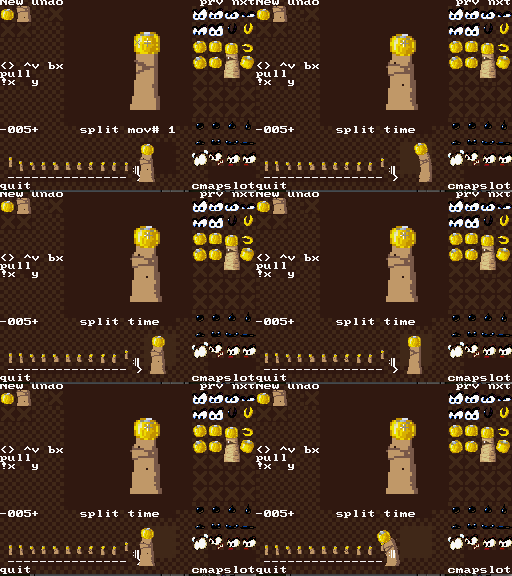
Showing posts with label walk. Show all posts

Saturday, August 23, 2025

Une pente qui tombe à l'eau

I had tiles that push you along a slope. They've been shown in the sands mostly, but more importantly, they've been tested in a setup where there's plain ground at the bottom of the slope.

Here, I'd like to use water falling down a slope as a way to implement a one-way region somewhere in a cavern of the green zone. But it didn't quite worked as intended. What makes Bilou slide down in such a setup is that a test-point queries the tile number under his feet and use that to look up a physics values array. But once you get down the hill, the hotspot gets in the air, and nothing finishes to push you out. 

Il y a sous l'arbre creux une sorte de pente rendue glissante par une cascade sous-terraine. Mon frère l'avait utilisée pour créer une sorte de sens interdit entre deux morceaux du niveau. Alors j'ai déjà des pentes, donc ça aurait dû être une simple formalité, mais comme vous l'aurez sûrement deviné par le titre, ça n'a pas été sans mal Premier couac: en voulant rendre ce "tapis roulant" plus rapide que les chutes de sable, je suis sorti des limites d'un tableau, ce qui a eu pour effet d'appliquer l'effet geyser à l'ensemble du niveau ^^".

Plus contrariant, une fois arrivé en bas de la pente ... rien. On ne tombe pas dans l'eau, on reste juste là, sur le rebord. Parce que c'est le pixel sous le *milieu* de Bilou (le "hotspot") qui détermine si on se trouve sur un tapis roulant mais qu'il faut qu'il n'y ait plus rien sous lui sur toute sa largeur pour qu'il commence à tomber. Je dois donc rajouter un autre type de tile qui pousse comme un tapis roulant tout en étant pas du sol.

So I added another tile that behaves like air and keeps pushing you as if you were on sliding ground and put them at the bottom of the slope, but even that wasn't enough to get it working. It would take you as far away from the slope as you want, but then, once your hotspot is in plain air, you'll stop, happily idling in the middle of nowhere.

The part I was still missing was the F_START_FALLING property to my new tile type, something introduced so that we could land in slopes properly by having slope tiles letting you keep falling into them (until the hot spot reaches the ground) but not start falling through them when you're walking.

Il restait un dernier soucis. Un couac lié à un changement plus récent et qui fait qu'après avoir bien emmené Bilou au milieu de nulle-part, il ne tombe toujours pas. tout ça parce que j'ai donné au nouveau tile possède bien la propriété F_FALLTHRU, utilisée pendant que Bilou tombe, mais pas F_START_FALLING utilisée pendant que Bilou est au sol pour voir s'il pourrait tomber ^^"

With that new bit set, we finally have it: Bilou keeps sliding until there's no solid ground, and there  it cando(START_FALLING) and ends up in the water :P

There's one odd thing going on with the way the water slide is made as a conveyer, though. Conveyers just move you and don't affect your speed, and that's on purpose. But that means that as you're running full-speed against the water flow (if you manage to) and decide to jump, you suddenly move in the air at top speed while you were almost idle on the ground.

Maybe I should mimmic Sonic's water slide and make a dedicated "woah! I'm sliding down!!" state for Bilou as well.

But even then, when Bilou is walking against a conveyer, it is natural that he's walking faster than he's moving ... against water, we all know there's a force slowing us down, so it'd make sense to see his animation slowed down and pixel-fitting its motion against the water ... which would mean acting on his speed rather than shifting his position ... Meditate on this I will. 

Thursday, July 20, 2023

class AppleWalls : public WallTest, UsingApple

So I had managed to get shell/walls interaction mostly fixed. I thought it would be wise to get it run 'unit tests' to ensure nothing got broken by the fix, but it would do more than a few seconds of tests before failing. In Walls/Walk test , a fairly recent addition to MapTests.cpp, for which I do not seem to have any commit where that test is a success.

The test failure will produce patterns such as

--(120,0)+<-508,0>:[-224,0]     's/7f.f, S/fe08.0, '
--(118,0)+<-512,0>     's/7f.f, S/fe08.0, '
--(116,0)+<-516,0>     's/7f.f, S/fe08.0, '

--(114,0)+<-520,0>:[-232,0]     's/77.f, S/fdf8.0, '
--(112,0)     's/77.f, S/fdf8.0, '
--(110,0):[-240,0]     's/77.f, S/fdf8.0, '
--(108,0)     's/77.f, S/fdf8.0, '
--(106,0):[-248,0]     's/6f.f, S/fdf8.0, '
--(104,0)     's/6f.f, S/fdf8.0, '
--(103,0)+<248,0>:[0,0]     's/6f.f, S/fdf8.0, '

which I, too, find cryptic. I should at least inform future self that they are from saved "last state" array, dumped on exception like assert failure during the test.
  • (%{x}, %{y}) is used to report new coordinates
  • <%{vx}, %{vy}> is used to report a new speed
  • [%{dx}, %{dy}] is used to report new delayed step

Together with the arena layout defined by walls1, it can start making sense. For instance, x=104 is the lowest valid position before entering the two-# "wall" of the upper platform, where the Gob-under-test is walking. Granted, this is arcane and confusing, and it would deserve a review fix even if it is only for me. Possibly even more confusing are the `s/%x.%x` codes reported between quotes afterwards. These are generated from ChiefInspector::report() call from the WalkerController.

  • lowercase s indicates that there has been a change of tile considered in doslopes(). hex values are the coordinates of the hotspot used to decide that.
  • uppercase S indicates that doslopes() reported we're on sloped ground. hex values are the speed defined during doslopes().

Even with that wrong report of sloped ground fixed, I still have my 'follower' capable of entering walls. It happens when we stop next to the wall, but do not cancel the 'step value still needed'. More investigation needed.

With some break getspeed and cond BREAKNO (x >> 8) < 105 && cdata[GOB_XSPEED] == -520 in an epic gdb session, I could trace precisely what happens, one GobController call after another, and how the speed, delayed steps and the like where further processed.

The issue turned to be linked to the 'maxmove computation', an engine feature added in 2020 that scans the animation commands ahead of think() calls, so that we don't ask doslopes() to check for something different than what we'll actually do, else the vertical move and the horizontal move won't match and we'll end up out of the slope. The code that decides what to do when we detect a move must be cancelled assumes that the motion debt stored in the 'delayed step' variable has already been validated by controllers. In case of failure, we're safe to move *at least there*.

That was true with the "school rush" engine, where it was helpful to ensure we actually get close enough to the walls for the testpoints to work as intended. It is no longer true if maxmove shortened some of it. How precisely this can be fixed still has needed a bit more time to be figured out.

PS: while looking for the 'inspector codes' in my 2020-notepad, I got my eyes caught by a character stating "this is contemporary to maxmove introduction"... The line below reads "hopefully, no need to tweak things (how many loops are allowed while processing animation instructions, btw) too much. All it takes is building an animation list with enough 'I_MOVETO(+1, *)' commands before it loops."

PPS: of course, fixing things here broke things there, but mostly because code was wrongly assuming that some things (like vertical position or FAIL counter)

Friday, March 11, 2022

Animating the Undead Cell


I admit one of the reason for playing Epic Mickey again was to see how they had dealt with the sands and desert things in the Agrabah level, but I was far from imaginating that it would unlock my animation issue for the UndeadCell. One of the ennemies we face in the game is a mushroom species that has level-themed variation.

J'avoue: une des raisons pour lesquelles j'ai rejoué à Epic Mickey, c'est parce que j'ai réalisé qu'il y avait là la meilleure version graphique de l'univers d'Aladdin, tout en sable fluide et pierres jaunes. Quoi de mieux comme source d'inspiration pour ma pyramide bilouteuse ? Mais je ne m'attendais pas à ce que ce soit le champi-turban qui me serve le plus de source d'inspiration.

Conveniently enough, the sprite table was available on the Spriter resource, but let's be clear: if you can rebuild the animation from the sheet, you're the original animator. But at least, there was one thing I could extract from it: the sine motion for the pot of the character and the fact that the 'hat' more or less follows the slope of the sine. Colors for the turban are h30s18v99, h31s40v87, h27s51v75, h29s60v62, h25s59v55, just in case I wouldn't be satisfied with the current ones.

So I tried to sketch that and it looked nice on paper. I redrawn it in my SpriteEditor and it looked interesting (although I couldn't loop 'walking' animations properly). Getting it to work in AnimEditor was a bit harder: you can lock a sprite in the world while you're animating the rest, but the undead cell has no thing such as a foot that could be locked and moved backwards (pushing the rest of the character forward) like dumblador had.

C'est que, voyez-vous, l'animation actuelle de la pile-momie est tellement peu concluante que je ne l'ai toujours pas intégrée dans le niveau-test. Mais ce champi mélange pixel art et technique d'animation "cartoon-ancestrale" qui me montre la voie à suivre. Je gribouille donc une sinusoïde qui servira de repère. Je note que dans leur animation, l'orientation et l'étirement du chapeau suit la pente de cette sinusoïde. Je fais de même.

Il y a encore une 'pose iconique' dont je veux m'inspirer: cette manière dont le personnage fait une courbe montante au moment de se redresser. Comme s'il se déplaçait en utilisant le poids de sa coiffe qu'il laisse d'abord tomber vers l'avant puis qu'il doit courir pour la redresser telle la pile de livre de Lagaffe.

Hopefully, while animating in SEDS, I made the character actually move within its 32x32 frame. Part of why it moves now is because I kept that, but scrolled the frame backwards so that the eye always remained at the same spot within the bounding box.


So here it is, in a "how it started / how it is going" sort of animation (from a file beamed before I could fix the forward motion). As you can see, it still need to be significantly polished, and I got barely any time to work on it this week, as my kid had to finish a show-and-tell for school.

ça me fait pas loin de 11 étapes d'animation pour la pile qui avance. de 32x32 chacune, mais bon j'ai 256K de sprites à ma disposition... ce serait dommage de faire le gripsou et ne pas en profiter à ce stade-ci.

J'ai du chipoter un peu pour trouver comment adapter le mécanisme de 'verrouillage de sprite' qui avait bien marché pour dumblador sur un personnage qui ici n'a pas de pied. Est-ce la bonne vitesse ? Bah, dans le pire des cas, je la mettrai sur du sable qui coule, et ça justifiera une vitesse plus élevée, hein ;) La voir revenir en arrière dans les premiers temps de son développement m'a donné l'idée que la vitesse d'écoulement du sable devrait être telle qu'elle reste immobile à contre-courant.

edit: ouaip. C'est bien beau tout ça, mais une animation qui "marche" dans AnimEDS n'équivaut pas forcément à une animation qui marche dans le jeu. En particulier, l'éditeur joue en réalité l'animation à la vitesse indiquée, forçant le déplacement correspondant. Le moteur de jeu, au contraire, asservit l'animation au déplacement. Ce qui donne ici une pile qui reste immobile un long moment puis joue presque toutes ses frames d'un coup parce que j'ai abusé du 'mov#1' et du 'mov#0' (enfin, je crois).

Monday, August 23, 2021

walking kritter

A large part of the 'walk' effort is to have characters' feet sticking on the ground while walking. It may not always be a good idea but I always grimace when I see walking characters half-sliding on the ground in games with no obvious reason. At least for monsters, it should almost never occur.

In my current engine, this is achieved by hints in the animation sequence about how much pixels the character would travel with the new frame. Animator code then ensures the game character has already accumulated that much 'deferred moves' before switching simultaneously to both the next frame and the next position.

Quand je fais marcher un personnage, j'aime généralement mieux qu'il soit bien ancré dans le sol. Ce n'est pas toujours forcément une bonne idée, mais les personnage qui donnent l'impression de patiner au lieu de marcher alors qu'ils ne portent pas de patins, ce n'est pas ma tasse de thé. Du coup, mon moteur de jeu est prévu pour des animations qui contiennent des indices sur le nombre de pixels (plutôt que de frames) à attendre entre deux images.

But checking the walk cycle for the 'Kritter' monster in DKC makes me realise that there might be an easier approach, in which the motion speed for the character is constant while its animation still features a 'natural' motion where it speeds up and down: just offset the monster graphics within the buffer. This might sound like advice from a nightmare from a one-hardware-sprite-per-object point of view, where pixels would have to be effectively shifted in video memory to accomodate for the partly-moved object, but for a SNES-like sprite that re-codes the relative OAMs positions with every frame anyway, it could be nice to have.

Now there's a catch: the hitbox for your character will move at constant speed and your graphics will not. That might be source of other (Infogramesque) collision issues.

ça a aussi l'avantage de fonctionner avec des cycles de marche qui ne sont pas uniformes. Les boîteux, les excessifs, les discrets ... toutes catégories de personnages qui viendraient sans problème peupler l'univers de Bilou. Et où regarder après un exemple de ce genre de persos mieux que dans la série Donkey Kong Country ?

J'avais donc repris l'animation d'un Kritter et choisi un point de référence qui devrait rester ancré au sol (un orteil) pour voir comment il se déplaçait de frame en frame. Chose assez intéressante: on est souvent autour de la même valeur de 5 pixels par frame d'animation, mais pas tout le temps. Et vu les faibles déviations, vu aussi que l'image doit de toutes façon être reconstituée à partir de plusieurs sprites hardware, on pourrait probablement ici avoir un game object qui avance à vitesse constante et avoir un léger décalage sur la gauche ou la droite de l'image par rapport à la hitbox. Attention quand-même à ne pas pousser ça trop loin sous peine de créer des situations infogramesques.

Sunday, April 12, 2020

Mekappleman

Le rythme 'confinement' me laisse paradoxalement moins de temps pour bilouter que mon rythme habituel. Malgré l'absence des activités de fin de journée des enfants, malgré l'absence de trajets en voiture. Entre les repas qui sont rallongés (intervention parentale oblige), les ballades de santé qui se transforment en promène-le-gamin, les mises au lit plus tardives et les débuts de soirées amputés d'un jt pour se tenir un minimum informé ...

Bref, dans tout ça, j'ai quand-même fait tourner un pseudo-dumblador sur le terrain simulé pour tester les pentes du nouveau moteur de jeu. Et je me suis retrouvé bloqué. Dans certains conditions, le code de gestion des pentes le fait entrer dans le sol plutôt que de le faire monter sur la pente. En cause, le mécanisme qui permet de 'mettre en attente' un déplacement le temps que l'animation soit prête pour un déplacement (qui peut être de plusieurs pixels d'un coup).

Some claim they can start new hobbies while they are covid-confined. I had a hobby already before, but not having to drive the car to the office and back doesn't really give me free time. Just more time tending the kids. But well, I still managed to find some time to have mecha-blador walking in virtual level and try new slopes for the revised game engine. Then I got stuck...

From times to times, slopes-handling code would makes mecha-blador enter the ground rather than climb up the slope. The cause turned out to be the trick allowing to delay a move until the animation could follow it (which may require we move several pixels at once). The tricky part is that dumblador animation mixes move-to and delay instructions. Trying to validate fixes in such conditions doesn't feel appealing, so I instead picked back the Appleman, who's walking animation is using only MOVETOs.


Là où ça se complique, c'est que le DumbBlador mélange ce genre de déplacement et des pauses. Difficile de s'assurer que les correctifs fonctionneront pour tous dans ces conditions. J'ai donc ressorti un personnage à l'animation 'plus simple', inspiré de l'Appleman.

J'ai aussi revu le mécanisme qui capture l'évolution des personnages, me basant sur l'idée que si ça ne t'aide pas à trouver les erreurs, ce n'est pas un unit test. Jusque là, testme BasicSlopesTests pouvait juste me dire que ça n'allait pas, et à quelles coordonnées le meka s'était arrêté. Le reste, c'était à faire dans le débuggeur.

Now, if I want it to be unit-tests like, it has to be useful to identify what goes wrong. So far, testme would just tell me at what coordinates the meka-sprite ended up. Everything else was to be done in the debugger. A new GameObjectState class can now collect information about how coordinates evolve and and what 'debug signals' controllers sent to InspectorWidget. Granted, $/ffff0001 is crude, but I can tell it is sent by doSlopes, which failed with (-1, 1) motion. It could actually be post-processed by a PERL script.

C'est un début, mais c'est clairement perfectible. J'ai donc un nouvel objet GameObjectState destiné à capturer tout ce qu'il faut savoir du meka pour les besoins des tests (à la discrétion du programme de test) et un ensemble de ces objets en guise d'historique (plutôt que 2 tableaux de coordonnées et un de vitesses). J'ai pu aussi intercepter les rapports destinés au ChiefInspector (relai vers l'InspectorWidget) et les capturer dans les GameObjectState correspondant. C'est un peu  
laborieux à décoder, mais ça devrait réduire tout de même le travail de mise au point. Par exemple ce '$/ffff0001' est émis par doslopes qui échoue un déplacement (-1, 1) et 'S/0' que GobWalkerController reprend la main avec des vitesses nulles dans les deux directions.

Wednesday, January 03, 2018

A dos de blador.

Mes taille-crayons, une fois en mouvement, font d'assez mauvaises plates-formes, en vérité. Celà vient de leur animation. D'abord (comme la plupart des animations de marche), elle va retarder certains mouvements pour consommer d'un coup 2 pixels de déplacement après être restée immobile pendant 4 images si la vitesse de consigne est d'1/2 pixel-par-60eme de seconde. Ensuite, parce que contrairement à Bilou, le déplacement de dumblador s'interrompt pour une courte pause avant de reprendre: non seulement ce taille est trop "dumb" pour mettre un pied devant l'autre, mais en plus, il lui faut un moment pour se souvenir de ce qu'il convient de faire pour finir le mouvement qu'il a entammé. Autant dire qu'il vaudrait sans doute mieux pour une "pile de dumbladors" de tomber d'un étage quand un des tailles-crayon se remet en mouvement plutôt que de jouer à rajouter des "selles invisibles" pour offrir quelque-chose de plus souple.

Non. Je préfère tenter maintenant de faire tenir Bilou sur un taille-crayon à l'arrêt. Et là aussi, j'ai du travail: il faudra veiller à

  • forcer une mise à l'arrêt complet au contact, puisque le contrôleur "stopper" sera court-circuité,
  • "détacher" Bilou de son support lorsqu'il saute,
  • compléter le contrôleur "onpath" pour qu'il provoque le détachement lorsque Bilou n'est plus par-dessus le chemin.
This has been a "known issue" since April 2014, and it still wouldn't be easy to fix it today: you can walk on a Dumblador (after stunning it) as if it was a platform, but as it wakes up, weird things occur that make Bilou slightly slip forward and eventually fall of the blador. Initially, it was also affecting stacked dumbladors, so I added a rule to "break" the stack as a blador wakes up.

The core of the problem comes from the fact that a carried GOB will adapt to the "moving platform"'s speed in order to give the illusion of friction, but when it comes to dumbladors, the speed and the effective motion quite disagree. First because - as with any WALKing GOB - the horizontal speed isn't constant, and second because I introduced a small pause between two steps for the blador, to reinforce the feeling of "dumbness". As a reminder, the GPath abstraction is as follow:

  • GameObjects have an 'onpath' pointer, which complements the 'attach' pointer (to a gob).
  • GobArea now implements the (horizontal) GPath API, returning always the same y coordinate, and checking that you're in the desired xrange.
  • 'Ap' in a gobexpression will attach the object to a "path" rather than to an object, the area that triggered the collision will be used to define the new path.
I gave path-capable engine a try back in february 2013, but that was nothing I could test. The idea was to support both NSMB-like angled mushrooms and (softly) swinging ropes. The current code with dynamic GPath comes from June 2013 and has still to be complemented with a controller that uses it.

It's all described and motivated in Walking on Platforms

Tuesday, August 05, 2014

Corner Case

Oui, voici *encore* Bilou coincé dans un mur. A mon avis, une sombre combinaison d'une animation de transition qui tente de suivre le mouvement avec le passage vers un état qui n'est pas sensé utiliser ce type de suivi. Dans ces conditions, difficile de se rendre compte de l'évolution de la difficulté du niveau au fur et à mesure que la vitesse de montée de l'encre augmente O_o.
Ce qui est curieux, c'est que selon le "contrat" entre personnages et contrôleurs, il ne devrait jamais y avoir un "déficit de mouvement" tel qu'il puisse m'envoyer dans un mur ...

Everytime I end up with a character in a wall is an annoying proof that my tools are still merely hobby things. I wish so much they were cleaner than this. I have a nasty transanim-with-selfmove combination that somehow allows Bilou to enter a wall on walk/idle transition that disappears as soon as those transition animations are removed. So let's have them removed at the moment and have their return as a "todo" item.
A more curious case, now: bouncing from the ground (thus moving up under gravity, but not in "jump" state) allows Bilou to slightly enter the ceiling. If I then turn to another state, I'll end up merged with the level once for all ... And not even David Herdeg could pull him out.


  1. Bilou atterit, il a toujours une vitesse horizontale et l'animation tombe/marche est activée;
  2. le DPAD est relâché mais avec son inertie, Bilou va continuer à accumuler des déplacements-en-retard;
  3. au moment où il passe de "marche" à "arrêt", Bilou fait un pas quantique vers l'intérieur du mur;
  4. une fois bloqué dans le mur, Bilou y reste.
  5. Si je retire l'animation de transition, le problème disparaît. 
Chose plus étonnante, alors que j'essaie de corriger quelque-chose d'équivalent lors du choc avec le plafond: Bilou qui rebondit *ne cherche apparemment même pas* à ne pas rentrer dans le plafond: au moment où la transition "rebond/tomber" se produit, Bilou est *déjà* rentré dans le mur.

edit: En combinant le mode pas-à-pas d'InspectorWidget avec les breakpoints de ddd, j'ai pu pointer que la vitesse est correctement annulée par GravityController: Bilou n'entrera pas dans le mur. Mais au moment d'activer l'animation utilisée pour l'état "idle" (puisque dans le cas "encastré dans le coin", le point-test indiquant une collision avec le plafond est resté inactif), la position de Bilou est remontée de quelques pixels pour qu'il "s'aligne avec le sol dans ce nouvel état où il prend plus de place"... Haha. La bonne blague. La vraie solution, c'est la vitesse d'impact verticale qui est négative alors qu'elle serait positive dans une collision avec le sol. Une correction qui a déjà été utilisée lors de la mise au point de la gomme sauteuse.

Tuesday, May 28, 2013

extractanim.pl

Maybe you wonder why, after two teasers on "the great walking pendat", you still can't see it animated ? Well, the thing is I still haven't got any competent animation exporter so far. All the previous animations from AnimEDS were either hand-generated from static snapshots, or screencasts from either AnimEDS in desmume or from the game engine.

But that screencast tool (byzanz-record) shows its limits when one wants pixel art-level animation, and not merely a gameplay teaser: it's introducing dirty pixels all over the place.

Voilà un moment que je vous mets l'eau à la bouche avec "mon crayon qui marche", et vous n'avez toujours pas eu droit à une petite animation. Pourquoi ? eh, ben parce que je n'ai pas encore d'exporteur d'animations. Je m'en suis tiré jusqu'ici avec des animations bricolées à partir de screenshots ou des 'screencast' convertis en .gif animés tandis qu'AnimEDS tournait dans l'émulateur desmume. C'était sympa, mais l'outil de sreencast n'est pas complètement convaincant pour du pixel-art: il a trop vite tendance à rajouter du dithering dans tout les coins et des pixels parasites.

Du coup, je reprends ma doc de Imlib2 histoire d'extraire les différentes images d'une animation en .png à partir de ses descriptions puis on construira l'animation dans un 2eme temps.

So I refreshed my brain with API of the Imlib2 library I used for spr2png a while ago and started a proper animation ripper for my own .spr file format. I plan to first build static frames in .png and let a post-processing step build an animation out of that. I bet swapping will be the most annoying feature to support.

Stay tuned ...

hmm ...

edit: Well, the tools have progressed, that's sure. I still need to hack support for 32x32 blocks, though. On the other hand, it's pretty screwed for the pendat: I used pencil tiles as a quick replacement for pencil sprites content, but that's not a valid approach in the game engine, and that isn't either for the extractanim.pl tool :P

But with the "apply change to this frame and all the following" button, replacing the page and recovering graphics is a matter of 5 minutes with the DS in hands ^_^

Comme vous l'avez deviné, le truc-machin en haut est tiré d'un des premiers essais de l'outil. Il a fait de son mieux, le brave, mais j'avais été pécher mes morceaux de crayons dans la spritesheet 'blocks' plutôt que dans une spritesheet 'sprites'. Et extractanim.pl ne charge pas les blocks, évidement. Heureusement, j'avais ajouté une option "appliquer les changements à cette frame et toutes les suivantes" dans AnimEDS, du coup j'ai pu corriger tout à en 5 minutes DS en main.

Tuesday, May 21, 2013

Animating with AnimEDS

AnimEDS place les différents cellulos (étapes -- ou 'frame') édités sur une ligne du temps. Plutôt classique pour un programme d'animation, me direz-vous. On peut décaler l'une ou l'autre étape d'animation pour ajuster le timing, mais surtout on peut "casser" un délai en deux en dupliquant l'image en cours.

The "split" button appeared in AnimEDS in early July 2012 -- that is, right when I started using the tool for real. It allows one frame to be split so that one can refine animation from keyframes, and it has been the key feature for almost every animations I created lately. I start setting up all the limbs for an "initial" frame, then copy into 3 to 5 key frames depending on the animation, and adjust position/sprite used by the different limbs to get something fairly close to what I'd have used with "traditional" animation. The result is more or less the 4 hightlighted frames on the picture.

L'animation du crayon soldat est assez longue -- 16 images -- et n'aurait clairement pas eu ce nombre d'étapes avec le moteur d'Apple Assault. Pourtant, il n'y a que 4 étapes-clé (mise en évidence sur l'image) qui sont celles que j'aurais eu tendance à dessiner sans AnimEDS. Vous noterez aussi assez rapidement qu'un grand nombre d'images sont très proches l'une de l'autre.

*Then* the magic "split" button gets into action. I insert between frame 1 and 2 a copy of frame 1, adjusting the delays so that the animation still renders the same, and I'm now free to add an intermediate step to increase the smoothness. This is where the "small crosses" depicting actual (white), previous (straight, greyed) and next (slanted, greyed) position of the current limb proves extremely useful, given that a "dynamic" animation usually implies that there's a lot of movement in a small amount of time, and then a lot amount of time where limbs are only moved by a couple of pixels.

En fait, pour donner un air "martial" au crayon, je passe le moins de temps possible entre deux états quasi-fixes "pied au sol" et "pied en l'air" (comme l'image 01). Par contre, pour éviter que ça ne se traduise en une animation saccadée, il y a un léger "temps de freinage": 3 étapes donc, ou le pied bouge d'un seul pixel d'avant en arrière. J'avais utilisé le même style d'approche avec la course de Bilou, et je crois que ça va devenir peu à peu mon style préféré.

Saturday, July 14, 2012

sprsplit.pl ; dumpanim.pl

SEDS, LEDS and AnimEDS use a dedicated file format: .spr, which is not very complicated, but specific to this project. The rationale is that, given the limited resources on the DS, I don't want to mess up with parsing or encoding of complex representation. I've got chunk of data, which have a given size and a given "type". This is how IFF files used to work back in the Amiga times, and I don't believe there is need for more over here.

However, with the toolset growing in features, hacking .spr files with an hex editor becomes tedious. A few weeks ago, I came up with two small tools -- sprsplit and sprmerge -- that can explode a .spr into one-file-per-chunk so that one could more easily e.g. replace a buggy animation with a sane one (from a previous file) without losing updates on the graphics themselves. Granted, a separate .anm file with the animations alone would have saved me the trouble :P


Bien: Bilou marche à gauche et à droite, escalade la règle, l'encre est animée et la "zone de collision principale" a fini de changer au moindre mouvement. Mis à part le côté 'bricolage' de la map et un nombre effrayant de messages de débug au démarrage, le niveau-test pour la school zone commence à devenir un brin plus propre. Dernier couac avant de m'intéresser de plus près aux "transanims": un à-coup dans la démarche de Bilou (alors que l'éditeur d'animation m'en fait un rendu parfaitement fluide ...)

Je sors donc un des petits outils développés dernièrement -- sprsplit -- pour "éclater" le fichier .spr correspondant en 'blocs logiques' histoire de repérer plus aisément l'animation qui cloche. Ensuite, un nouveau petit outil -- dumpanim -- va (enfin ;) me permettre de "décompiler" les commandes pour avoir la confirmation qu'une des commandes "délai 2 frames" n'a pas été convertie en "instruction pour l'éditeur d'animation" mais qu'elle reste bien présente dans les instructions adressées au moteur de jeu.

I've been one step further today, with a small "dumpanim" tool that present in a readable(?) format the content of an animation. It's crude, for sure, but less than mentally converting 0x2104fffe into UPDATE|COORDS|4|-2|-1 or 0x01000002 into CONTROL|DELAY|0x0002, etc. Here's how to make sense of its output:

  • :**=xxxx : this is a "definition", such as page numbers, box size, etc. They're only read once
  • .s?=yyyy : indicates that sprite #? should be changed
  • .c?=xx,yy : indicates that sprite #? should be moved to (relative) coordinates xx,yy
  • .m=xx,yy : indicates that the whole object should move by xx,yy
  • !dxxxx : indicates that we should pause for xxxx frames before going on with playback
  • !loop, !pop, !done : end-of-animation notifications
  • // : an annotation for the editor (typically, how to place frames on the timeline when only the movement of the GOB guides the playback speed).


Now that AnimEDS' export code is fixed, I have great walk animations. Huzzah!

Mais bon, assez ri: la maison a besoin d'un coup de pouce pour se ranger ... entre les chaussettes et dumblador qui se bloque dans tous les coins, je vais devoir ajuster mes priorités :P

The Slope Bug (maybe?)


That bug has been haunting me for a while. Since I introduced slopes, actually. Even in Apple Assault, it may happen that you remain "stuck" at the bottom edge of a slope, no matter how hard you press the DPAD. Jumping is your only way out.

As I was trying to figure out how to allow Bilou Compound GOBs to climb up and down the ruler, I've found something suspicious that would be worth some more investigations:

  • the "Walking" controller do not directly affect GOB's position. Instead, it updates cdata[STEPX] and cdata[STEPY] to indicate "how far away you should move";
  • when we have a "selfmove" animation for the state, these STEP* remains accumulated until we have a value higher than the one required by the animation (reading->_.mspr.dx, for instance)
  • climbing up slopes is allowed by realising that the animation does not provide a vertical move itself, but tolerates any vertical move you'd want to use. Some bits of .mspr.id control that.

Now, suppose your walker decides that you should move by -3,+3 pixels to follow a slope, but that your animation is only ready for moving by 2 pixels, you'll end up at -2,+3 and not at -2,+2 as you should. I haven't found out (yet) whether this is the real cause, and how that could lead to move Bilou into a wall (for instance), but it sure doesn't smell good.


fixed!

Tuesday, July 03, 2012

Tout ou rien

Ça être un rien plus long que prévu: il n'est pas possible de mélanger animation normale et composite pour un même GOB à l'heure actuelle: le nombre de sprites-membres et le décodeur d'animation sont fixés à l'instanciation en fonction de la première animation utilisée pour le GOB (son état initial).

Bilou's conversion to the new animation system has started. It's pretty funny and fairly fluid, although I failed to capture a decent video of it so far. It's still very buggy, I'm afraid.

C'est donc une grande partie du fichier bilou.cmd qu'il me faut mettre à jour, alors que AnimEDS n'est pas (encore) capable de "retourner" les animations lui-même.

Celà étant dit, dans l'éditeur d'animation, cette nouvelle démarche de Bilou donne franchement bien :)

Sunday, July 01, 2012

10: GOTO 10

To be honest, I didn't expected it to be that complicated to fix, with a lot of trials and source reading (on my shinynew Cybook) to figure out why the code behaved differently than I expected. But at last, AnimEditor is now able to set "sticky limbs" on the first frame of an animation as well, which in turn enables me to craft a walking animation for Bilou in the editor.

I took the time to document the thing a bit more, too. The trick is that I have two representation for the animation: the tlist that is a sequence of TIFrame at specified time positions. This is just perfect for editing, as each frame fully encode the state without any reference to past/future state. The game engine needs just the opposite: a list of commands that instructs it to move that limb, change the sprite used by this one, then move the whole sprite by x,y pixels and wait for 3 vertical refreshes. All these commands are encode()d into flat 32-bit integers that are easy to read and write to files. When exporting them, frames are compared and updates are generated when required. When importing, the last generated frame is copied after every delay and altered to reflect the new state. So far so good.


Bien. Voilà un deuxième point règlé dans ma "roadmap de l'été": je peux créer une animation qui déplace le personnage à chaque "frame", y compris entre la dernière et la premère image, lors du "rebouclage". Je vais (enfin?) pouvoir améliorer la marche de Bilou grâce à AnimEDS :) Ça ne fut pas aussi simple que je l'avais pensé, celà dit ... croyez-moi (ou apprenez l'Anglais :)

It gets a little more complicated with the "sticky limbs" thing. The editor needs to know which limb sticks at the same place on-screen. You do that by selecting one of the limbs on the leftmost "limbtable" and then pressing the "time/move" button just between the frame editor and the animation preview (highlighted on screenshot), which initially just reads 'time'. If you decide to move dumblador's sticky foot further to the right, dumblador will move faster, and if you move the foot closer to dumblador's body, it will slow down its walk.

At the export, the offset of the sticky limb compared to the previous position of that limb is used to generate a "I_MOVETO" command. Devil was in the details, as always: when should the information be cleared when reading back, how to handle the commands when a TIControl item is selected, and whether the additional I_MOVETO has to be stored at the end of the serialised animation or before all the other update commands.

Well, I got it more or less sorted out now. All I'll need is improve the walk animation itself and patch bilou.cmd so that it makes good use of it.

Sunday, May 20, 2012

FLITS again

Okay, let's keep tools-fusion for later on and focus on the impending walk of Dumbladors. I had them stepping blindly yesterday, and now, I'm trying to use the "walker" controllers (the one that can follow slopes and so on) to control them, so that they can be placed like Applemen rather than suffering woodworm-like bugs.

I had some more "FLITS" bugs, with dumbladors disappearing into the void of the toroïdal space (?) as soon as they hit a wall 0_o

The good news is that InspectorWidget was already much more capable than I thought, despite its cryptic user interface:

  1. (1) touch here to set a "breakpoint on bounding-box intersection
  2. (2) once a monster appears, click its "name" (2 first letters of BLador.cmd plus current state number) to give it the inspector focus.
  3. (3) click the coordinates of one monster to "disable" it from execution (or resume its execution).
  4. (4) click the focused gob's "name" bar to switch between iGobControllers display or cdata (GOB's private variable used in GobScript) display.
  5. (5) touch "p*" or "a*" to enable the rendering of collision areas.
  6. press L to step to the next frame (slow-motion) or L+START to resume normal play (with breakpoints active).

After fixing the "silly sunday bug" (giving a positive v0 speed for a state that moves to the left :P), I think I identified the reason why blador disappears: the "deficit" for step-based walk increases by v0 at every frame, but I also have "delay xxx" instructions in my animation, which makes the GOB to accumulate deficit move over time. When it comes to turn around, it is first "wrapped" to the place it's supposed to be (not very ideal)... and that happened to be off-screen this time ^^"

Thursday, May 17, 2012

Yeah! Blading time!

Wow. I had no idea it would go so fast! Less than 24 hours after the proper alignment of dumblador on screen, I can now have it walking around in a level. Many things remain, such as making it detect edges and turn around, just like applemen and woodworms. That will be a next level. Here's the updated AnimEDS for download, although I'm pretty sure it needs more feedback hints before it becomes user-friendly.

Eh bin !? ça n'aura pas trainé. Je sentais bien que je n'étais pas loin de "dumblador qui avance", mais de là à deviner qu'en une soirée, ce serait réglé dans AnimEDS et qu'avec juste 2 heures de plus dessus ce matin (dont un peu d'ajustement de sprites), je pourrai le faire avancer aussi dans le moteur de jeu ... C'est pourtant le cas. Chouette. Je vais pouvoir commencer à ajouter la définition des zones de collisions entre sprites ... ou alors je garde ça pour un programme annexe encore un moment ?

Monday, May 14, 2012

Voo have a problem

Okay, there was enough to do over the week-end to support an Internet service downtime, but it was still a pain to see that brand new Voo modem rebooting for 48h, completely out of my control, with only a few 5-minute window where I could commit some code to my svn.

Hopefully enough, one of my systems at home had a pretty freshly updated code base to work with, so I could fix those solid-box-definition issues and bring AnimEDS to a point where I can start toying with embedded movements... at last. Let's see if I can make dumblador actually *move* by the end of the week (and get that modem fixed, btw).

Wednesday, April 25, 2012

Blador stepping

Well, I've got dumblador stepping properly, but I still have a couple of things to fix before it can actually "walk" on the floor of the school zone. My next target will be to ensure it *is* on the floor, and not "hovering" as it currently is. That requires:
  • [MEDS] defining the desired "floor position" in the animation (and thus the size of the bounding box) - done;
  • [MEDS] possibly also define the (0,0) position of the gob, against which other elements are positioned - done;
  • [GEDS] make sure the game engine can accomodate with that parameter (it worked only with 16x16 and 32x32 so far, iirc)
  • [LEDS] allow auto-alignment of the GOB so that feet can be aligned on the ground.
Bien, j'ai mon dumblador qui apparaît dans la school zone avec son animation complète (et plus un demi-pas). Maintenant, reste à faire en sorte qu'il soit sur le sol ... puis qu'il marche sur le sol. Après avoir fait un petit tour dans le code, c'est essentiellement au niveau des "cando()" qu'on se sert des paramètres hbox, vbox. La zone de collision principale commence donc d'office en (0,0), et il faudra ajuster les coordonnées relatives des "membres" du sprites par rapport à cette zone, et non l'inverse. Du travail pour AnimEDS, tout ça ...

Tuesday, June 08, 2010

Animeds

As soon as I've got Apple Assault running and my level editor "repaired" so that we can toy with monsters despite the new "file-scope" state numbering, the next big thing I'd like to work on is the animation editor extension to SEDS.
So far, animation edition is pretty crude: you just push frames by clicking them on the sprite sheet, and you can't modify them afterwards. Plus, you can't save your work for later use in a game.


Le prochain "gros morceau" pour l'édition de jeux sur la DS, ce sera l'introduction d'un "véritable" éditeur d'animation. Enfin, dès que j'en ai fini avec Apple Assault et que LEDS est réparé, bien-sûr. Parce que si SEDS est déjà capable de donner un aperçu d'une animation, il faut bien avouer que devoir tout recommencer au moindre faux-pas est moyennement intéressant. Et qu'être incapable de sauver son travail le cantonne au rôle "d'outil de validation" pour les graphismes en cours.
Pourtant, le workflow de base restera le même: une fois qu'on s'est choisi la spritesheet avec laquelle on travaille, on ajoute des étapes à l'animation en cours en cliquant sur les sprites sur la droite de l'écran.

I've toyed with a lot of concepts around "animeds", which most likely explain why it's only 5% done so far. But this last one seems to work better. It keeps the basic of the current system (click a sprite to add it as a frame), but it builds a timeline representation where you can do additional manipulation. I used the animated apple bonus as an example:

  • click a frame on the timeline to select it
  • L-click somewhere on the time line to move it there
  • select another frame,
  • move it as well.
  • click the "time arrow" to adjust the whole animation duration (and scale delays of every frame accordingly).
And that's just for the basics. From then on, being able to store the animation list in the .spr file rather than being part of the .cmd file will be a major improvement in how I build new monsters.

Pour pouvoir gérer et retoucher tout ça, il faut que j'ajoute un widget "ligne du temps" sur lequel il serait possible de déplacer les étapes d'animation pour ajuster les délais. Accélerer et ralentir l'animation complète peut aussi s'avérer intéressant. "Historiquement", les animations sont stockées sous forme de commande texte parce que je n'ai pas voulu introduire de dépendance trop forte entre le moteur de jeu et l'éditeur. Sans doute une sage idée compte tenu des "condloop" et autre "move 2 *" qui sont venus se rajouter par la suite. Je ne vais donc certainement pas essayer de produire des GobAnims[] dans mes fichiers .spr, plutôt une version "lexèmisée" de l'animation avec une liste de constante et une liste d'instruction à traiter conjointement pour produire ces GobAnims.

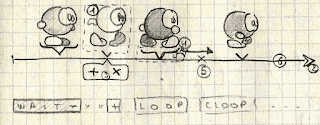
I also need the opportunity to duplicate/kill a frame ([+ X] buttons depicted below as (3)); undo a deletion (the little x at (5) can be clicked to summon a frame back to life)

The most challenging aspect, I guess, will be to include engine-related features such as conditional loops (loop the animation only if testpoints are satisfied), the use of "spatial timeline" rather than "temporal timeline" (yeah, that's an odd concept, but I don't see how to phrase it differently :P)

And then, finally, I'll have to include that so-long-delayed composed -- à la Rayman --animation that was present in the BASIC version ^^"


J'ai quelques idées pour avoir une représentation graphique efficace des opérations telles que "copier une étape, supprimer ou récupérer une étape supprimée", etc. Ce qui sera plus complexe, ce sera justement de prendre en compte les boucles (conditionnelles ou non) et les déplacements (en ajout comme en remplacement des délais)... Je me demande dans quelle mesure il serait possible de garder cet aspect-là dans le .cmd, tiens.

Friday, May 22, 2009

Moon walk ?

As seen in former post: Scripting Sunday:

TODO: moving Bilou through the animation isn't the right way to go. Maybe "delay x" in the animation sequence to have the next frame triggered only when we move to the next pixel would be better
Faire marcher un personnage est loin d'être une tâche facile et en particulier, ça demande une synchronisation parfaite entre le déplacement du sprite et son animation. Le moindre décalage et le joueur aura l'impression que le personnage "glisse" sur le sol au lieu de marcher. En clair, le pied en contact avec le sol doit rester au même endroit par rapport au sol jusqu'à ce qu'il se lève. Ce genre de défaut était assez fréquent dans les jeux de mon enfance (hein, Eric ;). Une manière assez simple d'y remédier est évidemment de faire courir le personnage, de préférence "à la supermario"

La solution que je pensais y apporter était relativement simple: intégrer les déplacements dans l'animation à coup de "move x y" entre deux images. C'est comme ça que je déplace le wooworm et ça réussit plutôt bien. Le hic, c'est de combiner ça avec une vitesse éventuellement variable et le test des collisions qui a été ramené dans le contrôleur (qui ignore tout de l'animation en cours).

I've never been satisfied by typical game-making animation tool that just let you define a constant moving speed (e.g. one pixel per frame) and an walking animation that you try to match that. It always gave me the feeling that the hero is "sliperring" on the ground or walks with rollers. I initially planned to fix this by integrating moves to the animation itself (i.e. 'show frame A, then wait for 2 frames, move by 2 pixels horizontally and show frame B'). That's how woodworm works, but i couldn't simply extended to Bilou's walk... Not until a friend of mine suggested that i could also delay the animation _until sufficient movement has been accumulated to 'hop' two pixels away_. Here comes the specific code that does that (only when the animation is "self-moving", which would be typical from ladder climbing, walking and other "friction-based" moves.

C'est Pierrick qui m'a donné la solution a mon problème en racontant comment du temps du CPC il faisait faire des sauts "réalistes" à son petit bilou en modifiant la durée d'affichage à chaque emplacement vu qu'il lui était impossible de placer le bilou (eh oui, c'était lui) entre deux tiles (pas de sprites en CPC basic ?). Plutôt que de chercher midi à 14 heures (du genre "modifier la vitesse d'écoulement du temps pour que Bilou coure plus vite"), j'ai juste changé l'interprétation de "move x y" en "ne passe à l'étape d'animation suivante qu'une fois que le contrôleur aura 'accumulé' le décalage suffisant. Traduit en code, ça donne :

inline bool trymove(int dx, int dy) {
    forcechecks=false;
    if (selfmove) {
        int cflags  = cast==HERO?F_PLAYERTHRU:F_MONSTERTHRU;
        bool notyet = (dx>0 && cdata[4]<dx) || (dx<0 && cdata[4]>dx)
                   || (dy>0 && cdata[5]<dy) || (dy<0 && cdata[5]>dy);
        if (notyet) return false;
        if (cando(dx,dy, cflags)==cflags)  {
            x+=dx; cdata[4]-=dx;
            y+=dy; cdata[5]-=dy;
            return true;
        } else {
            cdata[4]=0; cdata[5]=0;
            return setstate(state->dochecks(x>>8,y>>8,world, cdata));
        }
    } else {
        x+=dx;
        y+=dy;
        return true;
    }
}
  • selfmove est défini par état : true pour monter à l'échelle, false pour tomber, etc.
  • cdata[STEPX] et [STEPY] accumule les valeurs de cdata[XSPEED] et cdata[YSPEED] (vitesses définies par le contrôleur) en mode "selfmove" (normalement, on a directement x+=cdata[0])
  • trymove(dx,dy) est appelé lorsqu'une étape d'animation utilse la commande "MOVE"
  • condloop et check permettent de vérifier les testpoints sur des frames données (p.ex. quand le personnage a de nouveau les pieds au sol).
Voilà. J'avais envie de démystifier ça. J'espère que ça sera utile à l'un ou l'autre.

A pair of per-object variables (cdata[])will thus be used to accumulate some intended move until that "step" size becomes large enough for the move x y instruction found in the animation list. The trymove(dx, dy) tells whether such a move is possible right now or must wait until more motion has been accumulated.

edit: De manière étonnante, Miyamoto avait lui fait le choix délibéré, dès Donkey Kong, de casser le lien entre animation et déplacement parce qu'il jugeait qu'une animation de marche réaliste "ne collait pas à l'action frénétique d'un jeu vidéo" (l'Histoire de Mario, p.240)

2024 #choice reality check: It is still there, and I like how it makes many character feel like they're in contact with the ground. But let's be honest, it makes the code a bit more complicated every year. It makes it possible to have characters whose motion accelerates and decelerates over one step with a constant average speed, but offseting the graphics for a truly-constant-speed could achieve something similar, and that wouldn't even be complicated for a compound sprite. So there I am. Maybe this was not a good choice, but I haven't replaced it yet.

Monday, February 09, 2009

Scripting Sunday

Didn't quite got as far as i hoped in my "coding sunday", so it has rather be a "scripting - and - guru - meditation" sunday instead. Most has been done through state machine scripts or within Sprite/Level editor on the DS ... but some code will have to change. I cannot keep Bilou walking through walls or in the sky, can I ?

C'était un dimanche bien rempli donc, même si je n'ai pas vraiment coder autant que je l'avais prévu. Entre le bricolage de la machine d'état qui gère Bilou, les nouvelles animations et la construction d'un premier "niveau démo" avec les tiles que j'ai dessiné pendant l'année 2008. Pourtant, il faudra que j'y passe. Il y a quelque-chose de fondamentalement foireux dans le couplage "animation/déplacement" qui permet à Bilou de marcher à travers les murs ou dans le ciel ^^"

  • got the GameScript understand multi-set spritesheets (with one set for tiles and one for monsters all in the same file)
  • got Bilou walking animation done
  • bilou walks up/right, jumps and fall
  • sketched a little level for those new tiles i've been working on in 2008 ^_^
  • figured out that i'm still missing *many* tiles and a lot other tiles are unusable ^^"
  • fixed so weird memory things in libntxm, but i still have data corruption happening. Maybe a checksum of some internal arrays will help ... or replacing arrays with std::vectors somewhere ...
  • had fun with sprites on "mid" layer. Bilou can now hide within tree, so can woodworms :P
  • STill to do:
    • [done] testpoints should be checked at every frame, not just when the animation loops
    • [done] moving Bilou through the animation isn't the right way to go. Maybe "delay x" in the animation sequence to have the next frame triggered only when we move to the next pixel would be better.
    • [done] check my own code for things that might corrupt libntxm's internal state. (identified some memory leaks, but no buffer overflows or double-frees)
    • make sure we can see Bilou's feet on grass
    • [doc] let animated blocks work with "extra tilesheets"rather than copying sheets "as needed".
    • [done, leds] ignore extra sheets in the level editor (rather than just showing empty sheets)