Showing posts with label user interface. Show all posts

Tuesday, July 25, 2017

simplifions le HUD

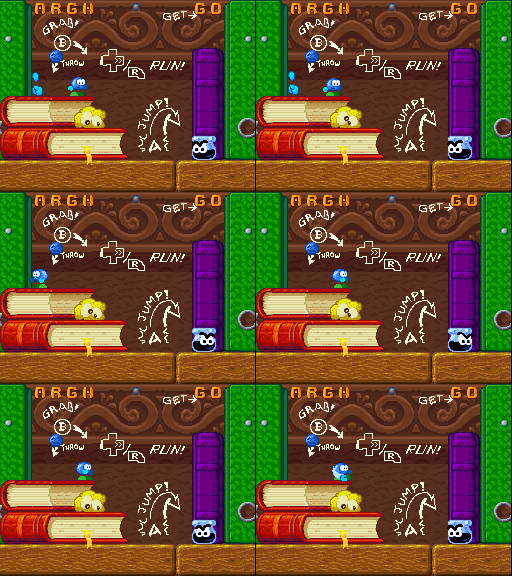
J'ai attaqué une révision du code de contrôle entre le moteur de jeu et l'affichage de l'écran du livre-magique. J'ai déjà remplacé les tests douteux sur des variables obscures supposés indiquer si on est sur le menu ou dans le jeu par une commande explicite "hud.mode=%c"

The code controlling the HUD logic deseperately needed some refactoring. It smells it has been written with a "oh, come on: this is just testing X and doing Y". As the rules for the game status display became more complex (different pictures for the menu, then custom behaviour for power-ups, then a complete different behaviour for the credits level ...

Je continue avec une simplification des relations entre "GameScript", "GameWindow" (qui s'appelle toujours CmdWindow parce qu'elle s'occupe des fichiers .cmd) et "Hud". Le Script et le HUD sont maintenant créés avant le chargement du niveau, le "setup" qui permet au HUD de savoir quel objet est le héro, où sont les compteurs, le score, etc. se produit explicitement lors du dernier "end"

So I started with making the behaviour of the HUD explicit through hud.mode=xxx in the scripts -- since both menu, credits and game levels are separate scripts. Then I refactored the way the HUD is constructed and linked to the GameScript so that parsing hud.show "xxx.spr" can lead to some Hud::showScreen() although the HUD isn't ready to run its play() function yet (i.e. because it doesn't know the pointer to Bilou's state and to game stats, which will be taught by the GameScript through the Hud::setup() call).

Once again, all this was made possible thanks to doxygen-on-cybook where I could annotate code with refactoring thoughts until I was ready to sketch the desired behaviour as UML. Once this is done, I'm ready to code it in small chunks, one evening at a time.


Enfin, je suis prêt pour un 'hud.show "somefile.spr"' qui me permettra de raconter une petite histoire sur l'écran du bas avec une image différente pour chaque niveau.

Saturday, July 08, 2017

Loading Chaos

Il y a environ 2 ans, quand j'ai reçu le commentaire d'Eric sur School Rush, j'étais en pleine tentative de changer radicalement la manière dont fonctionne le chargement des niveaux dans GEDS. Malheureusement, rien ne se déroulait comme je voulais. Du coup, sa remarque

Pourquoi le chargement des niveaux est aussi chaotique ??
est un peu restée en suspens. Je ne savais pas vraiment en faire grand-chose.

Remember Eric's comment that level loading felt like chaos? I haven't addressed it so far, partly because when he mentioned it, I was struggling to improve the way levels are loaded with libgeds. Meanwhile, the reason for which I wanted improved levels loading (a power-up shop) vanished and the chaos got hidden by "black curtains" (actually, the "window" feature of the NDS hardware). But loading time was still excessive and nothing happens while loading.

Entre-temps, le projet de "marché au bonus pendant les temps de chargement" est passé à la trappe en faveur d'un niveau-à-vies/power-ups. Le chaos du changement de niveau (en partie dû au fait que j'aime bien savoir si les étapes se passent correctement en phase de développement, j'avoue) est masqué par un "rideau noir", mais le temps de chargement, lui, est toujours aussi long.

En relisant son commentaire cette semaine, juste après avoir ajouté une "page-de-livre magique" supplémentaire, je me rends compte que l'écran du bas (le livre, donc) ne subit presque aucun changement pendant tout le chargement.

I reached that comment again this week, right after I took some time to have a custom "bottom screen picture" for the "credits level" and then realised that the bottom screen remains mostly unchanged (although completely hidden) while we're doing a lot of chaotic stuff on the top screen as result of the level loading. So If I want the player to get some info about the story, or tease/teach him, the bottom screen could do the job.

En haut, tous les graphismes sont re-chargés, puis la nouvelle map est mise à l'écran, puis -- seulement quand tous les scripts ont étés traduits en machines d'états et tous les personnages positionnés -- on peut positionner la caméra dans le niveau à l'endroit où doit commencer l'action.

Mais en bas, rien ne se produit jusqu'à ce que le niveau soit déclaré "prêt". Je peux donc repêcher une des illustrations qui servaient à présenter les niveau de difficulté et les donner en pâture au joueur -- peut-être avec un message adapté à sa performance (première arrivée dans le niveau, première raté dans le niveau, dernière chance). 

So I crafted a small prototype, that shows one of the 'difficulty selection' pictures and hides it just before we're about to show the "let's play" pages of the HUD book again to resume playing. Now that this is satisfying, I'll have to think about a few more pictures (one per level) and some messages.

J'ai un premier prototype pour ce genre de chose. Afficher l'image au moment où on commence le chargement, c'est facile. Je dois maintenant retrouver dans la séquence "démarrage du niveau" le moment où le niveau va démarrer de sorte qu'on puisse éviter un "glitch" du genre "la page de chargement était affichée, la page de jeu s'affiche un instant, puis l'écran devient brusquement noir avant de se rouvrir sue la page de jeu". N'est-ce pas, Eric ?
  • [done] glitchless showScreen() while loading.
  • [unplanned but done] refactor so that "hud.mode" is defined through script
  • [unplanned todo] refactor so that showScreen is called from "hud.load/show"
  • [done] adapt the picture to show to the level we're in
  • [>>>] adapt the position to show to the lives we have (for specific messages)
  • [done] make it tell the story of the game

Monday, August 01, 2016

Climbing level and end-of-game

  • [don't] don't insist on players grabbing "GO" to start playing. Pressing START anytime on the menu screen should work as well.
  • [done] update LEDS so that it crops out-of-boundary monsters when saving -- that should be easier than at loading.
  • [done] unit-test SEDS components and figure out what corrupts .spr files when editting
  • [need] show number of lives and grant an extra life every 100 letters.
  • [need] update build system so that the same controllers and 'guns' code can be shared by runme and games.
  • [wish] Tease players with CJ's "hurry up" theme
  • [done] implement pictures when the last level is beaten to support some story - or show it through some other mean.
  • [done] update libgeds so that GOBs freeze/restore also react to the vertical axis
ps: oops that shouldn't have evaded to the Web so early :-P Well. You may remember I wrote once that I'd like School Rush to conclude in an ascend-the-tower like level. There are a couple of technical barriers before I can integrate that, but none should be a major issue.

Eh! Un post échappé. Mais rattrappez-le! Rattrappez-le! Rhaa! mais ils sont tous en train de courir après des pokemons ... Bon bin c'est pas grave. Voilà: je mettrais bien un niveau grimpe-jusqu'en-haut pour conclure School Rush. Il y avait quelques bricolages à terminer avant de l'ajouter pour de vrai au jeu (bon, puis il faudra que je le construise, évidemment). J'avais commencé une petite "toudouliss" pépère, et j'ai dû cliquer sur "Publish" au lieu de "Save" malgré la différence de couleur.

edit: petite idée qui m'est venu comme ça pour la séquence de fin: Bilou retourne gentiment vers la gauche d'où il vient pendant que l'encre redescend assis sur une éponge qui flotte. En chemin, on voit des "recto/verso" calmés qui font la sieste, des dumbladors rassurés qui peuvent enfin rejoindre les leurs, etc.

Sunday, July 17, 2016

Riding Hints

Riding spongebops is not really a primary move in School Rush but still, it is important to know about it if you want to master the game. I managed to fit one more hint picture for the "magic book" on the bottom screen.

It was a bit more complicated to got it working this time: I needed a timer within the Hud so that we fall back to another hint when we stop bopping on a sponge. But as soon as you realize it is not the job for Bilou's state machine, the problem almost solves itself alone.


Si j'ai bien fait mes calculs, il est possible de terminer School Rush sans jamais avoir besoin de s'accrocher à une éponge. Celà dit, pour celui qui veut aller plus loin que juste "avancer dans le jeu" et a envie de devenir un Maître Bilou, savoir qu'il est possible de s'accrocher aux éponges est indispensable. Voilà donc une petite image supplémentaire pour le livre-interactif qui se déclenche lorsque Bilou rebondit sur une éponge.

Je voulais que l'image disparaisse automatiquement quand on aurait plus besoin d'elle. Ça aurait pu être quand Bilou retombe au sol, par exemple. Mais en fait, vu qu'il peut y avoir autant de rebonds qu'on veut et vu le nombre de variante pour "atterrir" qui existe dans la machine d'états de Bilou, le mieux c'est finalement que le retour à l'ancienne image soit géré directement par la classe HUD.

edit: that yellow mark on Bilou's head is the first step towards temporary sparkles when Bilou grabs a power-up that is now completed.

Wednesday, June 22, 2016

Next steps

  • [done] sound effect for airgrab = sound effect for grab
  • [done] import fixed maps
  • [done] hint page for "hold B to grab sponge"
  • [wish] keep easy/normal/hard text during the whole menu session
  • [done] allow up/down to select the difficulty level during menu session
  • [done] sparkles or something when you get a power-up.
  • [done] colors matching for FLOAT power-up on both screens.
  • [done] make sure the number of Punch power-up shown on the "book" are accurate.
  • [done] get rid of the ARGH letters and dever's power-up on the main menu.
I believe when I got this sorted out, I'm ready to tease VIP players with my little game. But I'll have to proceed gently, one tiny step at a time or I'll be exhausted before the official summer break starts.


18/7: I got the sparkles thing done.
On s'approche, on s'approche. J'ai pu rassembler quelques derniers points à travailler sur School Rush lors d'une petite session de tests avec mon frère et la S-Team. Je pense qu'une fois tout celà traité, je serai prêt pour une release à montrer aux ténors tels que Kirby Kid, Eric Zmiro et le joueur du grenier. Celà dit, je vais quand-même y aller en douceur histoire de ne pas me retrouver à nouveau dans un état d'épuisement où je ne parviens même plus à lire les posts sur les forums quand je passe dessus ...

Saturday, May 07, 2016

The lifemark


Allez, je vais tenter d'enchainer sur l'implémentation de la marque-ta-page-de-vie, parce que tout de suite, c'est moins utile quand l'illustration pour le 'punch' se fait manger à moitié dès qu'on prend un seul coup ^^"

Puis un peu de débugging, parce qu'au retour sur le menu, mon bel écran se fait cacher (pas de tile transparent sur les écrans de menu) ... donc je dois utiliser la version "normale" de desmume pour afficher/masquer les calques en cours de jeu (j'utilise d'habitude desmume-cli, la version sans interface utilisateur)...

Two great news. First, I'm almost done with that new life meter for Bilou: School Rush. The old "black rectangle" display mimick'ing some raising ink really doesn't work anymore with the gameplay hints on the bottom screen.

Second -- that happened as I tried to move a (regular) desmume window: looks like the full-fledged version of desmume (0.9.9) is now featuring a scaling filter that reconstruct curves from pixel images. And it behaves reasonably well with my pixel art.


Et là, surprise: desmume intègre maintenant un système pour agrandir l'image, avec du lissage qui donne plutôt bien dans le monde de Bilou.


Thursday, May 05, 2016

Its all sketched in the book!

early bugs to be caught.
Don't you dare thinking I'm using the BmxExcuse to pause School Rush development near completion once again. Here's the proof: a few more lines of code (with plenty of hard-coded magic values to bridge with the game logic and assets, I confess) and I get those illustrations on the bottom book updating as Bilou gets and loses power-ups. Even better: as she picks up bladors, the player is hinted that she could throw them at pendats, which is the way to get power-ups. 

Now all I have to do is to switch to that bookmark-health-bar because the raising black rectangle ridiculously obscures now-crucial gameplay feedback.

N'allez pas vous imaginer que j'utilise une autre excuse-de-BMX pour ne pas fignoler School Rush! J'attendais juste un moment un peu plus calme où je ne serais pas occupé à faire des trous dans les murs. C'est tout. Et nous y voilà justement, avec un sympathique changement d'illustrations pour guider le joueur dans son aventure et le renseigner rapidement sur les mouvements possibles.

Tuesday, May 03, 2016

HUD layers

Cette fois-ci, il faut que j'attaque le gros morceau du livre-interface: les images qui changent au fur et à mesure du ramassage de bonus. Les voilà prêts à être utilisés sur des calques hardware séparés pour qu'on change indépendemment l'illustration de gauche et celle de droite.

N for new tiles in hud-bg-none.spr
I had built complex plans and sketched VRAM usage layout to enable dynamic illustration updates as Bilou gets power-ups. And it all turns needless because they actually fit altogether on the 1024 tiles allowed on a tileset. That's better, because otherwise, enforcing a single palette in all the individual .spr could have proven complex. The only thing that could need a tileset update would be to replace "hud-bg-none" with another background book image, for instance as you collect puzzle pieces that give you gameplay hint (in easy mode only, ideally).

Sauf qu'en fait ce découpage se révèle totalement inutile: l'ensemble des 6 images totalise moins des 1024 tiles autorisés (de justesse) donc elles peuvent être encodées en une seule fois. En fait, elles doivent être encodées simultanément sinon, il va y avoir un problème de palette... Par contre, si je veux remplacer le "livre vide" (hud-bg-none), je devrai veiller à faire plus simple que le texte.

Le changement d'illustration pourra donc se faire simplement en reprogrammant (voire en scrollant vers) le bon morceau de la "map HUD", mais le tileset, lui, pourra rester constant.

Saturday, April 09, 2016

School Rush "Fish16"

https://sourceforge.net/projects/dsgametools/files/demo%20games/SchoolRush-Fish16.zip/download 
Here we go: the long awaited update on Bilou: School Rush game. Still only 4 levels, polished gameplay, improved menus for easier difficulty selection, and last but not least, improved software stability. I also fixed a couple of issues with level maps, esp. in level 2 that still featured a few excessively difficult things. More about that later on.
  • A : use your feet (jump, stomp, float)
  • B : use your hands (grab, throw, pick up, punch -- double-B)
  • R : run (or kirby-like tap-press the DPAD) 
Don't hesitate to have a look at the instruction in the former release if you need additional help to run the game.

Enfin! Une version stable avec gameplay, niveaux et menu amélioré. Cette fois, tout le monde devrait être capable de sélectionner la difficulté (c.à.d. la vitesse de montée de l'encre) qui lui convient. Alors faites-vous plaisir, et essayez cette nouvelle version de School Rush!
  • A pour les pieds (sauter, rebondir, planer)
  • B pour les mains (attrapper, ramasser, lancer), double-B pour le coup de poing (si on l'a).
  • R pour courir (ou alors, à la Kirby, avec un double-coup de DPAD).
The next BigThing (tm) is to complete HUD (or should I rather stay the status screen ?) and give better feedback to the player about available abilities like floating or punching. I thought about dust clouds, sparkles, palette blinks and many others, but given how tight I am currently with the spritesheet, something simple could be preferred. 

Pour la suite, il faut que je complète l'écran du bas, qu'il donne une idée claire de la vie restante, des power-ups, etc. Ce serait bien aussi que le joueur puisse "sentir" s'il a tel ou tel power-up sans quitter le jeu des yeux. J'ai déjà listé quelques possibilités, mais je crois que c'est à travers l'animation de Bilou que je peux faire passer ça au mieux... d'autant que ma planche de sprites -- en plus d'avoir à nouveau des clusters-croisés -- est méchamment remplie.

C'est vrai quoi: ça ne fait pas très sérieux, Bilou qui reste tout souriant à nous regarder alors que le crayon lui fonce dessus. Quelque-chose d'un peu plus street-fight-esque pourrait faire passer l'idée que oui, on a bien le punch-power là maintenant.

Watching the animations of last month, I figured out that something was missing with the ready-to-punch one: Bilou is waiting for pendat to approach and is ready to punch. Yet, he's looking at us, smiling and stancing rather than "feeling the tension of the imminent release of his super-power". I thought it would work better if the idle stance was adapted to this situation, and it could convey to the player the information that "yeah, you've got the power to punch, right here, right now" much better than any random sparkles could do.

Oh, and before you wonder, that's "Fish" because French-speaking people say "poisson d'avril" instead of "April fool".

Je brûle d'envie de faire essayer ça à Kirby Kid, Philippe Dessoly et Eric Zmiro, mais il manque encore ces quelques petites choses qui produiront une meilleure prise en main. A bientôt.


Thursday, March 10, 2016

Le livre qui dit tout...


Aah... enfin un moment pour transférer ma version du livret-qui-donne-des-indications-au-joueur. Qui serait bien utile au joueur occasionnel, si j'en crois un célèbre vendeur de bateaux des Caraïbes.

Il faudra aussi que je pense à une version qui rende le choix du niveau plus intuitif. La version actuelle est tout simplement inutilisable à moins de savoir exactement comment ça fonctionne.

Once upon a tile, I was drawing some background for the user interface and "head-up display" of School Rush. Tonight, I could beam them to my laptop, and build a mock-up of what it should look like once in-game.

Thursday, September 10, 2015

Pixel! HUD

J'avais été complètement charmé par "Pixel!" d'Arkedo. Le style graphique rétro mais parfaitement lisible, l'humour par les graphismes et les petites musiques chippy... N'ayant pas de PS3, par contre, je dois me contenter de l'étudier de plus près via youtube.

I hope you have a PS3. Because if you do, you are able to play arkedo's Pixel! game. In addition to its marvelous look, I want to point out the way the developer hint the player about a SHOOT ability that you earn by stomping monsters. You may easily miss the way the red gauge fills up, but what will not miss is the moment where it gets full, as it starts pulsating, turns yellow and produce little sparkles.

That's not only drawing your attention: that's also designed to make you feel the urge to press the Y button on your gamepad, as all of sudden, a button-shaped icon appears and gets animated with "press"-style motion while the icon of your cat animates as well.

I find it efficient, engaging and fun. I wish I had the idea to bring something like that for Apple Assault, and I'll have to look for something similar in School rush.


Un élément du gameplay de Pixel!, c'est que chaque rebond sur un monstre remplit un peu votre barre de Meeow! (en rouge, à côté de l'icône de votre personnage).
http://38.media.tumblr.com/251dfd1f0284f7e2e1aa618ab2a181f3/tumblr_nbxrwkx5CO1tliyz4o5_r1_500.gifCe que je trouve particulièrement réussi, c'est la transformation que cette jauge subit quand l'action MEEOW! devient disponible:
  • la couleur change, et passe au jaune
  • la barre "pulse" et brille avec des petits pixels blancs
  • l'icone s'anime
  • un rond représentant un des boutons de la manette apparaît et est animé pour montrer qu'on l'enfonce.
Bref, tout est là pour indiquer au joueur qu'une nouvelle chose est devenue possible... ça aurait très bien convenu pour les "shurikens" de Apple Assault.
Je dois maintenant réfléchir à quelque-chose de ce style pour les power-ups de mon School Rush.

Sunday, July 05, 2015

Design Stories by Juicy Beast

Lately, I've been reading through the posts relating the design of "Toto Temple" by Juicy Beast studios. I especially focused on "Designing a “playable” UI that secretly teaches how to play" and "evolution through iteration" posts, in which the author meets my own "no tuto" guideline.

In their game, going without a tutorial phase means that anyone can easily join the game (a 4-player catch-the-flag) without having to be taught the rules first. Because they're doing play-testing at conventions, it also means that people can play together without requiring a "game owner" to explain them how to play.


Ç'aurait pu être la couverture de la "gazette de Bilou 2015" si on était pas en pleine canicule. Je n'ai plus de google reader, mais mes contacts twitter m'apportent de temps en temps une chouette lecture malgré tout. Merci à l'équipe de Juicy Beast qui a pris le temps de quelques articles sur la conception et l'évolution de leur jeu "capture-de-drapeau" au thème sympathique, réalisé dans Unity tant bien que mal et qui rejoint mes propres tentatives de design sur l'organisation des menus.

Ici aussi, les actions du menu sont en réalités commandées par le personnage. Pas de curseur abstrait ou de cases à cocher. Mais les développeurs de Juicy Beast vont un cran plus loin en s'assurant que le joueur aura été confronté aux mécaniques principales de leur jeu avant de se lancer dans l'arène.

Coming this summer on OUYA, Xbox 360, WiiU, PS4 and Steam.
Another interesting similarity with my own games so far is that they dropped abstract menus-with-cursor in favour of a game interface where everything (selecting your level, teaming up, etc.) is manipulated with the game's own controls. Stickers on those screen will tell you to use X+<=> to hit the next/prev level buttons, for instance. Meanwhile, you can hop and dash just like what you'll do in-game.
 
PS: I've also read through the more "technical" posts on platforming. They were essentially working around oddities of the collision engine of Unity and detailing how the "raw", analogous input of the directional mushroom are converted into impulses through pre-processing rules such as "if the mushroom gets at rest while we're approaching a cliff, let's step on the breaks and avoid falling". ...
That sheds (yet) another light on those thousands of lines of code just to control the behaviour of Rayman (Origins).

Thanks for sharing, Alex. ^_^

Monday, July 14, 2014

pinky LEDS

I've spent too much of my hobby time trying to figure out why one object of my levels didn't work as expected, partly because properties were only encoded as obscure quadnary codes in the level editor. Now, I can give a nickname and a cpc-like SYMBOL statement to illustrate the block behaviour. Whenever a 0-3 special tile is found, the editor will investigate the surrounding tiles for a 16x16 full-block with all special properties, decode the quadnary value and retrieve the corresponding symbol. I thus have pink-ish 'plus' for bonuses that will work in-game, waves for ink, triangles for spikes, etc. At the moment, I still have to encode them with 0-3 tiles and will get the confirmation that they're properly encoded only when moving the screen around. I have plans for better than this, but the first step-stone is in place.

Voilà donc le premier pas vers un nouveau mode d'encodage des blocs spéciaux: chaque bloc peut se voir assigner un "symbole" (façon CPC basic) qui apparaîtra dans une jolie (?) couleur rosée lorsque l'éditeur fait le rendu du niveau. Il faut toujours faire l'encodage "à la main" (c'est même un peu plus délicat que précédemment, puisqu'on ne peut plus loucher sur les codes existants :P) mais dès qu'on déplace la vue, l'éditeur nous confirme que les règles du moteur de jeu ont bien été respectée (numéro de bloc spécial connu, un bloc tout entier a été utilisé, etc.) ... et le petit symbole pointu ne laissera plus de doute sur le fait qu'on a encodé un picot et non pas une fin de niveau ou un bonus.

Ce n'est qu'un premier pas, mais comme ça, je peux enfin trouver et corriger le problème d'interaction avec les taille-crayons dans le "niveau de *deline". J'espère pouvoir du coup aligner 2 ou 3 autres niveaux-courses d'ici la deadline de la neocompo (s'il y en a une cette année).

Tuesday, September 25, 2012

So many palettes!

This time, I do it the correct way: I start mapping which (hardware) palette is used where so that I can later properly track copies that goes on all over the place and figure out why I can't properly load/store palettes in that "multipal" update.

Many of the operations you can do on the PaletteWindow actually involve copies from one of the palette into the others. Ideally, they are all synchronised...
  •  as soon as you start editing your palette, it differs from those of the "upper screen" which are kept static
  • "okay" button copy the edited palette into SPRITE_PALETTE_SUB, allowing a preview on the current sprite page
  • if you're fine, "sure" button copies the edited palette on BG_PALETTE_SUB as well. It's now officially your working palette for the grid.
  • At anytime, you can undo something by clicking "oops", which copies BG_PALETTE_SUB back as the edited palette. 
There's something the multipal approach changes, however: what is now stored in the .spr file is the offscreen set of (up to) 4 palettes, which is updated every time you flip to another slot. So "okay/sure" only affects how you will draw pixels in the close future, not what is actually stored when saving. The bare minimum I can do is to ensure that onscreen->offscreen update is performed when clicking "okay" as well. 

I *could* also enforce this synchronisation when going out of the PaletteWindow, but that would break the former user interface convention (where going out without having pressed "okay" at all means you won't save your palette edits). To overcome this, and avoid data loss, I introduce an additional offscreen undopal[] where I can automatically store data, and a "lost" button that can recall what was on screen the last time you left the palette edition "window".

Wednesday, July 11, 2012

Frame.flipX()

If you look closely at the animation in last week's post, you'll note that there's something slightly odd with Dumblador's turn back. He's not doing a mirrored animation: position of the "body" against feet has changed, feet order isn't the same, and so on. That's because I just flipped the body and kept the feet animation identical from "walk left" to "walk right". Not out of laziness, but out of proper tool to do that.

It's now an experimental feature: holding (L) while touching the "flip horizontally" button doesn't flip the current limb, but the whole frame. Press UP/DOWN and apply it again on the next frame until you've flipped the whole animation, and dumblador will now walk the other way with a convincing animation.


Quelques ajustements, un petit mode "shift-click" supplémentaire sur un bouton, et me voilà (enfin) capable de retourner toute une animation dans AnimEDS ... et donc de faire marcher Bilou aussi bien vers la gauche que vers la droite. Ça n'aura pas été sans mal de tout peaufiner, notamment la position du "rectangle de collision" qui provoquait des plantages sans appels ici et là >_<

I'll still have to think about the appropriate way to do that with the interface, and then automate the process of flipping a whole animation... for instance through those "apply to this..last" or "apply to first..this" buttons.

What's funny about it is that I started an over-complicated version, and then squeezed it into a much simpler approach because I had forgot that the TIFrame (in-editor) use center-relative coordinates of limbs-center ... so most of my +width/2 additional stuff were useless and wrong. Maybe ohloh is right and maybe my code lacks documentation ^^"

edit: flipped some animations on the real hardware yesterday and experienced several guru meditation screens again ... I'm not yet done with that memory bug, or I've introduced a new one. I wish I could nail it down to a single, reproductible action sequence it appears when you switch from AnimWindow to FileWindow with Boxwidget displayed, and then back to AnimWindow.
edit+: it even happens in the emulator. "good". Now all I need to fix it is some spare time.
edit++: fixed

Sunday, April 22, 2012

Catching the eye

A few month ago, I was questioning the use of plain-dark tiles in game art. Facet pointed out four different ways to "catch the eye" of the player towards the region of the screen where things are "interesting" (and where they should focus to ensure the game is played well. Essentially, I retained level detail, contrast and chroma (color temperature)...
Faut-il nécessairement qu'un jeu ait de grosses zones noires et que seuls les bords soient détaillés ? ça devient trop fréquent à mon goût... A en discuter sur WoTP, Facet met en évidence d'autres façons de guider le regard du joueur: le contraste, le niveau de détail et la "température" des couleurs.

Hmm ... dans la même série, ne pas oublier de relire Sexy Tiles: Sidescrollers by Adam Saltsman

Monday, December 12, 2011

wanted features

There are things I would like to improve in each of my tools. Maybe it's a good time to collect them in one place. Various features I'd like to add to LEDS depend on the ability to display the map at once. I planned a radar widget in a corner of the TilesetWindow, but that's only 64 pixels wide. If I want 1 pixel per tile, that's only 2 screens wide.

To do better, I'll need to fit at least 8x8 tiles per pixel, thus I'll need direct-color rendering to vary the "gray" level to the number of "solid" tiles in an area.

I've already some code that creates a direct-color sprite (SpriteEditor, PaletteWindow, GrayPreview), but I remember I had a hard time making it work. Reading gbatek again wouldn't hurt.


On the other hand, it would be good if I could have a "stencil" feature (as in Deluxe Paint IIe) in SEDS. I realised when packing the new version for Atnas that I had a serious bug with my previous attempt to have it running. The 'quickpal' widget could be used more appropriatedly to build that idea.

Last thing, I'd need some alternate zoom level for the animation editor. Bilou, dumblador, ... they aren't the size of that Mr. Egg. I did a try a few weeks ago, but at some point, the code that enforce that position is at a specific pixel (not a fraction) despite the zoom level wasn't planned to work at other levels. More thouhgts needed.

edit: Oh, well, and of course, there's the revised collision engine, still pending in its branch. Maybe *that* should be the immediate focus ...

edit+: My milestone for the next release of LEDS should be to ensure that it's fun for a middle-aged kid to draw his own level. That may require the ability to "freely draw" an object for which no pixel art exist yet, and to allow that object to be imported in SEDS later.

Tuesday, December 06, 2011

SEDS interface revision with Atnas

One of Pixelation forum moderator started investigating tools for pixel-art (essentially game art) on DS/DSi. The only competitors listed against SEDS were actually animation programs (animatee and InchWorm on the DSiware). Pocket Pixies and Smoove are defunct homebrew. Yet, SEDS is still far from being user-friendly.

My main problem with the interface is even with the documentation, I have no idea what anything does and the controls don't respond as I'd expect, in fact at times they seem situational. I think if a little screenspace was dedicated to a tiny toolbox it would help things a lot. Another option is a sort of pop up menu like animanatee does: when you hold a key, in their case it's L, all the options are at your fingertips.

Also, sometimes when I'm fooling around with the tools to try to learn them, I get locked out and cant find my way back to drawing and need to restart. While I pixel I'll only ever have one hand for buttons, so making the left (or right, its usually mirrored in ds tools) dpad (buttons) contain everything I'll need is a plus.
If you want, I could give you a mockup of what sort of thing would be most helpful. SEDS is much more powerful than anything else out there, it's just much harder to use.


My first modification was thus to make sure you can always return to the normal "drawing" mode, by the addition of a "Draw" button on every sub-screens (such as palette screen or animator screen). That should avoid guest to get lost, even though they explore the controls. Pave they way out to the "normal" screen. I hope those colour-reduction buttons will not cause trouble.

SEDS est difficile à prendre en main. Ce n'est plus un scoop. Mais quand c'est un modérateur sur Pixelation qui en fait la remarque alors qu'il cherche un moyen de dessiner des graphismes pour un jeu avec une DS, ça a de quoi me motiver ... et pas qu'un peu. En attendant qu'il me propose un 'mock-up' pour une interface graphique remaniée et réponde à mon questionnaire, j'essaie déjà de résoudre les deux problèmes principaux que j'ai pu identifier en discutant avec lui: permettre à tout moment de recommencer à dessiner et choisir ses outils de dessin sans le secours des boutons ABXY.

Second message I've heard: keep the stylus-holding hand free. I mapped quite a lot of controls on the ABXY buttons, especially on the grid. If one doesn't know too well the drawing options available, it's easy to be confused. The "block", for instance, doesn't immediately draw, but needs two touches for the two extreme corners. Now, the tool you're using is always highlighted, and you can select a tool by just clicking the toolset on the top line.

Now, I still have to work on a way to provide a "menu" for secondary actions. Colour reduction, palette re-ordering and similar actions could be candidates, but I'll have to think which one must really go there to unclutter the UI without making most actions being multi-click.

There are other features I'd like to bring to SEDS, and one of them is free-hand sketching at "real DS resolution" over the "grid", so that you can then do your anti-aliasing or curves rendering with some guide-line.

Anyway. I'm waiting for Atnas' feedback in form of a UI mock-up ... Let's see whether we'll also have SEDS revised for christmas ;)

Friday, September 09, 2011

Vu sur Internet ...

J'aime assez bien la "jaquette" que les rédacteurs de scenebeta.com ont mise en place pour mon éditeur de sprite, lors de sa version n° 4. Elle me donne d'ailleurs une idée pour une extension d'enfer: encodez un bitly, et on "charge" l'image correspondante sous forme .spr directement comme spritepage supplémentaire ^_^

Par contre, les échos qui me reviennent parlent régulièrement d'interface perturbante, où on ne sait pas trop qui fait quoi... Comme dit Morukutsu "on sent que c'est fait pour moi, et pas pour un utilisateur". Ce qui n'est pas totalement faux, mais qui doit le devenir :P

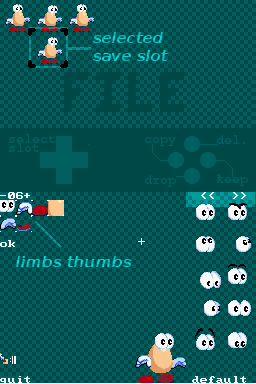
Voilà à quoi ressembleraient (imho) les écrans "gestion du fichier" dans SEDS et AnimEDS respectivement, avec cette nouvelle "ouverture au monde extérieur".

The notification of AnimEDS' new release has started propagating from newsboard to newsboard in a totally uncontrollable fashion. Welcome to the world of homebrew :P I just hope that the next wave of newsers will check out this blog rather than blindly quoting gbatemp's news, as 'AnotherWorld' has completely missed what was new in this release : you can create your own character skeletton.

Meanwhile, I also stumbled upon a post about the latest version of SEDS on scenebeta, where the newser made up a funny "cover" for the tool, depicting a megaman sprite re-worked again and again to show various Capcom characters ... yes, that too could be a use of SEDS. I guess all I still lack is a simple way to import some graphics from the Internet for that ... Maybe some online png->spr tool combined with a bitly encoding of the source URL would do it ?


Dans le même temps, un rédacteur de gbatemp a repris la niouze de la sortie de AnimEDS 0.2, mais sans trop se fouler. Notamment, il reprend texto "The application is still in the early stages of development and is hardcoded for a specific layout of the .spr file.", alors que la création de nouvelles structures, c'est justement ça que j'ai apporté entre la 0.2 et la 0.3 >_<

Friday, August 12, 2011

Stacking Troubles

Fix a bug, another appear. Does that sound any familiar ? I had to reorganise the "window" that constitute my animation editor, so that I would no longer miss some data while saving my work. Those "windows" are widgets container that you can stack over each other. When the GUI engine needs to deliver an event, it starts trying to give it to the top-level window and digs deeper until one of the window has one widget that can process e.g. the click.

The reorganisation consisted of introducing the ThumbWindow (see snapshot) below the FileWindow, so that one can control the slot where an animation should be saved while he's building new skelettons and making "save animation to slot" a natural operation when you're on the road to save to a file.

at first, it seemed to work fine, unless I realised that a single click on any of the limbs or sprite tables disabled all the actions on the "bottom screen" widget. I had overlooked the fact that two of my widgets on the bottom screen (the tables) were actually not part of the "FileWindow", but something laying on the main (application-wide) MetaWindow (in red), so that they could be shared by both file storage and animation edition activities.
Unfortunately, because MetaWindow is the lowest layer of the software, it were obscured by the screen-wide "SpriteTable" that contains all the thumbs. No way to go through. Of course, this is ridiculous: those thumbs are not on the touch screen so they shouldn't be receiving any stylus-based event ... but well, they are. For some odd (historical?-) reason, the GuiEngine ignores facts as trivial as "the top window is a DownWindow, so any UpWindow in the stack shouldn't receive GUI_CLICKED". Hopefully, it features an "active" flag that windows can set and clear to indicate their will to receive/ignore such events. It's to the application author (me ^^") to ensure Window::release() and Window::restore() update this flag accordingly to the desired effect. ... which is now done.

Now, if you don't mind, I have a staircase to polish.