Showing posts with label gadget. Show all posts

Saturday, March 27, 2021

Dev term?

Somewhen over the winter, my "grizzly" laptop just stopped working. I think I managed to make one last backup of its content, but it just does not power up any more. So from time to time, I manage to borrow my fairy's laptop for the evening and do some nds dev 'ing, but it became increasingly unlikely these days. I've got my new boox, though, so hopefully I can still do some homebrew-ish hobby, including uploading and translating contents on my blog. 

Unfortunately, we're still milestones away of the ability to scribble patches with a stylus. The device l'm really waiting for is ClockworkPi's devterm. I think of it as a typewriter device you can use in an armchair, with just the amount of screen needed to get content and check for typos. I have hope that, combined with the NUC, it will allow me to get more freedom

But there's a catch. I preordered it, and it should arrive by Avril, unfortunately, no one seems to have received any update from Clockwork Pi people since early January. So I keep my fingers crossed and. really, -really- hope that I haven't fell for another 'noteslate'-like vaporware hoax.

Once I'll receive my devterm kit, I'll have to go downtown and find a pair of lithium batteries to power it.

Post-pandemic global chips shortage?

Yup. Global shortage. See you in May ... (hopefully)

edit: happy end: arrived on Sept. 1st. Works when plugged on USB power if you don't have batteries yet.

Wednesday, March 17, 2021

e-book gets colors!

I decided to pick the expensive-but-easy road and to give the Nova 3 Color a try. It's been too long I'm trying to 'repair' web access on my N96 boox.

 Since the device comes with Chinese manuals, I've took some time to review

The personal note data will never be shared to any third party or internal staff 
[we] may collect info about installed applications, SDK version, system update settings

There are a good deal of things I've had to do to get the device in a usable state.

First, the device is initially couldn't use Google services. I had no "Play Store" around, but even the few google applications that were available through Boox's "Application store" (containing mostly alternate ebook viewers and book collections) -- like Google Drive -- wouldn't work because "the device was not certified". 

Bon, c'est pas la voie de l'économie, mais je jette l'éponge: je ne crois plus au fait de remettre en service le navigateur web de ma liseuse Boox N96 et je prends une Nova 3 Color à la place. Les conditions d'utilisations m'ont l'air ok, mais je resterai quand-même à l'écart du booxcloud, vu que l'appareil nous arrive de Chine.

Activer le PlayStore à travers l'application store du constructeur en entrant un GSF ID, désactiver la fonction "blanchir le fond" pour avoir des polices de caractères utilisables, c'est à peu près tout ce qu'il m'aura fallu faire pour arriver à me servir correctement de l'appareil. Je regrette qu'il n'ait pas de slot micro-SD ni de prise jack, mais un affichage 300dpi capable de me montrer quand les choses sont en couleurs avec une reconnaissance des traîts sans faille ... ça mérite quelques compromis.

Fixing that one wasn't too hard. Just below 'Enable Google Play', there was a cryptic 'GSF ID' box and tapping it (as suggested) took me through the process of telling google I trust the device and so should they (if I understood things correctly). I guess I couldn't expect more from a Chinese device right now.


Second, many of the 3rd-party applications I installed once this was fixed rendered weirdly. They seemed to believe that, as soon as text is large enough, it should be shown with outlined white characters.

I couldn't find any settings menu to change the system font or whatever and I started to get worried. Hopefully, this is tweakable, but not just with a system-wide configuration as I expected (or were told). 

Instead, we can tweak this application-by-application by means of the '°¨_o_' button of the ring-menu. The thing I had to disable was 'whiten the background', something that is certainly a good feature in many places but for some reason leads to weird-looking text.

I can also lie to applications about the device's resolution (actually 1872×1404 at 300dpi, which is über-amaZing) so that it doesn't throw huge fonts at me. That made Wordpress and Twitter back to normal rendering (with the stunning handscript recognition added ^_^)

As far as the device is concerned, my last regret is the lack of a micro SD card support and of an audio jack. So far the over-provisioned 32GB of internal flash sounds enough, but I don't like having to rely solely on some soldered, fated-to-fail storage on my device.

Now, I'll have to understand why the device cannot render my code-in-epub properly, and why it seems to be unable to browse completely my (huge, I must confess) epub files.

Until then, I think I'll populate '#booxread' on twitter ...

Friday, March 20, 2020

Coder pour Onyx Boox

Bon, j'avoue que autant installer un devkit android sur mon NUC était un objectif quasi-prioritaire en 2019, autant il ne s'est quasiment rien passé de ce côté-là, en fin de compte. Au mieux j'ai refait le week-end dernier un tour des repositories open-source et Androïd-Demo ... et je trouve assez curieux que l'un des deux soit entièrement avec du code C++ pour Qt. Mais tournerait-il vraiment sur le boox ? Les derniers commits sont de Nokia et on plusieurs années (je dirais qu'ils datent de 2012 ou 2013...) est-ce du code qui était prévu pour un ancien modèle (pré-android) ? Fort possible puisque les boox Androïd arrivent fin 2013.

Since the Cybook, I'd love to be able to run my own code on e-ink devices. Since the Boox is an Androïd, it should have been easy and I had pushed "setup an SDK on the NUC" as a top priority in 2019. I had gathered github links to see what would help me using native stylus recognition and screen driving, but it looks like most of what I got (featuring C++ and Qt) would be for pre-android devices like M9[0..2] while I have N96.

Most of what I did to customize my Boox use was through custom web servers on the NUC, but there is clearly room to do better. And I'd really love to have something feeling like Tomboy with a stylus, and a smart UML-sketching tool...

Moi j'ai un modèle N96, qui est une évolution du M96. Le package "booxsdk" propose des versions de gcc pour les modèles M90, M91 et M92, qui sont tous pré-androïd selon wikipédia.

On ne peut pas vraiment dire qu'Internet croule sous les projets et pourtant, il y aurait moyen de faire tellement mieux qu'un browser classique ou qu'une adaptation poussive de Tomboy ou de l'application Wordpress ... Je devrais peut-être essayer de commencer par termux ? Mais moi, ce que j'aimerais c'est plutôt un stylux :-/

C'est là que j'aurais bien aimé avoir sous la main un pote qui fait de temps en temps du développement Androïd pour me guider un peu dans ce nouveau monde.

Je n'ai toujours pas de solution pour les navigateurs web qui n'ont pas de mise à jour de leur certificats, par contre. C'est particulièrement agaçant, et ça semble même être de pire en pire. Au point que je ne suis pas sûr de pouvoir encore utiliser le Google Play Store. J'aimerais pourtant pouvoir éviter de rooter l'appareil ... 

 Oh, et pour ceux qui n'ont pas de boox, un petit coup d'oeil à EPaper-DIY ?

Thursday, March 28, 2019

nohup NUC

I got a NUC as Christmas gift, and it was more than welcome. I hope to use it as the post-desktop device for plenty of purpose, mostly just by turning it on and interacting with a WiFi-capable gadget...

[done] be the music machine of the living room
It is not too noisy with its fans, gets a jack output and can easily fit next to the HiFi system. I can use the WiFi connection to quickly view which song is being played, skip to the next song and switch between "fairy-lover" or "chiptune-lover" modes, from any device in the house including smartphones and tablets.

I would still need to let it learn which songs are less liked, or migrate some titles to other folders, etc. Preferably in a way that would not take effects immediately, but rather that is approved over ssh after having been collected during play sessions.

[done] make Fairy's laptop devkit-free

Fairy's laptop still has a battery. Mine is now powercord-tied to the ground. Fairy's one has poor resolution but increase mobility, but Fairy's one isn't always there, so it would be better to use it just as a remote terminal to the NUC instead.

[done] let it serve (auto-generated) epub doxygen
That means having it a mercurial hub with improved features. I use to have something like "nohup hg serve --webdir-conf /path/to/hg/hgweb.config -p 5555 &>/dev/null &" at work, where hgweb.config is simply a list of 'printname = full/path/to/repository', where printname may be 'organizational-folder/repository-printname'. It all falls under a [paths] section of an INI file. But I'd like it to try building and generating documentation whenever I push a new set of commits there. The ultimate goal is being able to browse up-to-date code from my boox without having to power up a laptop.

[wish] make it the server for boox-based diagram editing
That will also help integrating all sort of support pictures like screenshots and UML diagrams into the documentation.

[todo] make it download OC Remix updates on a daily/weekly basis

Because having OC remix on the wrong side of the firewall at work is a pain. My "coding music" is an open playlist,
  • and html class pl-video-title-link allows  to identify all the links to the mentioned videos.
  • and there is the page to the remix (https://ocremix.org/remix/OCR%%%%%) in tags
  • and there is a tag in youtube pages!
So I could have a script that automates download of new OC titles running on the cube...

[todo] enable Androïd development
 
That will be for when I got it plugged into a wired network again: I don't know whether this is due to the extra disk enclosed in the device, but the WiFi connectivity is a nightmare. I get a few 100Kbps at best ... barely enough to use a remote terminal. I'd rather not start installing big things that way.

[todo] make it a better youtube-on-TV than what the ISP provides in their box

Partly because there is no support for user accounts or playlist of any sort in the box...

Friday, August 03, 2018

Et dans Wordpress ?

Peut-être qu'un jour je devrai migrer tout ceci hors de blogger. Avec google, qui peut savoir ? Ce qui est sûr, c'est que blogger depuis une tablette, c'est décevant. Et depuis un boox qui tourne un vieil androïd 4, c'est encore pire. Comme je suis tombé sur un autre bloggueur de homebrew sur wordpress et que je me suis rendu compte qu'il y avait une fonction "notification pour les (réponses aux) commentaires", j'ai voulu vérifier si le passage blogger->wordpress était possible. Un p'tit compte gratuit, un coup d'oeil dans les FAQs et en avant.

Côté PC, l'interface est assez chouette. Plus fonctionnelle et réactive la version dont je me souvenais pour l'avoir fait tourner sur le serveur de l'Université. Rien que les miniatures dans la liste des posts, c'est chouette et sympa.

Maybe I'll have to migrate this blog out of Goolge's services one day. One thing is certain: blogger on my fairy's Android pad is disappointing, and it's simply un-available on my Boox device that runs an old Androïd 4. But both could run wordpress application, so it was worth giving the export/import feature a try. Spoiler: it worked. And it imported much of the pictures I had on my blog (not all, or if it did, it doesn't mention the same count as Google's photo gallery)

The UI on PC for wordpress is quite nice. the one on pad, a bit less. Thumbs turned gigantic so you can hardly see more than 2 entries on-screen. Using it to decide what you're going to update in your sofa is as convenient as scrolling through one of Titus The Fox levels. With 158 drafts waiting for me, it could be better. But if I'm not afraid of raw HTML mode, I can input some stuff directly with my stylus. Huzzah!

Côté tablette, c'est un peu moins réussi. les miniatures sont devenues des images énormes: il y a à peine deux articles accessibles par écran. Aucun contrôle pour changer l'ordre, filtrer ni rien de ce genre ... Il faudrait scroller et scroller encore (avec la vitesse de rafraîchissement de l'écran à encre électronique qui ferait passer les pluies sahariennes pour un coup de karcher :-/). Et pour ne rien arranger, les posts brouillons sont mis en avant, dans un ordre que je peine encore à définir. Et des brouillons, j'en ai. 158. Enfin, au moins ça devrait m'encourager à en mettre plus au net.

Et la bonne nouvelle, c'est que le texte de tout ce petit monde semble avoir été téléchargé dans la tablette et que je peux donc éditer à l'envi tout ça du fond du jardin. Enfin, à condition de ne pas être rebuté par l'éditeur en version Andröid qui semble penser que juste de l'HTML brut, c'est assez pour tout le monde :-/

Mais bon, je peux le faire au stylet, écriture manuscrite et sans écran. Et ça, c'est présssscieux.

Mais le plus impressionnant dans l'aventure c'est sans doute que wordpress a ré-importé automatiquement les 500+ illustrations du blog. Difficile évidemment de s'assurer qu'elles y sont bien toutes, mais c'est déjà un énorme travail d'évité. Et la galerie fonctionne aussi sur tablette (à condition d'être connecté. 'faut pas trop en demander quand-même: 7.5% de 3Go, ça fait son poids dans la gestion de mémoire cache du boox.

Mais il doit en manquer parce que l'album google "photos de votre blog" en comptait pas loin de 1240...

Saturday, June 16, 2018

iris mouse to the rescue

It is pretty handy to have the boox to draw sketches, but I don't find them as nice as the one I draw on paper. . Plus, when I'm using the boox to read the code, I can't update notes too. If I ever try, I'll have to face a near-minute swapping time every time.

So as I found the 'IRIScan Mouse' near my boarding gate, I just bought it. It's pretty funny. It's a hand-moved scanner (like the very first one I had) but fit into a mouse, and it can do both ... on Windows at least.

So it won't really make the USB printer/scanner obsolete at home, but it will certainly be helpful at the office. it has pretty nice rendering of my tiny handscript, avoids doing JPEG-by-default (afaik) and makes export of captured files pretty easy.

Or well, it should have been useful. Unfortunately, plugging the dongle into my Windows7 workstation didn't let me use the scanner feature. The mouse remains unreachable through the WiFi.

On my Linux laptop, all I see is a USB device with vendor ID 274f (Systech Electronics, according to dmesg) and product ID c001 (Zcan Wireless). no text identification of the device. The "mouse" feature does work, though. but I don't get an additional WiFi interface. So what is in the dongle exactly ? Some forum post suggests it is using the uvcvideo driver. It indeeds gets loaded. It doesn't seem like the USB device offers multiple

The dongle could be featuring just one NRF LU1P16 chip (there's one additional 1101GE marking), possibly made by NORDIC, although I couldn't find such a chip in their catalog.

But the original manufacturer's manual is clear:
Scan function requires Wi-Fi connection between computer and Zcan Wireless directly. Please add a Wi-Fi adapter (802.11 n is recommended) if Wi-Fi function is not available in your computer
my workstation at the office doesn't have any WiFi, and the dongle won't provide it. It also explains why scanning would fail on the office's laptop I've used so far when I had wifi enabled. When I'm actually connected to a network with my WiFi, the scanner can no longer reconfigure the WiFi interface to communicate with the mouse. Looks like I'll have to do some more shopping ...

Tuesday, February 20, 2018

Ideas for a handwriting recognition on DS


Il y a un moment que je retourne l'idée dans ma tête : un système permettant d'écrire librement (du code, pour l'éditeur de comportements) sur DS. Le système serait basé sur une grille 3x5 visible par l'utilisateur. Parce que les claviers virtuels, c'est pénible et qu'un système qui autorise l'utilisateur à écrire n'importe où et n'importe comment, ça n'aura aucune chance de marcher avec 66MHz


That is another idea that has been laying on paper for a while. I lack text and script editors at the NDS.  I don't want to go for a virtual keyboard, because they are really too slow to work with. I can't afford a complex recognition system, and even Google's handwriting system would suck on code expressions.


But I feel like it would be easy to recognize letters when they have been written on a grid. A bit like if we were painting a low-resolution font.


Every letter drawn corresponds to a 15-bit map that can be quickly tested against a small database of features and suggest letters to pick when the decision is fuzzy.

 Additional features could be the starting and terminating coordinates, as well as the number of strokes.

Cette petite grille fait que chaque lettre tracée correspond à un code sur 16 bits unique. A partir de ce code, on pourrait rapidement identifier un groupe d'entrées dans une petite base de données qui traduit les traîts en lettre (p.ex. à partir de la position du point d'origine et du nombre de traits). Je ne veux pas me limiter aux lettres, évidemment. L'idée est de reconnaître l'ensemble des caractères ASCII pour pouvoir éditer du code n'importe où le plus facilement possible. 

I hope the result will be an interesting compromise between
- early PDA "one-weird-stroke-to-write-them- all" (Palm's Graffiti system)
- sharp Zaurus "Free-letters-one-by-one"
- OCR from scanned text.


I know segmenting is a complex task in letters recognition. With pre-drawn grids, the user is guided to start a new segment or stay in the current one. We can also tell apart uppercase and lowercase Eg. "p", punctuations, etc. locally rather having to rely on some line-level calibration. And we can naturally move to the next space for the next letter.


Avec cette grille, je m'affranchis d'un des problèmes les plus costauds de la reconnaissance de caractères (la segmentation) tout en permettant d'utiliser le plus naturellement possible l'espace disponible (sur Zaurus, on devait presque toujours revenir au même endroit pour tracer la lettre suivante ou le mot suivant). Et c'est toujours plus pratique à apprendre (encore qu'on pourrait essayer d'apprendre de nouvelles écritures à la DS) d'écrire "comme Pype/Zaurus" plutôt que "comme en Grafiti", même si grafiti avait le bon goût de ne demander qu'un trait par caractère.

Granted, the hand script writing I use when I want maximum readability already separates letters a lot and uses only one stroke for most lowercase. Because I reformatted my writing for the Zaurus already. But it's not like I had a huge user base to take into account ^^".

The granularity of the grid should help making tricky characters like braces-versus-digits-versus-C easier to deal with.

Monday, October 02, 2017

Thanks, ::Twig

On y est presque. Un mois après l'arrivée du Boox comme remplaçant du Cybook, j'ai réussi à faire un petit script Perl convertissant la sortie de Doxygen pour que le e-pub reader le plus puissant de l'appareil (point de vue navigation) parvienne à afficher correctement les extraits de code. Et ce grâce à l'aide d'un petit module plutôt bien foutu -- XML::Twig -- permettant d'écrire dès règles du style "si tu rencontres
<div class="line">...</div>, remplace par <tt>...</tt>".

Yo! One month later, I finally have a nice Perl script for converting stylesheet-heavy doxygen output for the super-navigating (but style-agnostic) reader application embedded on my Boox device.
The XML::Twig package I used for the job seems pretty powerful -- and much easier to use than XmlStylesheetsTransformationLanguage, as far as I am concerned.

I can't help but dreaming about pushing it further and have blog excerpts integrated with code snippets on an enlightening document that would progressively turns the readers into code writers that would contribute to dsgametools ...


Il serait très tentant d'utiliser ça pour faire aussi un peu de fusion blog/doxygen, d'ailleurs. histoire de reprendre les schémas UML dans le code navigable.


Thursday, September 07, 2017

Doxygen on Onyx

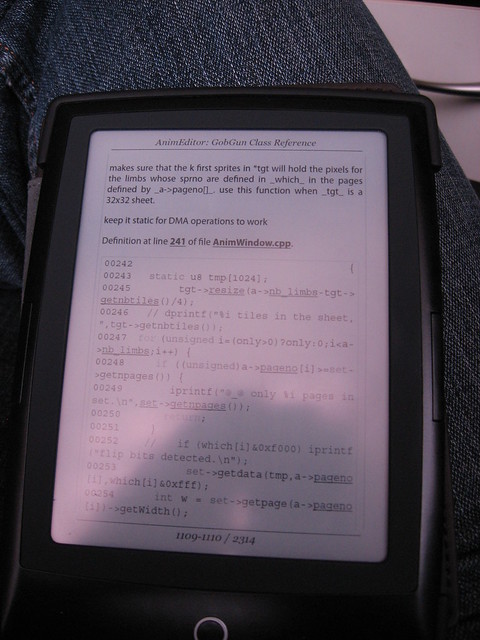
I don't exactly know what I have changed, but using the "Neo Reader" application on the Boox today, my doxygen-to-epub-through-calibre file now renders as expected. I thought that could be linked to the disabling of "cache reflow bitmap" cryptic option in the advanced settings (see the small icon pointed by the stylus on the picture), but re-enabling it doesn't change anything (or it only has an effect when restarting the application ?)

Qu'est-ce que j'ai changé ? Je n'en sais plus trop rien. J'ai "torturé" le morceau de code qui apparaissait dans la version e-pub de mon blog pour essayer de trouver ce qui faisait la différence entre un rendu correct (white-space: pre-wrap ? utilisation de
<pre>plutôt que <div>? de <tt> plutôt que <span>?


Rien n'a semblé avoir d'effet. Puis ce midi, en jetant un coup d'oeil à mon code converti par doxygen et calibre, surprise! tout est impecablement rendu.

Plus de numéro de lignes indésirables, changements de polices, traitement correct des espaces ... tout y est.

Est-ce que ça vient du réglage "cache reflow bitmap" que j'avais changé ? difficile à dire. Le désactiver ne semble pas avoir d'effet immédiat, mais ils auraient pu omettre de dire qu'il fallait redémarrer l'application ...

One major drawback, though: Neo Reader application is the only one for which I find no way to hop back to the place I was before following a link in the epub document. And that will make navigation extremely annoying, I'm afraid.
Neo Reader v2.0 had nice backtracking feature, and that one gets interesting behaviour on my test epub document.
  • When using <span> or <div> with the CSS classes associated with working 'code-style' elements, nothing happens
  • When using <pre> or <tt> with the same elements, code is rendered as it should (as printed on dot-matrix ;-)
  • The style applied to "English section" (using <en>) doesn't go italic, while emphasis directly using <i> in the French part goes italic.
  • skipping CSS classes altogether has no impact (given that you're using
    pre/tt tags)
  • embedding the whole stuff in "blockquote" doesn't seem to have much effect
  • trying to use tables with colspan and some cells containing only a few whitespaces failed miserably. I think all cells are just sitting in a vertical list, not laid out on a table at all. 

Wednesday, September 06, 2017

Sketching on Boox

La première prise en main de l'application "prise de notes" de mon nouvel Onyx Boox n'avait pas franchement été convainquante... arrêter son traît au bon endroit, viser un emplacement avec le stylet ... tout ça est plus complexe que ça ne le devrait. La faute à mon avis à l'absence de compensation de l'inclinaison du stylet.

Starting to draw with my "Boox" was a bit disappointing. Whatever I could try with stylus calibration, there was still a significant offset between the contact point of the stylus tip and the actual drawing point. I bet better tilting support in the software (or hardware?) would have avoided that, but that's not something I can improve. Hard to stop at the right place on a rectangle's corner. Harder to make a circle (or whatever else) at a precise spot ... and almost impossible to make an arrow >_<

Du coup, quoi qu'on fasse avec la fonction "calibrage", le point de contact du stylet avec la surface et le point où l'encre change de couleur ne coïncide pas.

Difficile du coup de faire de beaux rectangles ou  (encore plus ennuyeux) des flèches. Difficile aussi de dessiner des p'tits Bilous dans le coin d'une explication. Ou de faire du dessin type "ligne claire".

I usually love to have small Bilou / Bouli talking and illustrating a technical chat... That will be difficult to do here. It usually requires to draw at small scale, a single line, Tintin-style. And that works terribly bad with the imprecisions of the Boox "Notes" application. 
 
But hopefully, lining up multiple lines and writing works naturally well. 

The good news, however, is that if I'm just sketching at a scale of 5-7 cm, striking over again and again to make the lines more defined gives some quite interesting results. Not really suitable for artwork either, but creating quite acceptable sketches.

Par contre, le style "repasser sur les lignes, plus nerveux, plus "esquisse" ne donne pas trop mal.

edit: for those who're curious about it, Onyx documents its scrible interface on github.

Friday, September 01, 2017

I got a Boox

J'ai reçu mon nouveau gadget à base d'encre électronique, donc. Même si au prix où il était, j'espère qu'il sera plus proche d'un ordi que d'un gadget, évidemment. Il s'agit d'un Onyx Boox 9.6" combinant un stylet magnétique et un écran capacitif.

I jumped completely out of my comfort zone and ordered online a device I never had in hands before at a price well over that of a Nintendo DS: the Onyx Boox N96, combining magnetic stylus (afaik), capacitive screen and e-ink display for roughly the size of a A5 sketchpad.

Malgré une boîte tout-en-chinois un peu intimidante, l'appareil a des menus en bon Anglais et la prise en main s'est faite assez facilement. Ma grande inquiétude, évidemment, c'était de savoir si je pourrai m'en servir pour mes documents "doxygen" si utile pour faire du développement intermittent.

The device feels right in hand, is quite a hybrid between an androïd tablet (unfortunately only 4.0, making applications for twitter, picasa and blogger unusable >_<), but what was really stressing me was to know whether I could use it for epub+doxygen code browsing I've been usiing sooo much for the last years to progress on my pet projects. And unfortunately, out of the 4 embedded readers, none of them got the layout right. No indentation, useless line numbers, incoherent spacing ... all of the issues I had fixed earlier this summer -- and some I never heard of before -- were back to haunt me.

Ce n'est pas gagné: sur les quatre lecteurs e-pubs embarqué, aucun n'a un système "styles de l'éditeur" comme mon regretté Cybook. Et sur chacun d'eux, le code produit a tous les défauts d'une mauvaise conversion: pas d'indentation, numéro de ligne inutiles, tailles incohérentes, etc.

J'avais compté sur l'installation de FBReader, testé avec succès sur la tablette de ma fée, mais c'était compter sans une dernière roublardise d'androïd: Il y a en réalité une version plus ancienne de FBReader dans le pack d'applications préinstallées, ce qui m'empèche d'installer une version plus récente pour cause d'erreur -104. (j'aurai peut-être plus de chances après une recompilation ?)

My plan was to use the open-source FBReader if such thing occured, but unfortunately, I couldn't install it from Google Play: interference between the pre-installed FBReader (older version) in the firmware makes it fail with error -104.


I was hesitating between sending it back and switching to some pure html-based doxygen crawling when a post in one of my blog-on-epub conversion caught my attention.

Bref, je m'apprétais à devoir me rabattre sur une utilisation de pages webs moins pratiques (pas d'annotations, pas de marqueur 'vous êtes ici' d'une lecture à l'autre, etc.) lorsqu'au détour d'un post de ce blog converti en fichier e-pub, je constate que l'un des lecteurs par défaut (je ne me souviens pas duquel il s'agit :P) que les styles sont tout à fais satisfaisants pour mes besoins:
  • le bloc de code est en police monospace alors que le texte du post est en police classique,
  • les indentations ont fonctionné correctement,
  • (bin y'a pas denuméro de ligne, forcément, vu que je n'en ai pas mis. Haha.)
Le jeu, ça va être maintenant de comprendre la différence entre ce bloc-là et ce que j'avais dans mon document doxygen pour faire des doxygens qui marchent mieux.

See ? It's all there. Indentation, font switching... The CSS reading is there. The rendering works. It's all a matter of making the doxygen stuff damn simple enough so that it couldn't possibly fail. That's something I can handle. The boox may stay here.

Monday, August 21, 2017

End of Cybook ?

After about 5 years of helpful operation, my e-ink device "cybook odyssey" seems to be definitely damaged. I cannot do more than a few minutes of reading before getting the system to reset. Sometimes even just clicking a link or trying to change the font size will jam the device. I tried a factory settings restore, but that only help for a few minutes.

And now the "gadget" class of the device really shows up. I have no logs that could point out the flaw, no way to access the critical components (namely the internal flash). The device as a whole will have to be recycled just because one component is weared out.


Mon Cybook me lache à nouveau. Trois ans après son passage en service-après-vente, mais sans espoir d'intervention de garantie, cette fois-ci. Me le réparerait-on de nouveau ? Peut-être. Est-ce que j'ai envie d'injecter encore de l'énergie dans un appareil que je ne peux empêcher de vieillir ? Pas franchement. Est-ce qu'il y a mieux à acheter ? Peut-être si je suis prêt à lâcher 300€ pour un modèle Androïd-à-encre-électronique.

Est-ce le moment de tenter un jailbreaking de l'appareil ? ou de lui concevoir une custom ROM ? Je n'ai plus grand-chose à risquer en le faisant, en tous cas.

So what ? Shall I replace it with another one, with slightly increased screen resolution, take advantage that I know the beast, including the annoying amount of time it takes to accurately select a phrase to highlight it (and risk having issues with memory again within a few years) ? Shall I pay up to 3 times the price for a device with stylus, android (including the ability to program my own tools on it), bluetooth, but unfortunately not the version of Android required to run the infamous "inkspace" application required for my bamboo spark ?

There is even 13" models, but they seem to be sold near 700$, not the 400$ I spot on alibaba. The same company makes 9" devices too, claimed to be half the price (which gets into the "expensive but affordable" category). Maybe I should wait for a few weeks and see whether that "ReMarkable" thing actually ships this august and at what price ?

None of these could be found in stores so far, but I had a look at a Kobo Aura One this afternoon, and it was quite sexy, with its all-flat front side. No stylus and no android (afaik), though.

Wednesday, June 28, 2017

UML_LOOK = YES ?

Voilà un des schémas que Doxygen peut produire si je le mets en mode UML (ce qui est sympa, parce que du coup, je peux comprendre les flèches) pour une des classes de mon éditeur de niveaux. Je peux limiter le nombre de "champs" pour chaque catégorie (histoire de garder la taille des boîtes sous contrôle), mais malheureusement pas la profondeur d'exploration. Résultat, le graphe devient vite immense, inutilisable.

When I come back to some code I've been writing long time ago (hey, the project is 10+ years old, now, remember?), I usually take some time with my cybook to study the code through doxyge-rendered documents and sketch in UML what is meaningful for the feature I want to add/change. So it would make sense to have doxygen do some UML for me, wouldn't it ?

Well, doxygen indeed has an UML_LOOK setting that turns available as soon as you declare to have the "dot" graph tool from graphviz package on your (linux) system. Neat. It also has -- took me some time to find them -- settings to reduce the amount of classes that are explored, and the amount of items that are reported for each class.

This is all quite nice, but I'm afraid it will not work nicely with cybook viewing. Whatever I do, the collaboration graph remains very large, both in pixels (and I'm unsure the cybook could pan in a bigger image) and in bytes (10x bigger than doxygen's defaults -- which had only inheritance graph, I admit).


Non configurable ? vraiment ? Voyons, et DOT_GRAPH_MAX_NODES, alors ? et DOT_GRAPH_MAX_DEPTH ?

Eh bien ils font plutôt du bon travail, mais je reste avec près de 3Mo de fichiers .svg pour LEDS, contre 500Ko de .png quand je reste aux graphes de base. Pour la lecture sur tablette, je crois que je préfère ne pas prendre le risque.

What would the perfect feature set be ?
- having the inspected class at the center of the diagram
- be able to specify a canvas size, instead of a maximum amount of nodes
- don't say "and ## more items" when you drop some items
- have a separate "depth" setting for inheritance and for structure/composition
- only show "meaningful" methods/fields of surrounding classes
- still show when a class has relationships with multiple classes of the graph
- don't show "obvious" common ancestors (e.g. the Widget class for all the widgets)
- don't show "obvious" type of data that everyone uses (e.g. std::vector) as a compound.

But let's be pragmatic: this is not the job of a heuristic filter: this is the job of an interactive exploring program. Sure I wish such an interactive tool could be running on my e-ink device, but this is not part of Cybook's business plans, unfortunately. And it is unclear that this could be achieved solely through e-pub documents structure. (would more require an HTML5 canvas or dynamic SVG + JavaScript)

Monday, March 27, 2017

Bamboo Spark to the rescue

J'avais envisagé m'offrir une noteslate pour mon anniversaire. Mais même un an après la date de sortie annoncée dans l'appel à pré-commandes, il n'y a toujours pas de Noteslate disponible. Par contre, j'ai reçu la très sexy et un peu curieuse "bamboo spark". Une tablette graphique nomade et autonome, en somme.

I have a dream of an electronic device that would not hurt the eye. It would be as easy to use as a sketchpad. It might be crude, but it could capture drawn information as naturally as a keyword captures typed information.

I had hope that noteslate would match that dream. I had hope that staedler digital pen would fulfill that dream. I had hopes that hacking code for the cybook would make that dream close to reality. It didn't worked. This week-end, my family gave me a Bamboo Spark unit. Something that captures pen strokes, even when there is no computer around. You just write on plain paper with a modified rollerball pen. When close to an Androïd/iOS device, you can then swap pages that are in the device's memory.

From there on, you can send your notes to different data-sink applications on the phone/pad you have, though unfortunately, with my fairy's pad, twitter and blogger applications don't seem to work.


On trace, ça enregistre. On synchronisera avec un appareil Androïd (ou iOS pour les autres) plus tard. Les traits sont nets, bien plus précis et fiables qu'avec le décevant stylo numérique de chez Staedler, malgré la présence ici et là de "lignes fantômes" que je dois encore retoucher dans gimp. C'est aussi beaucoup plus propre qu'une photo de bloc-note et même que la plupart des scans.

 The result is clearly more appealing that whatever I come up with using a scanner or shooting a picture, but it is unfortunately not yet perfect. First, I cannot crop without downloading the file on a full-blown computer (or maybe I could do that in Androïd's Image Gallery ?). Second, the device introduce random "ghost strokes" that impact readability and better have to be deleted. It's a shame the "draw" feature of the androïd application can only paint white (or black) pixels over the captured strokes, and not delete a stroke as a vector object.

Pour les schémas du type "UML" et sans doute pas mal de croquis d'études, c'est assez chouette. Par contre, peu probable que je puisse m'en servir au bureau pour encoder directement les comptes-rendu de réunion: la reconnaissance d'écriture n'est présente ni dans l'application Android, ni dans l'appareil lui-même, mais uniquement sur les serveurs de chez Wacom. Pas sûr que le boss apprécierait que tout ce qui se dit en salle de réunion termine là... Et pour le contenu du blog, on repassera: la fonction n'est disponible que moyennant abonnement premium :(

If sketching UML documents works fairly well, there is no default handwriting recognition. For that, you have to upload to wacom's cloud and pay the premium subscription to their services. That means the device can't be used as a write-to-report short cut, unfortunately. Not if the meeting whas somewhat private, as any meeting at work would be:


Wacom may disclose all of Your Personal Data to service providers [for data processing, storage and transmission, and other form of support for the application] and to legal authorities [in case wacom believes this is required by law]. Wacom will not sell or disclose your personal data  to other third parties.
I thought I had found a windows application that would allow me to skip the need for a android device at hand (for use in the office, that is), but it is apparently for another device. I also find it strange that it leaks usage information through Google Analytics. The era of Micro Application is so far away ! (in any case, as mentioned in the Inkspace license contract, "You can withdraw your consent by opting-out the use of Google Analytics. The opt-out is available under /Settings/About/Google Analytics/ within the Inkspace App").


Wednesday, January 04, 2017

Pico8

La pseudo-console PICO8 est sans doute le gadget le plus sympa que j'aie découvert au cours de l'an dernier. Un système tout-en-un, avec une programmation style BASIC (mais pas tout à fait) et un petit éditeur de graphisme et de son intégré, tout à fait dans l'esprit "game development for all", mais sur un support imaginaire, accessible via un browser et sur un assez grand nombre de systèmes. Des petits jeux qui rappellent l'âge de la programmation de garage sur commodore.

I'm enthusiast. PICO8 virtual console and the PocketC.H.I.P computer are likely the gadget-computers I love the most among those "thing-a-teach-kids-coding" I've met so far. BASIC-style, embedded editors. Easy to take along. I played a few platformer projects last week-end and enjoyed quite a lot of them. They remind me of fresh little projects that could be found in the garage-afternoon-devin' times of the C64 era. It's unclear to me whether that could support logic as complex as the one found in School Rush, though.

Si je n'en parle que maintenant, c'est que jusque là, je n'avais pas eu l'occasion de voir de plus près à quoi la programmation peut effectivement ressembler (mis à part quelques démos officielles). Mais je suis tombé cet après-midi sur un tuto "comment faire son premier shoot-em-up" en quelques gifs animés.

Et à mon avis un des hardwares les plus sympas pour faire tourner cet émulateur 8-bit, c'est le PocketCHIP... un ordinateur de la taille d'une calculette des années '80

Thursday, April 28, 2016

Hello (androïd) World

Excellent! Les smartphones sont maintenant devenus suffisamment puissants pour faire tourner un émulateur DS. Ils sont nombreux les anciens homebrewers qui se sont fait la malle dans le monde du mobile depuis l'arrivée de l'Androïd et de son SDK accessible.

Je sais, j'aurais pu me mettre au développement Androïd, mais je préfère continuer à travailler sur le coeur du jeu et utiliser le super hardware de la DS comme "game engine" que de perdre du temps à chercher quel framework marcherait bien pour un jeu qui de toutes façons ne colle pas bien avec le hardware d'un smartphone.

That's the best news of the week! My brother managed to get a version of Bilou : School Rush running on an Androïd phone thanks to DraStic emulator. That's great news because it means that -- as I hoped -- I can keep working on the game on a platform I love rather than spending efforts at emulating that platform on a poorly-picked system that will eventually be deprecated by its maintainer. You see, nintendo console cannot turn deprecated. They can become obsolete, they can take dust, they can be forgotten or sold for gold, but they cannot turn deprecate because they were hardware. Therefore, an emulator for such a platform is something that is (until now) more age-traversing and cross-platform than any DirectX or OpenGL release.

edit: I tried the game on my brother's device. It indeed look, sound and moves fine, but there something going wrong with loading new levels. Hard to tell if there's something wrong with my code or if their emulator still needs improvement. 

edidit: J'ai fait un essai hier sur le smartphone de mon frère, j'admets qu'en dehors de l'aspect "gif animé interactif", l'émulateur sur Androïd ne permet pas vraiment de jouer au jeu. J'ai eu aussi cet espèce de bug lors des changements de niveau (l'émulateur refuse de nous relancer le jeu si on meurt, par exemple). Le mieux que je puisse dire, c'est qu'il est probable que l'émulateur ne soit pas encore suffisamment fidèle au vrai hardware. A réserver pour les curieux, mais pas vraiment une alternative crédible à DeSmuME sur PC ou au jeu sur une vraie DS.

Monday, July 21, 2014

Sonic 2 for free ?_?

J'avais eu l'occasion de télécharger Sonic 2 pour Androïd, temporairement gratuit, sur la recommandation de mon frère. Une valeur sûre, de 1992. Emerald Hill et ses ponts spiralés ... La Chemical Zone et ses blocs lambinants qu'il faut escalader après avoir dévalé des pipe-line de liquide bleu-louche.
J'essaierais bien d'aller jusqu'à la Mystic Cave voire Oil Ocean, mais pour tout dire, les contrôles sur tablettes sont une catastrophe! Le bouton de saut ne réagit pas systématiquement, ce qui est un comble pour un jeu de plate-forme où les réflexes sont si importants. Ça fonctionne un peu mieux quand on appuie vers la mi-hauteur, mais ça veut dire que presque tout ce qui se trouve devant Sonic devient masqué par ma main >_<

What good is a free copy of Sonic 2 if you can't play it ? And how could play a reflex-based platformer when your hands are hiding half of the play screen ? How could you have proper timing when you can't have your hero reliably jumping on "button" press ? And if trying to move backwards may be ignored because you suddenly move out of the active detection region ?

does it really deserve the 'sonic' tag ?

Tuesday, February 25, 2014

Décevante Tablette

    Vous vous souvenez peut-être que j'avais rejetté l'idée d'un iPad assez rapidement. Trop cher. Inutilisable. Pourtant, une fois le "contenu" de Bilou's Adventure créé, ce serait assez sympa de pouvoir le présenter sur de ces systèmes androïd qui seront bientôt incontournables. Une tâche de fond surveillait donc les équippements ARM-powered pour dégotter le petit système sympa mais pas trop gourmand, avec juste les interconnections qu'il faut pour devenir le processeur du programme qui fusionnera le rendu son/lumière de desmume avec le moteur de jeu GEDS en un seul composant natif appelé depuis la couche Java.

    So there's now a tablet at home. It's not mine: I offered it to my fairy. She saw the lack of configuration, the over-simplified interfaces as features, so the tablet perfectly fitted her need for "something simple enough that I can use to check e-mail, share pictures and browse online shops". For at least 10 other blogging-related tasks, it failed me. Not that it's un-usable, but what it comes with (a web browser and that's it) is completely unsufficient.

    J'ai finalement acheté une tablette, mais pour ma fée. Un modèle Polaroïd. Parce que chaque
    fois que je présentais un inconvénient (pour moi) des tablettes, il se transformait pour elle en avantage. Vous noterez qu'après les tests de stylet pour écrans capacitifs, je n'envisage même plus l'édition de niveaux sur tablette: la DS restera l'outil le plus pratique pour ça, mais j'avoue que l'espace d'un instant, j'ai cru que ça me permettrait de blogger mes avancées plus confortablement ou de simplifier les petites tâches satellites si cruxiales au développement d'un jeu vidéo. J'ai déchanté. Je me suis donc mis à rassembler la liste-des-dix-chose-qu'on-ne-sait-pas-faire-avec:

    Etre facile: avec le "play store" Androïd qui n'est pas préinstallé (au profit du service concurrent d'Amazon), je n'ai accès qu'à un sous-ensemble des applications tablettes.
      Etre bloggeur: pas de chance, même une fois le playstore activé, l'application Blogger est refusée sur ce type d'équippement non-compatible. Quoi, il faut un quad-core pour taper du texte, en 2014 ?
        Ecrire des posts: le clavier bluetooth fourni avec ? Belle blague! il n'est détecté qu'une fois sur deux. Retourner changer un mot précis ? Bonne chance! Supporter les mots anglais dans un texte français (sans même parler de faire des posts bilingue) ? Je me marre !
          appréciez la qualité de la photo ... ou pas.
          Illustrer des posts... Vous aviez cru qu'un capteur optique, une interface tactile et le WiFi aurait fait de cette tablette l'outil-magique-pour-illustrer-les-posts? Rêvez pas. Qualité d'image très approximative (seulement moins pire qu'un petit GSM), absence totale de mise au point, impossibilité d'envoyer directement l'image vers un post blogger (il me faudra passer par un google drive, puis télécharger et ré-envoyer depuis un PC).

          Regarder des vidéos en faisant la vaisselle, qu'il s'agisse de la dernière des piano guys ou du longplay de Mario World Wiiu, je dépose par-ci par-là mon laptop dans la cuisine pour un peu de youtube. Oublie, avec la tablette: la réception Wifi est tellement mauvaise que la vidéo s'interrompt toutes les 10 secondes. Ce que je n'explique pas aisément, c'est la différence perçue par les deux appareils (à moins de supposer que les gens de chez Polaroïd ont mis une antenne de qualité LIdL ou qu'il l'ont noyée dans une cage de farraday, bien sûr).

            Etudier les graphismes des "pros" de deviant-art. Avec chaque page qui prend plus d'une minute à s'afficher, la gallerie des téléchargements qui se vide en cas de redémarrage de la tablette et un service de flux RSS qui décide à ma place si je veux voir ou pas les posts plus anciens que son installation, celà relève plus du combat que du confort. Je passe sur le dossier "téléchargements" qui est apparemment vidé à chaque redémarrage et le fond d'écran qui disparaît définitivement du système une fois qu'on en choisit un nouveau.

            Etudier du pixel'art, c'est encore pire. Le navigateur installé ne permet pas de faire du redimensionnement d'image sans y aller de  son flou quadratique lissant.

            Retourner voir quelque-chose dans le SVN de Bilou ... ça serait bien pratique, non ? "j'avais une référence ou un pointeur, dans LevelMonster, au fait ?" ... ha! bien essayé. La navigation sera tellement ardue sans la saisie de mot-clé à retrouver qu'il vaut mieux que je ressorte mon Cybook. La lourdeur du service en ligne de sourceforge n'y est peut-être pas totalement étranger.

            Editer un p'tit script de Bilou pourrait-il passer mieux ? Après tout, le port micro-SD me permettrait de compenser le fait que je n'ai toujours pas d'éditeur texte convaincant sur ma DS. Bin il faudra sans doute que je refasse un tour sur le amazon-shop, parce qu'il n'y a aucun éditeur texte pré-installé (la dernière que j'ai vu ça, c'était sur C64, mais là on avait un BASIC) et que le fichier .txt téléchargé par le navigateur n'est pas de type connu et ne peut donc pas être affiché.

            Payer les factures, ne serait-ce que pour se libérer du temps pour le reste. Bin non. La "sécurité" de l'application bancaire se résume à un mot de passe lié une fois pour toute à l'appareil (hautement volatile, faut-il le rappeler). On n'aurait pu imaginer une façon plus sûre de me faire fuir à toute vitesse.

            Et malheureusement, le projet eInk-A4-stylus de Sony n'est pas à la hauteur des attentes que le NoteSlate m'avait instillé.

            Saturday, September 15, 2012

            Doxygen & Cybook : round 2

            That's for sure: doxygen output on a cybook is a great thing to plan the next update on my tools. I can do that any time while commuting, take simple notes and then just commit the changes into code when I get to a keyboard-enabled computer :)

            Still, that requires a bit of tweaking of my Doxyfile configuration:

            COLS_IN_ALPHA_INDEX    = 3
            ALPHABETICAL_INDEX     = YES
            REFERENCES_LINK_SOURCE = NO
            REFERENCED_BY_RELATION = YES
            FULL_PATH_NAMES        = NO
            Au fil des mois, mon cybook odyssey se révèle de plus en plus un puissant allié pour la programmation de projets-hobby. Toujours en poche (ou presque), il me permet de planifier les évolutions de mon projet à tête reposée, dans mon fauteuil, sans nécessiter de réimprimer à chaque fois la dernière version du code. Il a évidemment fallu un peu chipoter pour avoir des documents "pratiques" sur cet écran 600x800, en enlevant les numéros de ligne ici, changeant la structure du document là, etc. Mais le résultat est plutôt satisfaisant.

            J'aimerais juste que l'Odyssey soit capable de détecter les "clics" sur les schémas en mode "image map" (cf. p. 1629, par exemple) et que doxgen propose un mode "epub" natif qui m'éviterait de faire tourner "calibre" pendant près de 10 minutes pour la conversion html->epub.

            Once the doxygen files have been created, I need to post-process them to strip out line numbers in the code. There's unfortunately no configuration setting to do that *in doxygen* itself, and I lost the patch that forced doxygen to avoid generating them altogether.
            fe class*.html "mv % /tmp/% ; sed /tmp/% -e 's:/a>0[0-9]*:/a>:g;' > % ; echo % stripped"

            Last step is to get rid of <namespace>:: prefix in some classes name (in the class index) so that it actually fits 3 columns.
            mv classes.html /tmp/ ; sed /tmp/classes.html -e "s/>[A-Z][a-zA-Z]*::/>/g;" > classes.html

            Unfortunately, calibre is still über-slow processing this, and it looks like the Cybook Odyssey doesn't support clickable image maps. Anyway, if you want to give it a try (and have the hardware as well), here's the file.

            Sunday, June 10, 2012

            cybook + doxygen = long

            Le Sprite Editor est en rade, mon fichier d'images pour la school zone de plus en plus mal en point ... et pourtant je "perds mon temps" à essayer d'avoir du contenu 'bilou' sur mon nouveau gadget: le Cybook Odyssey. Encre électronique, écran tactile, ce n'est pas la noteslate que j'espérais, mais au moins il existe ... et avec un peu de chance, il me permettra d'avoir les yeux moins fatigués en fin de journée, au boulot.

            L'appareil supporte les fichiers HTML en natif, donc les choses auraient dû être assez simples ... Sauf qu'en mode "lecture de fichier offline", les liens sont ignorés dans le mode HTML. Il me faut donc passer au format dédié "epub".

            Je me suis perdu dans des tentatives de conversion doxygen xml -> docbook -> epub en passant par les feuilles de styles XSL de la bibliothèque boost ... alors qu'il suffisait de prendre un fichier HTML et de le passer à calibre pour qu'il me fasse un "joli" epub prêt à l'emploi (en près de 5 minutes quand-même :P), récupérant lui-même les pages inter-dépendantes, etc.

            I wasn't much into amazon library, but I managed to purchase a french e-ink device to get some publications shown without having to print things all over the time: the Cybook Odyssey. It has a touchscreen (that was a must for me) and WiFi, and while it is not the NoteSlate I hoped to purchase, it should help me avoiding eye strain at the end of the day.

            Since it natively supports HTML content, showing bilou-ish things on it should have been trivial, but unfortunately, if you check some HTML in offline mode, many things don't work. Hyperlink, for a start. And annotations. If I want to have some doxygen on it, I'll have to convert it to the dedicated e-book file format: epub.

            Et là-dessus, je n'ai toujours pas corrigé plus SEDS ... et il est temps d'aller souhaiter bonne fête à mon papa ^^"

            EDIT: note pour les autres utilisateurs de cybook: il y a malgré tout moyen d'avoir les annotations, surlignage et signets pour les fichiers PDF même si ça n'apparaît pas directement dans le menu contextuel. Tapottez un coup dans le coin supérieur droit de votre cybook (comme vous pouvez d'ailleurs le faire sur les .epub) pour avoir directement le menu "annotations" qui apparaît. C'est un peu hésitant (toucher/relâcher ne marchera pas, ni un petit glissement. Il faut vraiment une petite touche du bout du doigt comme si vous vouliez vérifier que la casserole n'est pas trop chaude sans risquer de vous brûler. Par contre, si votre pdf est un vieux document numérisé sans reconnaissance de caractères (au hasard, un mode d'emploi de C64 ? :P), oubliez tout ce qui nécessiterait un surlignage pour l'instant: le cybook prend vraiment trop longtemps à essayer de trouver le texte à surligner dans ce cas-là.

            After some aborted attempts to go through docbook format, I realised that there was a tool (calibre) that could do straight HTML->epub conversion, producing some decent output. It takes a while to process the file, though. Easily up to 5 minutes. 

            Oh, and you could have annotations and 'highlighting' with PDF files too, although it doesn't show up in the contextual menu. Just double-tap the upper-right corner to get the annotations menu showing up.